
1. Entwodiksyon
Thank you for choosing the Andoer W200RGB LED Video Light. This manual provides detailed instructions for the proper setup, operation, and maintenance of your device. Please read this manual thoroughly before use to ensure optimal performance and longevity of the product. Keep this manual for future reference.
2. Pwodwi souview
2.1 Kontni pake a
Lè w ap ouvri pake a, tanpri verifye si tout atik ki nan lis anba a yo la epi yo an bon eta:
- Andoer W200RGB LED Video Light
- USB Kalite-C Chaje Kab
- Mini tripod
- senti ponyèt
- User Manual (English and Chinese)

Image: Contents of the Andoer W200RGB LED Video Light package, showing the light, USB cable, mini tripod, and wrist strap.
2.2 Karakteristik kle
- Konsepsyon kontra enfòmèl ant ak pòtab: Rod-shaped design, 20cm in length, lightweight for easy transport.
- Segondè klète: Equipped with 184 high-quality LED beads (69 white, 69 yellow, 46 RGB) with 7W output and CRI 95+.
- RGB Colored Light Mode: 360° adjustable HUE and 0%-100% adjustable brightness for diverse colorful lighting effects.
- CCT Cold & Warm Light Mode: Wide adjustable color temperature range from 2500K to 9000K.
- 20 Special Lighting Effects: Includes ambulance, fireworks, TV, candle, party, strobe, RGB strobe, red flash, green flash, blue flash, slow HSI, fast HSI, and more.
- Batri rechargeable entegre: Integrated 3.7V 3000mAh lithium battery for extended working time, rechargeable via Type-C port.
- Retounen mayetik: Built-in magnets at both ends allow for easy attachment to magnetic surfaces.
2.3 Kontwòl ak Ekspozisyon
The Andoer W200RGB features intuitive controls and an LCD screen for easy operation.

Image: The control panel of the Andoer W200RGB LED Video Light, showing the power button, mode button, adjustment buttons, and LCD screen.
- Bouton pouvwa: Press and hold to turn the light on or off. Short press to switch between modes.
- Bouton mòd (M): Short press to cycle through CCT, HSI (RGB), and Scene modes.
- Bouton Monte/Desann (▲/▼): Adjust parameters such as brightness, color temperature, HUE, or saturation depending on the selected mode.
- Ekran LCD: Displays current settings including mode, brightness, color temperature, HUE, and battery level.
- Kalite-C chaje pò: Located at one end for charging the internal battery.
3. Enstalasyon
3.1 Chaje batri a
The Andoer W200RGB LED Video Light comes with a built-in rechargeable lithium battery. Before first use, it is recommended to fully charge the device.
- Connect the supplied USB Type-C cable to the charging port on the light.
- Konekte lòt bout kab USB a nan yon adaptè kouran USB estanda (pa enkli) oubyen nan yon pò USB òdinatè.
- The LCD screen will indicate the charging status. A full charge typically takes a few hours.

Image: The Andoer W200RGB LED Video Light highlighting its internal 3.7V 3000mAh battery and Type-C charging capability.
3.2 Attaching the Mini Tripod
The included mini tripod can be attached to the 1/4-inch screw hole at the bottom of the light for stable placement.
- Locate the 1/4-inch screw hole on the bottom of the LED light.
- Screw the mini tripod securely into the screw hole.
- Adjust the tripod legs for desired height and stability.
4. Operasyon Enstriksyon
4.1 Power On/Off
- To turn on the light, press and hold the Power button (labeled with a circle and vertical line) for a few seconds.
- To turn off the light, press and hold the Power button again for a few seconds.
4.2 Chanje mòd
After powering on, short press the Mode button (M) to cycle through the available lighting modes:
- CCT Mode (Color Correlated Temperature): For adjusting white light from warm to cool.
- HSI Mode (Hue, Saturation, Intensity): For adjusting RGB colored light.
- Mode sèn: For selecting special lighting effects.
4.3 CCT Mode Operation
In CCT mode, you can adjust the color temperature and brightness.
- Use the Up/Down buttons (▲/▼) to adjust the brightness from 0% to 100%.
- Short press the Power button to switch to color temperature adjustment. Use the Up/Down buttons (▲/▼) to adjust the color temperature from 2500K (warm) to 9000K (cool).

Image: Visual representation of brightness adjustments (0%, 50%, 100%) and color temperature settings (6000K, 5000K, 2800K) in CCT mode.
4.4 HSI Mode (RGB) Operation
In HSI mode, you can adjust the HUE (color), saturation, and brightness.
- Use the Up/Down buttons (▲/▼) to adjust the HUE (360° color spectrum).
- Short press the Power button to switch to saturation adjustment. Use the Up/Down buttons (▲/▼) to adjust saturation.
- Short press the Power button again to switch to brightness adjustment. Use the Up/Down buttons (▲/▼) to adjust brightness from 0% to 100%.
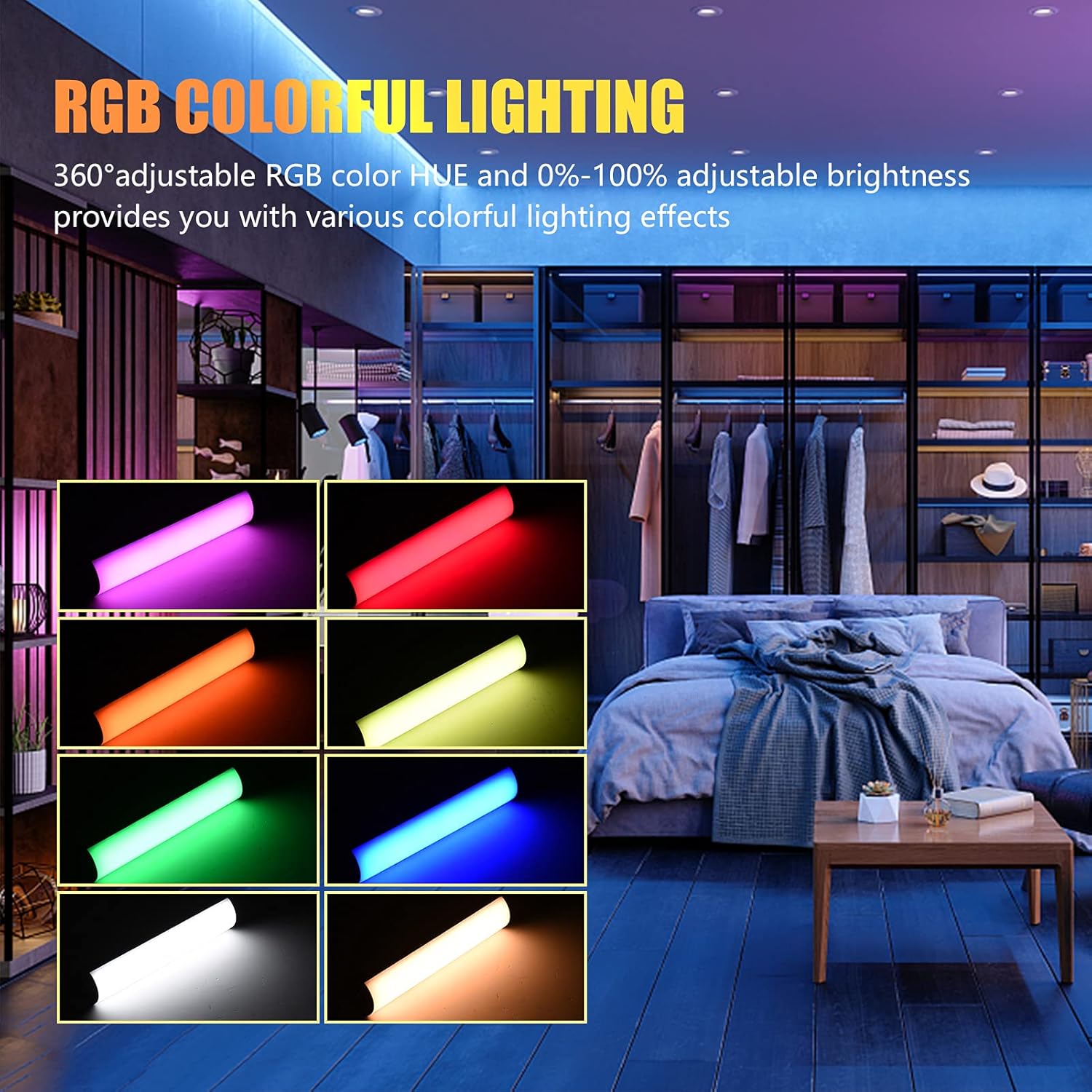
Image: The Andoer W200RGB LED Video Light demonstrating its RGB colorful lighting capabilities, showing different hues and brightness levels.

Image: Several Andoer W200RGB LED Video Lights illuminated in various solid RGB colors, showcasing the rod-shaped design.
4.5 Scene Mode Operation (Special Effects)
In Scene mode, you can select from 20 pre-programmed special lighting effects.
- Use the Up/Down buttons (▲/▼) to cycle through the 20 special effects.
- Some effects may have adjustable parameters (e.g., speed or intensity), which can be adjusted by short pressing the Power button and then using the Up/Down buttons.

Image: A visual guide to the 20 dynamic scene light effects, such as police car, ambulance, fireworks, TV, candle, party, strobe, and various color flashes.
4.6 Using the Magnetic Back
The Andoer W200RGB LED Video Light features built-in magnets at both ends, allowing it to be easily attached to metallic surfaces for flexible lighting setups.
- Simply place either end of the light onto a suitable magnetic surface.
- Ensure the surface is stable and can support the weight of the light.

Image: The Andoer W200RGB LED Video Light highlighting its magnetic ends, demonstrating how it can be attached to metal surfaces.
4.7 Aplikasyon pratik

Image: A comparison of scenes before and after using the Andoer W200RGB LED Video Light, illustrating its effectiveness in enhancing illumination for various activities.
5. Antretyen
5.1 Netwayaj
- Asire w ke aparèy la etenn epi dekonekte li nan nenpòt sous kouran anvan ou netwaye li.
- Sèvi ak yon twal mou epi sèk pou siye sifas limyè a.
- Pou pousyè tè ki difisil pou retire, yon ti kras dampRense twal la avèk dlo. Evite itilize pwodui chimik ki agresif, solvang, oswa pwodui netwayaj abrazif.
- Do not allow water or liquids to enter the device.
5.2 Depo
- Sere limyè a nan yon kote ki fre epi sèk, lwen limyè solèy dirèk ak tanperati ekstrèm.
- Si w ap sere l pou yon peryòd pwolonje, chaje batri a apeprè 50% chak twa mwa pou kenbe l an bon eta.
5.3 Swen Batri
- Evite dechaje batri a nèt souvan.
- Pa ekspoze batri a nan tanperati ki wo oswa pike li.
- If the battery shows signs of swelling or leakage, discontinue use immediately and dispose of it properly according to local regulations.
NAN. Depanaj
If you encounter any issues with your Andoer W200RGB LED Video Light, please refer to the following common problems and solutions:
- Limyè pa limen:
- Ensure the battery is charged. Connect the light to a power source using the USB Type-C cable.
- Press and hold the Power button for a few seconds to ensure it's not just a short press.
- Light flickers or output is unstable:
- Check the battery level; low battery can cause unstable performance. Recharge if necessary.
- Ensure the light is not exposed to extreme temperatures.
- Cannot change modes or adjust parameters:
- Ensure you are pressing the correct buttons (Mode button for mode changes, Power button to cycle through adjustable parameters within a mode, Up/Down buttons for value adjustment).
- Rekòmanse aparèy la pa etenn li epi limen ankò.
- Batri pa chaje:
- Verify the USB Type-C cable is securely connected to both the light and the power source.
- Try a different USB cable or power adapter to rule out faulty accessories.
- Asire w ke sous kouran an fonksyone.
Si pwoblèm nan pèsiste apre ou fin eseye solisyon sa yo, tanpri kontakte sèvis kliyan pou plis asistans.
7. Espesifikasyon
| Karakteristik | Spesifikasyon |
|---|---|
| Mak | Andoer |
| Modèl | W200RGB |
| Pèl ki ap dirije | 69pcs White + 69pcs Yellow + 46pcs RGB |
| Tanperati Koulè | 2500K-9000K |
| CRI (Endèks rann koulè) | 95+ |
| Max Sorti pouvwa | 7W |
| Flux lumineux | 800Lux / 0.3m |
| Angle gwo bout bwa | 120° |
| Kalite batri | Bati-an 3.7V 3000mAh ityòm batri |
| Port chaje | USB Kalite-C |
| Gwosè Atik | 20 x 4 x 3.5 cm (7.9 x 1.6 x 1.4 pous) |
| Pwa atik | 11.3 ons (apeprè 320g) |
| Tripod (folded length) | 7.5cm (use height 4.5cm) |
| Nimewo Modèl (ASIN) | QEX6686347803069PL (B09F8RLMSY) |
8. Enfòmasyon sou Sekirite
Avètisman:
Si ou wè pwodwi a domaje, defòme, oswa li pa fonksyone byen, tanpri sispann itilize li imedyatman epi kontakte nou.
Always handle the device with care. Do not disassemble or modify the product. Keep out of reach of children.
9. Garanti ak sipò
Andoer products are designed for reliability and performance. This product is covered by a standard manufacturer's warranty against defects in materials and workmanship. For specific warranty terms and conditions, please refer to the documentation provided at the time of purchase or contact your retailer.
For technical support, troubleshooting assistance, or warranty claims, please contact Andoer customer service through the retailer's platform or the official Andoer websit. Tanpri kenbe modèl pwodwi ou a ak enfòmasyon sou acha ou a pare lè w ap kontakte sipò a.
Vizite la Andoer Store on Amazon pou plis enfòmasyon ak pwodwi yo.