
Sonel SON001
Manyèl Enstriksyon pou Miltimèt Endistriyèl Sonel CMM 30
Model: SON001
1. Entwodiksyon
The Sonel CMM 30 is an advanced industrial multimeter engineered for versatility, modern functionality, and exceptional durability. This device integrates 11 fundamental measurement functions along with additional features, providing a broad spectrum of applications for professionals. Its robust design includes drop protection and an IP67 rated casing, ensuring reliable performance even in challenging environments.
Key features include a smartphone application for remote reading and data saving via wireless communication, an automatically adjusting backlight for optimal screen visibility, and a built-in flashlight for illumination in dark conditions. This manual provides essential information for the safe and effective use of your CMM 30 multimeter.
2. Enfòmasyon sou Sekirite
Always adhere to the following safety precautions to prevent electric shock, injury, or damage to the meter or equipment under test.
- Read and understand all instructions and safety information in this manual before operating the meter.
- Pa sèvi ak mèt la si li sanble domaje oswa si izolasyon sou fil tès yo konpwomèt.
- Toujou dekonekte kouran sikwi a epi dechaje tout gwo vòltaj yo.tage capacitors before making resistance, continuity, diode, or capacitance measurements.
- Pran prekosyon lè w ap travay ak voltagpi wo pase 30V AC RMS, 42V pik, oswa 60V DC. Volim sa yotages poze yon danje chòk.
- Pa depase limit maksimòm opinyon yo pou okenn fonksyon.
- Ensure the function switch is in the correct position for the desired measurement before connecting the test leads to the circuit.
- Replace batteries as soon as the low battery indicator appears to ensure accurate readings.
- Pa sèvi ak mèt la nan anviwònman ki gen gaz, vapè, oswa pousyè ki ka eksploze.
3. Pake kontni
Verify that all items listed below are present and undamaged upon opening the package:
- Sonel CMM 30 Industrial Multimeter
- Fil Tès (Wouj ak Nwa)
- Sond tanperati (tèmokoupl tip K)
- 4 x AAA Batteries (pre-installed or separate)
- Manyèl Itilizatè (dokiman sa a)
Si gen nenpòt atik ki manke oswa ki domaje, tanpri kontakte founisè ou imedyatman.
4. Pwodwi souview
Familiarize yourself with the components of your Sonel CMM 30 multimeter:
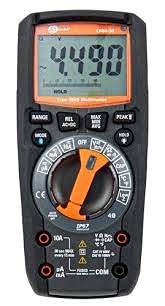
Figi 4.1: Devan view of the Sonel CMM 30 Industrial Multimeter. This image displays the device's main components, including the digital display, the central rotary function switch, and the various input terminals for test leads.
4.1. Montre
The large LCD shows measurement readings, units, function indicators, and battery status. It features an automatic backlight that adjusts to ambient light conditions for optimal visibility.
4.2. Rotary fonksyon switch
This central switch is used to select the desired measurement function (e.g., Voltage, Current, Resistance, Capacitance, Temperature, Frequency).
4.3. Bouton Fonksyon
Various buttons provide additional controls and features:
- RANGE: Toggles between manual and automatic ranging.
- MOD: Selects sub-functions within a main rotary switch position (e.g., AC/DC voltage, Diode/Continuity).
- RETE: Li bloke lekti aktyèl sou ekran an.
- MAX/MIN/MOYÈN: Records maximum, minimum, and average readings.
- REL: Relative mode, subtracts a stored value from subsequent measurements.
- Bluetooth/Light: Activates Bluetooth connectivity for the smartphone app and controls the built-in flashlight.
4.4. Input Jacks
These are the connection points for the test leads:
- COM: Common terminal for the black test lead.
- VΩHzCAP°C: Antre pou voltage, resistance, frequency, capacitance, and temperature measurements (red test lead).
- mAµA: Antre pou miliampere ak mikwoampmezi kouran (plon tès wouj).
- 10A: Input for up to 10 Ampmezi kouran (plon tès wouj).
5. Enstalasyon
5.1. Enstalasyon batri
The Sonel CMM 30 requires 4 AAA batteries. These may be pre-installed or included separately.
- Asire w ke miltimèt la etenn.
- Jwenn konpatiman pil la sou dèyè mèt la.
- Sèvi ak yon tournevis pou dekole vis(yo) ki kenbe kouvèti batri a.
- Retire kouvèti batri a.
- Insert the 4 AAA batteries, observing the correct polarity (+ and -) as indicated inside the compartment.
- Remèt kouvèti batri a epi sere vis yo byen sere.
Nòt: Always use fresh batteries of the same type. Remove batteries if the meter is not used for an extended period to prevent leakage.
6. Operasyon Enstriksyon
6.1. Powering On / Off
Turn the rotary function switch from the OFF position to any desired measurement function to power on the meter. To power off, turn the switch back to the OFF position.
6.2. Basic Measurement Procedures
Before any measurement, ensure the test leads are correctly inserted into the appropriate input jacks for the selected function.
6.2.1. VòltagMezi (AC/DC)
- Insert the black test lead into the COM jack and the red test lead into the VΩHzCAP°C jack.
- Vire switch rotary a sou V~ (Volim AC)tage) oubyen V- (Volim DCtage) position. If both are combined, use the MODE button to select AC or DC.
- Konekte fil tès yo an paralèl atravè sikwi a oswa konpozan ki pral mezire a.
- Li voltage valè sou ekspozisyon an.
6.2.2. Mezi Kouran (AC/DC)
Atansyon: Never connect the meter in parallel for current measurement. Always connect in series with the circuit.
- Insert the black test lead into the COM jack. For currents up to 10A, insert the red test lead into the 10A jack. For smaller currents (mA/µA), insert the red test lead into the mAµA jack.
- Turn the rotary switch to the A~ (AC Current) or A- (DC Current) position, or the mA/µA position as appropriate. Use the MODE button to select AC or DC if needed.
- Open the circuit where current is to be measured and connect the meter in series.
- Li valè aktyèl la sou ekran an.
6.2.3. Mezi rezistans
- Insert the black test lead into the COM jack and the red test lead into the VΩHzCAP°C jack.
- Turn the rotary switch to the Ω (Resistance) position.
- Ensure the circuit or component is de-energized before connecting the test leads across it.
- Li valè rezistans nan ekspozisyon an.
6.2.4. Mezi kapasite
- Insert the black test lead into the COM jack and the red test lead into the VΩHzCAP°C jack.
- Turn the rotary switch to the CAP (Capacitance) position.
- Ensure the capacitor is fully discharged before connecting the test leads across it.
- Li valè a kapasite sou ekspozisyon an.
6.2.5. Mezi Tanperati
- Insert the temperature probe into the VΩHzCAP°C and COM jacks, observing polarity if applicable.
- Turn the rotary switch to the °C/°F (Temperature) position.
- Mete pwent sond tanperati a sou oswa toupre objè ou vle mezire tanperati a.
- Li valè tanperati a sou ekran an.
6.3. Karakteristik avanse
6.3.1. True RMS Measurement
The CMM 30 features True RMS for AC voltage and current measurements, providing accurate readings for non-sinusoidal waveforms.
6.3.2. Wireless Communication and Smartphone App
The CMM 30 can connect wirelessly to a smartphone application, allowing for remote reading and saving of measurements. This is particularly useful in hard-to-reach or hazardous locations.
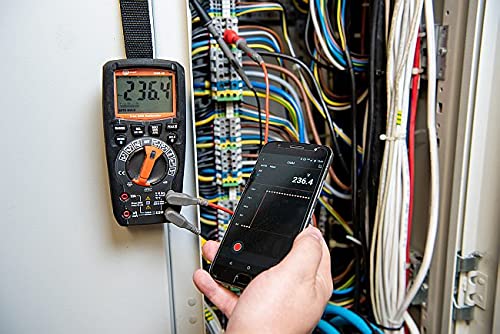
Figure 6.1: The Sonel CMM 30 Multimeter connected to an electrical panel, demonstrating its wireless communication feature. A smartphone displays the measurement reading remotely, highlighting the convenience for inaccessible areas.
Pou itilize karakteristik sa a:
- Download the official Sonel CMM app from your smartphone's app store.
- Pèmèt Bluetooth sou smartphone ou.
- Press the Bluetooth button on the multimeter to activate its wireless communication.
- Follow the app's instructions to pair with your CMM 30 and begin remote monitoring.
6.3.3. Bati-an flach
The integrated flashlight assists in illuminating measurement areas, especially in low-light conditions. Activate it by pressing the dedicated light button.
6.4. Durability and IP67 Rating
The CMM 30 is designed with an IP67 rating, signifying its protection against dust ingress and immersion in water up to 1 meter for 30 minutes. This makes it suitable for demanding industrial environments.
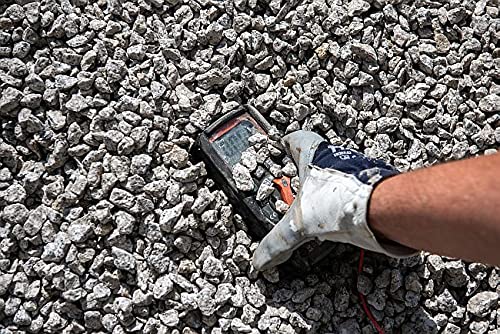
Figure 6.2: The Sonel CMM 30 Multimeter partially submerged in gravel, illustrating its robust construction and resistance to dust and debris, a testament to its IP67 rating.

Figure 6.3: The Sonel CMM 30 Multimeter creating a splash as it impacts a muddy puddle, demonstrating its exceptional water resistance and ability to withstand harsh, wet conditions.
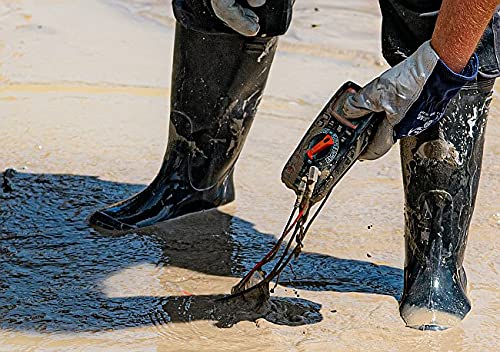
Figure 6.4: A person, wearing protective boots and gloves, retrieves the Sonel CMM 30 Multimeter from a muddy environment. This image emphasizes the device's resilience and ease of handling even after exposure to challenging conditions.
7. Antretyen
7.1. Netwayaj
Siye c mèt laasing ak piblisiteamp twal ak yon savon dou. Pa sèvi ak pwodui abrazif oswa solvang. Asire w ke mèt la byen sèk anvan w itilize li.
7.2. Ranplasman batri
Gade Seksyon 5.1 pou enstriksyon sou ranplasman pil yo. Ranplase pil yo touswit lè endikatè pil ki fèb la parèt sou ekran an.
7.3. Depo
When not in use for extended periods, store the multimeter in a dry, cool place, away from direct sunlight and extreme temperatures. Remove the batteries to prevent leakage.
NAN. Depanaj
| Pwoblèm | Kòz posib | Solisyon |
|---|---|---|
| Kontè a pa limen. | Pil ki mouri oswa ki mal enstale. | Tcheke polarite pil yo oubyen ranplase pil yo. |
| No reading or "OL" (Overload) displayed. | Incorrect function selected; open circuit; measurement exceeds range. | Select correct function; check circuit continuity; switch to a higher range or auto-range. |
| Lekti ki pa kòrèk. | Low battery; dirty test leads/jacks; external interference. | Replace batteries; clean leads/jacks; move away from strong electromagnetic fields. |
| Pwoblèm koneksyon Bluetooth. | Bluetooth not enabled on meter/phone; app issues; distance. | Ensure Bluetooth is on; restart app/phone; reduce distance between devices. |
9. Espesifikasyon
| Karakteristik | Spesifikasyon |
|---|---|
| Mak | Sonel |
| Nimewo Modèl | SON001 |
| Koulè | Nwa |
| Pwa atik | 418 g |
| Dimansyon pake | 30 x 15 x 10 cm |
| Batri | 4 pil AAA obligatwa (enkli) |
| Fonksyon Mezi | AC / DC Voltage, AC/DC Current, Resistance, Capacity, Temperature, Duty Cycle, Frequency |
| Ranje | Manyèl ak otomatik |
| Vrè RMS | Yes (for AC voltage ak aktyèl) |
| Evalyasyon Pwoteksyon Ingress (IP). | IP67 |
| Koneksyon | Wireless (Smartphone App) |
| Karakteristik adisyonèl | HOLD function, Built-in flashlight, Backlight auto-adjustment |
10. Garanti ak sipò
10.1. Enfòmasyon sou Garanti
Sonel products are manufactured to high standards and are warranted against defects in materials and workmanship for a period specified by your regional distributor from the date of purchase. This warranty does not cover damage caused by misuse, unauthorized modification, accident, or neglect. Please retain your proof of purchase for warranty claims.
10.2. Sipò teknik
For technical assistance, troubleshooting beyond this manual, or warranty inquiries, please contact your local Sonel distributor or the authorized service center. Contact information can typically be found on the Sonel official websit la oubyen atravè pwen acha ou a.
When contacting support, please have your product model number (SON001) and purchase date readily available.
Ask a question about this manual
Ask about setup, troubleshooting, compatibility, parts, safety, or missing instructions. Manuals+ will review the question and use this page’s manual context to help answer it.