
1. Entwodiksyon
This instruction manual provides detailed information on the setup, operation, maintenance, and troubleshooting for your Aibecy withzoom 1080P 3X Optical Zoom Webcam. Please read this manual thoroughly before using the product to ensure proper functionality and to prevent damage.
2. Pwodwi souview
2.1 Karakteristik kle
- 1080P Full HD Video Resolution
- 3X Optical Zoom Lens
- 355° Horizontal Rotation and 90° Vertical Rotation
- Operasyon kontwòl Remote
- Koneksyon USB
- Compatible with Windows, Mac, Linux, and Chromebook operating systems
- Infrared (IR) support
2.2 Kontni pake a
Verifye ke tout atik yo prezan nan pakè a:
- Aibecy withzoom Webkam
- Kontwòl Remote
- AC pouvwa adaptè
- USB kab
- Mounting Bracket
- Vis pou enstalasyon

Figi 1: Sa ki pakè
2.3 Dyagram pwodwi

Figi 2: Devan View ak Konpozan
- Lantiy HD: Captures high-definition video.
- 355° Rotating Gimbal: Allows for wide-angle coverage and precise positioning.
- IR Infrared Receiver: Resevwa siyal soti nan kontwòl la remote.
- Endikatè pouvwa: Montre estati pouvwa aparèy la.
- Remote Indicator: Lights up when a remote control signal is received.
3. Gid Enstalasyon
3.1 Metòd Enstalasyon
The Aibecy withzoom webKam ofri opsyon enstalasyon fleksib:
- Plasman Tablo: Place the camera on a flat surface such as a desk or conference table.
- Plafon mòn: Use the included mounting bracket and screws to attach the camera to the ceiling. Ensure the image flip function is enabled if mounting upside down.
- Support Mount: Attach the camera to a tripod or other compatible bracket using the screw hole at the bottom.

Figi 3: Opsyon Enstalasyon
3.2 Konekte Kamera a
Follow these steps to connect your webCam:
- Koneksyon pouvwa: Connect the AC power adapter to the camera's 12V power input port and plug it into a power outlet.
- Koneksyon USB: Connect the USB cable from the camera's USB port to an available USB port on your computer (Windows, Mac, Linux, or Chromebook). The camera is plug-and-play and does not require driver software.
- Optional RS232/RS422 Connection: If advanced control via RS232 or RS422 is required, connect the appropriate cable from the camera to your control device.

Figi 4: Dyagram Koneksyon
Once connected, open your video conferencing software (e.g., Zoom, Skype, Microsoft Teams) and select the Aibecy withzoom camera as your video input device.
4. Operasyon Enstriksyon
4.1 Operasyon debaz
- Pouvwa sou: After connecting the power adapter, the camera will automatically power on. The Power Indicator light will illuminate.
- Pouvwa Off: Disconnect the power adapter from the camera.
4.2 Sèvi ak kontwòl remote la
The included remote control allows for easy adjustment of camera functions.

Figi 5: Webcam and Remote Control
- Camera Selection Buttons: If multiple cameras are connected, use these buttons to select the camera you wish to control.
- Rotation Speed Control: Adjust the pan/tilt speed for smoother movements.
- Pan/Tilt/Zoom (PTZ) Controls: Use the directional arrows to pan (left/right) and tilt (up/down) the camera. Use the zoom in/out buttons to adjust the optical zoom.
- Preset Function Area: Save and recall specific camera positions and zoom levels using the preset buttons.
4.3 Camera Movement and Zoom
The camera supports wide-range movement for comprehensive coverage:
- Wotasyon orizontal: Tèt kamera a ka vire 355 degre orizontalman.
- Wotasyon vètikal: The camera head can tilt 90 degrees vertically.
- Zoom optik: Utilize the 3X optical zoom to focus on specific areas without loss of image quality.
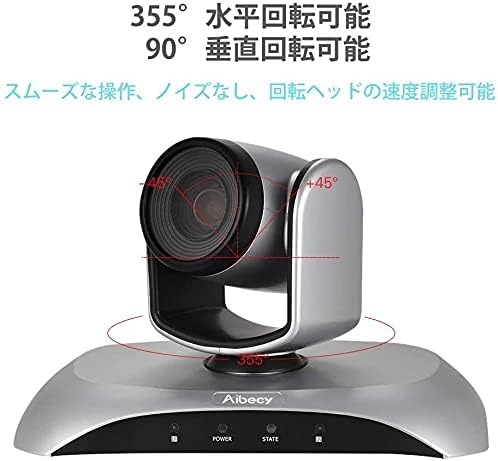
Figure 6: Camera Rotation Capabilities
4.4 Image Flip Function
If the camera is mounted upside down (e.g., on a ceiling), you can use the image flip function to correct the video orientation.

Figure 7: Image Flip Function in Use
Refer to the remote control instructions for the specific button to activate or deactivate the image flip function.
5. Antretyen
Bon antretyen asire lonjevite ak pèfòmans optimal ou a webCam.
- Netwayaj: Use a soft, dry cloth to clean the camera body. For the lens, use a specialized lens cleaning cloth and solution. Avoid abrasive cleaners or solvents.
- Depo: Lè w pa itilize kamera a pou yon bon bout tan, sere l nan yon kote ki fre epi sèk, lwen limyè solèy dirèk ak tanperati ekstrèm.
- Manyen: Evite lage kamera a oswa soumèt li a gwo enpak.
NAN. Depanaj
If you encounter issues with your Aibecy withzoom webcam, refer to the table below for common problems and solutions.
| Pwoblèm | Kòz posib | Solisyon |
|---|---|---|
| No image or video output | Power not connected; USB cable loose; Incorrect camera selected in software. | Ensure power adapter is securely connected. Check USB cable connection. Select the Aibecy withzoom camera in your video conferencing software settings. |
| Remote kontwòl pa travay | Batteries low/dead; Obstruction between remote and camera; Remote not pointed at IR receiver. | Replace remote control batteries. Ensure a clear line of sight to the camera's IR receiver. Point the remote directly at the camera. |
| Image is upside down | Camera mounted upside down and image flip not activated. | Activate the image flip function using the remote control. |
| Move kalite videyo | Insufficient lighting; Dirty lens; Network bandwidth issues. | Ensure adequate lighting in the room. Clean the camera lens. Check your internet connection speed. |
7. Espesifikasyon teknik
| Karakteristik | Spesifikasyon |
|---|---|
| Mak | Aibecy |
| Nimewo Modèl | withzoom |
| Rezolisyon Capture Videyo | 1080p |
| Zoom optik | 3X |
| Wotasyon orizontal | 355° |
| Wotasyon vètikal | 90° |
| Koneksyon Teknoloji | USB |
| Aparèy konpatib | Windows, Mac, Linux, Chromebook |
| Karakteristik espesyal | Remote Control, Infrared |
| Estabilizasyon Imaj | Non |
| Dimansyon pake | 29.7 x 22.4 x 19.9 cm |
| Pwa atik | 1.51 kg |
8. Enfòmasyon Sipò
For further assistance or inquiries not covered in this manual, please refer to the official Aibecy support channels or contact your retailer. Keep your purchase receipt for warranty purposes.