
1. Entwodiksyon
Welcome to the Hubble Connected Touch Twin 5-inch Smart Baby Monitor. This device is designed to provide reliable monitoring of your child with advanced features including a 5-inch interactive touchscreen viewer, two portable camera units, Wi-Fi connectivity for smartphone access, remote pan, tilt, and zoom, two-way talk, room temperature display, infrared night vision, and preloaded lullabies. This manual will guide you through the setup, operation, and maintenance of your new baby monitor system.
2. Enfòmasyon enpòtan sou sekirite
- Danje trangle: Keep all cords out of reach of children. Never place camera or cords within 3 feet (1 meter) of the crib or playpen. Secure cords to a wall or floor using cable clips.
- Danje toufe: Pwodwi sa a gen ti pati. Kenbe soti nan atenn timoun yo.
- Surchof: Do not cover the monitor or camera with blankets or towels. Ensure proper ventilation.
- Dlo ak imidite: Do not expose the product to water or moisture. Use only in dry indoor environments.
- Sous pouvwa: Use only the provided power adapters. Using unauthorized adapters may damage the product and void the warranty.
- Entèferans: Keep the monitor away from other electronic devices that may cause interference.
- Sipèvizyon granmoun: This product is intended to assist in monitoring your child and should not be used as a substitute for responsible adult supervision.
3. Pake kontni
Your Hubble Connect Touch Twin 5-inch Smart Baby Monitor package includes:
- 2 x Baby Camera Units
- 1 x Parent Monitor (5-inch Interactive Touchscreen Viewer)
- 2 x adaptè pouvwa
- 1 x Gid Quick Start
- 2 x Hubble Grip flexible mounts

4. Enstalasyon
4.1 Charging the Parent Unit and Camera Units
Before initial use, fully charge the Parent Monitor and both Camera Units using the provided power adapters. A full charge ensures optimal performance and portability.
4.2 Plasman Kamera
Position the camera units in locations that provide a clear view of your child. Ensure the camera is at least 3 feet (1 meter) away from the crib or playpen to prevent strangulation hazards from the power cord. The flexible Hubble Grip mounts allow for versatile placement on crib rails or other surfaces.

The camera features remote pan, tilt, and zoom capabilities, allowing you to adjust the viewing angle from the parent unit or smartphone app.
4.3 Pairing the Camera Units (if not pre-paired)
Your camera units should be pre-paired with the parent unit. If re-pairing is needed, consult the Quick Start Guide for specific instructions. Generally, this involves accessing the pairing menu on the parent unit and pressing a pairing button on the camera unit.
4.4 Connecting to Wi-Fi and Smartphone App
For advanced features and remote viewing, download the HubbleClub app on your smartphone or tablet. Follow the in-app instructions to connect your monitor system to your home Wi-Fi network.

5. Kijan pou w itilize monitè w la
5.1 Debaz Viewing and Navigation
Turn on the Parent Monitor. The screen will display the live video feed from one of your camera units. Use the directional buttons on the parent unit to pan and tilt the camera remotely. Pinch-to-zoom functionality may be available on the touchscreen for closer views.

5.2 Pale Bidireksyonèl
Press and hold the microphone button on the parent unit to speak to your child through the camera's speaker. Release the button to listen.
5.3 Vizyon lannwit
The camera automatically switches to infrared night vision in low-light conditions, providing a clear black-and-white image of your child.

5.4 Lullabies and Soothing Sounds
Access the menu on the parent unit to select and play preloaded lullabies, audiobooks, or soothing sounds to help your child relax.
5.5 Siveyans Tanperati Chanm
The parent unit displays the room temperature detected by the camera unit, allowing you to ensure a comfortable environment for your child.
5.6 Mode konfidansyalite
For enhanced privacy, manually close the camera lens cover. This physically blocks the camera's view.

5.7 Hubble Baby Mode
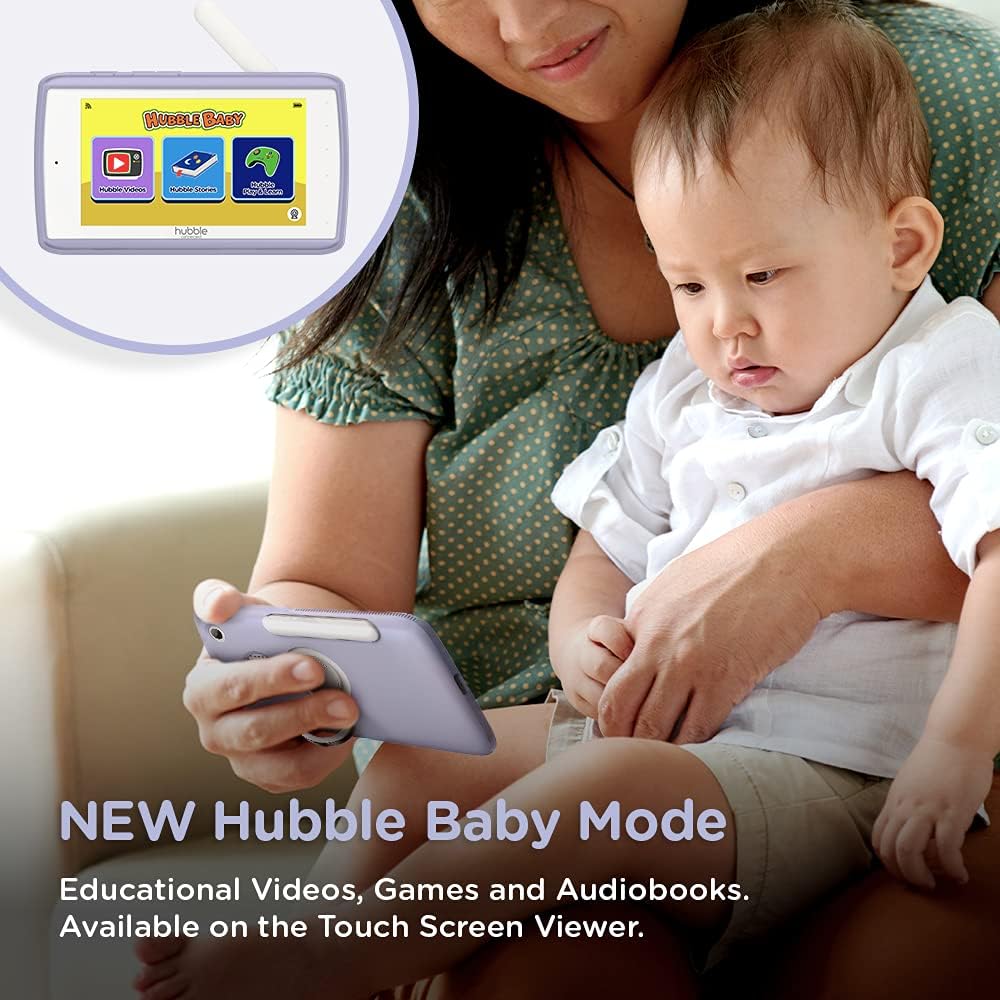
The 5-inch interactive touchscreen viewer can switch to "Hubble Baby Mode," offering educational videos, games, and audiobooks for your child's entertainment and learning as they grow.
6. Antretyen
- Netwayaj: Sèvi ak yon twal mou epi sèk pou netwaye monitè a ak inite kamera yo. Pa sèvi ak pwodui netwayaj abrazif oswa solvan.
- Swen batri: Pou pwolonje lavi batri a, evite tanperati ekstrèm epi dechaje epi rechaje batri a nèt detanzantan.
- Depo: If storing the product for an extended period, ensure it is fully charged and stored in a cool, dry place.
NAN. Depanaj
| Pwoblèm | Solisyon |
|---|---|
| Pa gen videyo/odyo sou inite paran an. | Ensure both parent unit and camera are powered on and charged. Check if they are within range. Re-pair the units if necessary (refer to Quick Start Guide). |
| Poor video quality or interference. | Move the camera or parent unit closer. Ensure no large metal objects or other electronic devices are causing interference. Check Wi-Fi signal strength if using the app. |
| Parent unit battery drains quickly. | Reduce screen brightness. Enable ECO mode (if available). Ensure the unit is fully charged before use. Battery life can vary with usage. |
| Cannot connect to HubbleClub app. | Ensure your home Wi-Fi is active and the camera is within range. Restart the camera and your router. Verify correct Wi-Fi password in the app. |
| Camera not responding to pan/tilt/zoom. | Check connection between parent unit/app and camera. Restart both devices. Ensure no physical obstructions are blocking camera movement. |
8. Espesifikasyon
| Karakteristik | Detay |
|---|---|
| Gwosè ekran | 5 pous |
| Rezolisyon Capture Videyo | 720p |
| Koneksyon Teknoloji | Wireless, Wi-Fi |
| Sous pouvwa | Batri Powered |
| Karakteristik espesyal | Vizyon lannwit |
| Itilizasyon Andedan kay la / Deyò | Andedan kay la |
| Konpozan ki enkli | 2 x Baby Camera Units, Parent Monitor, 2 x Power Adapters, Quick Start Guide |
| Pwa atik | 3.25 liv |
| Dimansyon pwodwi | 13 x 13 x 13 pous |
| Batri | 3 pil ityòm Ion obligatwa (enkli) |
9. Garanti ak sipò
For warranty information and technical support, please refer to the official Hubble Connected websit la oubyen kontakte sèvis kliyan yo dirèkteman. Kenbe prèv acha ou pou reklamasyon garanti.
Vizite la HUBBLE CONNECTED Store pou plis enfòmasyon ak pwodwi yo.