
1. Entwodiksyon
This manual provides essential instructions for the installation, operation, and maintenance of your Hikvision 8MP AcuSense WDR Mini Bullet Network Camera, model DS-2CD2083G2-IU. Please read this manual thoroughly before using the product and retain it for future reference.
Pwodwi souview
The Hikvision DS-2CD2083G2-IU is a high-performance 8-megapixel (4K) network camera designed for advanced surveillance. It features AcuSense technology for accurate human and vehicle target classification, Wide Dynamic Range (WDR) for clear imaging against strong backlight, and a fixed 2.8mm lens for a wide field of view. Its IP67 rating ensures robust outdoor performance, and the integrated microphone allows for audio monitoring.
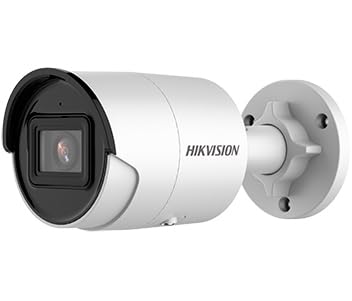
Figure 1: Hikvision 8MP AcuSense WDR Mini Bullet Network Camera (DS-2CD2083G2-IU)
This image displays the Hikvision 8MP AcuSense WDR Mini Bullet Network Camera, highlighting its compact bullet-style design suitable for various installation environments.
Karakteristik kle
- 8 Megapixel (4K) Resolution: Delivers high-quality, detailed video.
- Teknoloji AcuSense: Reduces false alarms by accurately classifying human and vehicle targets.
- Wide Dynamic Range (WDR): Ensures clear images even in scenes with strong contrast.
- Fixed 2.8mm Lens: Bay yon laj viewang ang.
- Infrared (IR) Illumination: Night vision up to 40 meters.
- Evalyasyon rezistans move tan IP67: Suitable for outdoor use in various weather conditions.
- Mikwofòn entegre: Enables audio monitoring.
- Integrated Card Reader: Supports local storage (microSD card not included).
2. Enfòmasyon sou Sekirite
Tanpri obsève prekosyon sekirite sa yo pou evite blesi oswa domaj nan pwodwi a:
- Ensure the power supply meets the camera's requirements (6.5 Watts).
- Pa ekspoze kamera a nan tanperati ekstrèm, imidite, oswa anviwònman koroziv.
- Avoid pointing the lens directly at strong light sources, as this may damage the sensor.
- Se pèsonèl kalifye ki ta dwe fè enstalasyon an, dapre kòd elektrik lokal yo.
- Sèvi ak sèlman akseswa espesifye pa manifakti a.
- Clean the camera lens with a soft, dry cloth. Avoid harsh chemicals.
3. Enstalasyon ak Enstalasyon
3.1 Debake
Carefully unpack the camera and check for any signs of damage. Ensure all components are present. (Typical components include: camera unit, mounting template, screws, waterproof connector, quick start guide).
3.2 Enstalasyon Fizik
The camera is designed for ceiling mounting. Select a suitable location that provides the desired field of view and is within reach of network and power cables. Due to its IP67 rating, it is suitable for outdoor environments.
- Use the provided mounting template to mark drill holes on the ceiling.
- Drill the necessary holes and insert wall plugs if required.
- Secure the camera base to the mounting surface using the supplied screws.
- Ajiste ang kamera a pou pi bon pwoteksyon.
3.3 Koneksyon Rezo ak Kouran
This is an IP network camera. It requires a network connection and power. Power over Ethernet (PoE) is typically supported, simplifying installation by delivering both power and data over a single Ethernet cable. If PoE is not used, a separate 12V DC power adapter (not included) will be required.
- Connect an Ethernet cable from your network switch/router to the camera's RJ45 port. Use the waterproof connector for outdoor installations.
- If not using PoE, connect a 12V DC power adapter to the camera's power input.
- Once connected, the camera will power on. Allow a few minutes for it to boot up.
3.4 Inisyal Konfigirasyon
Jwenn aksè a kamera a web koòdone atravè a web browser using its default IP address (refer to the quick start guide or use Hikvision's SADP tool to discover the IP address). You will be prompted to set a strong password for security. Follow the on-screen instructions to configure network settings, date/time, and other basic parameters.
4. Operasyon Enstriksyon
4.1 Viv View ak Anrejistreman
After initial setup, you can view the live feed from the camera through its web interface, a Network Video Recorder (NVR), or Hikvision's client software (e.g., iVMS-4200) or mobile app (Hik-Connect). Configure recording schedules and methods (continuous, motion-triggered) via the camera's settings or NVR.
4.2 AcuSense Smart Features
The AcuSense technology allows the camera to distinguish between humans, vehicles, and other moving objects, significantly reducing false alarms caused by animals, rain, or falling leaves. Configure these detection rules in the camera's event settings to receive more accurate alerts.
- Deteksyon Mouvman 2.0: Set up detection zones and sensitivity for human and vehicle events.
- Deteksyon entrizyon: Define virtual boundaries, and the camera will trigger an alarm if a human or vehicle crosses them.
- Deteksyon kwaze liy: Similar to intrusion, but for a specific line.
4.3 Gwo Ranje Dinamik (WDR)
WDR compensates for extreme lighting conditions, such as strong backlight, to ensure that both bright and dark areas of the image are clearly visible. This feature is typically enabled by default but can be adjusted in the image settings.
4.4 Infrared (IR) Night Vision
The camera automatically switches to IR mode in low-light conditions, providing clear black-and-white video up to 40 meters. Ensure no obstructions block the IR LEDs for optimal night vision performance.
4.5 Siveyans Odyo
With its built-in microphone, the camera can capture audio from the surveillance area. Audio settings, including gain control, can be configured in the camera's web interface. Ensure local regulations regarding audio recording are followed.
5. Antretyen
- Netwayaj: Netwaye lantiy kamera a ak bwat la regilyèman avèk yon twal mou,amp twal. Pa sèvi ak pwodui netwayaj abrazif.
- Mizajou mikrolojisyèl: Tcheke paj ofisyèl Hikvision yo detanzantan. website for firmware updates. Keeping the firmware updated ensures optimal performance, new features, and security enhancements.
- Enspeksyon kab: For outdoor installations, periodically inspect cables and connections for wear or damage, especially the waterproof connectors.
- Jesyon modpas: Regularly change your camera's password to maintain security.
NAN. Depanaj
| Pwoblèm | Kòz posib | Solisyon |
|---|---|---|
| No image/camera offline | No power, network cable disconnected, incorrect IP address. | Check power supply and network cable. Verify IP address using SADP tool. Restart camera. |
| Pòv bon jan kalite imaj | Dirty lens, incorrect focus (if adjustable), poor lighting, network bandwidth issues. | Clean the lens. Ensure adequate lighting. Check network connection speed. Adjust image settings (WDR, exposure). |
| Fo alam ki soti nan deteksyon mouvman | Sensitivity too high, environmental factors (trees, animals), AcuSense not configured. | Adjust motion detection sensitivity. Configure AcuSense human/vehicle detection. Adjust detection zones. |
| Pa ka jwenn aksè web koòdone | Adrès IP ki pa kòrèk, pwoblèm koneksyon rezo, konpatibilite navigatè. | Verify IP address. Ensure camera and PC are on the same network segment. Try a different browser. |
If the problem persists after attempting these solutions, please contact Hikvision technical support.
7. Espesifikasyon
| Karakteristik | Detay |
|---|---|
| Nimewo Modèl | DS-2CD2083G2-IU |
| Capteur Imaj | CMOS |
| Max. Rezolisyon | 8 MP (4K) |
| Lantiy | 2.8mm fiks lantiy |
| IR Range | Jiska 40 mèt |
| WDR | Sipòte |
| AcuSense | Human and Vehicle Target Classification |
| Odyo | Mikwofòn entegre |
| Depo lokal yo | Integrated Card Reader (MicroSD slot) |
| Rating ki enpèmeyab | IP67 |
| Konsomasyon pouvwa | 6.5 Watts |
| Dimansyon (L x W x H) | 15 x 15 x 8 cm (apeprè) |
| Kalite aliye | Mòn plafon |
| Kalite Alèt | Motion Only (configurable for human/vehicle) |
8. Garanti ak sipò
Hikvision products typically come with a limited manufacturer's warranty. Please refer to the warranty card included with your product or visit the official Hikvision websit la pou wè kondisyon garanti detaye ki espesifik pou rejyon ou an.
For technical support, firmware downloads, or further assistance, please visit the official Hikvision support portal or contact their customer service department. Ensure you have your product model number (DS-2CD2083G2-IU) and serial number ready when contacting support.
Hikvision ofisyèl Websit: www.hikvision.com