
Entwodiksyon
This manual provides comprehensive instructions for the installation, operation, and maintenance of your Piko 56503 HO Scale PSD XP 5.1 Decoder. This non-sound decoder is designed for use with HO scale model locomotives, offering advanced digital control capabilities. Please read this manual thoroughly before attempting installation or operation to ensure proper function and longevity of your decoder.
Enfòmasyon sou Sekirite
- Always disconnect power from the track and locomotive before installing or removing the decoder.
- Pwodui sa a gen ti pyès ladan l epi li pa apwopriye pou timoun ki poko gen 14 zan.
- Avoid contact with water or excessive moisture.
- Do not attempt to modify the decoder. Unauthorized modifications can damage the unit and void the warranty.
- Ensure correct polarity when connecting the decoder to avoid damage.
Kontni pake
Verifye ke tout atik yo prezan nan pakè a:
- 1x Piko 56503 HO Scale PSD XP 5.1 Decoder (Non-Sound)
- 1x Manyèl Enstriksyon (dokiman sa a)
Enstalasyon ak Enstalasyon
The Piko 56503 decoder supports both PluX16 and 8-Pin interfaces. Ensure your locomotive is compatible with one of these interfaces.
1. Preparing the Locomotive
- Dekonekte pouvwa: Always disconnect the locomotive from the track power supply before beginning installation.
- Access Locomotive Interior: Carefully open the locomotive shell according to the manufacturer's instructions to access the decoder interface.
- Remove Existing Decoder/Dummy Plug: If an old decoder or a dummy plug is present, gently remove it. Note its orientation.
2. Installing the Decoder
The Piko 56503 decoder is designed for easy plug-and-play installation into compatible sockets.
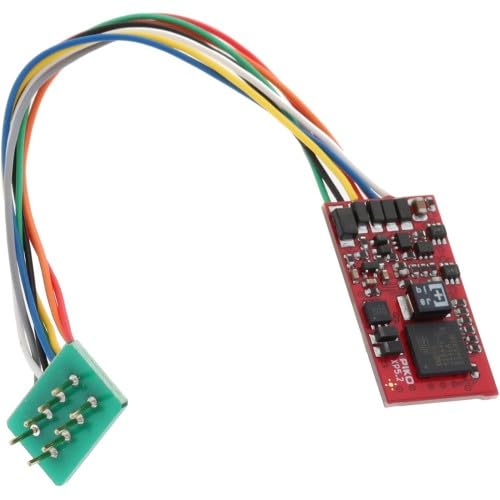
Imaj: Piko 56503 HO Scale PSD XP 5.1 Decoder. This image shows the compact design of the decoder, highlighting its PluX16 and 8-Pin connection points, which are crucial for installation into compatible HO scale locomotives. The small size allows for easy integration into various models.
- Identify Pin 1: Locate the marking for Pin 1 on both the decoder and the locomotive's socket. This is usually indicated by a small dot, a square pad, or a "1" label.
- Aliman epi mete: Carefully align the decoder's pins with the corresponding socket. Gently push the decoder into the socket until it is fully seated. Do not force it, as this can bend or damage the pins.
- Dekodeur an sekirite: Ensure the decoder is securely placed and does not interfere with the locomotive's moving parts or the re-installation of the shell.
3. Tès enstalasyon an
- Reassemble Locomotive: Carefully reattach the locomotive shell.
- Mete sou track: Place the locomotive on a powered track connected to your DCC system.
- Tès Inisyal: The decoder is factory-set to address 3. Attempt to control the locomotive using your DCC controller. Check for basic functions like forward/reverse movement and headlight operation.
- Depanaj: If the locomotive does not respond, immediately disconnect power and re-check all connections. Refer to the Troubleshooting section for common issues.
Enstriksyon Operasyon
1. Operasyon debaz
- DCC Address: The default DCC address for the Piko 56503 decoder is 3. You can change this using your DCC system's programming functions.
- Kontwòl direksyon: Use your DCC controller's direction button to switch between forward and reverse.
- Kontwòl vitès: Adjust the speed step knob or buttons on your DCC controller to increase or decrease locomotive speed.
- Function Outputs: The decoder provides function outputs for lights and other accessories. These are typically controlled by function buttons (F0-F28) on your DCC controller. Refer to your locomotive's manual for specific function assignments.
2. Programming the Decoder (CVs)
The Piko PSD XP 5.1 decoder allows for extensive customization through Configuration Variables (CVs). Refer to your DCC system's manual for detailed instructions on programming CVs.
- Mòd pwogramasyon: Most DCC systems offer "Programming on Main" (PoM) and "Service Mode" programming. PoM allows programming while the locomotive is on the main track, while Service Mode requires a dedicated programming track.
- Common CVs:
- CV1 (Primary Address): Sets the short DCC address (1-127).
- CV29 (Configuration Data): Controls various decoder settings like 28/128 speed steps, analog mode, and direction of travel.
- CV3 (Acceleration Rate): Adjusts how quickly the locomotive speeds up.
- CV4 (Deceleration Rate): Adjusts how quickly the locomotive slows down.
- CV5 (Vmax): Sets the maximum speed.
- CV6 (Vmid): Sets the mid-range speed.
- Advanced CVs: The PSD XP 5.1 decoder offers many advanced CVs for fine-tuning motor control, lighting effects, and other features. Consult the full Piko decoder manual (often available online from Piko's website) for a complete list of CVs and their functions.
Antretyen
- Netwayaj: The decoder itself requires no regular cleaning. If it becomes dusty, gently wipe it with a dry, soft cloth. Do not use liquids or solvents.
- Depo: When not installed, store the decoder in its original packaging or an anti-static bag in a dry, cool environment away from direct sunlight.
- Manyen: Always handle the decoder by its edges to avoid touching the electronic components, which can be sensitive to static electricity.
Depanaj
| Pwoblèm | Kòz posib | Solisyon |
|---|---|---|
| Locomotive does not respond to DCC commands. |
|
|
| Lights flicker or do not work. |
|
|
| Lokomotiv la ap mache yon fason iregilye. |
|
|
Espesifikasyon
- Modèl: Piko 56503
- Kalite: HO Scale PSD XP 5.1 Decoder (Non-Sound)
- Entèfas: PluX16 / 8-Pin (NEM 658 / NEM 652 compatible)
- DCC Standard: NMRA DCC compatible
- Kantite chanèl: 1
- Fonksyon: Multiple function outputs for lighting and auxiliary features (F0-F28 support).
- Kontwòl motè: Advanced motor control with load compensation.
Garanti ak sipò
Piko products are manufactured to high-quality standards. For specific warranty terms and conditions, please refer to the documentation provided with your purchase or visit the official Piko website. For technical support, troubleshooting assistance beyond this manual, or spare parts, please contact Piko customer service or your authorized Piko dealer.
Piko Ofisyèl Websit: www.piko.de