
Jeni A17179
DR-HO'S MotionCiser Foot Massager User Manual
Modèl: A17179
Entwodiksyon
Thank you for choosing the DR-HO'S MotionCiser. This innovative foot massager combines vibration and heat functions to provide a soothing and relaxing experience. This manual provides important information on how to set up, operate, and maintain your MotionCiser for optimal performance and longevity. Please read it thoroughly before first use.

Image: The DR-HO'S MotionCiser foot massager unit with its accompanying remote control, showcasing its compact design and user-friendly interface.
Kontni pake
Asire w tout atik yo prezan nan pakè a:
- 1 x DR-HO'S MotionCiser Main Unit
- 1 x pouvwa adaptè
- 1 x kontwòl remote
- 1 x Manyèl Itilizatè (dokiman sa a)

Image: A visual representation of the MotionCiser package contents, including the main unit, power adapter, and remote control.
Enstalasyon
- Debake: Retire tout konpozan yo nan anbalaj la avèk prekosyon. Kenbe anbalaj la pou depo oswa transpò pita.
- Plasman: Place the MotionCiser on a flat, stable surface in a comfortable seating area. Ensure there is enough space around the unit for proper ventilation.
- Koneksyon pouvwa: Insert the power adapter cable into the DC input port located on the side of the MotionCiser unit. Plug the other end of the power adapter into a standard electrical outlet.
- Kontwòl Remote: Ensure the remote control has batteries installed (if not pre-installed, refer to the battery compartment on the back of the remote).
Enstriksyon Operasyon
Kòmanse
Once the unit is plugged in, you can begin using your MotionCiser.
- Sit comfortably in a chair with your feet placed flat on the footpads of the MotionCiser.
- Peze a ON/OFF button on the remote control or the main unit to power on the device. The display will illuminate.
Sèvi ak kontwòl remote la
Kontwòl remote la pèmèt ou ajiste paramèt yo fasilman:
- Vitès Vibration: Sèvi ak la + epi - buttons under "Speed" to increase or decrease the vibration intensity. There are 10 speed levels available.
- Fonksyon chalè: Sèvi ak la + epi - buttons under "Degree of heat" to activate and adjust the heat therapy. The heat function operates between 30°C and 50°C.
- Pou fèmen aparèy la, peze la ON/OFF bouton ankò.

Image: A user's feet resting on the MotionCiser footpads, demonstrating the proper usage position for the device.
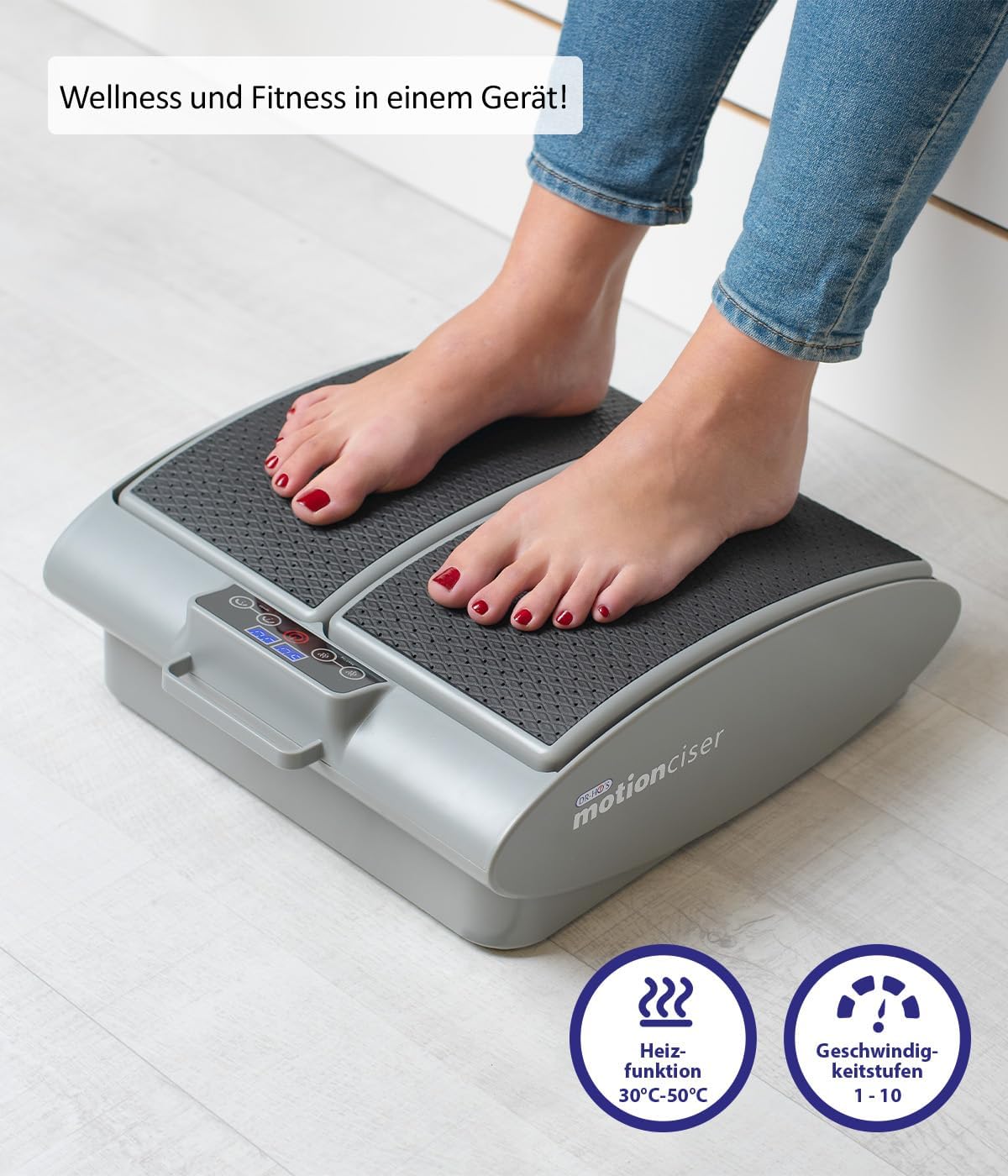
Imaj: Yon gwo plan view of the MotionCiser's control panel and footpads, highlighting the heat function (30°C-50°C) and speed levels (1-10).

Imaj: Detaye view of the MotionCiser's control interface, showing the digital display and buttons for adjusting heat and speed settings.
Antretyen
Netwayaj
- Always unplug the MotionCiser from the power outlet before cleaning.
- Siye sifas inite a ak yon mou, damp twal. Pa sèvi ak pwodui netwayaj abrazif oswa pwodui chimik piman bouk.
- Pa plonje aparèy la nan dlo oswa nan nenpòt lòt likid.
Depo
- Store the MotionCiser in a cool, dry place, away from direct sunlight and extreme temperatures.
- If storing for an extended period, it is recommended to place the unit back in its original packaging to protect it from dust and damage.
Depanaj
| Pwoblèm | Kòz posib | Solisyon |
|---|---|---|
| Aparèy la pa vire. | Not plugged in correctly; Power outlet issue; Remote control batteries low. | Ensure power adapter is securely plugged into the unit and outlet. Test the outlet with another device. Replace remote control batteries. |
| Pa gen vibrasyon. | Speed setting is too low or off; Internal malfunction. | Increase the vibration speed using the remote control. If the issue persists, contact customer support. |
| Pa gen chalè. | Heat function is off; Internal malfunction. | Activate and increase the heat setting using the remote control. If the issue persists, contact customer support. |
| Kontwòl remote la pa reponn. | Pil yo mouri oswa yo pa byen mete; Gen yon obstak ant kontwòl remote la ak aparèy la. | Replace batteries, ensuring correct polarity. Remove any obstructions. Point remote directly at the unit. |
Espesifikasyon
| Karakteristik | Detay |
|---|---|
| Nimewo Modèl | A17179 |
| Mak | jeni |
| Dimansyon (L x W x H) | 41 x 18 x 38 cm (16.1 x 7.1 x 15 pous) |
| Pwa | 3.75 kg (8.27 liv) |
| Sous pouvwa | Elektrik |
| Materyèl | Metal |
| Koulè | White (as per product image, though spec says Blanc.) |
| Karakteristik espesyal | Easy to use, remote temperature adjustment |
| Heat Function Range | 30°C - 50°C |
| Vibration Speed Levels | 1-10 |

Image: Diagram illustrating the dimensions of the MotionCiser unit: 36 cm length, 33 cm width, and 12.5 cm height.
Garanti ak sipò
For warranty information and customer support, please refer to the contact details provided with your purchase documentation or visit the official Genius product websit la. Kenbe prèv acha ou a pou nenpòt reklamasyon garanti.
If you encounter any issues not covered in the troubleshooting section, please contact our customer service team for assistance.
Ask a question about this manual
Ask about setup, troubleshooting, compatibility, parts, safety, or missing instructions. Manuals+ will review the question and use this page’s manual context to help answer it.