
1. Entwodiksyon
Mèsi pou acha aasing the VILINICE 6500 Lumens 720P Native Portable Projector. This manual provides essential information for the safe and efficient operation of your device. Please read it thoroughly before use and retain it for future reference.
2. Enfòmasyon sou Sekirite
To ensure safe operation and prolong the lifespan of your projector, please observe the following safety precautions:
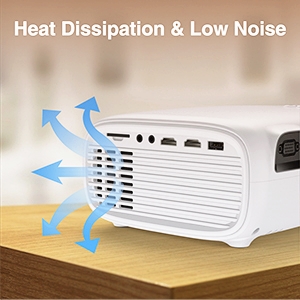
- Pa bloke ouvèti vantilasyon yo. Asire w ke gen ase lè k ap sikile toutotou pwojektè a pou anpeche l chofe twòp.
- Avoid direct exposure to the projector lens light. The bright light can cause eye strain or damage.
- Do not place the projector in unstable locations. Ensure it is on a flat, stable surface to prevent falls.
- Kenbe pwojektè a lwen dlo, imidite, ak materyèl ki ka pran dife.
- Sèvi sèlman ak adaptè kouran ki vini ak pwojektè a.
- Pa eseye repare pwojektè a tèt ou. Konfye tout antretyen bay pèsonèl kalifye.
- Dekonekte pwojektè a pandan tanpèt zèklè oswa lè ou pa itilize li pou yon bon bout tan.
3. Pake kontni
Tanpri verifye sa ki nan pake a lè w ap ouvri li. Si gen nenpòt atik ki manke oswa ki domaje, kontakte sèvis kliyan.
- VILINICE 6500 Lumens 720P Native Portable Projector
- Kontwòl Remote
- Pouvwa kab
- HDMI kab
- AV Kab
- Manyèl itilizatè
- 100-inch Projector Screen (as indicated in product images)
4. Pwodwi souview
Familyarize w ak konpozan ak interfaces pwojektè a.

Image: The VILINICE projector shown with its remote controls, highlighting its compact design.
4.1 Devan ak sou kote View
- Lantiy pwojeksyon: Emèt imaj la sou ekran an.
- Bag konsantre: Ajiste klète imaj la.
- Bag Koreksyon Keystone: Korije distòsyon imaj trapezoidal la.
- Ouvèti vantilasyon: For heat dissipation. Do not block.

Image: The projector's rear and side panels displaying multiple connectivity options including AV, AUX, HDMI, USB, VGA, and SD card slot.
4.2 Rear and Side Interfaces
- Pò AV: Pou konekte ansyen aparèy lè l sèvi avèk yon kab AV.
- AUX (Audio Out) Port: Pou konekte oratè ekstèn oswa kas ekoutè.
- Pò HDMI (x2): For connecting devices like laptops, gaming consoles, or TV sticks.
- Pò USB (x2): For connecting USB drives to play media or power devices.
- Pò VGA: For connecting computers with a VGA output.
- Plas kat SD: Pou jwe medya dirèkteman nan yon kat SD.
- Antre pouvwa: Konekte ak adaptè pouvwa a.
5. Enstalasyon
5.1 Plasman ak Pwojeksyon
Position the projector on a stable surface. The optimal projection distance and screen size can vary. Ensure the projector is perpendicular to the screen for the best image quality.

Image: The projector set up for an outdoor movie night, demonstrating its portability and the included 100-inch screen.
The projector also features a mounting hole for ceiling or tripod installation.
Imaj: Yon imaj detaye view of the projector's mounting hole, suitable for various installation methods.
5.2 Koneksyon pouvwa
Konekte kab kouran an nan antre kouran pwojektè a epi branche li nan yon priz kouran.
5.3 Koreksyon Fokus ak Keystone
After powering on, adjust the focus ring on the projector lens until the image is clear. If the image appears trapezoidal, use the keystone correction ring to adjust it to a rectangular shape.

Image: Visual guide demonstrating how to adjust the focus and keystone correction for a clear and properly shaped image.
5.4 Konekte Aparèy
Pwojektè a sipòte plizyè sous opinyon:
- HDMI: Connect laptops, TV sticks, gaming consoles (PS4, Xbox), or DVD players using an HDMI cable.
- USB: Insert a USB disk to play photos, videos, or music directly.
- VGA: Connect older computers or laptops using a VGA cable.
- DE: Connect legacy devices like VCRs or older DVD players.
- Kat SD: Insert an SD card into the slot to access media files.
- Smartphones: For smartphone connectivity, an external MHL HDMI adapter (not included) may be required.

Image: Illustration of connecting a smartphone or laptop to the projector, emphasizing ease of use.
6. Operasyon
6.1 Limen/Etenyen
Peze bouton pouvwa a sou pwojektè a oswa sou kontwòl remote la pou limen oswa etenn aparèy la.
6.2 Seleksyon Sous Antre
Use the "Source" button on the remote control or the projector's control panel to select the desired input source (HDMI1, HDMI2, USB, VGA, AV, SD Card).
6.3 Ajiste Anviwònman
Navigate the on-screen menu using the remote control to adjust various settings:
- Anviwònman Foto: Adjust brightness, contrast, color, and aspect ratio.
- Anviwònman son: Control volume and audio modes. The projector features a built-in HiFi stereo speaker for an immersive audio experience.
- Fonksyon Zoom: The projector supports a 100%-75% zoom function, allowing you to adjust the screen size without moving the projector.
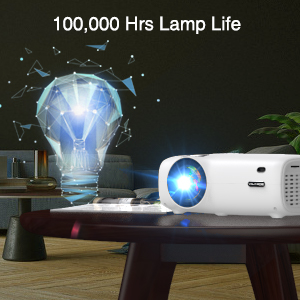
Image: Visual representation of the projector's zoom function, showing how the image size can be reduced from 100% to 75%.

Image: A family enjoying a movie projected by the VILINICE projector, highlighting the built-in HiFi stereo speaker for a great auditory experience.
7. Antretyen
Proper maintenance ensures optimal performance and longevity of your projector.
- Netwayaj lantiy: Use a soft, lint-free cloth and lens cleaning solution specifically designed for optical lenses. Do not use abrasive cleaners.
- Retire pousyè: Regularly clean the projector's exterior with a soft, dry cloth. Use a can of compressed air to gently clear dust from ventilation openings.
- Depo: Lè w pa ap itilize pwojektè a, sere l nan yon kote ki fre epi sèk, lwen limyè solèy dirèk ak tanperati ekstrèm.
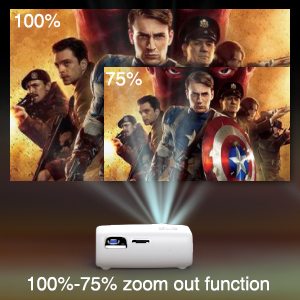
Image: Illustration of the projector's heat dissipation system, designed for efficient cooling and low noise operation.
The projector is designed with a long-lasting lamp lavi ki rive jiska 100,000 èdtan.

Image: A visual representation emphasizing the projector's extended lamp lifespan of 100,000 hours.
NAN. Depanaj
Si ou rankontre pwoblèm, gade pwoblèm ak solisyon komen sa yo:
- Pa gen pouvwa:
- Asire w ke kab kouran an byen konekte ak pwojektè a ak priz kouran an.
- Tcheke si priz kouran an fonksyonèl.
- Pa gen imaj:
- Verifye sous antre a byen chwazi (pa egzanp, HDMI1, USB).
- Check the connection cable (HDMI, VGA, AV) between the projector and the source device.
- Asire w ke aparèy sous la limen epi li ap bay yon siyal.
- Imaj flou:
- Ajiste bag konsantre sou lantiy pwojektè a.
- Asire w distans pwojeksyon an nan limit rekòmande a.
- Clean the projector lens if it is dirty.
- Trapezoidal Image:
- Ajiste bag koreksyon trapèz la jiskaske imaj la vin rektangilè.
- Ensure the projector is placed on a flat surface and is perpendicular to the screen.
- Pa gen son:
- Ogmante volim nan tou de pwojektè a ak aparèy sous la.
- Check if external speakers are connected and properly functioning.
- Ensure the audio output settings on the source device are correct.
9. Espesifikasyon
Below are the technical specifications for the VILINICE 6500 Lumens 720P Native Portable Projector:
| Karakteristik | Spesifikasyon |
|---|---|
| Mak | VILINICE |
| Rezolisyon ekspozisyon | Natif natal 1280 x 720 (720P) |
| Rezolisyon sipòte | 1080P Full HD |
| Klète | 6500 Lumen |
| Kalite ekspozisyon | LCD |
| Koneksyon Teknoloji | HDMI, MHL, USB, VGA |
| Karakteristik espesyal | Portable, 100%-75% Zoom Function |
| Kalite Oratè | Built-In, Surround (HiFi Stereo) |
| Lamp Lavi | Jiska 100,000 èdtan |
| Pwa atik | 4.92 liv |
| Dimansyon pwodwi | 12.6 x 5.51 x 8.27 pous |
10. Garanti ak sipò
VILINICE products come with a standard manufacturer's warranty. For detailed warranty information, product support, or technical assistance, please refer to the warranty card included in your package or visit the official VILINICE website. Do not attempt to open or modify the projector, as this may void your warranty.