
Matrix TF30 Treadmill with XER Console
Matrix Fitness TF30 Treadmill with XER Console
Model: TF30 Treadmill with XER Console (UPC: 763165008846)
Entwodiksyon
Welcome to your new Matrix Fitness TF30 Treadmill with XER Console. This manual provides essential information for the safe and effective operation, setup, maintenance, and troubleshooting of your treadmill. Designed for a comfortable and high-performance running experience, the TF30 combines robust construction with advanced technology to enhance your fitness journey.

Figure 1: Matrix Fitness TF30 Treadmill with XER Console, showcasing its sleek design and integrated console.
Enfòmasyon sou Sekirite
Before operating the treadmill, please read and understand all safety instructions. Failure to do so may result in serious injury or equipment damage.
- Ijans Stop: Always attach the safety key clip to your clothing before starting a workout. In case of an emergency, pulling the safety key or pressing the emergency stop button will immediately halt the treadmill.
- Clearance: Ensure adequate clearance around the treadmill (at least 6 feet behind and 2 feet on each side) for safe operation and emergency dismount.
- Soulye: Toujou mete soulye atletik ki apwopriye pandan w ap itilize tapi kous la.
- Timoun ak bèt kay: Kenbe timoun ak bèt kay lwen tapi a pandan operasyon an.
- Kondisyon Medikal: Konsilte yon doktè anvan ou kòmanse nenpòt nouvo pwogram egzèsis, sitou si ou gen pwoblèm medikal ki egziste deja.
- Pouvwa: Connect the treadmill to a properly grounded outlet. Do not use extension cords.
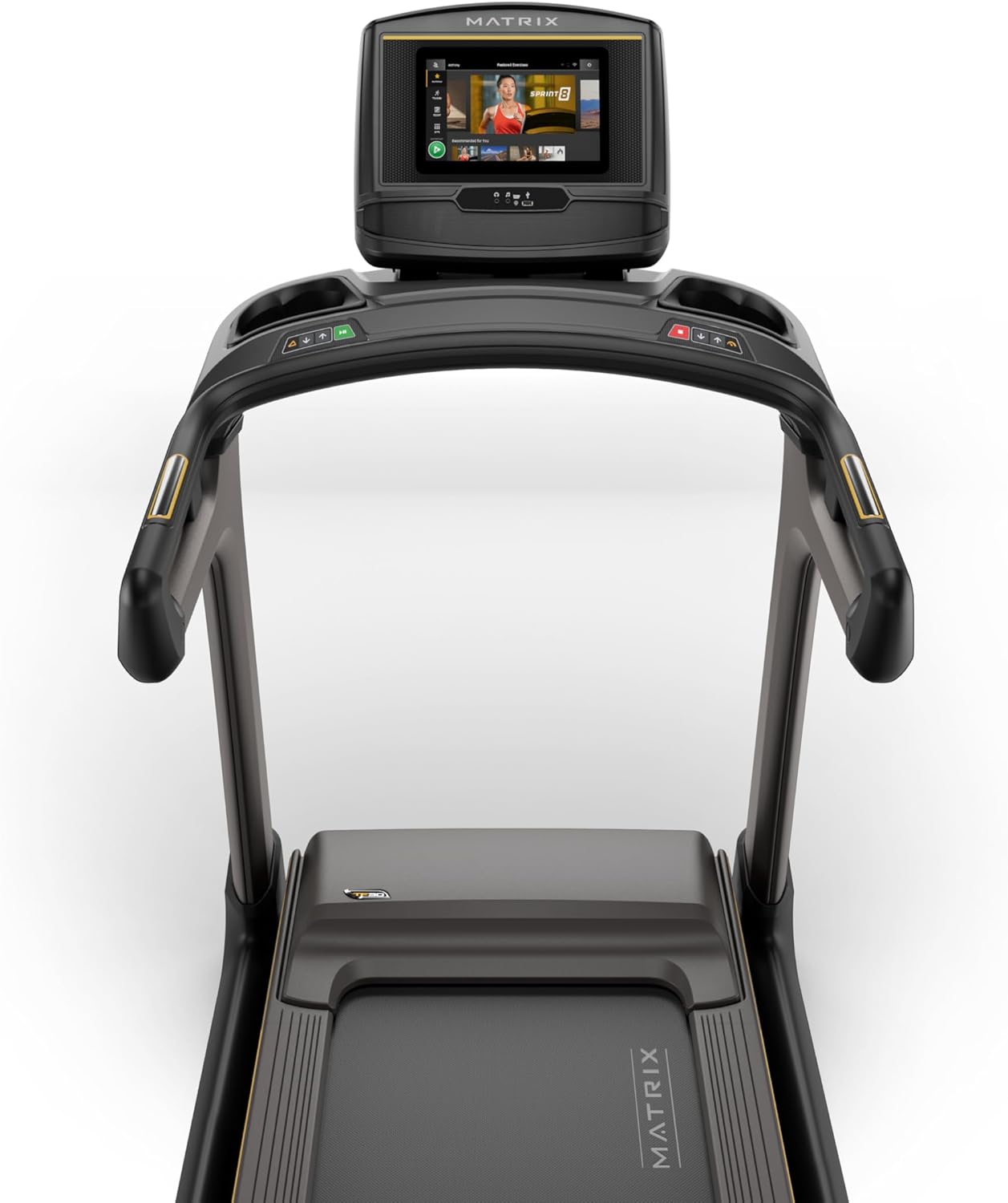
Figure 2: Close-up of the XER Console, highlighting the emergency stop button and safety key attachment point.
Enstalasyon
The Matrix Fitness TF30 Treadmill requires some assembly. Please ensure all components listed below are present before beginning assembly.
Eleman ki enkli:
- Treadmill ankadreman
- Mast
- Mast Boots
- Konsole baz
- Guidon
- Handlebar Sleeves
- Bouchon gidon
- Frame Cover Sets
- Kouvri dèyè
- Kòd pouvwa
- Kle sekirite
- Twous Materyèl
For detailed assembly instructions, please refer to the separate assembly guide provided with your product. Ensure the treadmill is placed on a flat, stable surface.
Enstriksyon Operasyon
Your TF30 Treadmill is equipped with advanced features for an optimal workout.
Karakteristik kle:
- Sifas Kouri: A spacious 20" x 55" running surface provides ample room for comfortable strides.
- Speed & Incline: Adjust speed from 0.5 to 12.5 mph and incline from 0% to 15% to customize your workout intensity.
- Johnson Drive System: Experience quiet, durable, and responsive performance with the continuous-duty drive system.
- Ultimate Deck System: Benefit from a heavy-duty frame, extra-thick deck, and industrial-grade cushioning for superior comfort and joint protection.
- Konsepsyon pou ekonomize espas: The treadmill features a near 90-degree fold for convenient storage when not in use.

Figure 3: Diagram illustrating key features of the TF30 Treadmill, including its folding design, running surface, motor, incline, speed, and cushioning.

Figure 4: Demonstrating the space-saving folding capability of the TF30 Treadmill.
XER Console Operation:
The 10-inch touchscreen XER Console offers a rich interactive experience.
- Aplikasyon entegre: Stream entertainment from popular apps like Netflix, YouTube, and Spotify directly on the console.
- Pwogram antrennman: Access 12 built-in programs, including Sprint 8, and integrate with iFIT and Virtual Active for diverse workout experiences and scenic routes.
- Koneksyon: Connect via Bluetooth FTMS to third-party apps and use Bluetooth HR with the included strap for heart rate monitoring.
- Chaje san fil: Conveniently charge your compatible smartphone by placing it on the designated wireless charging pad on the console.
- Itilizatè Profiles: The console supports multiple user profiles, allowing personalized settings and tracking for each user.

Figure 5: The XER Console, highlighting its 10-inch touchscreen and integrated apps for entertainment and diverse workouts.

Figure 6: The XER Console's interface showing various entertainment applications available for use during workouts.

Figure 7: The XER Console displaying a virtual active scenic route, enhancing the immersive workout experience.
Antretyen
Antretyen regilye asire lonjevite ak pèfòmans optimal tapi kous ou a.
- Netwayaj: Wipe down the treadmill and console after each use with a damp twal pou retire swe ak pousyè. Evite pwodui netwayaj abrazif.
- Lubrification Belt: Periodically check and lubricate the running belt according to the instructions in your detailed product manual to ensure smooth operation and prevent wear.
- Belt Tension & Alignment: Inspect the running belt for proper tension and alignment. Adjust as needed to prevent slipping or rubbing.
- Zòn motè: Keep the area around the motor clean and free of dust and debris to ensure proper ventilation.
Depanaj
If you encounter issues with your treadmill, refer to the following common troubleshooting tips.
| Pwoblèm | Kòz posib | Solisyon |
|---|---|---|
| Tapis roulan an pa limen. | Power cord not connected, circuit breaker tripped, safety key not engaged. | Ensure power cord is securely plugged in. Check household circuit breaker. Ensure safety key is fully inserted. |
| Senti kous la glise oswa li ezite. | Belt tension too loose, belt needs lubrication. | Adjust belt tension according to manual. Lubricate the running belt. |
| Bri dwòl pandan operasyon an. | Loose components, motor issues, belt friction. | Inspect for loose bolts and tighten. Check belt lubrication. If noise persists, contact customer support. |
| Console display is blank or unresponsive. | Pwoblèm kouran, pwoblèm lojisyèl. | Ensure power is connected. Try restarting the treadmill by unplugging and re-plugging. |
For more complex issues, please refer to the comprehensive troubleshooting section in your full user manual or contact Matrix Fitness customer support.
Espesifikasyon
| Spesifikasyon | Valè |
|---|---|
| Mak | Matris |
| Non modèl | Matrix Fitness TF30 Treadmill |
| Style | TF30 Treadmill with XER Console |
| Dimansyon pwodwi (LxWxH) | 77"D x 35"W x 62"H |
| Gwosè ki plwaye | 42"x35"x71" |
| Pwa atik | 294 liv |
| Rekòmandasyon pwa maksimòm | 350 liv |
| Running Surface (Deck Length x Deck Width) | 55 pous x 20 pous |
| Vitès maksimòm | 12.5 Mil pou chak èdtan |
| Vitès minimòm | 0.5 Mil pou chak èdtan |
| Pousan Incline Maksimòmtage | 15% |
| Maksimòm Puissance | 3.25 Puissance |
| Kalite ekspozisyon | LCD (10 Inches Screen Size) |
| Kantite Pwogram yo | 12 |
| Sous pouvwa | Fil elektrik |
| Asanble obligatwa | Wi |
| Metrik Mezire | Distans |

Figure 8: Dimensions of the Matrix Fitness TF30 Treadmill.
Garanti ak sipò
Your Matrix Fitness TF30 Treadmill is backed by a comprehensive manufacturer's warranty:
- Ankadreman: Garanti pou tout lavi
- Motor and Cushioning: Garanti pou tout lavi
- Konsole: 5 years parts / 1 year labor
- Frame (Parts/Labor): 5 years parts / 2 years labor
For customer support or warranty claims, please contact Matrix Fitness USA directly.
Ask a question about this manual
Ask about setup, troubleshooting, compatibility, parts, safety, or missing instructions. Manuals+ will review the question and use this page’s manual context to help answer it.