
Entwodiksyon
Thank you for choosing the JBL Cinema SB190 Soundbar. This manual provides essential information for setting up, operating, and maintaining your soundbar system. Please read it thoroughly to ensure proper use and optimal performance.
Enfòmasyon enpòtan sou sekirite
Always follow these basic safety precautions when using your soundbar system:
- Li enstriksyon sa yo ak anpil atansyon.
- Kenbe enstriksyon sa yo pou referans nan lavni.
- Fè atansyon tout avètisman yo.
- Swiv tout enstriksyon yo.
- Pa sèvi ak aparèy sa a toupre dlo.
- Netwaye sèlman ak yon twal sèk.
- Pa bloke okenn ouvèti vantilasyon. Enstale li dapre enstriksyon manifakti a.
- Pa enstale tou pre okenn sous chalè tankou radyatè, rejis chalè, recho, oswa lòt aparèy (tankou amplifiers) ki pwodui chalè.
- Pwoteje kòd elektrik la pou yo pa mache oswa kwense, sitou nan priz, resipyan konvenyans, ak pwen kote yo sòti nan aparèy la.
- Itilize sèlman atachman/akseswa manifakti a espesifye.
- Deploge aparèy sa a pandan tanpèt zèklè oswa lè li pa itilize pou yon peryòd tan ki long.
- Refere tout sèvis yo bay pèsonèl sèvis kalifye. Reparasyon nesesè lè aparèy la domaje nenpòt fason, tankou kòd kouran oswa ploge domaje, likid koule oswa objè tonbe nan aparèy la, aparèy la te ekspoze a lapli oswa imidite, li pa fonksyone nòmalman. , oswa li te tonbe.
Ki sa ki nan bwat la
Your JBL Cinema SB190 package includes the following components:
- Ba son
- Wireless subwoofer
- Remote kontwòl ak pil
- Power cords (region specific)
- HDMI kab
- Mi-mòn twous bracket ak vis
- Gid pou kòmanse rapid
- Kat garanti
- Fèy sekirite

Image: Included accessories for the JBL Cinema SB190, featuring the remote control, HDMI cable, power cords, and wall-mount hardware.
Pwodwi souview
Soundbar Front and Top Panel

Imaj: Devan view of the JBL Cinema SB190 Soundbar, showcasing konsepsyon elegant li yo.
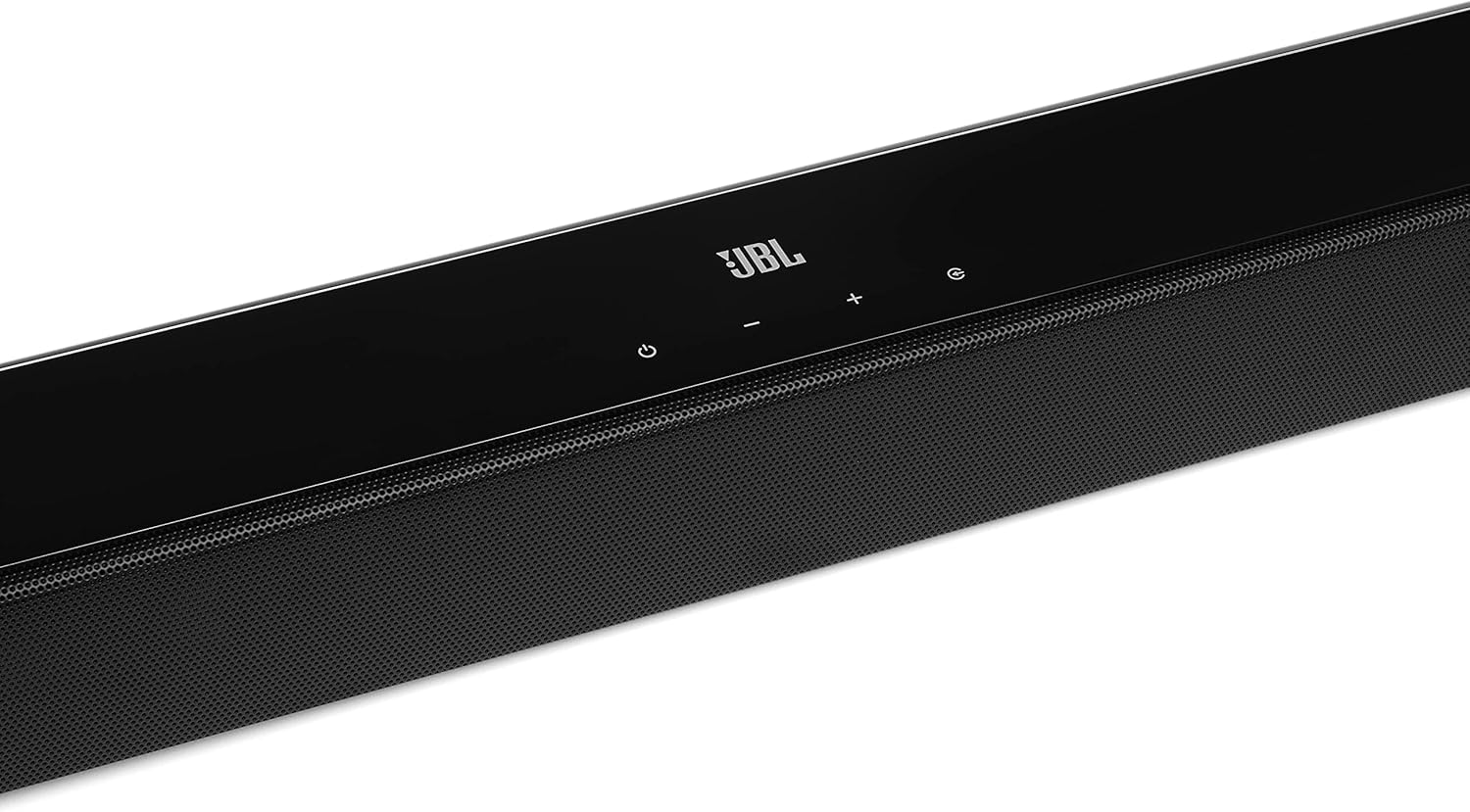
Image: Close-up of the top panel controls on the JBL Cinema SB190 Soundbar, including power, volume, and source selection buttons.
The soundbar features a minimalist design with essential controls located on the top panel for easy access. These include power, volume up/down, and input selection.
Soundbar Rear Panel Connections

Image: Rear panel of the JBL Cinema SB190 Soundbar, showing the power input, HDMI eARC, HDMI In, and Optical In ports.
The rear panel provides various connection options for your audio sources and TV, including HDMI eARC, HDMI In, and Optical In. A power input is also located here.
Wireless subwoofer

Imaj: Devan view of the JBL Cinema SB190 Wireless Subwoofer, featuring the JBL logo at the bottom.

Imaj: Dèyè view of the JBL Cinema SB190 Wireless Subwoofer, showing the power input and pairing button.
The wireless subwoofer provides deep bass and connects automatically to the soundbar. Its rear panel includes the power input and a pairing button if manual pairing is required.
Kontwòl Remote
The included remote control allows full command over your soundbar system, including power, volume, input selection, sound modes (Music, Movie, News), Voice enhancement, and Bass level adjustment.
Enstalasyon
1. Plasman
Ba son: Place the soundbar on a flat surface directly in front of your TV, centered. Ensure no objects obstruct the front of the soundbar. Alternatively, you can wall-mount the soundbar using the provided bracket kit.
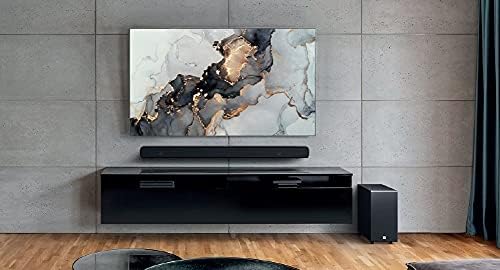
Image: The JBL Cinema SB190 Soundbar positioned below a television, with the wireless subwoofer to the side.
Subwoofers: The wireless subwoofer can be placed anywhere in the room, ideally within 50 feet (15 meters) of the soundbar, for optimal bass distribution. Avoid placing it in a corner directly, as this can sometimes lead to boomy bass.
2. Koneksyon
Choose one of the following connection methods to connect your soundbar to your TV:
- HDMI eARC (Rekòmande): For the highest quality audio, connect an HDMI cable (included) from the HDMI eARC port on your soundbar to the HDMI eARC port on your TV. This connection supports Virtual Dolby Atmos and allows for TV remote control of the soundbar volume.

Image: HDMI icon, representing the HDMI eARC connection.
- Optik nan: If your TV does not have an HDMI eARC port, connect an optical cable (not included) from the OPTICAL IN port on your soundbar to the optical output on your TV.

Image: TV icon, indicating connection to a television.
- HDMI Nan: You can also connect an external device (e.g., Blu-ray player, game console) directly to the HDMI IN port on the soundbar. The video signal will pass through to your TV via the HDMI eARC/ARC connection.
3. Koneksyon pouvwa
- Connect the power cords to the soundbar and subwoofer.
- Plug the power cords into an AC outlet.
- The soundbar and subwoofer will automatically power on and attempt to pair. The subwoofer's LED indicator will turn solid white once successfully paired.
Itilizasyon Soundbar ou a
Power On/Off
Peze a Pouvwa bouton ki sou ba son an oswa sou kontwòl remote la pou limen oswa etenn sistèm nan.
Kontwòl Volim
Sèvi ak la Volim + or Volim - bouton ki sou ba son an oswa sou kontwòl remote la pou ajiste nivo volim nan.
Seleksyon Antre
Peze a Sous button on the soundbar or the dedicated input buttons (HDMI IN, HDMI ARC, OPT, BT) on the remote control to switch between audio sources.
Mòd son
The remote control features dedicated buttons for optimizing audio for different content types:
- MIZIK: Amelyore odyo pou lèktur mizik.
- FILM: Optimizes sound for cinematic experiences, including Virtual Dolby Atmos effects.
- NOUVEL: Enhances vocal clarity for news and dialogue-heavy content.
Voice and Bass Adjustment
The remote control allows for fine-tuning of voice clarity and bass levels:
- VWA: Press the VOICE button repeatedly to cycle through different levels of voice enhancement. This helps make dialogue clearer.
- BASS: Press the BASS button repeatedly to adjust the subwoofer's bass output level.
Pè Bluetooth
To stream audio wirelessly from your mobile device:
- Peze a BT button on the remote control or soundbar. The soundbar's indicator will flash, indicating pairing mode.
- On your mobile device, enable Bluetooth and select "JBL Cinema SB190" from the list of available devices.
- Once connected, the indicator on the soundbar will turn solid. You can now stream audio from your device.

Image: Bluetooth icon, representing wireless audio streaming.
Antretyen
To ensure the longevity and optimal performance of your JBL Cinema SB190 Soundbar:
- Netwayaj: Sèvi ak yon twal mou epi sèk pou netwaye sifas ba son an ak subwoofer la. Pa sèvi ak pwodui netwayaj likid oswa materyèl abrazif, paske yo ka domaje fini an.
- Vantilasyon: Ensure that the ventilation openings on the soundbar and subwoofer are not blocked to prevent overheating.
- Depo: Si w ap sere aparèy la pou yon bon bout tan, debranche l nan priz kouran an epi sere l nan yon kote ki fre epi sèk.
Depanaj
Si ou rankontre pwoblèm ak soundbar ou a, gade pwoblèm ak solisyon komen sa yo:
Pa gen son ki soti nan Soundbar la
- Asire w ke ba son an limen epi volim nan pa twò ba oswa li pa twò piti.
- Verifye ke sous antre ki kòrèk la chwazi sou ba son an (pa egzanp, HDMI ARC, Optik, Bluetooth).
- Check all cable connections (HDMI, Optical) between the soundbar and your TV/source device. Ensure they are securely plugged in.
- If using HDMI ARC/eARC, ensure your TV's HDMI ARC/eARC feature is enabled in its settings.
- Try restarting both the soundbar and your TV.
Pa gen son ki soti nan subwoofer la
- Ensure the subwoofer is plugged into a power outlet and powered on.
- Check the LED indicator on the subwoofer. If it's not solid white, it may not be paired with the soundbar.
- To manually pair the subwoofer:
- Press and hold the pairing button on the back of the subwoofer until the LED flashes rapidly.
- On the soundbar, press and hold the Pouvwa button for 5 seconds. The soundbar will enter pairing mode.
- Once paired, the LED on the subwoofer will turn solid white.
Audio/Video Sync Issues
- If using HDMI eARC, this feature is designed to minimize sync issues. Ensure your TV's firmware is up to date.
- Some TVs have an audio delay setting (lip-sync) that can be adjusted. Consult your TV's manual.
- If connecting via Optical, audio lag can sometimes occur. Try connecting via HDMI eARC if available.
Pwoblèm koneksyon Bluetooth
- Ensure Bluetooth is enabled on your mobile device and the soundbar is in pairing mode.
- Deplase aparèy ou an pi pre ba son an.
- Efase lis koneksyon Bluetooth la sou aparèy ou an epi eseye konekte ankò.
- Asire w pa gen okenn lòt aparèy Bluetooth k ap entèfere.
Espesifikasyon
| Karakteristik | Detay |
|---|---|
| Non modèl | Cinema SB190 |
| Kalite Oratè | Ba son |
| Konfigirasyon chanèl son antoure | 2.1 |
| Total Speaker Power Output | 380 Watts |
| Subwoofer Dyamèt | 6.5 pous |
| Karakteristik espesyal | Bluetooth 5.1 streaming, Dedicated sound mode to enhance voice clarity, HDMI In and Optical In connection, HDMI eARC capable, Virtual Dolby Atmos technology |
| Koneksyon Teknoloji | Bluetooth, Wired (HDMI, Optical) |
| Metòd kontwòl | Remote |
| Dimansyon pwodwi (Soundbar) | 89.9L x 6.2P x 6.6H santimèt |
| Pwa atik | 7.5 Kilograms (Total system) |
| Materyèl | Plastik |
| Koulè | Nwa |
| Konpozan ki enkli | Soundbar, Wireless subwoofer, Remote control with batteries, Power cords, HDMI cable, Wall-mount bracket kit with screws, Quick start guide, Warranty card, Safety sheet |
Garanti ak sipò
For detailed warranty information, please refer to the warranty card included in your product package. For technical support, product registration, or further assistance, please visit the official JBL support websit oswa kontakte sèvis kliyan yo.
Ou ka jwenn plis enfòmasyon ak resous sipò sou Magazen JBL sou Amazon.