
1. Entwodiksyon
This manual provides detailed instructions for the setup, operation, and maintenance of your WISE TIGER LED Digital Alarm Clock (Model CK-LED1302). Please read this manual thoroughly before use to ensure proper functionality and to maximize your product experience.

Image 1.1: WISE TIGER LED Digital Alarm Clock and its remote control.
2. Pake kontni
Tanpri verifye ke tout atik yo prezan nan pakè ou a:
- WISE TIGER LED Digital Alarm Clock (Model CK-LED1302)
- Kontwòl Remote
- USB pouvwa kab
- Manyèl Itilizatè (dokiman sa a)
- Fixed Bracket (for desk placement)
3. Pwodwi souview
The WISE TIGER LED Digital Alarm Clock features a modern 3D design, offering clear time display and multiple functions for various environments.
3.1 Karakteristik kle
- Ekspozisyon tan: 12-hour or 24-hour format.
- Ekspozisyon kalandriye: Shows date.
- Revèy Alam: With snooze function.
- Ekspozisyon Tanperati: Montre tanperati anbyen.
- Klate reglabl: Automatic brightness sensor and manual adjustment via remote control.
- Fonksyon limyè lannwit: Provides soft illumination.
- Fonksyon memwa: Built-in battery retains time settings for 4-8 hours during power disconnection.
- Plasman versatile: Suitable for desk or wall mounting.

Image 3.1: Visual representation of the clock's main functions.
3.2 Eleman
Gade dyagram ki anba a pou plis enfòmasyonview of the clock's components and connection points.
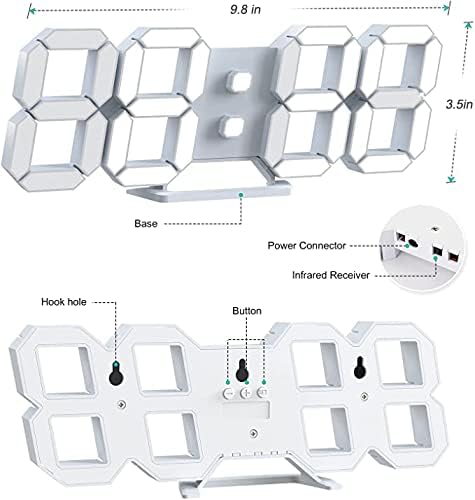
Imaj 3.2: Dèyè view and dimensions of the clock, highlighting the power connector, infrared receiver, and mounting options.
- Ekspozisyon: Large 3D LED digits for time, date, and temperature.
- Baz: Removable stand for desk placement.
- Pouvwa Connector: USB port for power input.
- Reseptè enfrawouj: Pou siyal kontwòl remote.
- Hook Holes: Pou aliye miray la.
- Bouton kontwòl: Located on the back for basic settings (Power, Up, Down, Set).
4. Enstalasyon
4.1 Koneksyon pouvwa
- Connect the provided USB power cable to the power connector on the back of the clock.
- Branche lòt bout kab USB a nan yon adaptè kouran USB estanda (pa enkli) oubyen nan yon pò USB òdinatè.
- The clock will power on and display the time.
The clock is powered by the USB cable only. A built-in battery serves to record time settings when power is disconnected, ensuring settings are retained for 4-8 hours.

Image 4.1: Explanation of the clock's power and memory function.
4.2 Opsyon Plasman
The clock can be used as a desk clock or a wall clock.
- Plasman biwo: Attach the fixed bracket to the bottom of the clock. The angle of the bracket can be adjusted for optimal viewing.
- Montaj mi: Remove the fixed bracket if attached. Use the installation slots (hook holes) on the back of the clock to hang it securely on a wall using appropriate fasteners (not included).

Image 4.2: The clock configured for wall mounting and desk placement.
5. Operasyon Enstriksyon
The clock's functions are primarily controlled using the included remote control. Basic settings can also be adjusted via the buttons on the back of the clock.
5.1 Mete Lè ak Dat
- Peze a TAN button on the remote control to enter time setting mode.
- Sèvi ak la UP epi DESANN arrows to adjust the hour.
- Peze TAN again to move to minute setting, then use UP epi DESANN pou ajiste.
- Kontinye peze TAN pou chanje paramèt ane, mwa ak jou, epi ajiste chak ak UP epi DESANN.
- Peze TAN one last time or wait a few seconds for the settings to save automatically.
5.2 Fòma 12/24 èdtan
Pou chanje ant fòma 12 èdtan ak 24 èdtan, peze bouton an 12/24H bouton sou kontwòl remote la.

Imaj 5.1: Egzanpample of 12-hour and 24-hour time display.
5.3 Mete alam la
- Peze a ALAM button on the remote control to enter alarm setting mode.
- Sèvi ak la UP epi DESANN arrows to set the desired alarm hour.
- Peze ALAM again to move to minute setting, then use UP epi DESANN pou ajiste.
- Peze ALAM one last time or wait for the settings to save.
- Pou aktive/dezaktive alam lan, peze bouton an ALAM button briefly outside of setting mode. An alarm icon will appear/disappear on the display.
5.4 Repete Fonksyon
Lè alam la son, peze la SNOOZE button on the remote control to temporarily silence the alarm. The alarm will sound again after a set interval (typically 5-10 minutes).

Image 5.2: The snooze alarm function in use.
5.5 Ajisteman klète
The clock features both automatic and manual brightness control.
- Otomatik klète: The built-in sensor automatically adjusts the display brightness based on ambient light conditions.
- Manual Brightness: Peze a KLIYE button on the remote control to cycle through different brightness levels (e.g., high, medium, low).

Image 5.3: Automatic brightness adjustment based on ambient light.

Image 5.4: Manual adjustment through three brightness levels.
5.6 Display Tanperati
The clock automatically displays the ambient temperature. No manual adjustment is typically required for this function.
6. Antretyen
To ensure the longevity and optimal performance of your WISE TIGER LED Digital Alarm Clock, follow these maintenance guidelines:
- Netwayaj: Use a soft, dry cloth to wipe the display and casing. Avoid abrasive cleaners, solvents, or spray cleaners directly on the clock.
- Pouvwa: Always use the provided USB cable for power. Ensure the power source is stable.
- Anviwònman: Keep the clock away from extreme temperatures, direct sunlight, and high humidity.
- Kontwòl Remote: Store the remote control in a safe place to prevent loss or damage. Ensure batteries are replaced when needed (typically 2 Lithium Ion batteries, included).
NAN. Depanaj
Si ou rankontre pwoblèm ak revèy ou a, gade pwoblèm ak solisyon komen sa yo:
| Pwoblèm | Kòz posib | Solisyon |
|---|---|---|
| Revèy pa limen | Pa gen pouvwa oswa koneksyon ki lach | Ensure USB cable is securely connected and power source is active. Try a different USB port or adapter. |
| Remote kontwòl pa travay | Remote batteries are dead or remote is out of range/blocked | Replace remote control batteries. Ensure remote is pointed at the clock's infrared receiver (refer to Image 3.2) and within 8 meters. Remove any obstructions. |
| Tan pa kòrèk | Time was not set precisely | Reset the time carefully, ensuring you set it at the exact second of the desired time. |
| Display is too dim or too bright | Brightness setting needs adjustment | Peze a KLIYE button on the remote to cycle through manual brightness levels. Check if automatic brightness is functioning correctly in different light conditions. |
| Alam pa sonnen | Alam lan pa aktive oswa li pa byen mete | Ensure the alarm is set and activated (alarm icon visible). Verify the alarm time is correct. |
8. Espesifikasyon
| Karakteristik | Detay |
|---|---|
| Mak | WISE TIGER |
| Nimewo Modèl | CK-LED1302 |
| Kalite ekspozisyon | Digital |
| Koulè | Blan |
| Dimansyon pwodwi | 9.7" lajè x 3.5" wotè |
| Sous pouvwa | Fil elektrik (USB) |
| Batri memwa | 2 Lithium Ion batteries (included), retains settings for 4-8 hours |
| Kalite aliye | Wall Mount, Desk Mount |
| Karakteristik espesyal | Adjustable Brightness, Alarm Clock, Temperature Display, Date Display, 12/24 Hour Format |
| Materyèl | Acrylonitrile Butadiene styrene |
| Pwa atik | 0.317 ons (apeprè 9 gram) |
| UPC | 728990655931 |
9. Garanti ak sipò
For warranty information or technical support, please refer to the product packaging or contact the retailer where the product was purchased. Keep your purchase receipt as proof of purchase.