
Entwodiksyon
Thank you for choosing the PHEANOO D6 Sound Bar System. This 2.1 channel soundbar with a dedicated wired subwoofer is designed to enhance your audio experience, providing clear dialogue, powerful bass, and immersive sound for your home entertainment. This manual provides detailed instructions for setup, operation, maintenance, and troubleshooting to ensure optimal performance and longevity of your device.
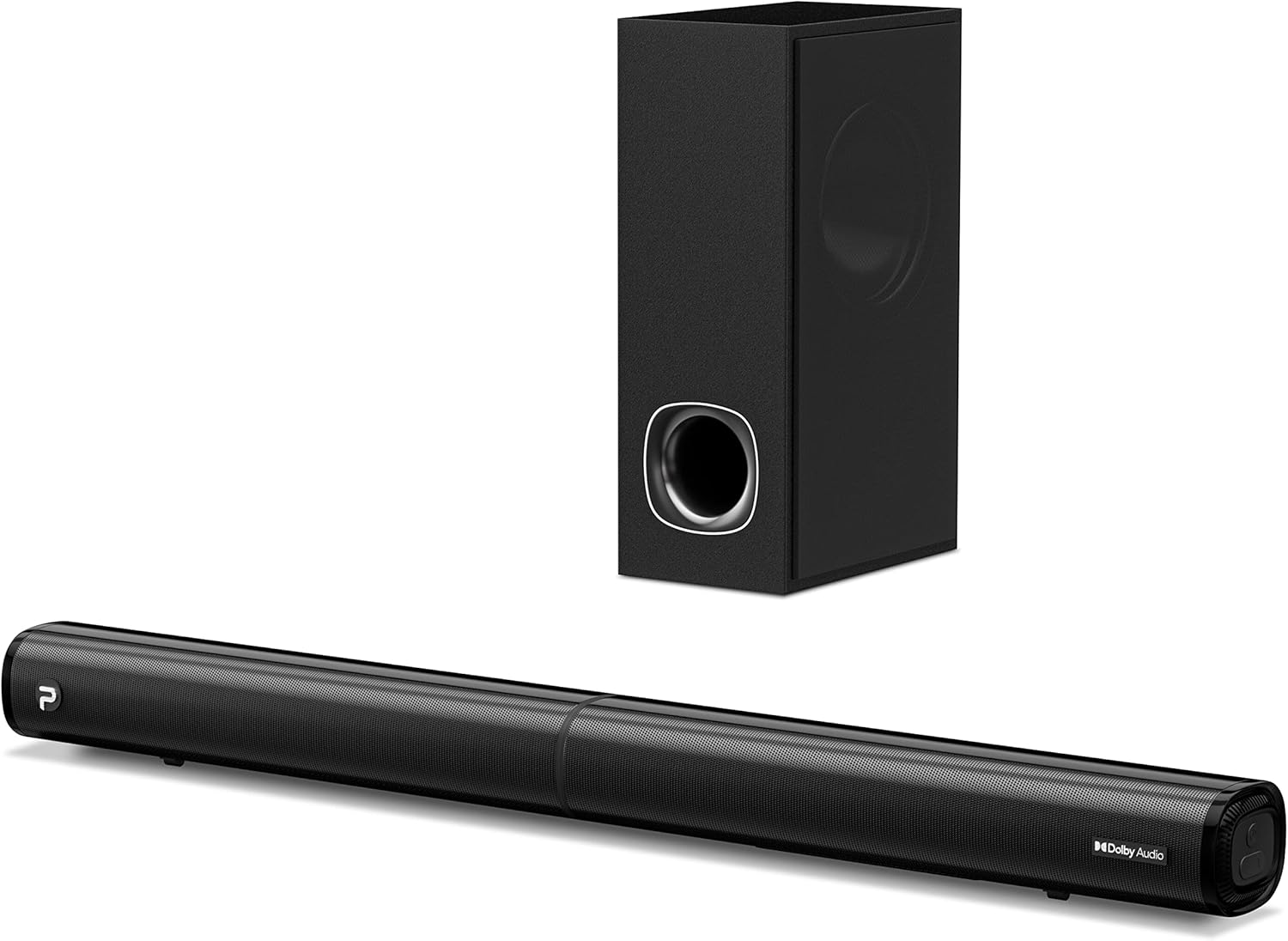
Image: The PHEANOO D6 Sound Bar and its accompanying wired subwoofer, showcasing konsepsyon nwa elegant yo.
Ki sa ki nan bwat la
Tanpri verifye sa ki nan pake a ak anpil atansyon. Si gen nenpòt atik ki manke oswa ki domaje, kontakte sèvis kliyan.
- Soundbar and Wired Subwoofer
- HDMI kab
- RCA kab odyo
- Wall Mount Kit (screws and anchors)
- Kontwòl Remote (pil pa enkli)
- Adaptè pouvwa

Image: All components included in the PHEANOO D6 Sound Bar package, laid out for clear identification, including the soundbar, subwoofer, cables, remote, and wall mount kit.
Enstalasyon
1. Assembling the Soundbar (Detachable Design)
The PHEANOO D6 soundbar features a unique detachable design for flexible placement. Follow these steps to assemble it:
- Align the audio connector from one half of the soundbar with the corresponding port on the other half.
- Gently push the two halves together until they click into place.
- Twist the two halves to secure the connection, ensuring the soundbar is firmly assembled.

Image: A three-step visual guide demonstrating how to connect the two halves of the detachable soundbar, ensuring proper alignment and secure locking.
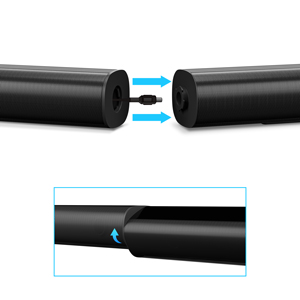
Imaj: Yon gwo plan view of the soundbar's detachable connection point, showing the male and female connectors.
2. Konekte Subwoofer la
Connect the wired subwoofer to the soundbar using the dedicated subwoofer cable. Ensure the connection is secure.
3. Opsyon Plasman
You can place the soundbar on a tabletop or mount it on a wall.
- Plasman Tabletop: Mete ba son an dirèkteman devan televizyon ou an, asire w ke li pa bouche detèktè telekòmand televizyon an.
- Montaj mi: Use the included wall mount kit. It is recommended to measure and mark the drilling points accurately, rather than relying solely on the paper stencil, to ensure a level installation.
4. Koneksyon odyo
The PHEANOO D6 offers multiple connectivity options. Choose the best one for your device:
- HDMI (ARC): For the best audio quality and control, connect an HDMI cable from the soundbar's HDMI (ARC) port to your TV's HDMI (ARC) port. This allows your TV remote to control the soundbar's volume.
- Optik: Connect an optical cable from the soundbar's Optical port to your TV's Optical Digital Audio Out port.
- AUX: Use the 3.5mm AUX cable to connect to devices with a 3.5mm audio output.
- Bluetooth 5.0: For wireless connection, pair your device via Bluetooth.

Image: The rear panel of the PHEANOO D6 Sound Bar, highlighting the HDMI (ARC), Bluetooth, Optical, and AUX input ports with corresponding icons.

Imaj: Yon imaj detaye view of the soundbar's input panel, showing the AUX, Optical, and HDMI (ARC) ports clearly labeled.
5. Koneksyon pouvwa
Connect the power adapter to the soundbar and then plug it into a wall outlet.
Enstriksyon Operasyon
Kontwòl Remote
The included remote control allows you to manage all functions of the soundbar. Insert two AAA batteries (not included) into the remote before use.

Image: The remote control for the PHEANOO D6 Sound Bar, showing its buttons and an indicator light.
Power On/Off
Press the power button on the remote or the soundbar to turn the unit on or off.
Seleksyon Antre
Press the "Input" button on the remote to cycle through available input sources: HDMI (ARC), Optical, AUX, and Bluetooth.
Pè Bluetooth
Pou marye yon aparèy Bluetooth:
- Select Bluetooth input on the soundbar. The indicator light will flash.
- Enable Bluetooth on your device (smartphone, tablet, etc.) and search for "PHEANOO D6".
- Select the soundbar from the list to pair. Once connected, the indicator light will be solid.

Image: A smartphone displaying a music app, wirelessly connected to the PHEANOO D6 Sound Bar via Bluetooth, indicated by a Wi-Fi like symbol.
Mòd son
The soundbar offers various sound modes to optimize your listening experience:
- Mòd dyalòg: Enhances vocal clarity, making speech easier to understand.
- Mòd Mizik: Optimize pou lèktur mizik, bay yon odyo balanse.
- Mode fim: Delivers an immersive cinematic experience with enhanced effects.
- Mòd 3D: Creates a wider, more enveloping soundstage.

Image: Icons representing different sound modes: Dialogue, Music, Movie, and 3D, indicating the soundbar's versatility.
Ajisteman Bass
Use the dedicated bass control buttons on the remote to increase or decrease the subwoofer's output level to your preference.

Image: A close-up of the subwoofer, with a visual effect suggesting powerful bass emanating from it.
Dolby Digital Support
The PHEANOO D6 Sound Bar supports Dolby Digital decoding, providing a rich and dynamic audio experience for compatible content.

Image: A living room setup with the soundbar and TV, overlaid with a grid pattern indicating premium 3D surround sound powered by Dolby Audio.

Image: The Dolby Audio logo accompanied by visual representations of sound waves, emphasizing the enhanced audio quality.
Roku TV Ready
This soundbar is certified to work seamlessly with your Roku TV. Enjoy smooth setup, easy access to sound settings, and compatibility with any Roku TV remote.

Image: A television screen displaying the "Roku TV Ready" setup interface, with the PHEANOO Soundbar and subwoofer positioned below it, illustrating seamless integration.
Antretyen
- Netwayaj: Sèvi ak yon twal mou epi sèk pou netwaye sifas ba son an ak subwoofer la. Pa sèvi ak pwodui netwayaj likid oswa ayewosòl.
- Vantilasyon: Asire w ke gen bon vantilasyon ozalantou ba son an ak subwoofer la pou anpeche yo chofe twòp. Pa bloke okenn ouvèti vantilasyon.
- Depo: Si w ap sere aparèy la pou yon bon bout tan, dekonekte l nan kouran an epi sere l nan yon kote ki fre epi sèk.
Depanaj
| Pwoblèm | Kòz posib | Solisyon |
|---|---|---|
| Pa gen pouvwa | Kab kouran an pa konekte; Priz kouran an pa fonksyone. | Asire w kab kouran an byen konekte. Eseye yon lòt priz kouran. |
| Pa gen son | Antre ki pa kòrèk la chwazi; Volim nan twò ba; Kab yo pa byen konekte. | Select the correct input source. Increase volume. Check all audio cable connections. |
| Aparèy Bluetooth echwe | Ba son an pa nan mòd koneksyon; Aparèy la twò lwen; Entèferans. | Ensure soundbar is in Bluetooth input and indicator is flashing. Move device closer. Turn off other Bluetooth devices. |
| Move son kalite | Incorrect sound mode; Source audio quality is low. | Try different sound modes (Music, Movie, Dialogue). Ensure the audio source is high quality. |
| Remote kontwòl pa travay | Batteries dead or incorrectly inserted; Obstruction between remote and soundbar. | Replace batteries, ensuring correct polarity. Remove any obstructions. |
For more detailed troubleshooting, refer to the official Troubleshooting Guide PDF available on the product page or contact PHEANOO customer support.
Espesifikasyon
| Karakteristik | Detay |
|---|---|
| Modèl | D6 |
| Mak | PHEANOO |
| Kalite Oratè | Ba son ak filè subwoofer |
| Chèn konte genyen | 2.1 CH |
| Koneksyon Teknoloji | HDMI (ARC), Bluetooth 5.0, Optical, AUX |
| Gamme Bluetooth | Jiska 100 mèt (apeprè 328 pye) |
| Oratè maksimòm pwodiksyon pouvwa | 240 Watts |
| Dimansyon pwodwi (Soundbar) | 29.5" lajè x 2.4" wotè x 2.8" pwofondè |
| Pwa atik | 11.57 liv |
| Kalite kontwolè | Kontwòl Remote |
| Karakteristik espesyal | Dolby Digital Decoding, Dialogue Enhancement, Bass Adjustable, Detachable Design, Roku TV Ready |
Garanti ak sipò
The PHEANOO D6 Sound Bar System comes with a Garanti limiteTanpri gade kat garanti ki nan pakè a pou kondisyon espesifik yo.
For technical support, warranty claims, or further assistance, please visit the official PHEANOO website or contact their customer service department. You can also find additional resources like the Gid itilizatè (PDF) epi Gid depanaj (PDF) sou entènèt.