
1. Entwodiksyon
The Livoo TES242 is a versatile device that integrates a Bluetooth speaker, a 15W fast wireless charger, and an LED ambient light. This manual provides essential information for the safe and efficient use of your device. Please read it thoroughly before operation and retain it for future reference.
2. Enstriksyon Sekirite
- Pa ekspoze aparèy la nan dlo, imidite, oswa tanperati ekstrèm.
- Kenbe aparèy la lwen sous chalè, limyè solèy dirèk, ak materyèl ki ka pran dife.
- Use only the provided USB cable for power. Ensure the power adapter (not included) meets the required specifications (e.g., 5V/2A or higher for optimal charging).
- Pa eseye demonte, repare, oswa modifye aparèy la. Sa ap anile garanti a epi li ka lakòz domaj oswa blesi.
- Kenbe soti nan atenn timoun yo.
- Avoid placing metal objects or cards with magnetic strips (e.g., credit cards) on the wireless charging pad, as this may damage the device or the objects.
3. Pake kontni
Tanpri tcheke pake a pou atik sa yo:
- Livoo TES242 LED Speaker with Wireless Charger
- USB pouvwa kab
- Manyèl Itilizatè (dokiman sa a)
4. Pwodwi souview
Familiarize yourself with the components and controls of your Livoo TES242 device.
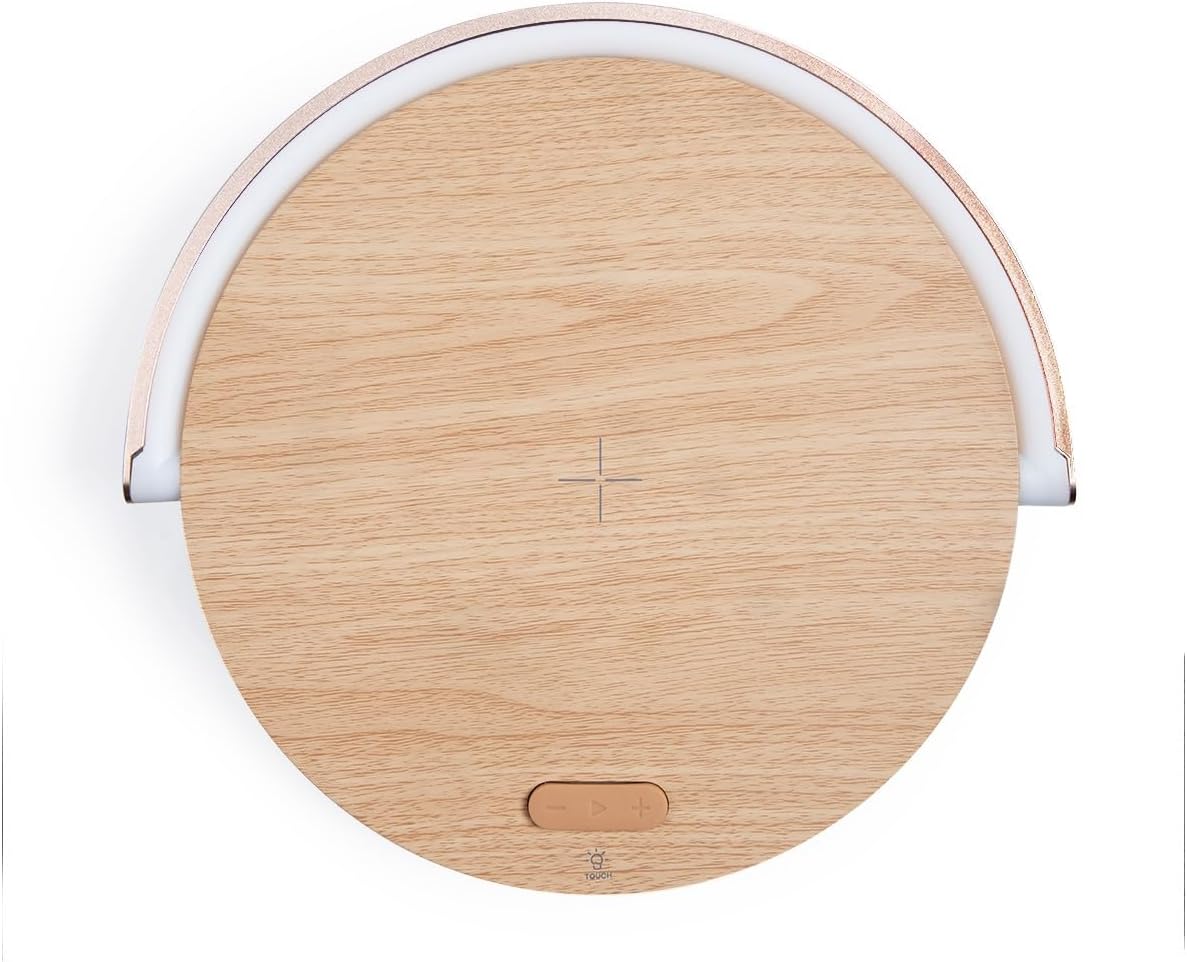
Figi 4.1: Top View nan Aparèy la. This image shows the top surface of the Livoo TES242, highlighting the central cross symbol for wireless charging alignment and the control buttons located below it.

Figure 4.2: Device with Phone on Charging Pad. Yon angilè view illustrating a smartphone positioned on the wireless charging pad, with the LED light arch illuminated, demonstrating the device in use.
Kontwòl ak Endikatè:
- Pad chaje san fil: Central area on the top surface for QI-compatible device charging.
- LED Light Arch: Provides ambient lighting, pivots for direction adjustment.
- Touch Button (Light Control): Located on the base, cycles through LED light modes.
- Bluetooth Oratè: Integrated speaker for audio output.
- Pò Antre USB-C: Pou konekte kab pouvwa a.
5. Enstalasyon
5.1 Koneksyon pouvwa
- Connect the small end of the provided USB power cable to the USB-C input port on the Livoo TES242.
- Connect the larger end of the USB cable to a compatible USB power adapter (e.g., a smartphone charger, minimum 5V/2A recommended for optimal performance, not included).
- Plug the power adapter into a wall outlet. The device will power on automatically or can be turned on by pressing a power button if available (refer to product overview for specific button locations).
5.2 Premye chaj
For optimal battery performance, it is recommended to fully charge the Livoo TES242 before its first use. The device has a built-in 1500 mAh Li-ion battery, providing up to 4 hours of audio playback on a full charge.
6. Operasyon Enstriksyon
6.1 Bluetooth Pairing
To connect your smartphone or other Bluetooth-enabled device:
- Ensure the Livoo TES242 is powered on. It will automatically enter Bluetooth pairing mode, indicated by an audible prompt or flashing light (if applicable).
- Sou telefòn entelijan ou oswa aparèy odyo ou, aktive Bluetooth epi chèche aparèy ki disponib yo.
- Chwazi "TES242" oubyen "Livoo Speaker" from the list of found devices.
- Once connected, a confirmation sound will be heard from the speaker. You can now play audio through the speaker.
- The effective Bluetooth range is up to 10 meters (33 feet).
6.2 Fonksyon chaje san fil
The Livoo TES242 features a 15W fast wireless charging pad:
- Ensure the Livoo TES242 is connected to a power source.
- Place your QI-compatible smartphone or device directly onto the center of the charging pad. Align your device with the cross symbol for optimal charging.
- Charging will begin automatically. Your device's screen or charging indicator will confirm that it is charging.
- For fast charging, ensure your power adapter supports the required output (e.g., 9V/1.67A).
6.3 mòd limyè ki ap dirije
The integrated LED light arch offers three ambient lighting modes:
- Locate the "Touch" button on the base of the device.
- Tap the "Touch" button to cycle through the available light modes: Limyè natirèl, Limyè Blan, ak Limyè jòn.
- The LED arch can be manually pivoted to adjust the direction of the light as desired.
7. Antretyen
- Netwayaj: Use a soft, dry cloth to clean the surface of the device. Do not use liquid cleaners, aerosols, or abrasive chemicals, as these may damage the finish or internal components.
- Depo: Lè w pa itilize aparèy la pou yon bon bout tan, sere l nan yon kote ki fre epi sèk, lwen limyè solèy dirèk ak tanperati ekstrèm.
- Swen batri: To prolong battery life, avoid fully discharging the battery frequently. Recharge the device regularly, even if not in constant use.
NAN. Depanaj
If you encounter issues with your Livoo TES242, please refer to the following common problems and solutions:
| Pwoblèm | Kòz posib | Solisyon |
|---|---|---|
| Aparèy pa limen. | No power connection or depleted battery. | Ensure the USB cable is securely connected to both the device and a working power adapter. Charge the device for at least 30 minutes. |
| Pa ka konekte atravè Bluetooth. | Speaker not in pairing mode, Bluetooth off on source device, or out of range. | Ensure the speaker is powered on and in pairing mode. Turn Bluetooth off and on again on your source device. Move the source device closer to the speaker (within 10m). Forget "TES242" from your device's Bluetooth list and try pairing again. |
| Chaje san fil pa travay. | Phone not QI-compatible, misaligned, or thick phone case. | Verify your phone supports QI wireless charging. Re-position the phone centrally on the charging pad, aligning it with the cross symbol. Remove any thick phone cases that might interfere with charging. Ensure the speaker is connected to a sufficient power source. |
| Move kalite son oswa dekoneksyon. | Weak Bluetooth signal or interference. | Move your paired device closer to the speaker. Ensure there are no large obstructions between the speaker and your device. Avoid placing the speaker near other electronic devices that may cause interference. |
9. Espesifikasyon
Technical details for the Livoo TES242 LED Speaker with Wireless Charger:
| Karakteristik | Spesifikasyon |
|---|---|
| Mak | Livoo |
| Nimewo Modèl | TES242 |
| Koneksyon Teknoloji | Bluetooth |
| Oratè Sorti pouvwa | 5 W |
| Gamme Bluetooth | Jiska 10 mèt |
| Estanda chaje san fil | Qi |
| Pouvwa chaje san fil | 15 W Fast Charge |
| Max Output (Wireless Charging) | 9 V / 1.67 A |
| Aparèy konpatib | Smartphones, Bluetooth-enabled audio devices |
| Ki ap dirije mòd limyè | 3 (Natural, White, Yellow) |
| Kalite batri | Li-ion |
| Kapasite batri | 1500 mAh |
| Tan Lekti Odyo | Jiska 4 èdtan |
| Sous pouvwa | USB kab (enkli) |
| Sòti Voltage | 5 Vòlt (DC) |
| Ampepòk | 1.67 A |
| Total pò USB | 1 |
| Materyèl Entèn | Akrilonitrile butadien stirèn (ABS) |
| Koulè | Bwa |
| Pòtab | Wi |
| Peyi orijin | Lafrans |
10. Garanti ak sipò
The Livoo TES242 LED Speaker with Wireless Charger comes with a 2-ane garanti apati dat acha a. Garanti sa a kouvri domaj fabrikasyon anba itilizasyon nòmal.
For technical support, warranty claims, or further assistance, please contact your retailer or visit the official Livoo websit entènèt pou jwenn enfòmasyon sou sèvis kliyan.