
Entwodiksyon
Manyèl sa a bay enstriksyon esansyèl pou enstale, opere, antreteni ak depanaj Black ou a.view Tab 10 Android Tablet. The Blackview Tab 10 features a 10.1-inch FHD+ display, an MTK8768 Octa-Core processor, 4GB RAM, 64GB internal storage, and runs on Android 11 (Doke OS_P 1.0). It supports dual SIM cards for 4G phone calls and data, Wi-Fi, and Bluetooth 5.0 connectivity.
Please read this manual thoroughly to ensure proper use and to maximize your tablet's performance and longevity.

Imaj: Nwa aview Tab 10 tablet shown from the rear in three color options: gray, golden, and silvery, highlighting its sleek design.
Enstalasyon
Kontni pake
Asire w tout atik yo prezan nan pakè a:
- Nwaview Tab 10 Tablet PC
- USB kab (Tip-C)
- Adaptè pouvwa (9V 2A)
- Manyèl itilizatè
Chaje batri a
Before first use, fully charge the tablet. Connect the USB Type-C cable to the tablet's Type-C port and the other end to the provided power adapter. Plug the adapter into a power outlet. The charging indicator will show the charging status. The tablet supports 18W fast charging.
Inserting SIM and TF Cards
Nwa aview Tab 10 supports dual Nano SIM cards or one Nano SIM card and one TF (microSD) card for expandable storage up to 128GB.
- Jwenn plato kat SIM/TF la sou bò tablèt la.
- Sèvi ak zouti ejèksyon SIM ki vini ak li a pou ouvri plato a.
- Carefully place the Nano SIM card(s) and/or TF card into the designated slots on the tray. Ensure the cards are correctly oriented.
- Dousman pouse plato a tounen nan tablèt la jiskaske li fè yon klik.
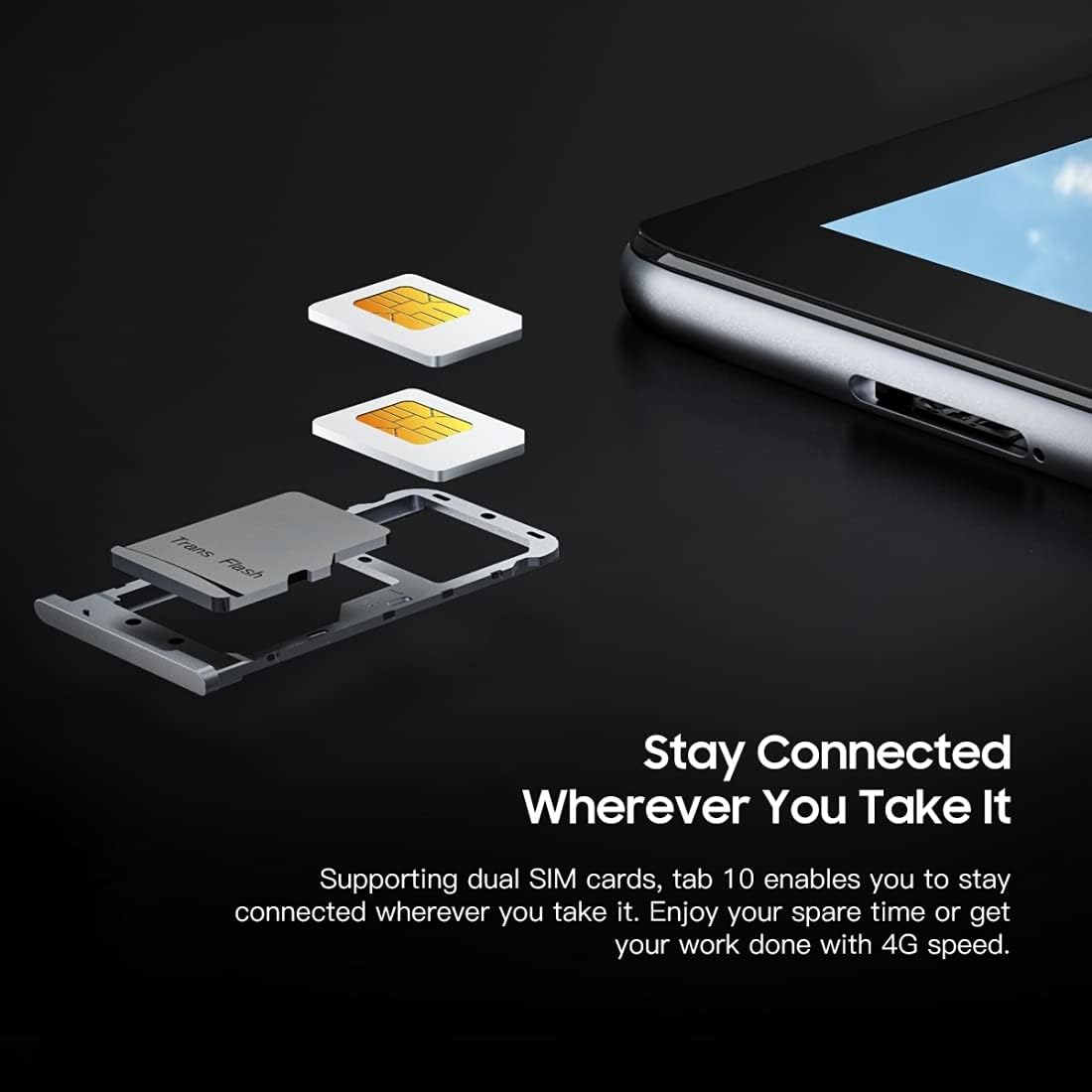
Imaj: Yon imaj detaye view nan Nwa aview Tab 10's SIM card tray, showing how two Nano SIM cards are inserted, illustrating the dual SIM support.
Limen / Off
- Pou limen: Peze epi kenbe bouton Pouvwa a jiskaske li vin nwa aview logo a parèt.
- Pou etenn: Peze epi kenbe bouton pouvwa a jiskaske meni opsyon pouvwa a parèt, answit chwazi "Etein".
- Pou rekòmanse: Peze epi kenbe bouton pouvwa a jiskaske meni opsyon pouvwa a parèt, answit chwazi "Rekòmanse".
Premye konfigirasyon
Lè w limen aparèy la pou premye fwa, swiv enstriksyon ki parèt sou ekran an pou w konplete premye konfigirasyon an:
- Chwazi lang ou.
- Konekte nan yon rezo Wi-Fi.
- Konekte avèk kont Google ou a oubyen kreye yon nouvo.
- Konfigire blokaj ekran an (Kòd PIN, modèl, modpas).
- Review epi aksepte tèm ak kondisyon yo.
Enstriksyon Operasyon
Navigasyon debaz
- Tape: Touche ekran an yon fwa pou ouvri yon aplikasyon, chwazi yon atik, oubyen peze yon bouton.
- Manyen epi kenbe: Peze epi kenbe yon atik pou jwenn plis opsyon oswa pou deplase li.
- Glise: Trennen dwèt ou sou ekran an pou defile paj yo oswa kontni an.
- Zongle: Sèvi ak de dwèt pou agrandi oswa diminye imaj yo epi web paj.
Konekte ak rezo
- Wi-Fi: Ale nan Anviwònman > Rezo ak entènèt > Wi-Fi. Turn Wi-Fi on, select your desired network, and enter the password if required.
- Bluetooth: Ale nan Anviwònman > Aparèy ki konekte > Bluetooth. Turn Bluetooth on, then select a device from the list to pair.
- Done mobil (4G): If a SIM card is inserted, go to Anviwònman > Rezo ak entènèt > Rezo mobil to enable mobile data and configure settings.
Sèvi ak Kamera a
Nwa aview Tab 10 features a 13.0MP rear camera and a 5.0MP front camera.
- Louvri a Kamera app.
- Tape ikòn kamera a pou chanje ant kamera devan ak dèyè.
- Tape bouton deklanchè a pou pran yon foto oswa pou kòmanse/sispann anrejistreman videyo.
- Explore various camera modes and settings within the app.

Imaj: Nwa aview Tab 10 displaying its camera features, including an 8MP front camera and a 13MP rear camera, emphasizing its photographic capabilities.
Android 11 and Doke OS_P 1.0
Your tablet runs on Android 11 with Blackview's Doke OS_P 1.0 interface, offering enhanced privacy controls, improved notification management, and a more intuitive user experience. Explore the Anviwònman menu to customize your device, manage apps, and optimize performance.

Imaj: Nwa aview Tab 10 screen showing the Doke OS_P 1.0 interface based on Android 11, with various settings and app screens visible.
Antretyen
Netwaye Aparèy la
- Sèvi ak yon twal mou ki pa gen pousyè pou netwaye ekran an ak kò tablèt la.
- Pou tach ki difisil pou retire, yon ti kras dampRense twal la avèk dlo oswa yon pwodui netwayaj ekran ki fèt pou aparèy elektwonik.
- Evite sèvi ak pwodui chimik ki fò, materyèl abrazif, oswa espre ayewosòl dirèkteman sou tablèt la.
Swen batri
- Avoid exposing the tablet to extreme temperatures (hot or cold), as this can affect battery life.
- Pa kite tablèt la ap chaje pou yon bon bout tan apre li fin chaje nèt.
- Use only the original charger and cable provided with the tablet.
Mizajou lojisyèl
Tcheke epi enstale mizajou lojisyèl regilyèman pou asire tablèt ou a gen dènye karakteristik yo, patch sekirite yo ak amelyorasyon pèfòmans yo. Ale nan Anviwònman > Sistèm > Aktyalizasyon sistèm lan.
Depanaj
Aparèy pa Limen
- Asire w batri a chaje. Konekte tablèt la nan plato a pou omwen 30 minit.
- Peze epi kenbe bouton Pouvwa a pandan 10-15 segonn pou fòse yon rekòmanse.
Pwoblèm Koneksyon Wi-Fi
- Rekòmanse routeur Wi-Fi ou a ak tablèt la.
- Bliye rezo a nan paramèt Wi-Fi yo epi rekonekte li.
- Asire w ou nan zòn siyal Wi-Fi a.
Pèfòmans Ralanti
- Fèmen aplikasyon ou pa itilize k ap fonksyone nan background nan.
- Clear cache data for apps that are frequently used.
- Asire w ke gen ase espas depo disponib. Efase sa ki pa nesesè files oswa apps.
- Konsidere yon reset faktori kòm yon dènye rekou (fè yon backup done ou yo an premye).
Aplikasyon aksidan oswa jele
- Fòse fèmen aplikasyon an: Ale nan Anviwònman > Aplikasyon ak notifikasyon, chwazi aplikasyon an, epi tape Fòs sispann.
- Clear the app's cache and data (this will reset the app).
- Désinstaller ak réinstaller app a.
Espesifikasyon
| Modèl | Tab 10 |
| Gwosè ekran | 10.1 pous |
| Rezolisyon ekspozisyon | 1920 x 1200 (FHD+) |
| Processeur | MTK8768 Octa Core Cortex-A53 2.0GHz |
| RAM | 4GB |
| Depo Entèn | 64GB |
| Depo dilatabl | TF card up to 128GB (not included) |
| Sistèm operasyon | Android 11 (Doke OS_P 1.0) |
| Kamera dèyè | 13.0MP with AF, LED flash |
| Kamera devan | 5.0MP |
| Kapasite batri | 7480mAh |
| Chaje | 9V 2A, 18W Fast Charging |
| Kominikasyon rezo | 4G LTE, Wi-Fi (802.11a/b/g/n/ac), Bluetooth V5.0 |
| Kalite SIM | Doub Nano SIM |
| Entèfas | 1 x 3.5mm Earphone Port, 1 x Type-C, 1 x Magnetic Port |
| Dimansyon (L x W x H) | 243 x 162 x 8.4mm (9.57 x 6.38 x 0.33 pous) |
| Pwa | 523g (1.15 liv) |

Imaj: Yon prezantasyon enfografikasing Nwa aview Tab 10's main features, including its 13MP rear camera, Octa-core processor, 7480mAh battery, 10.1-inch FHD display, 8.8mm slim body, and support for dual SIM cards.
Garanti ak sipò
Nwa aview Tab 10 comes with a standard manufacturer's warranty. Please refer to the warranty card included in your package for specific terms and conditions, including warranty period and coverage details.
For technical support, service inquiries, or additional product information, please visit the official Blackview websit la oubyen kontakte depatman sèvis kliyan yo. Kenbe resi acha w la ak nimewo seri pwodwi a a pòte de men lè w ap chèche èd.
Nwa Ofisyèlview Magazen: Nwaview Magazen sou Amazon