
1. Entwodiksyon
Mèsi pou acha aasing the Rapoo N300 Optical Wired Gaming Mouse. This manual provides detailed instructions for setting up, operating, and maintaining your new mouse. Please read this manual thoroughly before use to ensure optimal performance and longevity of the product.
2. Pwodwi souview
2.1 Karakteristik kle
- Suivi optik ak gwo presizyon: Equipped with a 2000 DPI tracking engine for accurate and responsive cursor control.
- 6 Bouton: Includes left, right, scroll wheel, DPI switch, and two side buttons for enhanced functionality.
- 2D Anti-Slip Scroll Wheel: Provides precise scrolling and tactile feedback.
- Konsepsyon anbidextre: Ergonomically designed for comfortable use by both left and right-handed users.
- Wired USB Connectivity: Ensures a stable and lag-free connection.
2.2 Kontni pake a
- Rapoo N300 Optical Wired Gaming Mouse
- Manyèl Itilizatè (dokiman sa a)
2.3 Dyagram pwodwi

Figi 1: Top view of the Rapoo N300 mouse, showing the left and right click buttons, scroll wheel, and DPI switch button. The Rapoo logo is visible at the base.

Figi 2: Side view of the Rapoo N300 mouse, highlighting the two side buttons and the textured grip area for improved handling.
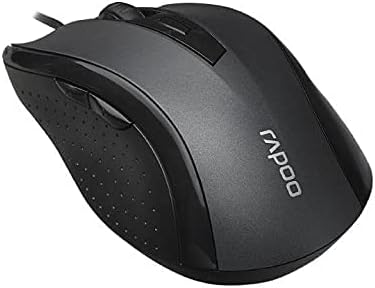
Figi 3: Angle view of the Rapoo N300 mouse, showcasing its ergonomic contour and the placement of the scroll wheel and side buttons.

Figi 4: Anba view of the Rapoo N300 mouse, displaying the optical sensor, product model number (N300), interface type (USB), and regulatory compliance markings.
3. Enstriksyon Enstalasyon
- Konekte sourit la: Locate an available USB port on your computer (desktop or laptop). Insert the USB connector of the Rapoo N300 mouse firmly into the USB port.
- Enstalasyon chofè: The Rapoo N300 mouse is a plug-and-play device. Your operating system (Windows XP, Windows 7, Linux, or newer versions) will automatically detect and install the necessary drivers. This process may take a few moments.
- Verifikasyon: Once the drivers are installed, the mouse cursor should become responsive. Move the mouse to confirm functionality.
No additional software installation is typically required for basic functionality.
4. Operasyon Enstriksyon
4.1 Fonksyon debaz
- Klike Goch: Primary action, selection, opening items.
- Klike sou dwa: Ouvri meni kontèkstal yo.
- wou woulo liv: Dokiman defile ak web pages vertically. Can also be pressed for middle-click functionality (application-dependent).
4.2 DPI Ajisteman
The Rapoo N300 features a dedicated DPI switch button, usually located behind the scroll wheel. Press this button to cycle through different DPI (Dots Per Inch) sensitivity settings. Each press will change the cursor speed, allowing you to adjust it to your preference for various tasks, from precise editing to fast-paced gaming.
4.3 Bouton Side
The two side buttons typically function as "Forward" and "Backward" in web navigatè ak file explorers. Their functionality may be customizable through operating system settings or third-party software, if available.
5. Antretyen
- Netwayaj: Sèvi ak yon twal mou epi sèk pou siye sifas sourit la. Pou pousyè tè ki difisil pou retire, siye yon ti kras.ampRense twal la avèk dlo oswa yon solisyon netwayaj dou. Evite itilize pwodui chimik ki agresif oswa materyèl abrazif.
- Optical sensor: Ensure the optical sensor on the bottom of the mouse remains clean and free of dust or debris for optimal tracking performance. Do not attempt to disassemble the mouse.
- Swen kab: Evite pliye byen file oswa rale kab USB a twòp pou anpeche li domaje.
NAN. Depanaj
| Pwoblèm | Solisyon posib |
|---|---|
| Sourit pa reponn |
|
| Mouvman kurseur a pa regilye oswa li pa rapid |
|
| Bouton DPI a pa chanje sansiblite a |
|
7. Espesifikasyon
| Karakteristik | Detay |
|---|---|
| Modèl | N300 |
| Tracking Engine | Optik |
| DPI | Jiska 2000 DPI |
| Kantite bouton | 6 (Left, Right, Scroll Wheel, DPI, Side Button 1, Side Button 2) |
| Scroll wou | 2D Anti-Slip |
| Oryantasyon men | Anbidextr |
| Kalite entèfas | Fil USB |
| Sistèm operasyon konpatibilite | Windows XP, Windows 7, Linux, and newer versions |
| Koulè | Nwa |
| Pwa atik | Apeprè 100 g |
| Dimansyon (Pake) | 15.4 x 8.4 x 4.2 cm |
8. Garanti ak sipò
Rapoo products are designed for reliability and performance. For specific warranty information and support details, please refer to the warranty card included with your product or visit the official Rapoo websit la. Kenbe resi acha ou kòm prèv acha pou reklamasyon garanti.
For technical assistance or further inquiries, please contact Rapoo customer support through their official channels.