
Entwodiksyon
This manual provides essential information for the proper use and maintenance of your Blitzwolf BW-AT2C Smartwatch. Please read these instructions carefully before using the device to ensure optimal performance and longevity. This smartwatch features Bluetooth calling, comprehensive health monitoring, various sports modes, and smart notifications.
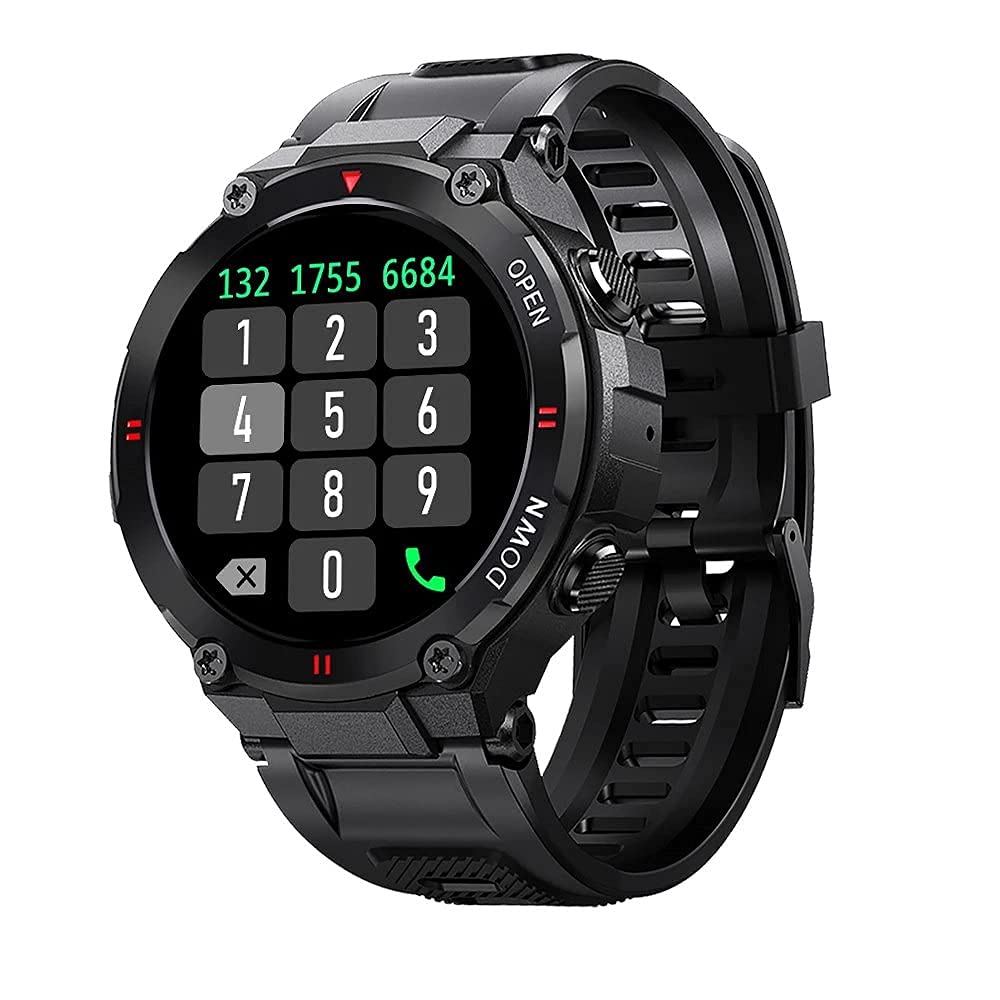
Imaj: Devan view of the Blitzwolf BW-AT2C Smartwatch, displaying a digital watch face with time, date, battery, and step count.
Pwodwi souview
The Blitzwolf BW-AT2C Smartwatch is designed for daily use, fitness tracking, and communication. It features a durable build and a clear display.
- Ekspozisyon: 1.3-inch IPS full touch screen.
- Kontwòl: Full touch screen and two side buttons.
- Detèktè: Heart rate, blood pressure, blood oxygen, pedometer, sleep monitor.
- Koneksyon: Bluetooth 5.0 for calls and data synchronization.
- Dirab: IP54 rezistans dlo.

Image: The smartwatch displaying weather information, highlighting its robust design and metal buttons.

Imaj: Dèyè view of the smartwatch, showing the optical heart rate sensor and magnetic charging contacts, along with the model number BW-AT2C.
Enstalasyon
1. Chaje Aparèy la
Before initial use, fully charge your smartwatch. Connect the magnetic charging cable to the charging contacts on the back of the watch and plug the USB end into a power adapter (not included) or a computer's USB port. The watch screen will indicate charging status. A full charge takes approximately 2 hours.
2. Enstalasyon ak koneksyon aplikasyon an
- Telechaje App a: Chèche pou "Da Fit" nan magazen aplikasyon telefòn entelijan ou an (Google Play Store pou Android oubyen Apple App Store pou iOS) epi enstale li.
- Pèmèt Bluetooth: Asire w ke Bluetooth aktive sou smartphone ou.
- Louvri aplikasyon Da Fit la: Launch the "Da Fit" application on your smartphone.
- Ajoute Aparèy: In the app, navigate to the "Device" section and select "Add Device". The app will search for available devices.
- Chwazi mont ou a: Choose "BW-AT2C" from the list of found devices to initiate pairing.
- Konfime pè: Follow any on-screen prompts on both your phone and watch to confirm the pairing.
- Enable Call Function: For the Bluetooth call feature, you may need to pair the watch a second time through your phone's Bluetooth settings. Look for "BW-AT2C_CALL" or similar in your phone's Bluetooth device list and connect to it.
Nòt: For full functionality, ensure the "Da Fit" app has all necessary permissions (e.g., location, notifications, contacts) enabled on your smartphone.
Enstriksyon Operasyon
Navigasyon debaz
- Ekran manyen: Glise agoch/adwat, monte/anba pou navige nan meni ak fonksyon yo. Tape pou chwazi.
- Bouton bò: The top button typically acts as a power/wake button and a back button. The bottom button may be a shortcut to sports modes or other functions, depending on customization.
- Reveye ekran: Raise your wrist or press a side button to wake the screen.
- Ajisteman klète: Adjust screen brightness through the watch settings or the Da Fit app for better visibility in various lighting conditions.
- Figi Montre Custom: Change watch faces directly on the watch or via the Da Fit app. You can also customize watch faces with your own photos.
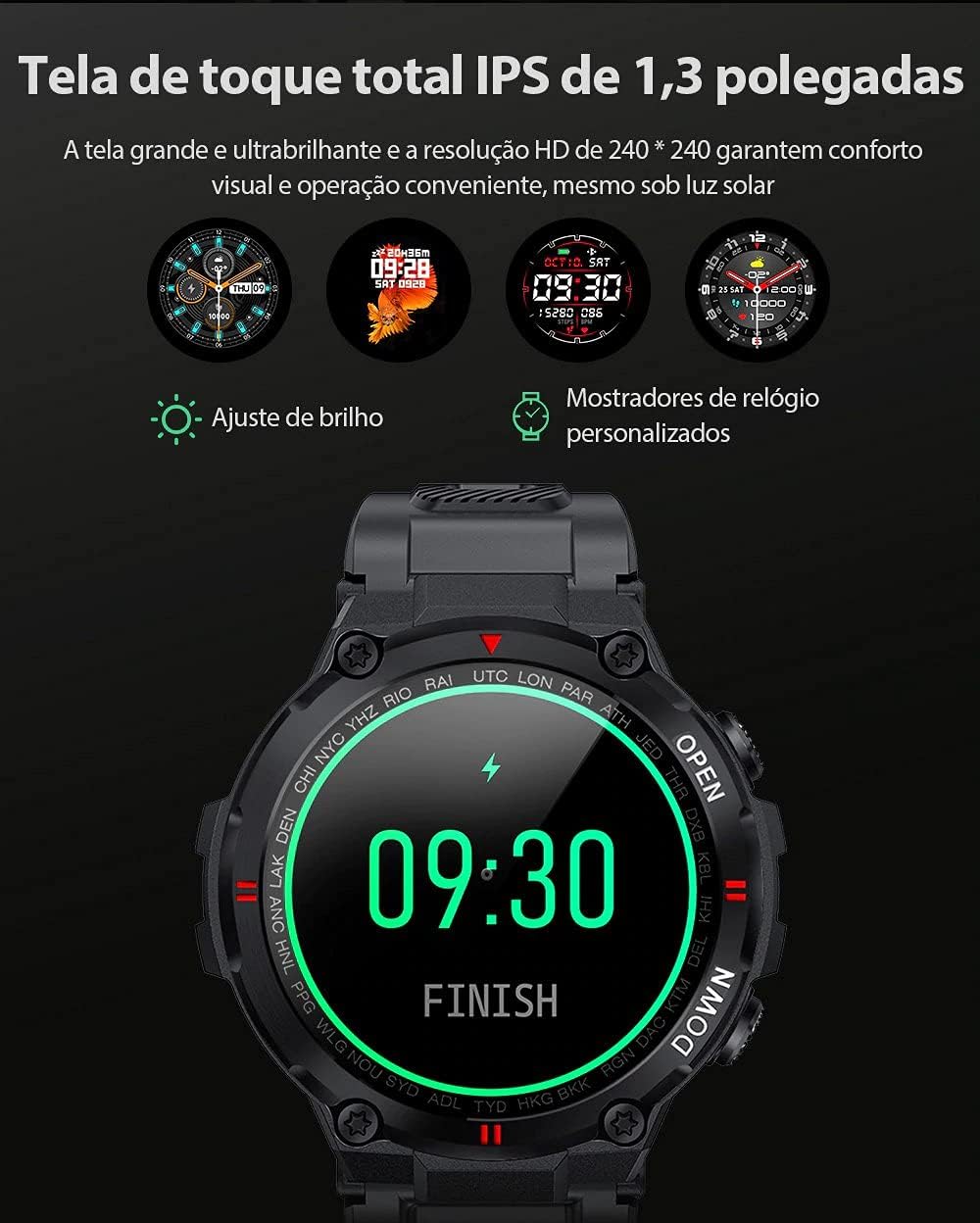
Image: The smartwatch displaying multiple customizable watch faces and options for brightness adjustment.
Fè ak Resevwa Apèl
The BW-AT2C allows you to make and receive calls directly from your wrist after successful Bluetooth pairing (including the call function pairing).
- Resevwa apèl: Lè yon apèl rive, mont lan ap montre idantifikasyon moun kap rele a. Ou ka reponn oswa rejte apèl la dirèkteman nan ekran mont lan.
- Fè apèl: Aksese pavé nimewo a oswa lis kontak ki sou mont lan pou kòmanse yon apèl.

Image: A comparison showing the BW-AT2C model with its Bluetooth call function (dial pad visible) next to the BW-AT2 model without this feature.
Kontwòl Mizik
Control music playback on your smartphone directly from your watch. Functions include play, pause, skip forward, and skip backward.
Siveyans Sante
The smartwatch continuously monitors various health metrics.
- Batman kè: Real-time heart rate monitoring. View your current heart rate and historical data in the app.
- Tansyon: Measure your blood pressure on demand.
- Oksijèn nan san (SpO2): Kontwole nivo saturation oksijèn nan san ou.
- Siveyans dòmi: Tracks your sleep patterns, including deep sleep, light sleep, and wake times.
- Pedomètr: Li konte pa ou fè chak jou, distans ou fè, ak kalori ou boule.

Image: The smartwatch screen showing a graph of heart rate data, indicating current BPM and historical trends.
Espò mòd
The watch supports multiple sports modes to track your workouts accurately. Available modes include Walking, Running, Cycling, Skipping Rope, Badminton, Basketball, and Football. Select your desired mode before starting an activity to record relevant data.
Notifikasyon
Receive notifications from your smartphone directly on your watch. This includes call reminders, message alerts, and app notifications from platforms like WhatsApp, Instagram, Facebook, and Twitter. Ensure notification permissions are granted in the Da Fit app and your phone's settings.

Image: The smartwatch on a user's wrist, showing an incoming call alert and SMS reminder, indicating its notification capabilities.
Lòt Karakteristik
- Revèy Alam: Set up to three alarms via the app.
- Kronomètr: Use the built-in stopwatch for timing activities.
- Rapèl sedantèr: The watch will alert you if you remain inactive for too long.
- Kontwòl Kamera Remote: Sèvi ak mont ou kòm yon deklanchè a distans pou kamera telefòn ou an.
- Find Watch/Find Phone: Locate your watch or phone using the respective functions in the app or on the watch.
- Kalandriye: Access calendar information.
Antretyen
- Netwayaj: Siye mont lan ak braslè a regilyèman avèk yon twal mou epi sèk. Pou pousyè tè ki difisil pou retire, sèvi ak yon twal yon ti kras mouye.amp twal epi seche byen. Evite pwodui chimik ki agresif.
- Rezistans dlo (IP54): The BW-AT2C is IP54 water-resistant, meaning it is protected against dust ingress and splashing water from any direction. It is suitable for daily use like hand washing or light rain. Do not submerge the watch in water, wear it while swimming, showering, or in saunas. Prolonged exposure to water or high-pressure water jets may cause damage.
- Kontak chaje: Keep the magnetic charging contacts clean and dry to ensure proper charging.
- Depo: Sere mont lan nan yon kote ki fre epi sèk lè w pa ap itilize li.
Depanaj
| Pwoblèm | Solisyon |
|---|---|
| Mont lan pa limen. | Asire w ke mont lan chaje nèt. Konekte l nan plato a pou omwen 30 minit. |
| Pa ka konekte ak telefòn entelijan an. |
|
| Yo pa resevwa notifikasyon. |
|
| Call function not working. | Ensure you have paired the "BW-AT2C_CALL" device in your phone's Bluetooth settings in addition to the main watch pairing. |
| Done sou sante ki pa egzak. | Ensure the watch is worn snugly on your wrist, not too tight or too loose. Keep the sensor clean. Note that this device is not a medical device and data is for reference only. |
Espesifikasyon

Image: Diagram illustrating the dimensions of the Blitzwolf BW-AT2C Smartwatch, including watch face diameter, strap width, and total length.
| Karakteristik | Detay |
|---|---|
| Mak | Blitzwolf |
| Modèl | BW-AT2C |
| Koulè | Nwa |
| Bluetooth vèsyon | 5.0 |
| OS konpatib | Android 4.4+ / iOS 8.0+ |
| Mòd operasyon | Full Touch Screen + 2 Side Buttons |
| Aplikasyon konpayon | Da Fit |
| Rezistans dlo | IP54 |
| Siveyans Sante | Heart Rate, Blood Pressure, Blood Oxygen, Sleep, Pedometer |
| Espò mòd | Walking, Running, Cycling, Skipping Rope, Badminton, Basketball, Football |
| Gwosè ekran | 1.3 pous ONSÈY |
| Rezolisyon | 240 x 240 piksèl |
| Kapasite batri | 400mAh |
| Tan sibstiti | Approx. 30 jou |
| Tan Itilizasyon | Approx. 4-7 days (varies by usage) |
| Tan pou chaje | Apeprè. 2 èdtan |
| Chaje Kalite | Chaje mayetik |
| Materyèl senti | Silicone |
| Lajè Mare | 22mm (Removable) |
| Dimansyon pwodwi | 52 x 12 mm (Watch Face) |
| Pwa pwodwi | 55 gram |
Garanti ak sipò
For warranty information and technical support, please refer to the documentation provided with your purchase or visit the official Blitzwolf websit la. Kenbe prèv acha ou pou reklamasyon garanti.
If you encounter issues not covered in the troubleshooting section, please contact customer support for assistance.