
Entwodiksyon
Thank you for choosing the Hbada Ergonomic Gaming Chair. This manual provides essential information for the safe and efficient assembly, operation, and maintenance of your new chair. Please read these instructions carefully before use and retain them for future reference.

Image: The Hbada Ergonomic Gaming Chair in a modern gaming environment, showcasing konsepsyon ak prezans li.
Enfòmasyon sou Sekirite
- Asire w tout konpozan yo la epi yo pa domaje anvan w asanble l. Pa sèvi avè l si gen nenpòt pyès ki manke oswa ki kase.
- Follow the assembly instructions precisely. Incorrect assembly can lead to instability and injury.
- Pa kanpe sou chèz la. Sèvi avè l sèlman pou chita.
- Pa depase kapasite pwa maksimòm lan (gade espesifikasyon yo).
- Kenbe timoun ak bèt kay lwen chèz la pandan asanblaj la.
- Evite ekspoze chèz la anba limyè solèy dirèk oswa tanperati ekstrèm pou anpeche materyèl la degrade.
Dimansyon pwodwi
Understanding the dimensions of your chair is important for proper placement and comfortable use. Below are the key measurements:
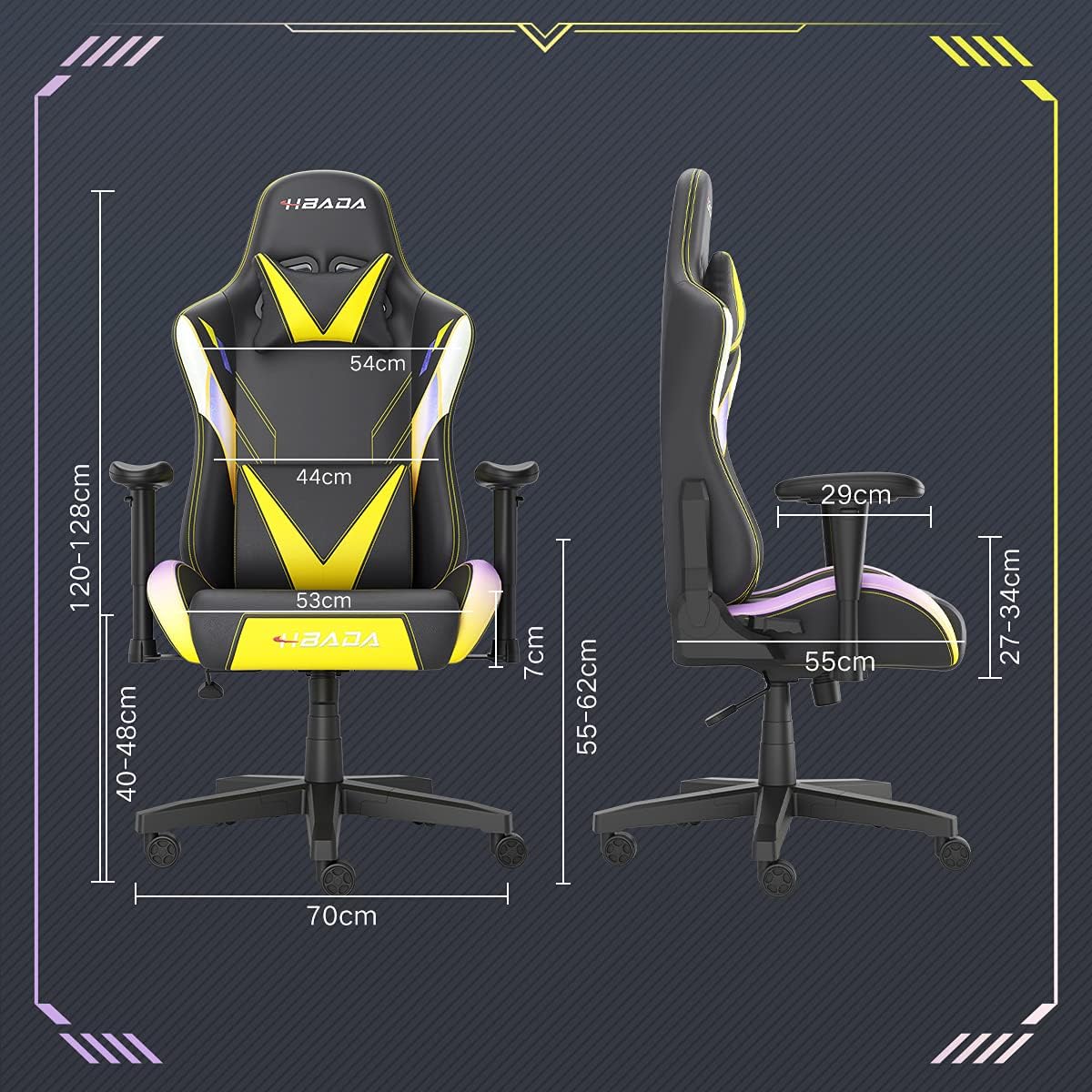
Image: A detailed diagram illustrating the various dimensions of the Hbada Gaming Chair, including height, width, and depth measurements.
- Wotè total: 120-128 cm (adjustable)
- Wotè chèz: 40-48 cm (adjustable)
- Sijè lajè: 53 cm
- Pwofondè chèz: 55 cm
- Lajè dosye a: 54 cm (shoulder area), 44 cm (lumbar area)
- Wotè akoudwar (soti nan chèz): 7 cm (adjustable)
- Dyamèt baz: 70 cm
Enstalasyon ak Asanble
Please follow these steps carefully to assemble your Hbada Gaming Chair. It is recommended to have a clear, spacious area for assembly.
Etap asanble:
- Step 1: Assemble the Base and Wheels
Insert the five casters into the holes on the star base. Then, place the gas lift cylinder into the center hole of the base.

Image: Illustration of attaching the five casters to the chair's star-shaped base and inserting the gas lift cylinder.
- Step 2: Attach the Seat and Backrest
Connect the backrest to the seat using the provided screws and mounting plates. Ensure all screws are tightened securely.

Image: Diagram showing the process of securing the backrest to the seat cushion using screws and brackets.
- Etap 3: Enstale akoudwa yo
Attach the armrests to the sides of the seat using the designated screws. Make sure they are firmly attached.

Image: Visual guide for attaching the armrests to the chair's seat base.
- Step 4: Connect Seat to Base
Carefully place the assembled seat onto the gas lift cylinder, ensuring it is properly seated and stable.

Image: Depiction of lowering the assembled seat onto the gas lift cylinder, connecting the upper and lower parts of the chair.
- Step 5: Attach Headrest and Lumbar Pillow
Secure the detachable headrest and lumbar support pillow to the chair as desired for optimal comfort.

Image: Instructions for attaching the headrest and lumbar support pillows to the gaming chair.
Enstriksyon Operasyon
Your Hbada Gaming Chair is designed with several adjustable features to provide personalized comfort and support.
Key Adjustable Functions:
- Adjustable Sitting Height: Use the lever located under the seat on the right side to raise or lower the chair. Pull the lever up to adjust the height, then release it at your desired position. The seat has an 8 cm elevation range.
- Reclining Backrest (90° to 155°): The backrest can be reclined from 90 degrees (upright) to 155 degrees (nearly flat). Use the recline lever on the side of the chair to adjust the angle. Lean back to your preferred position and lock the lever.
- Akoudwar reglabl: The armrests can be adjusted in height by 7 cm. Locate the button or lever on the side of each armrest to unlock, adjust, and then lock them into your desired height.
- 360° Free Swivel: The chair features a full 360-degree swivel function, allowing for easy movement and access to your surroundings without needing to move the entire chair.
- Detachable Headrest and Lumbar Support: The chair includes a removable headrest pillow and lumbar support cushion for enhanced ergonomic comfort. Adjust their positions or remove them based on your preference.

Imaj: Yon plis paseview of the chair's ergonomic systems, highlighting adjustable sitting height, armrests, 155° reclining, 360° swivel, cool racing casters, and durable base.

Image: The Hbada Gaming Chair demonstrated in its 155-degree reclined position, illustrating the recline controller.
Antretyen
Regular maintenance will help prolong the life and appearance of your Hbada Gaming Chair.
- Netwayaj kwi PU a: Siye sifas kwi PU yo ak yon twal mou,amp twal. Pou tach ki difisil pou retire, sèvi ak yon solisyon savon dou epi siye ak yon twal pwòp, damp cloth. Avoid harsh chemicals or abrasive cleaners, as these can damage the material.
- Swen Roulèt: Periodically check the casters for accumulated dust or hair. Clean them with a brush or vacuum cleaner to ensure smooth movement and prevent damage to your flooring.
- Frame and Components: Regularly inspect all screws and bolts to ensure they are tight. Re-tighten if necessary to maintain stability.
- Evite limyè solèy la dirèk: Prolonged exposure to direct sunlight can cause the PU leather to fade and crack. Position your chair away from direct sunlight when possible.
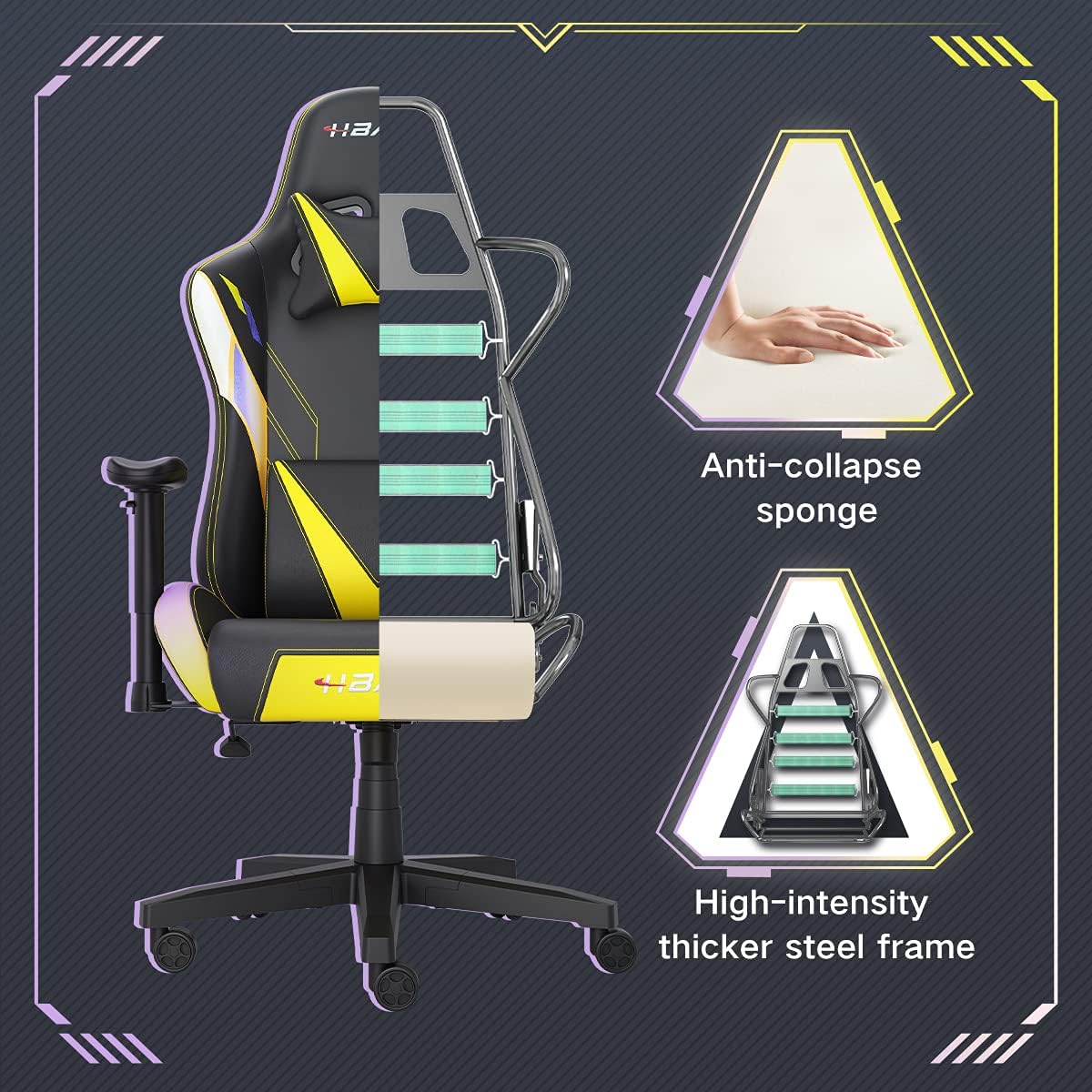
Imaj: Yon koupe view of the chair's internal structure, highlighting the anti-collapse sponge padding and the high-intensity thicker steel frame, indicating durable construction.
Depanaj
If you encounter any issues with your Hbada Gaming Chair, refer to the following common problems and solutions:
| Pwoblèm | Kòz posib | Solisyon |
|---|---|---|
| Chèz la pa ajiste wotè a | Pwoblèm asansè gaz la oswa levye a pa angaje. | Asire w levye ajisteman wotè a byen angaje. Si pwoblèm nan pèsiste, ou ka bezwen ranplase asansè gaz la. Kontakte sèvis kliyan. |
| Chèz la ap tranble oswa li pa estab | Vis ki lach oswa move asanblaj. | Check all assembly screws and bolts, and tighten them securely. Refer to the assembly instructions. |
| Rou yo pa woule san pwoblèm | Debri (cheve, pousyè) kole nan wou yo. | Vire chèz la tèt anba epi retire tout debri ki sou wou yo. |
| Dokiman an pa ka panche oswa bloke | Mekanis enklinasyon an bloke oswa levye a pa angaje. | Ensure the recline lever is fully engaged. Check for any obstructions around the mechanism. |
Espesifikasyon
| Karakteristik | Detay |
|---|---|
| Mak | Hbada |
| Nimewo Modèl | W203YMA/EU |
| ASIN | B095PSFLKX |
| Koulè | Jòn |
| Materyèl | PU Leather, Metal Frame |
| Dimansyon pwodwi | 70 x 70 x 128 cm (Longè x Lajè x Wotè) |
| Pwa pwodwi | 22 Kilogram |
| Karakteristik espesyal | Ergonomic, Swivel, Casters, Headrest Support, Adjustable Recline (90°-155°), Adjustable Seat Height (8cm range), Adjustable Armrests (7cm range) |
| Kantite inite yo | 1.0 Konte |
Garanti ak sipò
Your Hbada Gaming Chair comes with a yon ane garanti apati dat acha a. Garanti sa a kouvri domaj fabrikasyon ak defo materyèl anba itilizasyon nòmal.
If you experience any issues during use, including problems with installation, damage, or missing parts, please do not hesitate to contact Hbada customer service. We are committed to providing reliable service and can offer free exchanges for covered issues.
For support, please visit the official Hbada websit oswa kontakte revandè ou a.