
Entwodiksyon
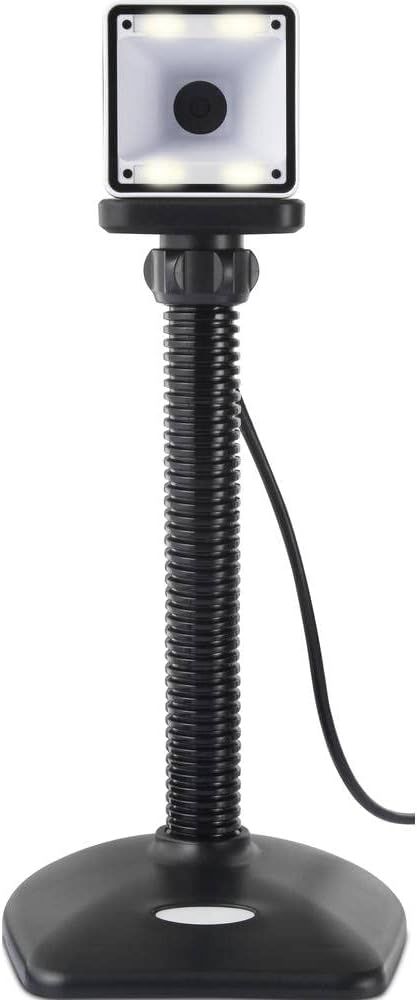
Thank you for choosing the Renkforce RF-SBS-500 2D Wired Barcode Scanner. This device is designed for efficient and reliable scanning of both 1D and 2D barcodes from various surfaces, including paper and smartphone screens. Its omnidirectional scanning capability and hands-free operation make it suitable for a wide range of applications. This manual provides essential information for the proper setup, operation, and maintenance of your scanner.
Enstriksyon Sekirite
- Do not expose the scanner to extreme temperatures, humidity, or direct sunlight.
- Avoid dropping the scanner or subjecting it to strong impacts.
- Pa eseye demonte oswa modifye eskanè a. Sa ap anile garanti a.
- Keep the scanning window clean to ensure optimal performance. Use a soft, dry cloth.
- Ensure the USB cable is connected securely to prevent accidental disconnection.
Kontni pake
- Renkforce RF-SBS-500 2D Wired Barcode Scanner
- Integrated USB-A Cable
- Manyèl Itilizatè (dokiman sa a)
Enstalasyon
Follow these steps to set up your Renkforce RF-SBS-500 barcode scanner:
- Depake eskanè a: Retire eskanè a nan anbalaj li avèk prekosyon.
- Konekte nan yon òdinatè: Plug the integrated USB-A cable from the scanner into an available USB port on your desktop or laptop computer.
- Enstalasyon chofè: The scanner is typically plug-and-play. Your operating system (Windows, macOS, Linux) should automatically detect and install the necessary drivers. Wait for the installation to complete.
- Plasman: Place the scanner on a stable, flat surface. The flexible neck allows for adjustment of the scanning head angle for optimal positioning.

Opere Scanner la
The Renkforce RF-SBS-500 is designed for ease of use with its omnidirectional and hands-free capabilities.
- Pouvwa sou: Once connected via USB, the scanner will power on automatically. The LED indicators on the scanner head may illuminate briefly.
- Eskane yon kòd bar: Position the barcode within the scanning area of the scanner head. The scanner will automatically detect and read the barcode.
- Feedback vizyèl ak odib: Upon successful scanning, the integrated buzzer will emit a short beep, and the LED display on the scanner will flash or change color, indicating a successful read.
- Omnidirectional Reading: The scanner can read barcodes regardless of their orientation, eliminating the need to align the barcode precisely.
- Hands-Free Mode (Presentation Mode): The scanner operates continuously in a presentation mode, allowing you to simply pass items with barcodes in front of the scanning window without pressing any buttons. This saves time and improves workflow efficiency.
- Kod bar ki sipòte: The scanner supports both 1D (e.g., EAN, UPC, Code 39) and 2D (e.g., QR Code, Data Matrix, PDF417) barcode types.
Antretyen
Bon antretyen asire lonjevite ak pèfòmans optimal eskanè ou a.
- Netwaye Fenèt Eskanè a: Regularly clean the scanning window with a soft, lint-free cloth. For stubborn dirt, slightly dampen the cloth with water or a mild, non-abrasive cleaner. Do not spray cleaner directly onto the scanner.
- Netwayaj jeneral: Wipe the exterior of the scanner with a dry or slightly damp twal. Evite itilize pwodwi chimik piman bouk oswa materyèl abrazif.
- Depo: Lè w pa ap itilize eskanè a, sere l nan yon anviwònman pwòp epi sèk, lwen limyè solèy dirèk ak tanperati ekstrèm.
Depanaj
Si ou rankontre pwoblèm ak eskanè ou a, gade pwoblèm ak solisyon komen sa yo:
| Pwoblèm | Kòz posib | Solisyon |
|---|---|---|
| Eskanè a pa limen. | USB cable not connected properly or faulty USB port. | Ensure the USB cable is firmly connected to both the scanner and the computer. Try a different USB port. |
| Eskanè a pa li kòd bar yo. | Barcode damaged, scanning window dirty, or incorrect barcode type. | Check the barcode for damage. Clean the scanning window. Ensure the barcode type is supported (1D/2D). Adjust the distance and angle of the barcode to the scanner. |
| No beep or LED feedback after scanning. | Barcode not read successfully. | Refer to the "Scanner does not read barcodes" solution. If the issue persists, contact support. |
| Done eskane yo parèt mal. | Pa gen matche ak layout klavye a oswa pwoblèm lojisyèl. | Ensure your computer's keyboard layout matches the expected output. Test with a simple text editor. |
If the problem persists after trying these solutions, please contact Renkforce customer support.
Espesifikasyon
| Karakteristik | Spesifikasyon |
|---|---|
| Nimewo Modèl | RF-4679568 |
| Kapasite eskanè | Kòd bar 1D ak 2D |
| Koneksyon Teknoloji | USB-A (Avèk fil) |
| Pousantaj eskane | 60 imaj pou chak segonn |
| Mòd eskanè | Omnidirectional, Hands-free (Presentation Mode) |
| Feedback | Integrated Buzzer, LED Display |
| Aparèy konpatib | Desktop Computer, Laptop, Smartphone (via appropriate adapter if needed) |
| Dimansyon (L x W x H) | 150 x 5.2 x 5.2 cm |
| Pwa atik | 102 gram |
| Sous pouvwa | USB Powered |
| Peyi orijin | Almay |
Garanti ak sipò
Renkforce products are manufactured to high-quality standards and come with a standard warranty. Please refer to your purchase documentation or the Renkforce official websit la pou wè kondisyon garanti espesifik ki aplikab nan rejyon ou an.
For technical support, troubleshooting assistance, or warranty claims, please contact Renkforce customer service. Contact details can typically be found on the Renkforce websit la oubyen sou anbalaj pwodwi ou a.