
1. Entwodiksyon
This manual provides detailed instructions for the setup, operation, and maintenance of your new Richmat Wireless Remote Control. This remote is designed to operate specific adjustable bed bases from Mlily, Bedtech, and Mattress Firm. Please read this manual thoroughly before use to ensure proper functionality.
Nòt Konpatibilite Enpòtan:
- This remote is compatible only with Mlily, Bedtech, or Mattress Firm 3000 Richmat bases that originally featured a remote identical to the ones pictured (white or black versions).
- Minor button label variations may exist (e.g., M3 button as a flat button, flat button as under bed light, anti-snore as TV lounge on certain Classic Brands remotes). These are functional equivalents.
- This remote will NOT work if your original remote had a Bluetooth logo in the bottom right corner.
- This remote will NOT work if your original remote had a flashlight button on the top row or other button icons/words not listed here.
2. Enfòmasyon sou Sekirite
- Kenbe kontwòl remote la lwen dlo ak imidite twòp.
- Do not expose the remote to direct sunlight or extreme temperatures.
- Do not attempt to disassemble or repair the remote control yourself. Contact qualified service personnel.
- Kenbe pil yo pa rive jwenn timoun yo. Si vale, chèche swen medikal imedya.
- Jete pil yo itilize dapre règleman lokal yo.
3. Pake kontni
Upon opening your package, please verify that you have received the following item:
- Richmat Wireless Remote Control (White or Black version)
4. Pwodwi souview ak Kontwòl
The Richmat Wireless Remote Control provides a clear layout for operating your adjustable bed base. You may receive either a white or black version of the remote, both offering identical functionality.

Figure 1: White and Black Remote Control Versions. You will receive one of these two versions based on current inventory. Both versions function identically.
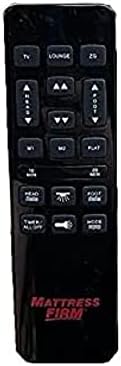
Figure 2: White Remote Control (Example with Mlily branding). This image displays the button layout and functions.

Figure 3: Black Remote Control (Example with Mattress Firm branding). This image displays the button layout and functions.
Fonksyon bouton:
- TV / LOUNGE / ZG (Zero Gravity): Preset positions for watching TV, lounging, or achieving a zero-gravity posture.
- HEAD UP/DOWN Arrows: Ajiste seksyon tèt kabann nan anwo oswa anba.
- FOOT UP/DOWN Arrows: Ajiste seksyon pye kabann nan anwo oswa anba.
- M1 / M2: Memory preset buttons to save and recall your favorite bed positions.
- PLAT: Retounen kabann nan nan yon pozisyon konplètman plat.
- 10 MINIT / 20 MINIT: Timer buttons for massage functions (if applicable to your base).
- HEAD / FOOT Massage: Activates or adjusts massage intensity for the head or foot sections.
- MINITÈ / TOUT ETE: Turns off all active functions, including massage and under-bed lighting.
- LIGHT (Under Bed Light): Toggles the under-bed lighting on or off.
- MOD: Cycles through different massage modes (if applicable).
Note: Button labels and specific functions may vary slightly depending on the adjustable base model. Refer to your adjustable base's manual for full details on its features.
5. Enstriksyon pou enstalasyon ak koneksyon
To use your new Richmat Wireless Remote Control, it must first be paired with your adjustable bed base. The pairing process is typically straightforward.
5.1. Enstalasyon batri
- Jwenn lòj batri a sou do a nan kontwòl remote la.
- Glise louvri kouvèti batri a.
- Insert the required batteries (typically AAA, check markings inside the compartment) according to the polarity indicators (+ and -).
- Fèmen kouvèti batri a byen.
5.2. Pairing Remote Control la
The exact pairing procedure may vary slightly depending on your adjustable bed base model. Generally, the steps involve:
- Asire pouvwa: Make sure your adjustable bed base is plugged into a working power outlet.
- Locate Pairing Button: Find the pairing button on the control box of your adjustable bed base. This box is usually located under the bed frame, near the head or foot end. It may be labeled "PAIR," "SYNC," or have a small button.
- Activate Pairing Mode on Base: Press and hold the pairing button on the control box for approximately 3-5 seconds until you hear a beep or see an indicator light flash. This indicates the base is in pairing mode.
- Activate Pairing Mode on Remote: While the base is in pairing mode (within 10-20 seconds), press and hold the "FLAT" button on your new remote control. Some remotes may require pressing and holding the "HEAD UP" and "FOOT DOWN" buttons simultaneously, or a dedicated "PAIR" button if present.
- Konfime pè: Release the button(s) on the remote when the indicator light on the control box stops flashing or you hear another beep, signifying successful pairing.
- Fonksyonalite tès: Test all remote functions (head/foot adjustment, flat, presets) to ensure proper operation.
If you encounter difficulties, refer to the original instruction manual for your specific adjustable bed base model for precise pairing instructions.
6. Operasyon Enstriksyon
Once paired, your Richmat Wireless Remote Control allows you to easily adjust your bed to your desired comfort position.
- Adjusting Head/Foot: Peze epi kenbe la TÈT ANWO/ANBA or FOOT UP/DOWN arrows to move the respective sections. Release the button when the desired position is reached.
- Pozisyon plat: Peze a PLAT button to return the bed to a completely flat position.
- Pozisyon Prereglaj: Peze TV, LOUNGE, oswa ZG (Zero Gravity) to move the bed to these pre-programmed comfort positions.
- Saving Memory Presets (M1/M2):
- Adjust the bed to your desired position.
- Peze epi kenbe la M1 or M2 button for approximately 3 seconds until the bed slightly moves or the remote indicates the position is saved.
- To recall a saved position, simply press the M1 or M2 bouton.
- Massage Functions (if applicable):
- Peze HEAD Massage or FOOT Massage to activate the massage for the respective section. Press again to cycle through intensity levels or modes.
- Sèvi ak la 10 MIN or 20 MIN buttons to set a timer for the massage function.
- Peze MÒD to change massage patterns.
- Under Bed Light: Peze a LIMYÈ button to turn the under-bed light on or off.
- Tout koupe: Peze MINITÈ / TOUT ETE to stop all active functions.
7. Antretyen
7.1. Ranplasman batri
When the remote control's range decreases or buttons become unresponsive, it's time to replace the batteries.
- Slide louvri kouvèti a lòj batri sou do remote la.
- Retire ansyen pil yo.
- Insert new batteries (e.g., AAA) ensuring correct polarity (+ and -).
- Fèmen kouvèti batri a byen.
- Jete ansyen pil yo yon fason responsab selon règleman lokal yo.
7.2. Netwayaj
Pou netwaye telekòmand lan, sèvi ak yon twal mou epi sèk. Pa sèvi ak pwodui netwayaj likid, ayewosòl, oswa materyèl abrazif, paske sa yo ka domaje sifas telekòmand lan oswa konpozan entèn yo.
NAN. Depanaj
| Pwoblèm | Kòz posib | Solisyon |
|---|---|---|
| Telekòmand lan pa reponn. |
|
|
| Bed base only moves in one direction or partially. |
|
|
| Pòte a distans lan fèb. |
|
|
If troubleshooting steps do not resolve the issue, please refer to the support section for further assistance.
9. Espesifikasyon
- Nimewo Modèl: 685650227221
- Manifakti: Richmat
- Aparèy konpatib: Mlily, Bed Tech, or Mattress Firm 3000 Richmat adjustable bases (specific models HJH55, Classic Brands Innova NU203CB, and others featuring identical remote as pictured).
- Max Kantite Aparèy Sipòte: 1 (one remote per base)
- Opsyon koulè: White, Silver (Black)
- Karakteristik espesyal: Ergonomik konsepsyon
10. Enfòmasyon sou Garanti
Specific warranty details for this Richmat Wireless Remote Control are not provided in the product information. Please refer to the documentation that came with your adjustable bed base or contact the original seller/manufacturer of the remote for warranty terms and conditions.
11. Sipò pou Kliyan
If you require further assistance, have questions, or need to report an issue that cannot be resolved using the troubleshooting guide, please contact the seller or manufacturer of your adjustable bed base or the remote control.
For purchases made through Amazon, you may contact the seller, UTAH RUSTIC FURNITURE, via your Amazon order history for support.