
Entwodiksyon
Mèsi pou acha aasing the LEDWOOD ACCESS100 Portable Bluetooth Speaker. This manual provides detailed instructions for setting up, operating, and maintaining your speaker to ensure optimal performance and longevity. Please read this manual thoroughly before using the product.

Image: The LEDWOOD ACCESS100 portable Bluetooth speaker, showcasing its cylindrical design and integrated carrying strap.
Kontni pake
Asire w tout atik ki nan lis anba a yo nan pake w la:
- 1 x LEDWOOD ACCESS100 Bluetooth Speaker
- 1 x Charging Cable (USB-A to Micro-USB)
- 1 x Audio Cable (3.5mm AUX)
- 1 x manyèl itilizatè
- 1 x Pote senti

Image: The LEDWOOD ACCESS100 speaker shown within its retail packaging box.
Pwodwi souview
Kontwòl ak pò
Familyarize w avèk kontwòl ak pò koneksyon oratè a:

Imaj: Yon imaj detaye view of the speaker's control panel, showing buttons and input ports.
- MicroSD Kat plas: Insert a MicroSD card for direct music playback.
- Pò USB: Mete yon kle USB pou koute mizik dirèkteman.
- DC 5V chaje pò: Konekte kab chaje a isit la.
- Antre AUX: Connect external audio devices using the 3.5mm audio cable.
- Tras anvan / Diminye volim (V-): Peze yon ti kras pou ale nan mizik anvan an, peze lontan pou diminye volim nan.
- Pwochen Mizik / Ogmante Volim (V+): Peze yon ti kras pou pwochen mizik la, peze lontan pou ogmante volim nan.
- Bouton pouvwa: Long press to power on/off. Short press to play/pause in Bluetooth/USB/MicroSD mode.
- Bouton Mòd (M): Short press to switch between Bluetooth, AUX, USB, MicroSD, and FM Radio modes.
- Bouton Jwe/Pòz / TWS: Short press to play/pause. Long press to activate TWS pairing (in Bluetooth mode).
Enstalasyon
Chaje Oratè a
Anvan premye itilizasyon an, chaje oratè a nèt.
- Connect the provided USB charging cable to the DC 5V port on the speaker.
- Konekte lòt bout kab USB a nan yon adaptè kouran USB (pa enkli) oubyen nan yon pò USB òdinatè.
- Limyè endikatè chaj la ap limen pandan chaj la epi li ap etenn lè li fin chaje nèt.
Limen / Off
- Pou limen, peze pandan lontan bouton an Bouton pouvwa jiskaske ou tande yon envit.
- Pou etenn, peze pandan lontan bouton an Bouton pouvwa ankò jiskaske oratè a fèmen.
Enstriksyon Operasyon
Bluetooth mòd
The speaker enters Bluetooth pairing mode automatically when powered on, or when selected via the Mode button.
- Ensure the speaker is powered on and in Bluetooth mode (indicated by an audible prompt).
- Aktive Bluetooth sou telefòn entelijan ou, tablèt ou, oswa lòt aparèy konpatib.
- Chèche pou "LEDWOOD ACCESS100" in your device's Bluetooth settings and select it to pair.
- Once paired, you will hear a confirmation sound. You can now play audio from your device through the speaker.
- Kontwòl:
- Kout laprès Bouton pouvwa jwe / pran yon poz.
- Kout laprès V- for Previous Track.
- Kout laprès V+ for Next Track.
- Long peze V- to Decrease Volume.
- Long peze V+ to Increase Volume.

Image: An icon representing wireless connectivity, indicating Bluetooth functionality.
Fonksyon True Wireless Stereo (TWS).
The TWS function allows you to pair two LEDWOOD ACCESS100 speakers together for a stereo sound experience.
- Ensure both ACCESS100 speakers are powered on and in Bluetooth mode, but not yet connected to any device.
- On one of the speakers (this will be the primary speaker), long press the Play/Pause / TWS Button. You will hear an indication sound.
- The two speakers will automatically search and pair with each other. Once successfully paired, you will hear a confirmation sound.
- Now, connect your smartphone or tablet to the primary speaker via Bluetooth as described in the "Bluetooth Mode" section.
- Kounye a, odyo a pral jwe an stereo nan tou de oratè yo.

Image: An icon representing True Wireless Stereo (TWS) functionality, showing two interconnected loops.
Mòd AUX
Use the AUX mode to connect devices without Bluetooth capability.
- Konekte yon bout kab odyo 3.5mm lan nan pò antre AUX ki sou oratè a.
- Konekte lòt bout la nan priz pwodiksyon odyo aparèy ekstèn ou an (pa egzanp, yon lektè MP3, yon òdinatè).
- Peze a Mode (M) bouton repeatedly until you hear the "AUX mode" prompt.
- Control playback and volume directly from your connected device.
USB / MicroSD Card Mode
Play music directly from a USB flash drive or MicroSD card.
- Insert a USB flash drive into the USB port or a MicroSD card into the MicroSD card slot.
- The speaker will automatically switch to the corresponding mode and begin playing music. If not, press the Mode (M) bouton to select USB or MicroSD mode.
- Kontwòl:
- Kout laprès Bouton pouvwa jwe / pran yon poz.
- Kout laprès V- for Previous Track.
- Kout laprès V+ for Next Track.
- Long peze V- to Decrease Volume.
- Long peze V+ to Increase Volume.
FM Radyo Mode
Listen to your favorite FM radio stations.
- Peze a Mode (M) bouton repeatedly until you hear the "FM Radio" prompt.
- To automatically scan and save available stations, long press the Play/Pause / TWS Button. The speaker will scan and store stations.
- To switch between saved stations, short press the V- or V+ bouton.
- Long peze V- to Decrease Volume.
- Long peze V+ to Increase Volume.
Antretyen
- Netwayaj: Sèvi ak yon twal mou epi sèk pou netwaye sifas oratè a. Pa sèvi ak pwodui netwayaj abrazif oswa solvan.
- Depo: Sere oratè a nan yon kote ki fre epi sèk, lwen limyè solèy dirèk ak tanperati ekstrèm.
- Swen batri: Pou pwolonje lavi batri a, evite dechaje oratè a nèt souvan. Chaje l regilyèman, menm si w pa itilize l pandan yon bon bout tan.
- Rezistans dlo: Oratè sa a se PA enpèmeyab. Evite ekspoze a dlo oswa imidite twòp.
Depanaj
| Pwoblèm | Kòz posib | Solisyon |
|---|---|---|
| Oratè a pa limen. | Batri ki ba. | Chaje oratè a nèt. |
| Pa gen son ki soti nan oratè a. | Volim twò ba; mòd ki pa kòrèk; aparèy la pa konekte. | Increase volume on speaker and connected device. Ensure correct mode (Bluetooth, AUX, USB, MicroSD, FM). Re-pair Bluetooth device or check cable connection. |
| Bluetooth appariement echwe. | Oratè a pa nan mòd koneksyon; aparèy la twò lwen; entèferans. | Ensure speaker is in Bluetooth pairing mode. Move device closer to speaker (within 10 meters). Turn off other Bluetooth devices. |
| Koneksyon TWS la echwe. | Oratè yo pa nan mòd koneksyon TWS; yo twò lwen youn ak lòt. | Ensure both speakers are in Bluetooth mode and not connected to any device. Long press the TWS button on one speaker. Keep speakers close during pairing. |
| USB/MicroSD playback issues. | Pa sipòte file format; corrupted media; incorrect mode. | Asire odyo files are in a supported format (e.g., MP3). Try a different USB drive or MicroSD card. Press Mode button to select correct input. |
| Resepsyon radyo FM ki fèb. | Siyal fèb; entèferans anviwònman. | Move the speaker to a different location. Re-scan for stations. |
Espesifikasyon
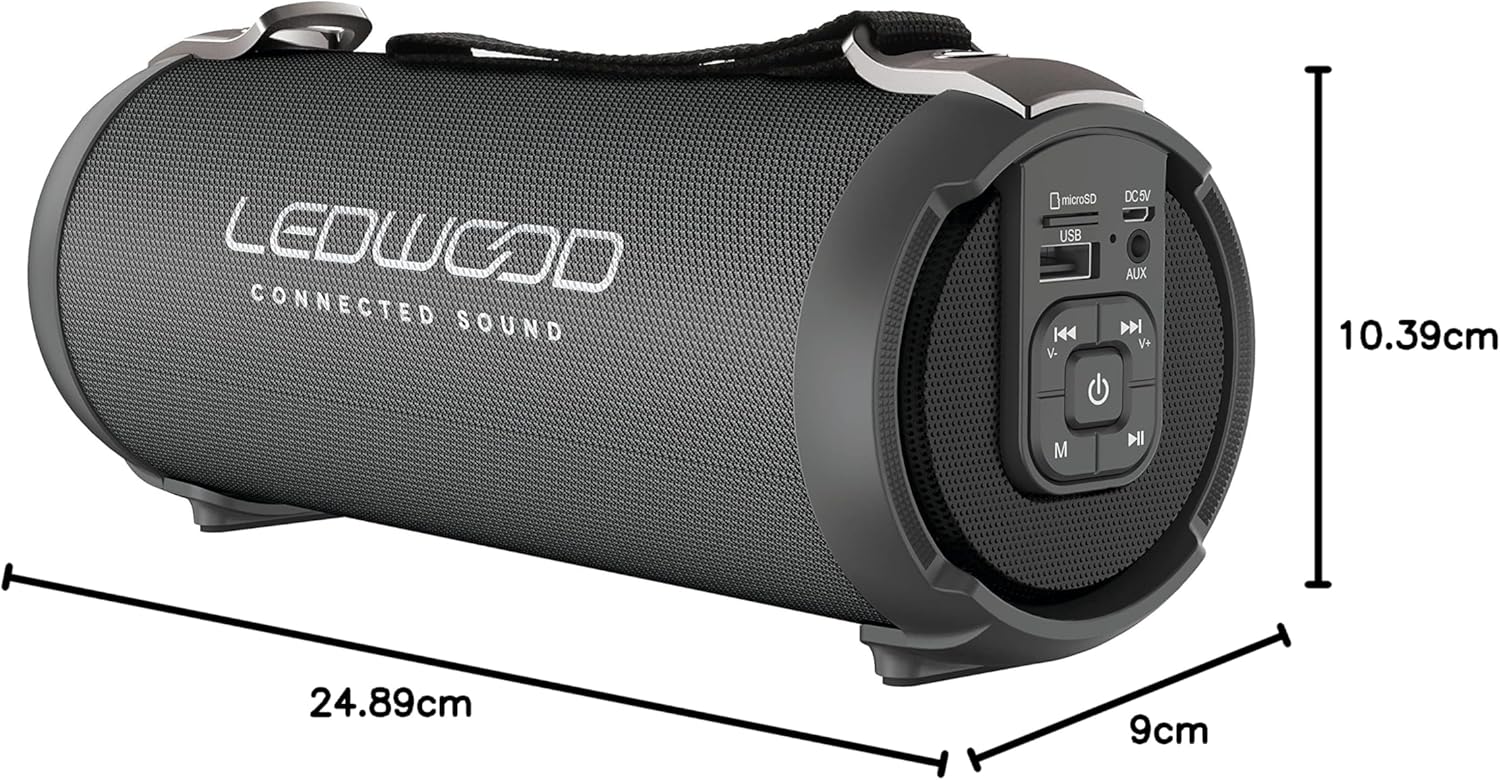
Image: The LEDWOOD ACCESS100 speaker with its length, width, and height dimensions indicated.
| Karakteristik | Detay |
|---|---|
| Non modèl | AKSÈ100 |
| Mak | Ledwood |
| Koneksyon Teknoloji | Bluetooth |
| Wireless Range | Jiska 10 mèt (33 pye) |
| Audio Sòti Mode | Stereo (2.0 Chanèl) |
| Speaker Output Power (RMS) | 8.5 Watts |
| Sòti pouvwa pik | 100 Watts |
| Karakteristik espesyal | USB Port, MicroSD Card Slot, AUX Input, FM Radio, TWS Function |
| Sous pouvwa | Battery Powered (rechargeable via USB cable) |
| Dimansyon pwodwi (L x W x H) | 24.9 cm x 9 cm x 10.4 cm (9.8 x 3.5 x 4.1 pous) |
| Pwa | 820 gram (1.8 liv) |
| Koulè | Nwa |
| Ki enpèmeyab | Non |
| Aparèy konpatib | Smartphones, tablèt |
Enfòmasyon sou Sekirite
- Pa ekspoze oratè a nan tanperati ekstrèm, limyè solèy dirèk, oswa imidite ki wo.
- Pa demonte, repare, oswa modifye oratè a tèt ou. Sa ap anile garanti a.
- Kenbe oratè a lwen timoun ak bèt kay.
- Sèvi sèlman ak kab chaje ki vini ak li a oswa yon kab ekivalan sètifye.
- Evite koute gwo volim pou peryòd pwolonje pou anpeche domaj tande.
- Jete pwodwi a ak batri li yon fason responsab dapre règleman lokal yo.
Garanti ak sipò
This product comes with a standard manufacturer's warranty. For detailed warranty terms and conditions, please refer to the warranty card included in your package or contact Ledwood customer support.
For technical support, troubleshooting assistance, or general inquiries, please visit the official Ledwood websit entènèt la oubyen kontakte depatman sèvis kliyan yo. Anjeneral, ou ka jwenn enfòmasyon pou kontakte yo sou anbalaj pwodwi a oubyen sou paj ofisyèl mak la. websit.