
1. Entwodiksyon
Thank you for choosing the Caliber HPG318DAB Portable DAB+/FM Radio. This device offers high-quality digital and analog radio reception, a compact design for portability, and convenient alarm functions. This manual provides essential information for the safe and efficient use of your radio.
2. Enfòmasyon sou Sekirite
- Li tout enstriksyon yo ak anpil atansyon anvan ou itilize yo epi konsève yo pou referans pita.
- Pa ekspoze aparèy la anba lapli, imidite, oswa tanperati ekstrèm.
- Evite mete aparèy la toupre sous chalè oswa nan limyè solèy la dirèk.
- Pa demonte oswa eseye repare aparèy la tèt ou. Konfye tout antretyen bay pèsonèl kalifye.
- Sèvi sèlman ak kab chaje ak adaptè ki vini ak aparèy la.
- Kenbe soti nan atenn timoun yo.
3. Pake kontni
Asire w tout atik yo prezan nan pakè a:
- Caliber HPG318DAB Portable DAB+/FM Radio Unit
- Manyèl itilizatè
- USB Chaje Kab
- Adaptè pouvwa
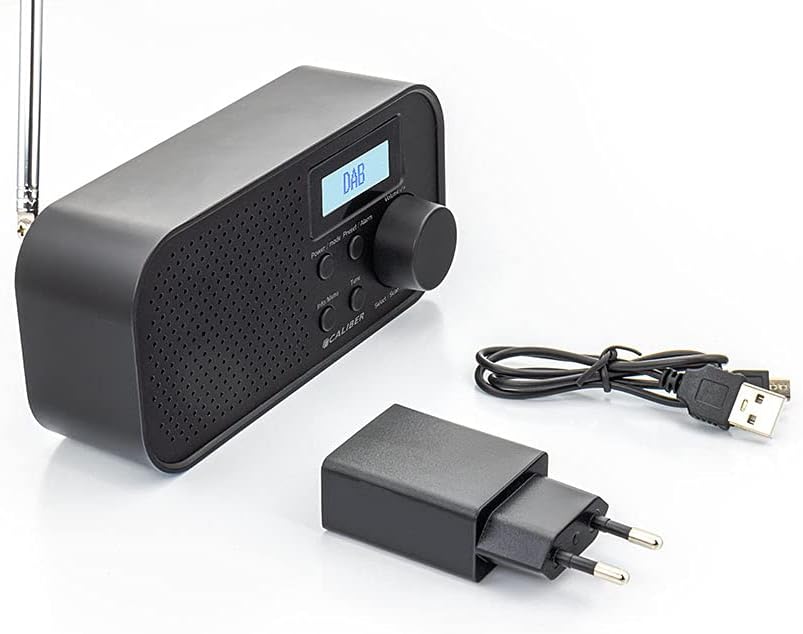
Image: Caliber HPG318DAB radio unit, USB charging cable, and power adapter.
4. Pwodwi souview
4.1 Kontwòl Panel Front
Imaj: Devan view of the Caliber HPG318DAB radio, highlighting the LCD screen, speaker grille, and control buttons.
- Ekran LCD: Montre enfòmasyon sou estasyon an, lè a, ak opsyon meni yo.
- Pouvwa / Mode bouton: Turns the radio on/off and switches between DAB+ and FM modes.
- Menu/Info Button: Accesses menu settings and displays additional information.
- Bouton Prereglaj/Alam: Saves/recalls preset stations and sets alarm functions.
- Select/Scan Button: Confirms selections and initiates station scans.
- Bouton Snooze: Temporarily silences the alarm.
- Volim bouton: Ajiste volim odyo a.
- Oratè Grille: Pwodiksyon odyo.
4.2 Koneksyon Panèl Dèyè

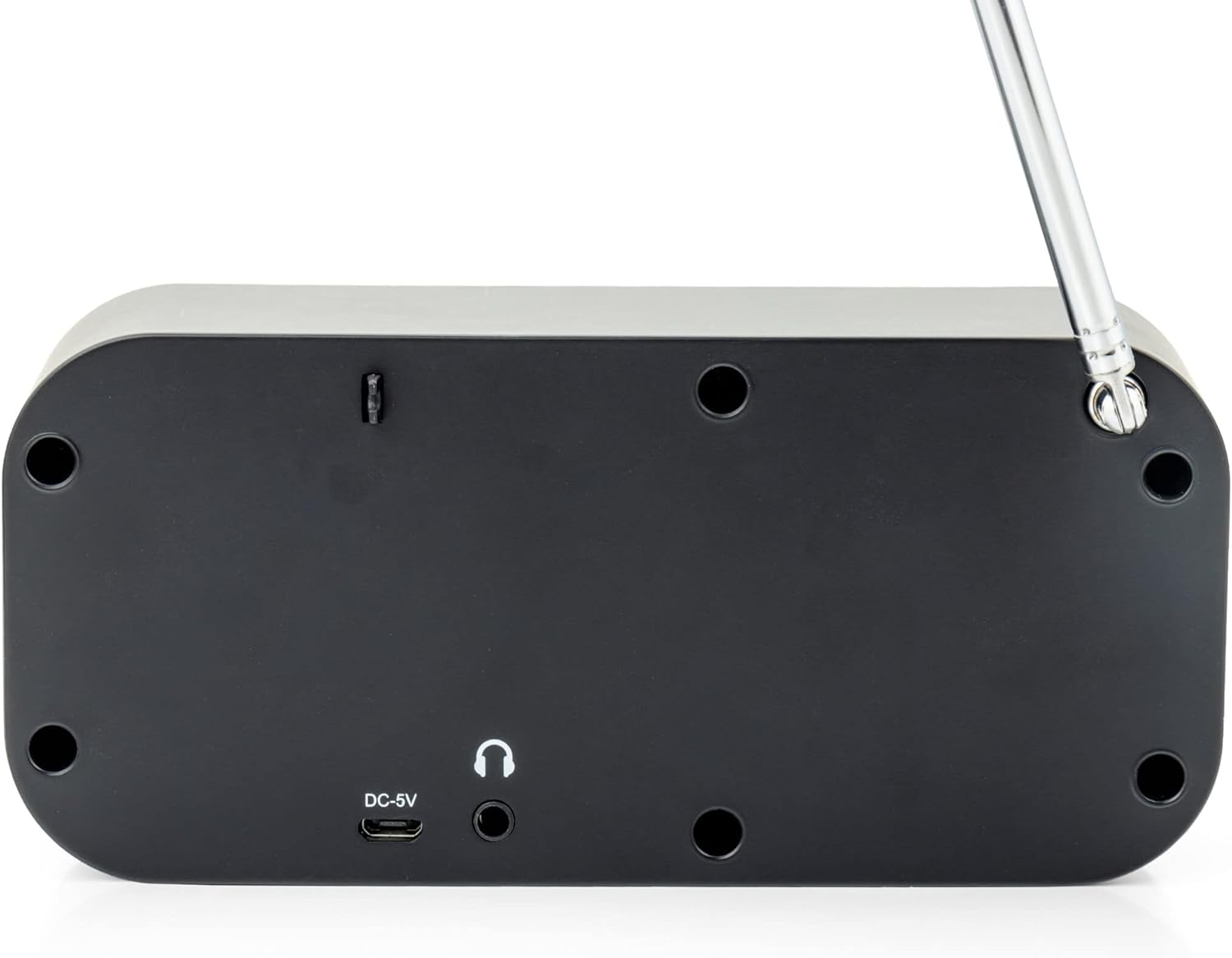
Imaj: Dèyè view of the Caliber HPG318DAB radio, showing the DC-5V charging port, 3.5mm headphone jack, and telescopic antenna.
- Antre DC-5V: Konekte kab chaje USB a isit la.
- Jack ekoutè 3.5mm: For connecting headphones or earphones.
- Antèn teleskopik: Ralonje l pou yon resepsyon radyo optimal.
5. Enstalasyon
5.1 Chaje batri a
The Caliber HPG318DAB features a built-in rechargeable battery, providing up to 8 hours of playback on a full charge.
- Connect the small end of the provided USB charging cable to the Antre DC-5V pò a sou dèyè radyo a.
- Connect the larger end of the USB cable to the provided power adapter.
- Ploge adaptè pouvwa a nan yon priz miray estanda.
- The charging indicator on the LCD screen will show the charging status. Once fully charged, the indicator will change.
Note: It is recommended to fully charge the battery before first use.
5.2 Ajisteman Antèn
For optimal radio reception, fully extend the telescopic antenna located on the rear of the device. Adjust its position to improve signal strength if reception is poor.
6. Operasyon Enstriksyon
6.1 Pouvwa pou limen/etenn ak seleksyon mòd
- Pou vire radyo a ON, peze epi kenbe la Pouvwa/Mòd bouton.
- Pou vire radyo a OFF, peze epi kenbe la Pouvwa/Mòd bouton ankò.
- Pou chanje ant DAB + epi FM modes, short press the Pouvwa/Mòd button while the radio is on. The current mode will be displayed on the LCD screen.
6.2 Operasyon Radyo DAB+
- Chanje nan mòd DAB+ lè l sèvi avèk la Pouvwa/Mòd bouton.
- The radio will automatically perform a full scan for available DAB+ stations upon first use or if no stations are found. To initiate a manual scan, press the Meni/Enfo button, navigate to 'Full Scan', and press Select/Scan.
- Sèvi ak la Volim bouton to scroll through the list of available stations. Press Select/Scan yo chwazi yon estasyon.
- To save a station as a preset (up to 10 presets): While listening to a station, press and hold the Prereglaj/Alam bouton. Sèvi ak la Volim bouton pou chwazi yon nimewo predefini (1-10), apresa peze Select/Scan pou konfime.
- To recall a preset station: Short press the Prereglaj/Alam bouton, sèvi ak la Volim bouton to select the desired preset number, then press Select/Scan.
- Peze a Meni/Enfo bouton pou view additional information (e.g., program type, signal strength, time) provided by Radio Data System (RDS).
6.3 Operasyon Radyo FM
- Chanje nan mòd FM lè l sèvi avèk la Pouvwa/Mòd bouton.
- To automatically scan for stations: Press and hold the Select/Scan bouton. Radyo a pral eskane epi li pral rete nan pwochen estasyon ki gen bon frekans lan.
- To manually tune: Rotate the Volim bouton pou ajiste frekans lan pa ti ogmantasyon.
- To save a station as a preset (up to 10 presets): While listening to a station, press and hold the Prereglaj/Alam bouton. Sèvi ak la Volim bouton pou chwazi yon nimewo predefini (1-10), apresa peze Select/Scan pou konfime.
- To recall a preset station: Short press the Prereglaj/Alam bouton, sèvi ak la Volim bouton to select the desired preset number, then press Select/Scan.
- Peze a Meni/Enfo bouton pou view additional information (e.g., station name, program type) provided by Radio Data System (RDS).
6.4 Kontwòl Volim
Vire gwo a Volim bouton nan sans zegwi mont lan pou ogmante volim nan epi nan sans kontrè zegwi mont lan pou diminye li.
6.5 Itilizasyon kas ekoutè
Connect any standard 3.5mm headphones or earphones to the Jack kas ekoutè 3.5mm on the rear of the radio for private listening. The internal speaker will automatically mute when headphones are connected.
6.6 Fonksyon alam
The radio includes alarm clock and sleep timer functions.
Mete revèy la:
- Peze epi kenbe la Prereglaj/Alam button until the alarm setup menu appears.
- Sèvi ak la Volim bouton to navigate through options like Alarm 1, Alarm 2, Time, Source (Buzzer/DAB/FM), and Volume. Press Select/Scan konfime chak anviwònman.
- Set the desired alarm time, choose your preferred alarm source (buzzer, DAB+ station, or FM station), and set the alarm volume.
- Ensure the alarm is set to 'On' in the menu.
Sèvi ak Fonksyon Snooze:
Lè alam la son, peze la Snooze button to temporarily pause the alarm for a short period (e.g., 9 minutes). The alarm will sound again after the snooze period.
Mete revèy la dòmi:
- Peze a Meni/Enfo bouton.
- Navigate to the 'Sleep' option using the Volim bouton ak peze Select/Scan.
- Select the desired sleep timer duration (e.g., 15, 30, 45, 60, 90 minutes, or Off). The radio will automatically turn off after the selected time.
7. Antretyen
7.1 Netwayaj
Pou netwaye radyo a, sèvi ak yon twal mou epi sèk. Pa sèvi ak pwodui netwayaj abrazif, sir, oswa solvan paske yo ka domaje fini an.
7.2 Depo
When not in use for extended periods, store the radio in a cool, dry place away from direct sunlight and extreme temperatures. Ensure the battery is partially charged before storage to maintain its lifespan.
7.3 Swen Batri
To prolong the life of the built-in Lithium-ion battery, avoid fully discharging it frequently. Charge the radio regularly, even if not in constant use.
NAN. Depanaj
| Pwoblèm | Kòz posib | Solisyon |
|---|---|---|
| Radyo a pa limen. | Batri ap vide. | Connect the radio to power using the USB cable and adapter to charge the battery. |
| Resepsyon radyo ki fèb (DAB+/FM). | Antèn nan pa lonje oswa siyal la pa bon. | Fully extend the telescopic antenna and adjust its position. Try moving the radio to a different location. |
| Pa gen son. | Volume is too low or headphones are connected. | Ogmante volim lè l sèvi avèk la Volim bouton. Disconnect headphones if you want sound from the speaker. |
| Alam lan pa sonnen. | Alam lan pa byen regle oswa li etenn. | Check alarm settings (time, source, volume, 'On' status) in the menu. |
9. Espesifikasyon
| Karakteristik | Spesifikasyon |
|---|---|
| Nimewo Modèl | HPG318DAB |
| Dimansyon (L x W x H) | 15 x 4 x 6.5 cm |
| Pwa | 255 g |
| Sous pouvwa | Battery-Powered (1 Lithium-ion battery required) |
| Lavi batri | Jiska 8 èdtan |
| Gwoup Radyo Sipòte yo | DAB +, FM |
| Koneksyon Teknoloji | AUX (for headphones), USB (for charging) |
| Maximum Speaker Output | 25 Watt |
| Materyèl | Plastik |
| Koulè | Nwa |
| Karakteristik espesyal | Portable, Alarm Function, RDS, LCD Screen |
10. Garanti ak sipò
For warranty information and customer support, please refer to the documentation provided with your purchase or visit the official Caliber websit la. Kenbe prèv acha ou a pou nenpòt reklamasyon garanti.