
1. Entwodiksyon
This user manual provides essential information for the safe and efficient operation of your Redmi Smart LED TV X55. Please read this manual thoroughly before using the product and retain it for future reference.
The Redmi Smart LED TV X55 offers a 55-inch 4K Ultra HD display, powered by Android TV, and features advanced audio and visual technologies for an immersive entertainment experience.
2. Enfòmasyon enpòtan sou sekirite
Toujou swiv prekosyon sekirite debaz yo lè w ap itilize pwodui sa a pou diminye risk dife, chòk elektrik, ak blesi.
- Pa ekspoze televizyon an ak lapli oswa imidite.
- Pa ouvri televizyon an.asing; konfye tout antretyen bay pèsonèl kalifye.
- Asire bon vantilasyon alantou televizyon an.
- Use only the power cord and accessories supplied by the manufacturer.
- Kenbe televizyon an lwen limyè solèy dirèk, sous chalè, ak chan mayetik fò.
- Netwaye televizyon an avèk yon twal mou epi sèk. Pa sèvi ak pwodui netwayaj likid oswa ayewosòl.
3. Pake kontni
Lè w ap debale, verifye si tout atik ki nan lis anba a yo la epi yo an bon eta:
- 1 x Redmi Smart LED TV X55
- 2 x Table Stand Bases
- 1 x kontwòl remote
- 4 x Screws for stand assembly
- 1 x Manyèl Itilizatè (dokiman sa a)
- 1 x pouvwa kab
4. Pwodwi souview
The Redmi Smart LED TV X55 is designed to deliver a premium viewing and audio experience. Below are its key features and components.
4.1. Visual Features
Experience stunning clarity and vibrant colors with the 55-inch 4K LED panel. Advanced technologies enhance your viewing:
- 4K LED Panel: Delivers ultra-high-definition resolution for sharp images.
- Vizyon Dolby ak HDR10: Provides superior contrast, brightness, and color depth.
- HLG (Ibrid Log-Gamma): Supports broadcast HDR content.
- Reality Flow & Vivid Picture Engine: Enhances motion smoothness and picture quality.
- MEMC (Estimasyon Mouvman, Konpansasyon Mouvman): Reduces motion blur for fast-paced scenes.

Figi 1: Devan view of the Redmi Smart LED TV X55.

Figi 2: Plis paseview of key visual features including Dolby Vision, 4K HDR, and Vivid Picture Engine.
4.2. Karakteristik Odyo
Immerse yourself in rich, powerful sound with the integrated audio system:
- 30W Output Speakers: Delivers clear and robust sound.
- Dolby Audio: Provides enhanced sound quality for movies and music.
- DTS Virtual:X: Creates a multi-dimensional audio experience.
- Dolby Atmos Pass-through via eARC: Allows for advanced audio formats to be sent to compatible sound systems.
- DTS-HD: High-definition audio decoding for a cinematic sound.
4.3. Smart Features & Performance
The Redmi Smart LED TV X55 runs on Android TV 10, offering a user-friendly interface and access to a vast ecosystem of apps.
- Android TV 10: Provides a smooth and intuitive smart TV experience.
- PatchWall 4 with IMDb Integration: A curated content platform with smart recommendations and IMDb ratings.
- Processeur kat nwayo: Ensures seamless performance and quick app loading.
- 2GB RAM + 16GB Storage: Ample memory and storage for apps and system operations.
- Built-in Wi-Fi (2x2 Dual Band) & Chromecast: Easy wireless connectivity and content casting from mobile devices.
- Ok Google: Voice control for searching content, controlling smart home devices, and more.
- Mòd Auto Low Latansi (ALLM): Optimize paramèt pou jwèt videyo, diminye reta nan antre.
- Miracast: Wireless display mirroring from compatible devices.
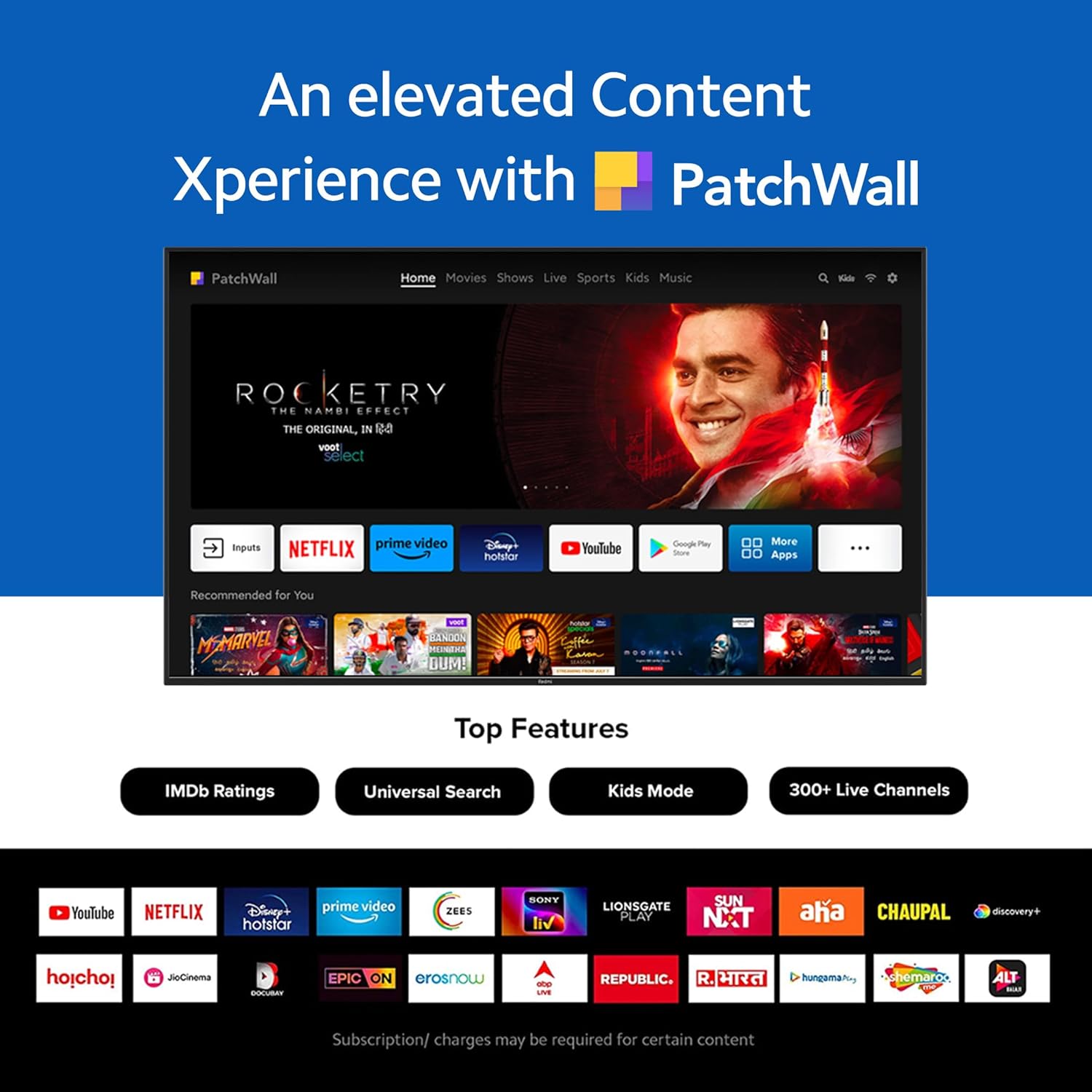
Figure 3: The PatchWall interface displaying various streaming apps and content.

Figure 4: Details on the TV's performance, including 2GB RAM, 16GB Storage, and Quad-core A55 processor.

Figure 5: Android TV 10 interface with Google Play, Ok Google, and Chromecast built-in.
4.4. Koneksyon
The TV offers multiple connectivity options for various devices:
- HDMI2.1: Multiple ports for high-definition audio and video input, supporting eARC.
- USB 2.0: Pou konekte aparèy depo ekstèn yo.
- Ethernet: Koneksyon rezo filaire.
- Pò optik: Pwodiksyon odyo dijital.
- 3.5mm Audio Port: Pou kas ekoutè oswa oratè ekstèn.
- Bluetooth 5.0 with BLE: Wireless connectivity for audio devices and accessories.

Figi 6: Dèyè view of the Redmi Smart TV X55 highlighting various input/output ports.

Figure 7: Close-up of the TV's ports, including HDMI 2.1, USB 2.0, Ethernet, Optical, and Headphone Jack.
5. Gid Enstalasyon
5.1. Enstalasyon Fizik
Your Redmi Smart LED TV X55 can be installed on a table stand or wall-mounted.
- Enstalasyon Sipò Tab: Attach the two provided table stand bases to the bottom of the TV using the included screws. Ensure the TV is placed on a stable, flat surface.
- Enstalasyon mòn miray la: For wall mounting, use a compatible VESA wall mount kit (sold separately). Follow the instructions provided with the wall mount kit and ensure professional installation for safety.

Figure 8: Dimensions of the Redmi Smart TV X55 for planning installation.
5.2. Premye limen ak koneksyon rezo a
- Konekte kab pouvwa a nan televizyon an ak yon priz kouran.
- Peze bouton pouvwa a sou kontwòl remote la oswa televizyon an.
- Follow the on-screen instructions to select your language, country, and connect to your Wi-Fi network or plug in an Ethernet cable.
- Sign in with your Google account to access Android TV features and the Play Store.
5.3. Setting Up Alexa Control
You can control your Redmi TV hands-free with Alexa devices. Follow these steps to set up Alexa:
Video 1: Instructions on how to set up Alexa control for your Redmi Smart TV.
To enable advanced settings for Alexa control, refer to the following video guide:
Video 2: Guide to enabling advanced settings on Redmi TV for Alexa control.
6. Operasyon Enstriksyon
6.1. Kontwòl Remote
The sleek remote control provides quick access to essential functions:
- Reveye rapid: Limen televizyon an nan mwens ke 5 segonn.
- Mute rapid: Tape bouton pou bese volim nan de fwa pou mete son an sou kote.
- Anviwònman rapid: Peze bouton PatchWall la pandan lontan pou antre nan meni paramèt rapid yo.

Figure 9: The sleek remote control for the Redmi Smart TV X55, highlighting quick access features.
6.2. Navigating the Smart TV Interface
Use the remote's directional pad and OK button to navigate through the Android TV and PatchWall interfaces. Access apps, settings, and content recommendations easily.
6.3. Itilizasyon Kontwòl Vwa
Press the dedicated voice assistant button on your remote and speak commands to control your TV, search for content, or interact with connected smart home devices via Ok Google or Alexa.
6.4. App Usage and Casting
The TV supports popular streaming services like Prime Video, Netflix, Disney+ Hotstar, YouTube, and Apple TV. You can also cast content from your mobile devices using Chromecast built-in or Miracast.
7. Antretyen
- Netwayaj: Gently wipe the screen and TV body with a soft, dry, lint-free cloth. Do not use abrasive cleaners or solvents.
- Mizajou lojisyèl: Ensure your TV's software is up to date for optimal performance and security. Navigate to Settings > Device Preferences > About > System update to check for updates.
- Jesyon pouvwa: Dekonekte televizyon an pandan tanpèt zèklè oswa lè li pap itilize pou yon bon bout tan.
NAN. Depanaj
If you encounter issues with your Redmi Smart LED TV X55, refer to the following common problems and solutions:
| Pwoblèm | Solisyon posib |
|---|---|
| Pa gen pouvwa | Check if the power cable is securely connected and the power outlet is working. Try a different outlet. |
| Pa gen imaj, men gen son | Ensure the correct input source is selected. Check HDMI cable connections. |
| Pa gen son, men imaj la la | Check volume levels and mute status. Verify audio output settings (e.g., internal speakers, external soundbar). |
| Remote kontwòl pa travay | Replace batteries. Ensure no obstructions between the remote and the TV. Re-pair the remote if necessary. |
| Pwoblèm koneksyon rezo | Restart your router and modem. Check Wi-Fi password. Try connecting via Ethernet. |
9. Espesifikasyon
Detailed technical specifications for the Redmi Smart LED TV X55:
| Karakteristik | Spesifikasyon |
|---|---|
| Mak | Redmi |
| Non modèl | X55 |
| Gwosè ekran | 55 pous |
| Teknoloji ekspozisyon | LED-LCD |
| Rezolisyon | 3840 x 2160 piksèl (4K) |
| Rafrechisman pousantaj | 60 Hz |
| Sistèm operasyon | Android TV 10 |
| Processeur | Kwadwilatè Nwayo A55 |
| RAM | 2 GB |
| Depo | 16 GB |
| Sòti odyo | 30 Watts |
| Koneksyon Teknoloji | HDMI, USB, Wi-Fi (2x2 Dual Band), Ethernet, Bluetooth 5.0 |
| Pò HDMI | 3 (HDMI 2.1, konpatib ak eARC) |
| Pò USB | 2 (USB 2.0) |
| Viewing Ang | 178 Degre |
| Aspè rapò | 16:9 |
| Pwa atik | 15 kg 300 g |
| Kalite aliye | Wall Mount; Table Mount |
10. Garanti ak sipò
Your Redmi Smart LED TV X55 comes with a standard brand warranty. For specific warranty terms, duration, and service procedures, please refer to the warranty card included in your package or visit the official Redmi support websit.

Figure 10: Information regarding Mi Extended Warranty, offering benefits like zero documentation, genuine spare parts, cashless repairs, authorized service centers, and on-site support.
For installation services, Amazon will coordinate with the brand within 48 hours of delivery. Scheduled delivery options are available in select cities. Installation charges may apply.