
1. Entwodiksyon
The Sygonix SY-4599778 is a robust, surface-mounted code lock designed for secure access control. This device features a durable metal, vandal-resistant housing and is IP66 rated for weather resistance, making it suitable for both indoor and outdoor environments. Access can be granted via RFID card or a user-defined PIN code.
2. Enfòmasyon sou Sekirite
Sekirite jeneral
- Li tout enstriksyon yo ak anpil atansyon anvan enstalasyon ak operasyon.
- Kenbe manyèl sa a pou referans nan lavni.
- Pa eseye modifye oswa repare aparèy la tèt ou. Konfye tout antretyen bay pèsonèl kalifye.
- Ensure the device is used within its specified operating conditions.
Sekirite elektrik
- The device operates on 18V/DC. Ensure the power supply matches this requirement.
- Disconnect power before performing any installation or wiring work.
- Wiring should be performed by a qualified electrician to prevent electrical hazards.
- Asire ke tout koneksyon yo an sekirite ak izole pou anpeche sikui kout.
Konsiderasyon anviwònman an
- The device has an IP66 rating, providing protection against dust ingress and powerful water jets.
- While weather-resistant, avoid submerging the device in water.
- Do not expose the device to extreme temperatures outside its specified operating range.
3. Pwodwi souview
Karakteristik
- Vandal-resistant metal housing for enhanced security.
- IP66 weather resistance for outdoor installation.
- Multiple access methods: RFID card or PIN code.
- Integrated keypad for code entry.
Eleman
Pake a tipikman gen ladan konpozan sa yo:
- Sygonix SY-4599778 Code Lock Unit (Keypad)
- Vis ak ploge miray pou monte
- Allen Key for secure mounting
- Diode (for electrical protection)
- Wiring Cable (integrated)
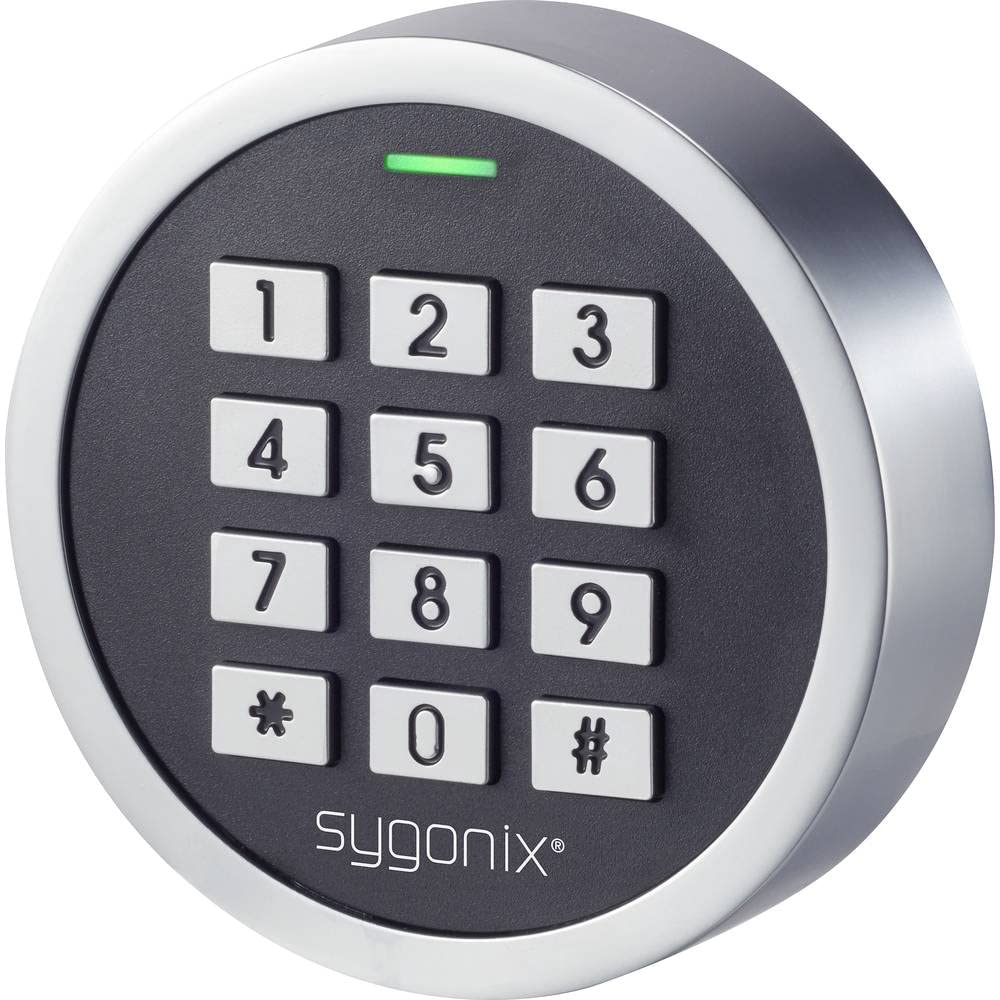
Figi 1: Devan view of the Sygonix SY-4599778 Code Lock, showing the numeric keypad and brand logo.
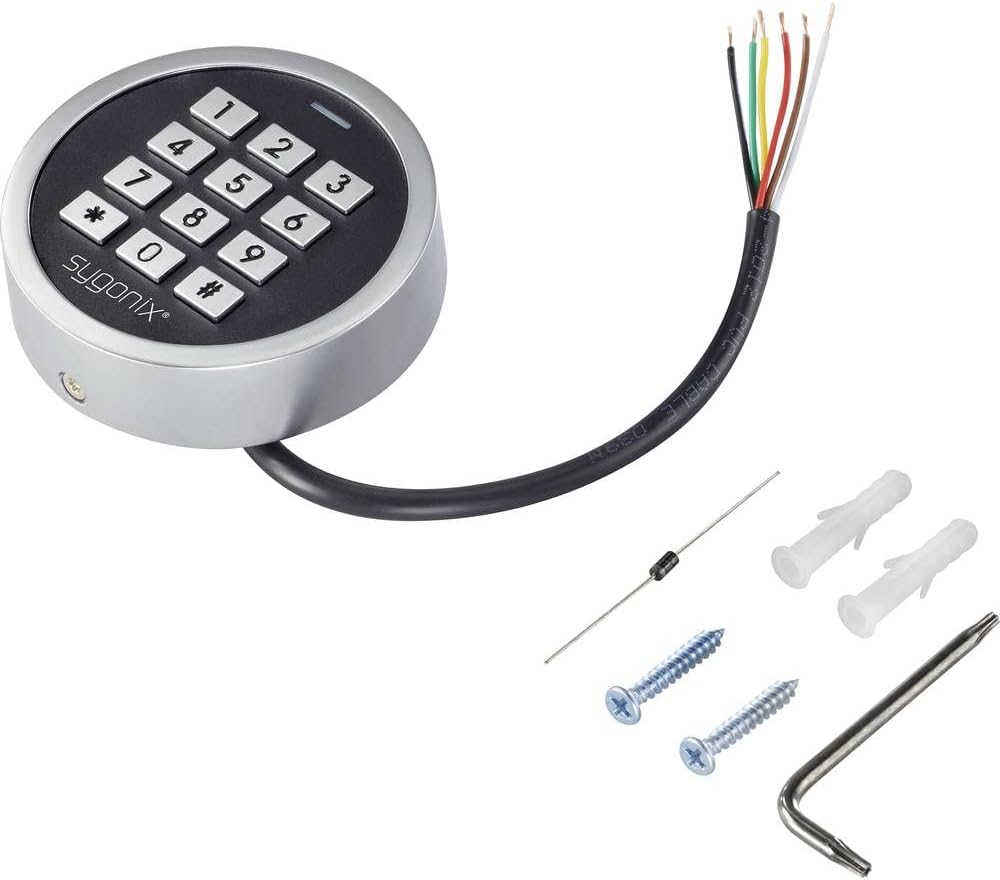
Figure 2: The Sygonix SY-4599778 Code Lock unit, displaying the integrated wiring cable, mounting screws, wall plugs, and a diode.
4. Enstalasyon ak Enstalasyon
Monte inite a
- Choose a suitable surface for mounting, ensuring it is flat and stable.
- Use the back plate of the unit as a template to mark the drilling points for the mounting screws.
- Drill holes at the marked positions and insert the provided wall plugs.
- Secure the back plate to the wall using the mounting screws.
- Attach the main unit to the secured back plate, ensuring a snug fit. Use the Allen key to tighten any security screws if present.
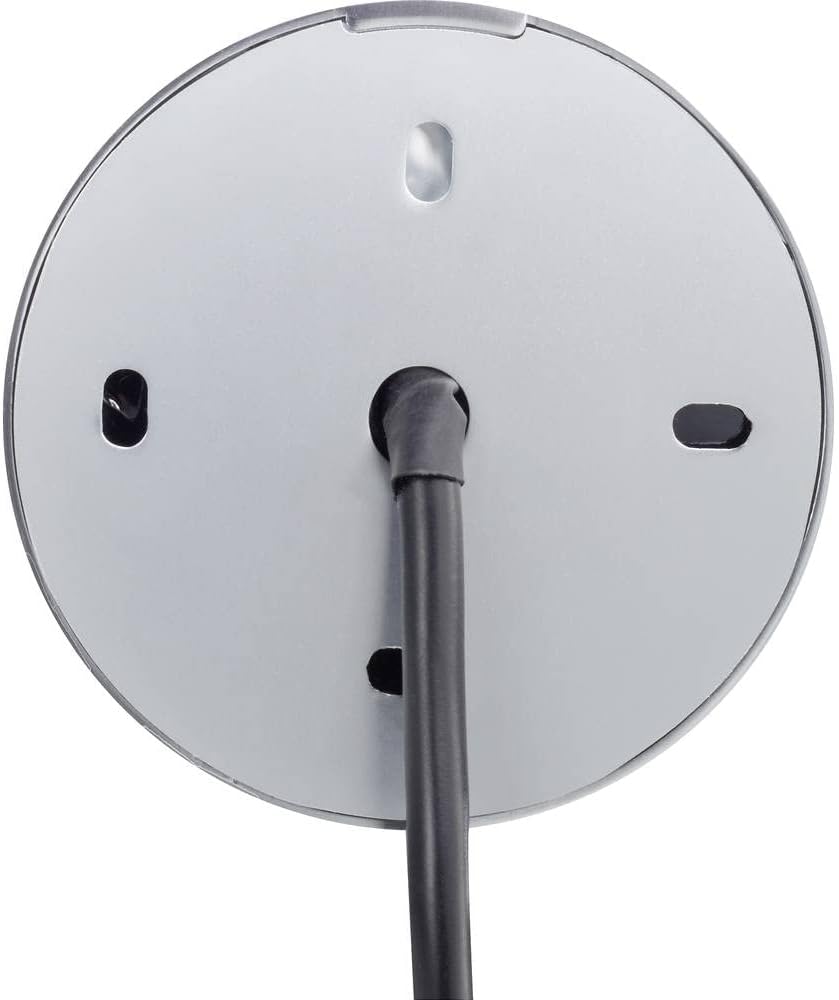
Figi 3: Dèyè view of the code lock, illustrating the mounting points and the integrated wiring cable.
Koneksyon fil elektrik
The device requires an 18V/DC power supply. Connect the integrated wiring cable according to the following general guidelines. It is highly recommended that a qualified electrician performs the wiring.
- Identify the power input wires (typically red for positive, black for negative).
- Connect the provided diode to the power line as instructed in the detailed wiring diagram (not provided in this general manual, refer to product-specific diagram). The diode helps protect the circuit from reverse polarity.
- Connect the output wires (e.g., for electric strike, alarm) to the corresponding terminals of your access control system.
- Asire w ke tout koneksyon yo izole epi pwoteje kont faktè anviwònman yo.
- After wiring, restore power to the unit. The unit should power on, indicated by an LED or audible signal.
5. Operasyon Enstriksyon
This section outlines the basic operation and programming of the Sygonix SY-4599778 code lock. Specific programming steps may vary slightly; always refer to the detailed programming guide included with your product for precise instructions.
Initial Setup and Master Code
- Upon first power-up, the device will be in a default state.
- Enter the default master programming code (refer to your product's specific manual for this code, often a sequence like `*123456#`).
- Change the default master code immediately for security purposes. Follow the prompts or specific key sequences to set a new master code.
Adding User PIN Codes
- Enter the master programming code to enter programming mode.
- Select the option to add a new user code (e.g., press `1` or a specific key).
- Enter the desired new PIN code (typically 4-6 digits) and confirm it.
- Sòti mòd pwogramasyon.
Adding RFID Cards
- Enter the master programming code to enter programming mode.
- Select the option to add a new RFID card (e.g., press `2` or a specific key).
- Present the RFID card to the reader area on the keypad. The unit will typically beep or flash to confirm registration.
- Sòti mòd pwogramasyon.
Aksè Lock la
Pou jwenn aksè:
- Sèvi ak yon kòd PIN: Enter your valid PIN code followed by the `#` key. The lock will activate (e.g., unlock an electric strike) for a set duration.
- Sèvi ak yon kat RFID: Present your registered RFID card to the reader area on the keypad. The lock will activate for a set duration.

Figure 4: The code lock keypad with a green indicator light, typically indicating successful operation or entry into programming mode.
6. Antretyen
Netwayaj
- Netwaye sifas klavye a avèk yon twal mou,amp twal.
- Pa sèvi ak pwodui netwayaj abrazif, solvan, oswa pwodui chimik ki agresif, paske sa yo ka domaje fini an oswa konpozan elektwonik yo.
- Ensure no liquid enters the internal components of the device.
Enspeksyon
- Periodically inspect the unit for any signs of physical damage or wear.
- Check the mounting screws to ensure the unit remains securely attached to the surface.
- Verify that all wiring connections are intact and free from corrosion or damage.
NAN. Depanaj
If you encounter issues with your Sygonix SY-4599778 code lock, refer to the following common problems and solutions:
| Pwoblèm | Kòz posib | Solisyon |
|---|---|---|
| Aparèy pa limen. | Pa gen kouran oswa fil elektrik yo pa kòrèk. | Check the 18V/DC power supply connection. Ensure wiring is correct and secure. |
| PIN code not recognized. | Incorrect PIN entered or PIN not programmed. | Verify the PIN code. Re-program the PIN if necessary. Ensure the '#' key is pressed after the PIN. |
| Kat RFID la pa fonksyone. | Card not programmed or not presented correctly. | Ensure the RFID card is registered. Present the card directly to the reader area. |
| Lock does not activate after valid entry. | Wiring issue to the electric strike/lock mechanism. | Check the output wiring from the code lock to the connected locking device. Ensure the locking device is functional. |
| Unit is unresponsive. | Pwoblèm elektwonik tanporè. | Disconnect power for a few seconds, then reconnect to perform a power cycle. |
Si pwoblèm nan pèsiste apre ou fin eseye solisyon sa yo, tanpri kontakte sèvis kliyan oswa yon teknisyen kalifye.
8. Espesifikasyon
| Nimewo Modèl: | SY-4599778 |
| Mak: | Sygonix |
| Pwovizyon pou pouvwa: | 18V/DC |
| Evalyasyon pwoteksyon: | IP66 (Dust tight, protected against powerful water jets) |
| Metòd aksè: | PIN Code, RFID Card |
| Materyèl: | Metal (Vandal-resistant housing) |
| Dimansyon (L x W x H): | 20 x 73 x 73 mm |
| Pwa: | 199 gram |
| Itilizasyon Rekòmande: | Outdoor environments, weather-exposed areas |
9. Garanti ak sipò
Enfòmasyon sou Garanti
The availability of spare parts for this product is typically 1 year from the date of purchase. For specific warranty terms and conditions, please refer to the documentation provided at the time of purchase or contact your retailer.
Sipò pou Kliyan
For technical assistance, troubleshooting beyond this manual, or warranty claims, please contact your point of purchase or the official Sygonix customer support channels. Contact information can usually be found on the product packaging or the manufacturer's official websit.