
Entwodiksyon
The Sharkoon Skiller SGK30 is a mechanical gaming keyboard designed for performance and durability. It features customizable RGB lighting, N-Key rollover, and a 1000Hz polling rate for responsive gameplay and typing. This manual provides essential information for setting up, operating, and maintaining your keyboard.

Image: Sharkoon Skiller SGK30 Mechanical Gaming Keyboard banner displaying the product name and type.
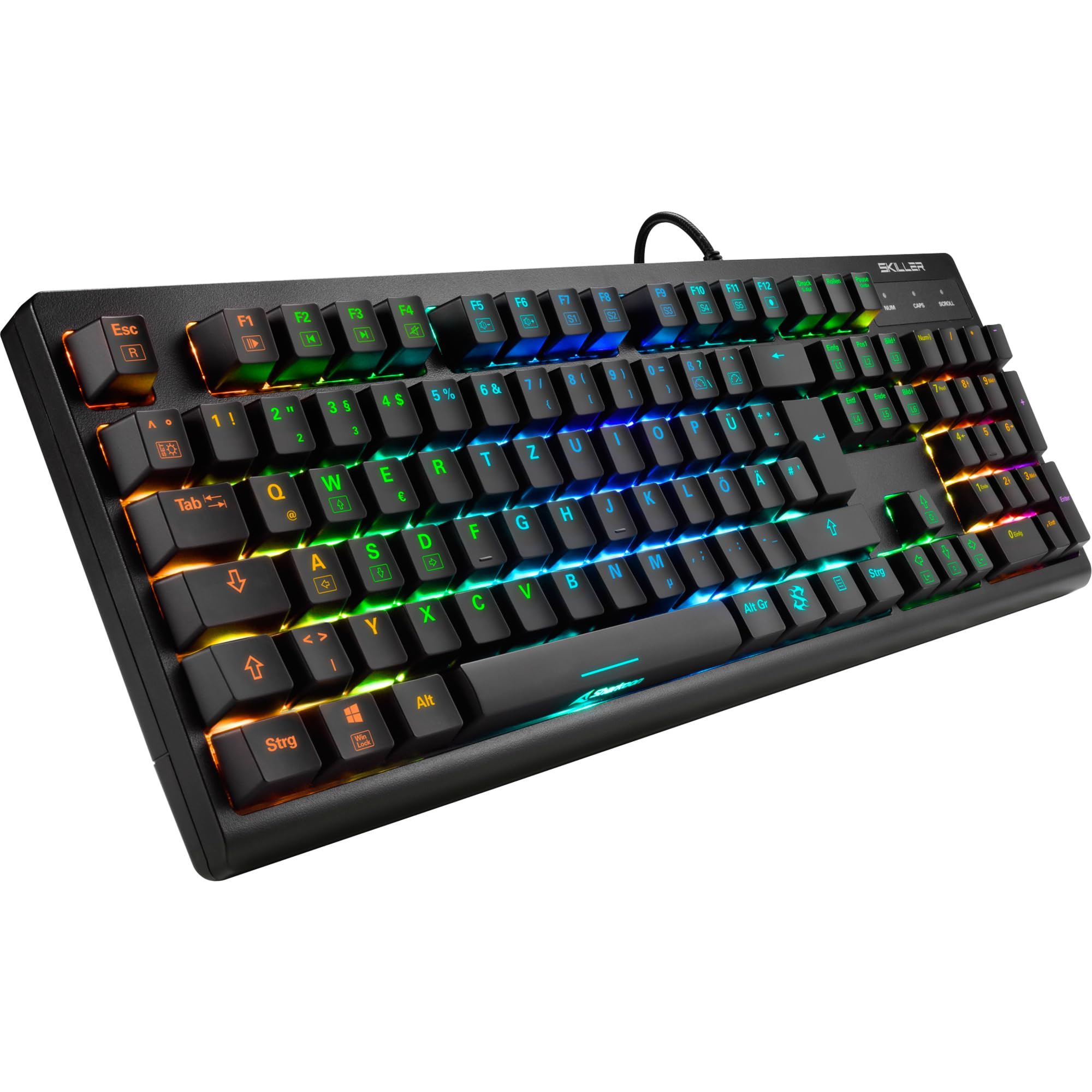
Imaj: Yon imaj anwo-anba view of the Sharkoon Skiller SGK30 mechanical gaming keyboard, showcasing layout konplè li yo ak ekleraj dèyè RGB vibran li yo.
Pwodwi souview Videyo
Videyo: Yon pwodwi ofisyèl finiview of the Sharkoon Skiller SGK30 Mechanical Gaming Keyboard, demonstrating its features, RGB lighting effects, and mechanical switches.
Enstalasyon
Follow these steps to set up your Sharkoon Skiller SGK30 keyboard:
- Depake klavye a: Carefully remove the keyboard and the included USB cable from its packaging.
- Konekte ak òdinatè: Plug the Micro USB end of the cable into the keyboard's port and the standard USB-A end into an available USB port on your computer.
- Enstalasyon chofè: The keyboard is plug-and-play. Your operating system (Windows 10 or later recommended) should automatically detect and install the necessary drivers.
- Enstalasyon lojisyèl (Si ou vle): For advanced customization of RGB lighting and key assignments, download the official Sharkoon software from the manufacturer's websit.

Image: The Sharkoon Skiller SGK30 keyboard positioned on a desk, ready for connection.
Enstriksyon Operasyon
Fonksyon kle debaz yo
The Sharkoon Skiller SGK30 features a standard layout with additional function keys accessible via the FN kle.
- FN + F1-F12: Access multimedia controls (e.g., play/pause, volume up/down, mute).
- FN + Windows kle: Bloke/debloke kle Windows la pou anpeche ou peze l aksidantèlman pandan w ap jwe.
- N-Kle Rollover: All keys are registered simultaneously, ensuring every keystroke is detected, even during rapid input.
Kontwòl ekleraj Rgb
The keyboard offers extensive RGB lighting customization. Use the following combinations to adjust lighting effects:
- FN + Insert/Home/Page Up/Delete/End/Page Down: Cycle through various pre-programmed lighting effects.
- FN + Arrow Keys (Up/Down): Adjust brightness levels of the lighting.
- FN + Arrow Keys (Left/Right): Ajiste vitès efè ekleraj dinamik yo.
- Custom Illumination: Use the dedicated software for advanced per-key lighting customization.

Imaj: Yon gwo plan view of the keyboard keys highlighting the adjustable RGB illumination capabilities.
Personnalisation lojisyèl
For advanced settings, macro programming, and detailed RGB customization, download and install the Sharkoon Skiller SGK30 software from the official Sharkoon websit. Lojisyèl la pèmèt ou:
- Create and save custom lighting profiles.
- Program macros for specific keys.
- Remap key functions.

Image: A screenshot showing the graphical user interface of the Sharkoon Skiller SGK30 customization software, illustrating various options for lighting and key remapping.
Antretyen
Bon antretyen asire lonjevite ak pèfòmans klavye ou a:
- Netwayaj: Use a soft, dry cloth to wipe the surface of the keyboard. For deeper cleaning, use compressed air to remove dust and debris from between the keycaps.
- Retire kouvèti kle a: If necessary, keycaps can be carefully removed using a keycap puller (not included) for thorough cleaning of the switches. Reinstall keycaps by pressing them firmly onto the switch stems.
- Evite likid: Pa ekspoze klavye a nan kontak ak likid. Si likid koule, dekonekte klavye a imedyatman epi kite l sèk nèt anvan ou rekonekte li.
- Depo: Sere klavye a nan yon kote ki fre epi sèk, lwen limyè solèy dirèk ak tanperati ekstrèm.

Imaj: Yon gwo plan view of the mechanical switches on the Sharkoon Skiller SGK30 keyboard, illustrating their design for durability and ease of maintenance. Note: This model is available with Red switches, while the image shows Blue switches.
Depanaj
If you encounter issues with your Sharkoon Skiller SGK30 keyboard, refer to the following common solutions:
| Pwoblèm | Kòz posib | Solisyon |
|---|---|---|
| Klavye pa reponn | Koneksyon USB ki lach, pò USB ki defektye, pwoblèm chofè. |
|
| Ekleraj RGB a pa fonksyone oswa li pa bon | Lighting settings incorrect, software conflict. |
|
| Kle yo pa anrejistre | Pousyè/debri anba kouvèti kle a, switch ki gen pwoblèm. |
|
Espesifikasyon
| Karakteristik | Detay |
|---|---|
| Mak | Sharkoon |
| Nimewo Modèl | 4044951030026 |
| Kalite klavye | Klavye mekanik Gaming |
| Chanje Kalite | Red Switch (Blue switches are also available for this model series) |
| Koneksyon | Mikwo USB |
| Pousantaj biwo vòt | 1000Hz |
| N-Kle Rollover | Sipòte |
| RGB ekleraj | Customizable RGB |
| Sistèm operasyon | Windows 10 (and compatible with other Windows versions) |
| Dimansyon (LxWxH) | 44 x 14.4 x 3.5 cm |
| Pwa | 867 g |
Ki sa ki nan bwat la
The Sharkoon Skiller SGK30 package includes:
- Sharkoon Skiller SGK30 Mechanical Gaming Keyboard
- USB kab
Garanti ak sipò
For warranty information and technical support, please refer to the official Sharkoon websit la oubyen kontakte détayan lokal ou a. Kenbe prèv acha ou pou reklamasyon garanti.
Remak: Espesifikasyon ak karakteristik pwodwi yo ka chanje san avètisman alavans.