
Entwodiksyon
This manual provides instructions for the operation and maintenance of your WIITHINK Portable CD Boombox, model WTB771. This device features multiple audio playback options including CD, FM radio, Bluetooth, USB, and AUX input, designed for versatile use.

Imaj: Devan view of the WIITHINK Portable CD Boombox WTB771, black color, showing the display, control buttons, speakers, and handle.
Kontni pake
- 1 x WIITHINK Portable CD Radio Boombox (WTB771)
- 1 x pouvwa kab
- 1 x AUX liy
- 1 x manyèl itilizatè
- 1 x kontwòl remote
Enstalasyon
Pwovizyon pou pouvwa
The boombox can be powered by AC power or batteries.
- AC pouvwa: Connect the provided power cable to the AC port on the back of the unit and plug it into a standard wall outlet (AC voltage: 220V / 50Hz, 110V / 60Hz).
- Pouvwa batri: For portable use, insert 4 C-sized batteries (not included) into the battery compartment located on the bottom of the unit. Ensure correct polarity.
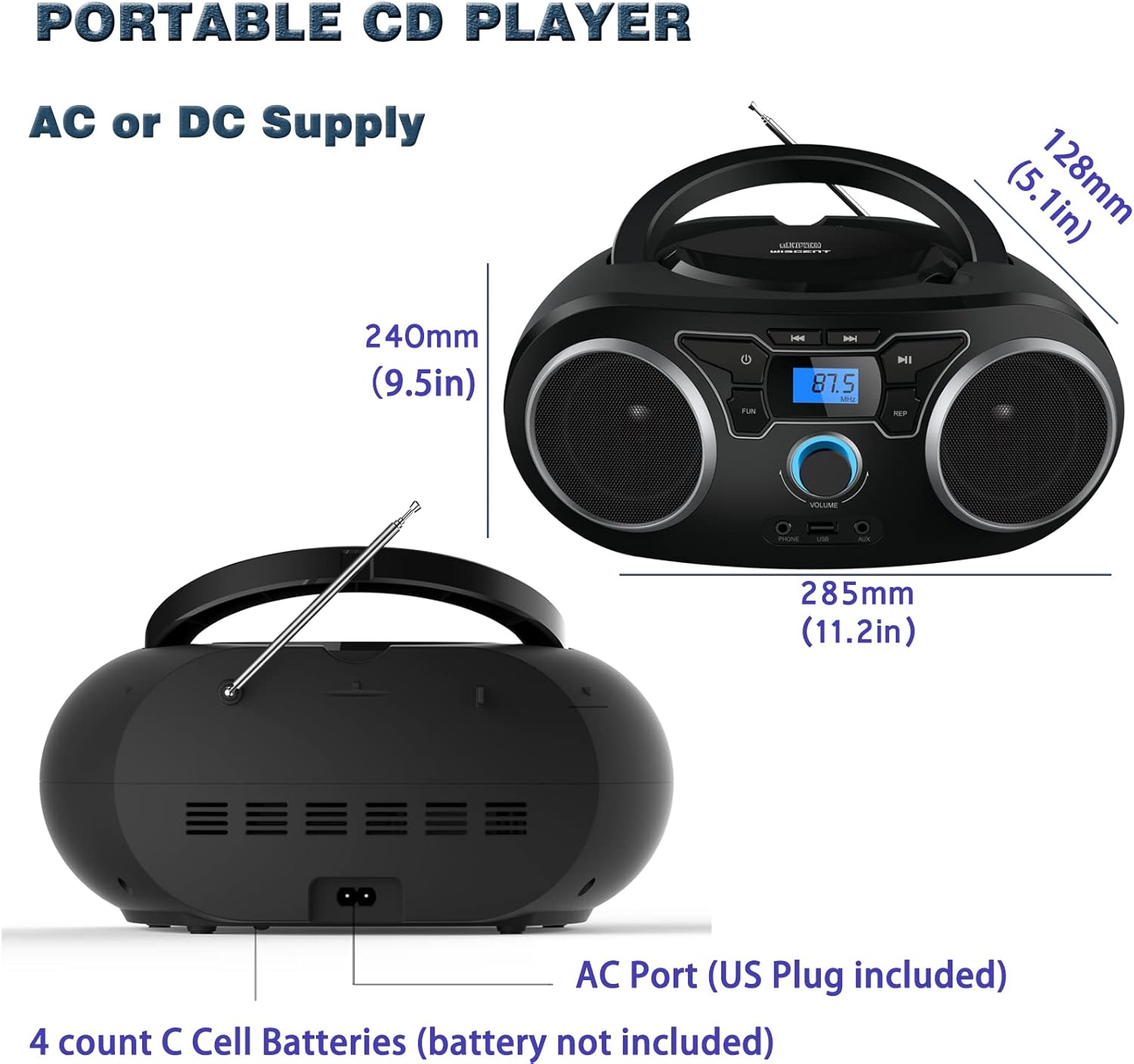
Imaj: Dèyè view of the boombox, highlighting the AC power port and the battery compartment for 4 C-sized batteries.
Enstriksyon Operasyon
Kontwòl Jeneral
The unit features a digital LCD screen and various control buttons and knobs. The main volume control is a rotary knob on the front. A remote control is also included for convenient operation.

Imaj: Anwo-anba view of the boombox, showing the CD compartment, control buttons, and volume knob.
1. Lektur CD
- Louvri kouvèti konpatiman CD a ki sitiye anlè aparèy la.
- Place a CD (CD, CD-R, CD-RW, MP3-CD) onto the spindle with the label side facing up.
- Fèmen kouvèti lòj CD a.
- Peze a MÒD bouton pou chwazi mòd CD.
- Peze a JWE/POZ bouton pou kòmanse lecture.
- Sèvi ak la SOTE / RECHÈCH bouton pou navige ant tras yo.
- La REPETE button allows for repeating a single track or all tracks.
- La PWOGRAM function allows you to create a custom playback order for tracks.
The boombox supports MP3 and WMA audio formats on compatible discs.
2. Operasyon radyo FM
- Lonje antèn teleskopik la pou yon resepsyon optimal.
- Peze a MÒD bouton an pou chwazi mòd Radyo FM.
- To auto-scan and save stations, press and hold the ESKANYE button. The unit will automatically search for and store up to 30 FM stations.
- Pou melodi manyèlman, sèvi ak la REGLAGE bouton oswa SOTE / RECHÈCH buttons to find desired frequencies.
- Sèvi ak la PRESET bouton navige nan estasyon sove.
Video: A user demonstrating the FM radio tuning function on the WIITHINK Portable CD Boombox WTB771, showing the digital display changing frequencies.
3. Bluetooth Koneksyon
- Peze a MÒD button to select Bluetooth mode. The display will indicate "BT" and the unit will enter pairing mode.
- On your Bluetooth-enabled device (e.g., smartphone, tablet), search for available devices and select "WTB771".
- Yon fwa ou konekte li, ou ka difize odyo san fil soti nan aparèy ou an pou ale nan boombox la.
Videyo: Yon ti prezantasyonview demonstrating Bluetooth connectivity, showing a smartphone wirelessly connected to the boombox.
4. Lektur USB
- Mete yon kondwi flash USB ki gen MP3 files nan pò USB sou devan inite a.
- Peze a MÒD bouton pou chwazi mòd USB.
- Aparèy la ap detekte epi kòmanse jwe MP3 otomatikman. files soti nan kondwi a USB.
- Use the playback controls (PLAY/PAUSE, SKIP/SEARCH) to manage your music.
5. AUX Antre
- Connect an external audio device (e.g., MP3 player, laptop) to the AUX input jack on the front of the unit using the provided 3.5mm AUX cable.
- Peze a MÒD bouton an pou chwazi mòd AUX la.
- Odyo ki soti nan aparèy ki konekte a pral kounye a jwe nan oratè boombox yo. Kontwole lekti a soti nan aparèy ekstèn ou an.
Controls and Ports Overview
| Karakteristik | Deskripsyon |
|---|---|
| Bouton pouvwa | Vire inite a sou / sou. |
| Bouton MODE | Chanje ant mòd CD, FM, Bluetooth, USB, ak AUX. |
| Volim bouton | Adjusts the audio output level (up to 32 levels). |
| JWE / PAUSE bouton | Starts or pauses playback in CD, USB, and Bluetooth modes. |
| Bouton SOTE/RECHÈCHE | Navigates tracks in CD/USB mode; tunes frequencies in FM mode. |
| Bouton REPEAT | Repeats current track or all tracks in CD/USB mode. |
| Bouton PWOGRAM | Sets a custom playback order for CD/USB tracks. |
| FM antèn | Telescopic antenna for FM radio reception. |
| Port USB | Connects USB flash drives for MP3 playback. |
| AUX Antre Jack | Antre 3.5mm pou konekte aparèy odyo ekstèn. |
| Jack kas ekoutè | Sòti 3.5mm pou koute an prive. |
| Kontwòl Remote | Provides wireless control over all functions. |

Image: Close-up of the front panel, showing the USB port, AUX input, and headphone jack.
Antretyen
- Netwaye aparèy la avèk yon twal mou epi sèk. Pa sèvi ak pwodui netwayaj abrazif oswa solvan.
- Kenbe konpatiman CD a pwòp epi san pousyè.
- Evite ekspoze aparèy la nan tanperati ekstrèm, imidite, oswa limyè solèy dirèk.
- When not in use for extended periods, remove batteries and unplug the AC power cable.
Depanaj
| Pwoblèm | Solisyon |
|---|---|
| Pa gen pouvwa |
|
| Pa gen Son |
|
| CD a ap sote/pa ap jwe |
|
| Resepsyon FM ki pòv |
|
| Pwoblèm Kouplè Bluetooth |
|
Espesifikasyon
- Modèl: WTB771
- Dimansyon pwodwi: 7 x 10 x 4.8 pous (17.8 x 25.4 x 12.2 cm)
- Pwa atik: 2.64 liv (1.2 kg)
- Sorti pouvwa: 2 x 2W RMS
- Koneksyon: Oksilyè, Bluetooth, USB
- Kalite oratè: Bati-an
- Pwovizyon pou pouvwa: AC (220V/50Hz, 110V/60Hz) or 4 x C batteries (not included)
- Kalite disk sipòte: CD, CD-R, CD-RW, MP3-CD
- Fòma odyo sipòte: MP3, WMA
- Prereglaj Radyo FM: Jiska 30 estasyon
Garanti ak sipò
WIITHINK offers an 18-month after-sales service for this product. For any inquiries or technical support, please contact WIITHINK customer service through your purchase platform. Lifetime technical support is provided.
For further assistance, you may refer to the "Your Orders" section on Amazon, locate your order, and contact "WIITHINK Direct".

Image: Graphic illustrating WIITHINK's customer support, including 18-month replacement and lifetime technical support.