
Sharp HP-TW30(BK)
Sharp HP-TW30 True Wireless Noise Cancelling Earphones
Model: HP-TW30(BK)
Pwodwi souview
The Sharp HP-TW30 True Wireless Noise Cancelling Earphones are designed for an immersive audio experience with enhanced comfort and durability. Featuring active noise cancellation, these earphones reduce background noise, making them ideal for various environments. They offer wireless charging, Bluetooth 5.0 connectivity, and are splashproof for active lifestyles.
Karakteristik kle:
- Anile aktif bri: Reduces ambient noise by 22dB for improved focus and enjoyment.
- Chaje san fil: Convenient charging with the included case, providing up to 4 full charges.
- Bluetooth 5.0: Ensures stable and efficient wireless connectivity with a range of up to 33 feet.
- IPX4 Rezistan a dlo: Resistant to splashes, sweat, and light rain, suitable for workouts and outdoor activities.
- Kontwòl manyen: Intuitive controls for managing playback, calls, and voice assistants.
- Kontwòl vwa: Full integration with Apple Siri and Google Assistant for hands-free operation.
- Long Playtime: Jiska 6 èdtan lekti odyo sou yon sèl chaj.

Figure 1: Sharp HP-TW30 True Wireless Earphones (Black)
Kontni pake
Anvan ou kòmanse, tanpri asire w ke tout bagay yo prezan nan pake a:
- Sharp HP-TW30 True Wireless Earphones (Left and Right)
- Ka chaje
- USB Type-C Charging Cable (not explicitly listed in 'whats_in_the_box' but implied by 'Charging Port: USB Type C')
- Small, Medium, and Large Ultra-comfortable Ear Tips (3 sizes)
- Manyèl Enstriksyon (dokiman sa a)
Enstalasyon
1. Chaje ekoutè yo ak bwat la
For first-time use, fully charge the earphones and the charging case. The charging case provides approximately 4 full charges for the earphones.
- Place both earphones into their respective slots in the charging case. Ensure they are seated correctly.
- Konekte kab chaje USB Kalite-C a nan pò chaje ki sou bwat la epi lòt bout la nan yon sous kouran USB (pa egzanp, adaptè miray, pò USB òdinatè).
- The LED indicators on the case will show charging status. Charging time for the case and earphones is approximately 2 hours.
- Yon fwa konplètman chaje, dekonekte kab la chaje.
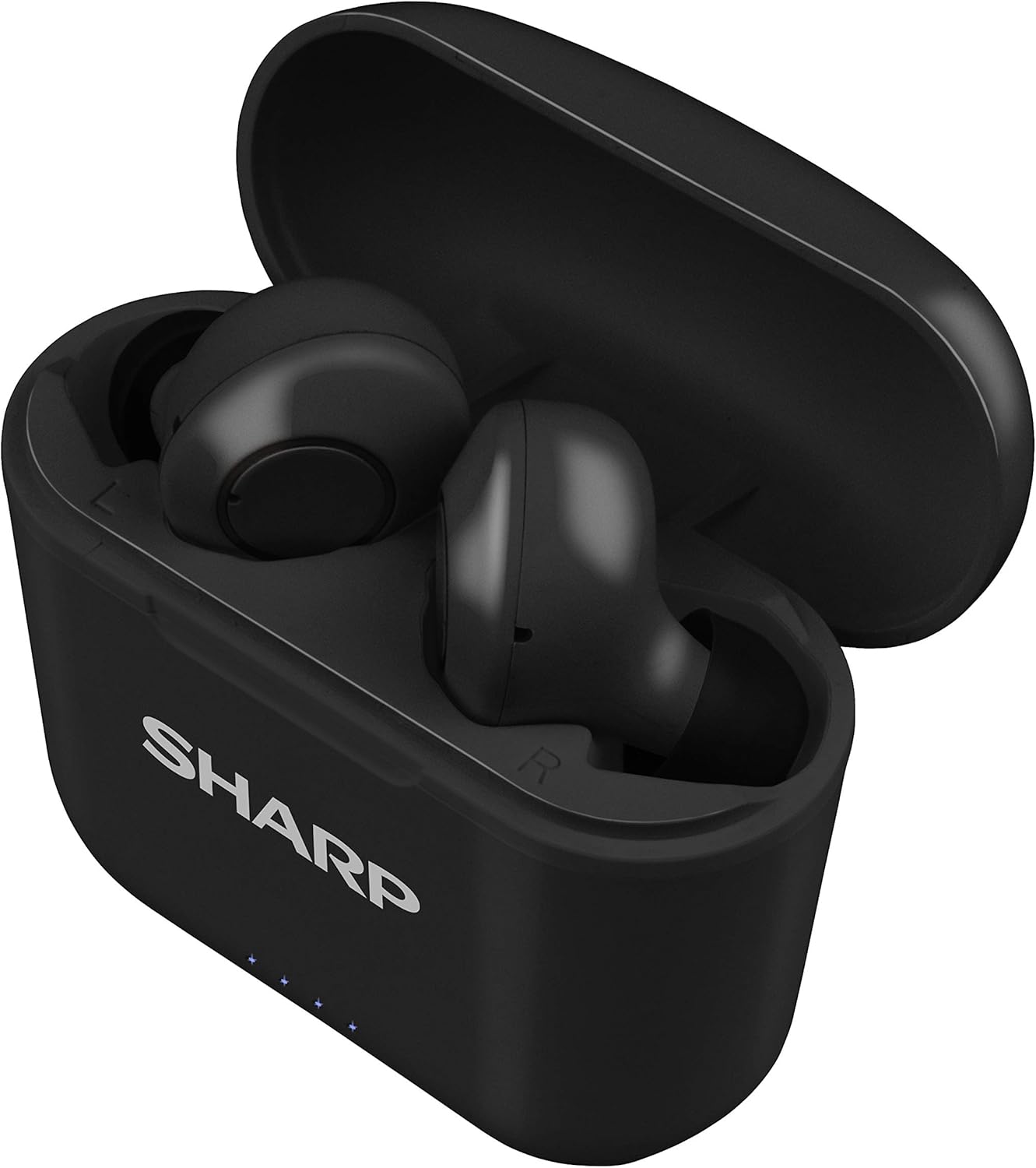
Figure 2: Earphones in Charging Case
2. Konekte ak aparèy ou an
The HP-TW30 earphones feature auto-pairing for effortless setup.
- Louvri bwat chaje a. Kas ekoutè yo ap limen otomatikman epi antre nan mòd koneksyon.
- Sou telefòn entelijan ou, tablèt ou, oswa lòt aparèy ki gen Bluetooth, ale nan paramèt Bluetooth yo.
- Chèche pou available devices and select "HP-TW30" from the list.
- Yon fwa konekte, yon mesaj vokal ap konfime koneksyon an reyisi.
- Kas ekoutè yo ap konekte otomatikman ak dènye aparèy ki te konekte a lè yo retire yo nan bwat la, si Bluetooth aktive sou aparèy la.
Enstriksyon Operasyon
Kontwòl manyen
The HP-TW30 earphones utilize touch-sensitive controls on each earbud for various functions:
- Jwe/Poz: Tape yon sèl sou chak ekoutè.
- Pwochen Track: Tape de fwa sou ekoutè dwat la.
- Track Previous: Tape de fwa sou ekoutè gòch la.
- Reponn/Fen Apèl: Tape yon sèl fwa sou nenpòt ekoutè pandan yon apèl k ap antre.
- Rejte apèl: Peze epi kenbe youn nan ekoutè yo pandan 2 segonn pandan yon apèl k ap antre.
- Activate Voice Assistant (Siri/Google Assist): Tape twa fwa sou nenpòt ekoutè.
- Anilasyon Bri Aktif (ANC) Aktif/Dezaktif: Peze epi kenbe ekouteur dwat la pou 2 segonn.
Anilasyon bri aktif (ANC)
The ANC feature reduces ambient background noise, providing a more focused listening experience. Activate or deactivate ANC using the touch control as described above.
Rezistans dlo (IPX4)
The earphones are rated IPX4 splashproof, meaning they are resistant to water splashes from any direction. This makes them suitable for light rain, sweat, and gym use. Do not submerge the earphones in water.
Antretyen
Bon antretyen asire lonjevite ak pèfòmans optimal kas ekoutè ou yo.
- Netwayaj: Netwaye ekoutè yo ak bwat chaje a regilyèman avèk yon twal mou, sèk, ki pa gen pousyè. Pa sèvi ak pwodui netwayaj abrazif oswa solvan.
- Konsèy zòrèy: Retire epi netwaye bout zòrèy yo detanzantan avèk piblisite.amp twal ak savon dou, apresa siye l byen anvan ou tache l ankò.
- Depo: Lè w pa ap itilize ekoutè yo, sere yo nan bwat chaje yo pou pwoteje yo kont pousyè ak domaj.
- Tanperati: Evite ekspoze kas ekoutè yo nan tanperati ekstrèm (cho oswa frèt) oswa nan imidite ki wo.
- Kontak chaje: Asire w ke kontak chaje yo sou tou de kas ekoutè yo ak anndan bwat la pwòp epi san debri pou kenbe chaj la byen.
Depanaj
If you encounter issues with your Sharp HP-TW30 earphones, try the following solutions:
- Earphones not pairing/connecting:
- Asire w ke tou de ekoutè yo byen chaje.
- Etenn Bluetooth sou aparèy ou an, epi aktive l ankò.
- Forget/delete "HP-TW30" from your device's Bluetooth list and attempt to re-pair.
- Place both earphones back into the charging case, close the lid for 5 seconds, then open it again to reset.
- Se yon sèl ekoutè k ap jwe son:
- Asire ke tou de ekoutè yo chaje.
- Mete tou de ekoutè yo tounen nan bwat chaje a, fèmen kouvèti a, epi ouvri l ankò. Souvan, sa senkronize yo ankò.
- Netwaye kontak chaje yo sou tou de ekoutè yo ak anndan bwat la.
- Try resetting and re-pairing the earphones as described above.
- Volim ki ba oswa kalite son ki pa bon:
- Ajiste volim nan tou de aparèy ou an ak kas ekoutè yo.
- Ensure the ear tips are the correct size for a snug fit and are clean.
- Check for any obstructions in the earbud nozzles.
- Ekoutè yo pa chaje:
- Asire w ke kab chaje a byen konekte ak tou de bwat la ak sous kouran an.
- Eseye yon lòt kab USB Kalite-C ak yon lòt adaptè kouran.
- Netwaye kontak chaje yo sou ekoutè yo ak anndan bwat la.
Espesifikasyon
| Non modèl | HP-TW30(BK) |
| Koneksyon Teknoloji | San fil (Bluetooth) |
| Bluetooth vèsyon | 5.0 |
| Gamme Bluetooth | Jiska 33 pye (10 mèt) |
| Kontwòl bri | Active Noise Cancellation (22dB reduction) |
| Playtime | Apeprè. 6 èdtan |
| Tan sibstiti | Apeprè. 90 èdtan |
| Tan pou chaje | Approx. 2 hours (earphones and case) |
| Port chaje | USB Kalite-C |
| Rezistans dlo | IPX4 Splashproof |
| Kalite kontwòl | Kontwòl manyen |
| Kontwòl vwa | Apple Siri, Asistan Google |
| Konpozan ki enkli | Small, Medium, and Large Ultra-comfortable Ear tips |
| Materyèl | Silikon (bout zòrèy) |
| Pwa atik | 7.9 ons |
Garanti ak sipò
Sharp products are manufactured to the highest quality standards. For warranty information, technical support, or service inquiries, please refer to the warranty card included with your purchase or visit the official Sharp support website. Please have your model number (HP-TW30(BK)) and proof of purchase ready when contacting support.
For further assistance, you may visit the Sharp Store on Amazon: Sharp Official Store
Ask a question about this manual
Ask about setup, troubleshooting, compatibility, parts, safety, or missing instructions. Manuals+ will review the question and use this page’s manual context to help answer it.