
1. Entwodiksyon
The RockSeed RS305D is a high-performance triple output linear DC power supply designed for various electronic applications. It features two main adjustable outputs (CH1/CH2) providing 0-30V/0-5A each, and one variable fixed output (CH3) with selectable voltages of 2.5V, 3.3V, or 5V. This unit supports independent, series, and parallel operation modes, offering flexibility for diverse testing and development needs. Its precise control and clear digital displays make it an essential tool for laboratories, educational institutions, and hobbyists.
2. Pwodwi Features
- Triple Output Channels: Two main adjustable channels (CH1/CH2: 0-30V/0-5A) and one fixed variable channel (CH3: 2.5V/3.3V/5V).
- Mòd operasyon miltip: Independent, Series (MAX 60V, MAX 5A), and Parallel (MAX 30V, MAX 10A).
- High Precision Digital Display: Clear LED displays for voltage and current on each channel.
- Coarse and Fine Adjustment: Dedicated knobs for precise control of voltage ak aktyèl.
- Sou-Voltage Protection (OVP) & Over-Current Protection (OCP): Built-in safety features to protect connected devices.
- Linear Pure Copper Transformer: Ensures stable output with low ripple and noise.
- Temperature Control Cooling System: Maintains stable performance during extended use.
- USB chaje pò: Includes USB-A and USB-C fast charging ports for convenience.
2.1. Front Panel Overview
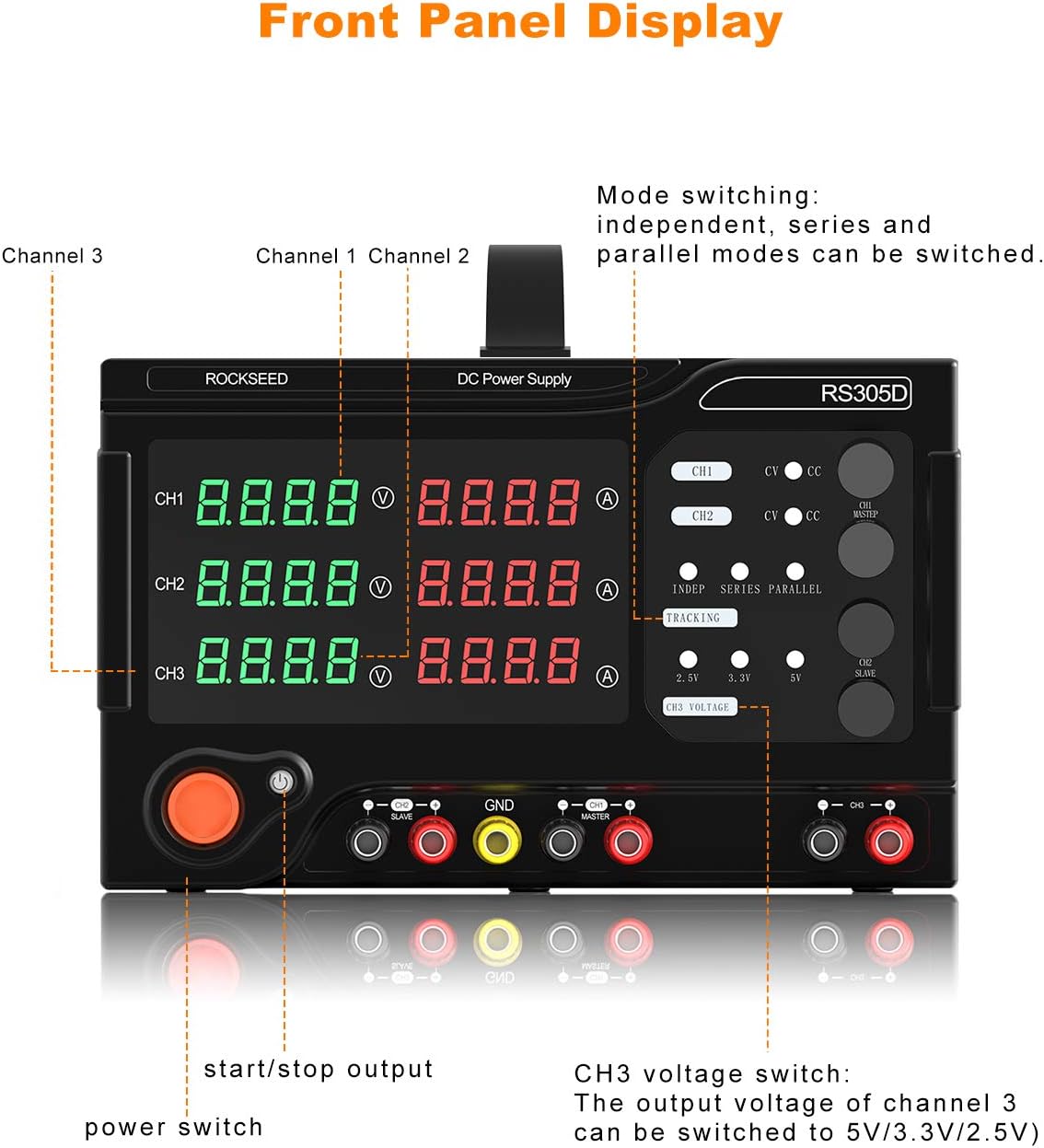
Deskripsyon imaj: This image displays the front panel of the RockSeed RS305D power supply. It highlights the three output channels (CH1, CH2, CH3) with their respective digital voltage and current displays. Key controls such as coarse and fine adjustment knobs for voltage and current, mode selection buttons (Independent, Series, Parallel), and output enable/disable buttons are clearly visible. The fixed voltage selection for CH3 (2.5V, 3.3V, 5V) is also indicated. Input/output terminals for each channel are located at the bottom.
2.2. Triple Output Capabilities
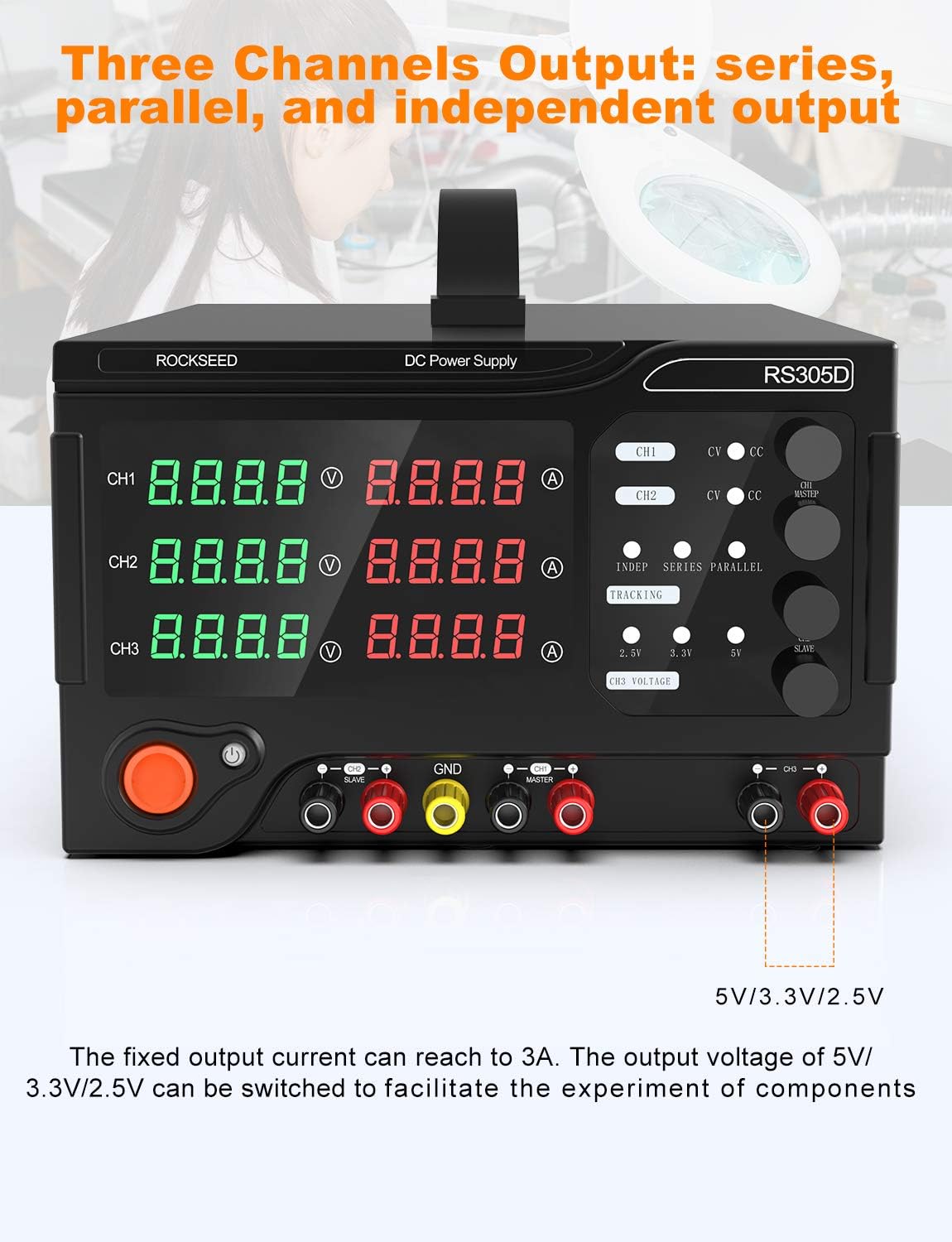
Deskripsyon imaj: This image illustrates the triple output capabilities of the RockSeed RS305D. It shows Channel 1 and Channel 2 providing adjustable 0-30V voltage and 0-5A current. It also highlights the maximum output in series mode (60V, 5A) and parallel mode (30V, 10A). Channel 3 is depicted with its fixed output current of up to 3A and selectable voltages of 5V, 3.3V, or 2.5V, emphasizing its utility for component testing.
2.3. Konpozan Entèn yo

Deskripsyon imaj: Imaj sa a bay yon imaj entèn view of the RockSeed RS305D, showcasing its linear pure copper transformer and temperature control cooling system. The linear transformer is noted for better performance, lower ripple, and less noise compared to switching power supplies. The temperature control cooling system is highlighted as crucial for maintaining stable power supply performance.
2.4. Digital LED Display
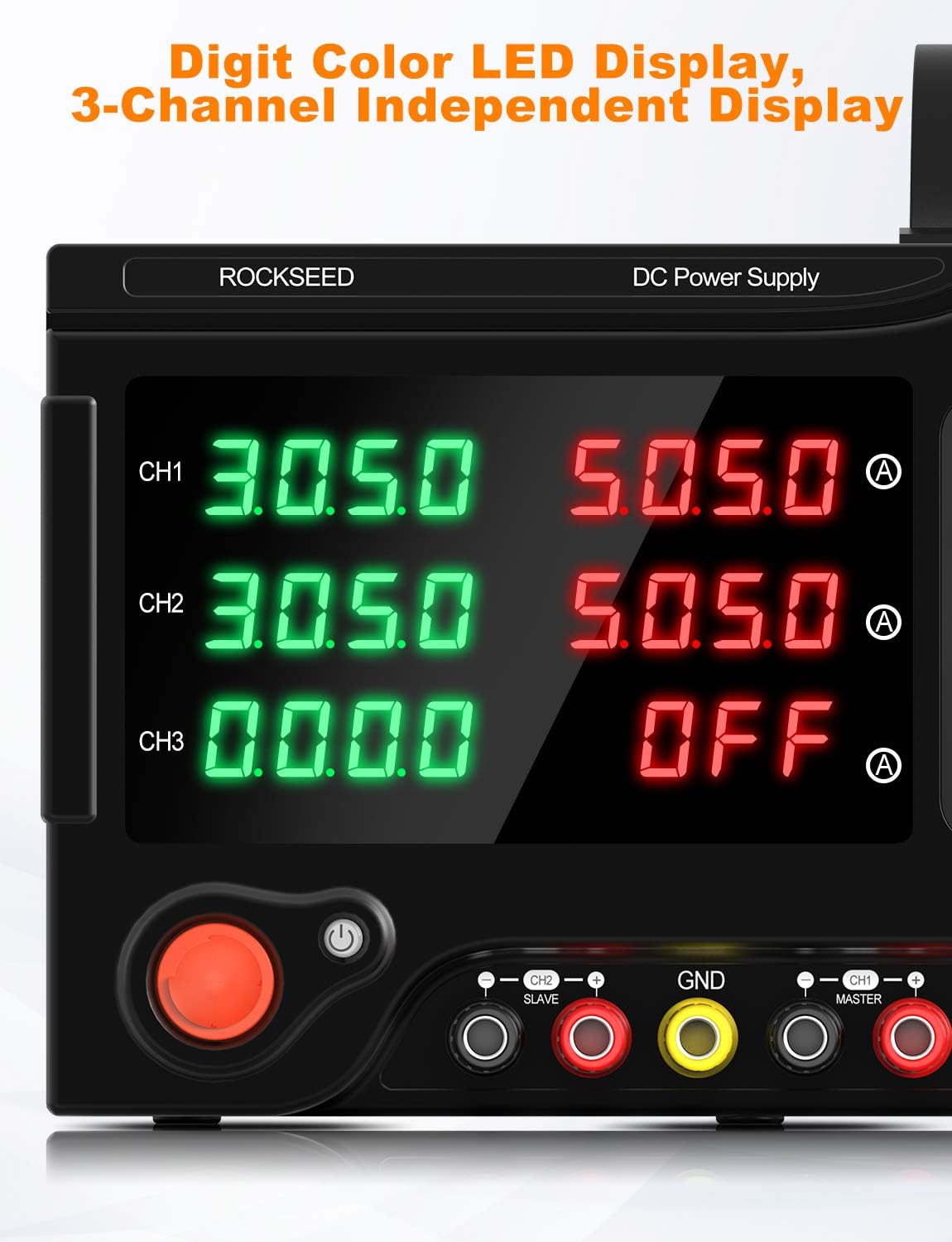
Deskripsyon imaj: This image focuses on the digit color LED display of the RockSeed RS305D. It clearly shows the independent displays for voltage and current for each of the three channels (CH1, CH2, CH3). The bright, multi-colored digits ensure excellent readability of the output parameters.
2.5. Pwodwi pou Telefòn enkli

Deskripsyon imaj: This image displays the accessories included with the RockSeed RS305D power supply. It shows two sets of red and black test leads with alligator clips, a power cord, and a user manual, providing all necessary components for immediate use.
3. Enstalasyon
- Debake: Carefully remove the power supply and all accessories from the packaging. Inspect for any signs of damage.
- Koneksyon pouvwa: Connect the provided power cord to the AC input socket on the rear panel of the power supply and then to a suitable AC power outlet. Ensure the voltage selector switch on the rear is set correctly for your region (115V or 230V).
- Koneksyon Sòti: Connect the test leads to the output terminals on the front panel. Red terminals are for positive (+) and black terminals are for negative (-). The yellow terminal is for ground.
- Plasman: Place the power supply on a stable, level surface with adequate ventilation around the unit. Do not block the ventilation openings.
4. Operasyon Enstriksyon
- Limen/Etenyen: Press the main power switch on the front panel to turn the unit ON or OFF.
- Anviwònman Voltage and Current (CH1/CH2):
- Press the 'V' (Voltage) or 'A' (Current) button for the desired channel (CH1 or CH2) to select the digit you wish to adjust. The selected digit will blink.
- Rotate the coarse or fine adjustment knob to change the value of the blinking digit.
- Repeat until the desired voltage and current limits are set.
- Output Enable/Disable: Apre ou fin mete volim ou vle atage and current, press the 'Output' button for the respective channel to enable or disable the output. The indicator light will show the output status.
- Setting Fixed Voltage (CH3):
- Press the 'CH3 Voltage' button to cycle through the available fixed voltages: 2.5V, 3.3V, ak 5V.
- Vol la chwazitage will be displayed on the CH3 output.
5. Mòd operasyon yo
The RockSeed RS305D offers three primary operation modes for its main channels (CH1 and CH2):
- Mòd endepandan: In this default mode, CH1 and CH2 operate completely independently. You can set different voltage and current values for each channel, and they will function as two separate power supplies.
- Mòd Seri: To achieve higher voltage output, CH1 and CH2 can be connected in series. In this mode, the total output voltage se sòm CH1 ak CH2 voltages (up to MAX 60V), while the current limit is determined by the lower of the two channel's current settings (up to MAX 5A). Ensure proper wiring for series connection.
- Mòd paralèl: For higher current output, CH1 and CH2 can be connected in parallel. In this mode, the total output current is the sum of CH1 and CH2 currents (up to MAX 10A), while the voltage is determined by the lower of the two channel's voltage settings (up to MAX 30V). Ensure proper wiring for parallel connection.
Use the 'INDEP SERIES PARALLEL' switch on the front panel to select the desired mode.
6. Prekosyon sekirite
- Always ensure the power supply is connected to a grounded outlet.
- Verifye opinyon voltage selector switch on the rear panel matches your local power supply (115V or 230V) before connecting to AC power.
- Do not operate the power supply in a wet or damp anviwònman.
- Before connecting any device to the power supply, always set the voltage and current limits to appropriate values to prevent damage to the device.
- Pa depase vol maksimòm lantage or current ratings of the power supply.
- Ensure proper ventilation to prevent overheating. Do not block air vents.
- In case of malfunction, disconnect the power supply immediately and contact customer support. Do not attempt to repair the unit yourself.
7. Antretyen
- Netwayaj: Sèvi ak yon twal mou epi sèk pou netwaye deyò ekipman pou pouvwa a. Pa sèvi ak pwodui netwayaj abrazif oswa solvan.
- Vantilasyon: Regularly check that the ventilation openings are clear of dust and debris. Use compressed air to clean if necessary.
- Depo: Lè w pa itilize ekipman pou pouvwa a pou yon bon bout tan, sere l nan yon kote ki fre epi sèk, lwen limyè solèy dirèk ak tanperati ekstrèm.
NAN. Depanaj
- Pa gen Sòti: Check if the 'Output' button for the respective channel is enabled. Ensure the power supply is turned on and connected to a working AC outlet.
- Lekti ki pa kòrèk: Verify that the test leads are securely connected to both the power supply and the load. Check the calibration of any external measurement devices.
- Overload/Protection Triggered: If OVP or OCP indicators light up, it means the output limits have been exceeded. Disconnect the load, reduce the voltage/current settings, and then re-enable the output.
- Inite a twò chofe: Ensure adequate ventilation. Check if the cooling fan is operating correctly. Reduce the load if operating at high power for extended periods.
9. Espesifikasyon
| Spesifikasyon | Valè |
|---|---|
| Mak | RockSeed |
| Modèl | RS305D |
| Main Output (CH1/CH2) | 0-30V / 0-5A |
| Variable Fixed Output (CH3) | 2.5V / 3.3V / 5V (MAX 3A) |
| Series Mode (MAX) | 60V / 5A |
| Parallel Mode (MAX) | 30V / 10A |
| Sòti Wattage | 240 Watts |
| Pwa atik | 19.41 liv |
| Dimansyon pake | 16.57 x 12.52 x 9.09 pous |
| Metòd refwadisman | Air |
| Dat Premye Disponib | 27 janvye 2021 |
10. Garanti ak sipò
For warranty information, technical support, or service inquiries, please refer to the contact details provided with your product packaging or visit the official RockSeed websit la. Kenbe resi acha ou kòm prèv acha pou reklamasyon garanti.