
Dynavin D9-55 Premium Flex
Manyèl Itilizatè Navigatè Radyo Machin Android DYNAVIN D9-55 Premium Flex
Model: D9-55 Premium Flex | Brand: Dynavin
1. Entwodiksyon
This user manual provides comprehensive instructions for the installation, operation, and maintenance of your DYNAVIN D9-55 Premium Flex Android Car Radio Navigator. Designed specifically for the VW Passat B8 (2014-2020), this system integrates advanced navigation, multimedia, and connectivity features to enhance your driving experience. Please read this manual thoroughly before using the product to ensure proper functionality and safety.
2. Pwodwi Features
- Konpatibilite machin: Specifically designed for VW Passat B8 models (2014-2020).
- Ekspozisyon segondè rezolisyon: 10.1-inch (1280 x 720 pixels) anti-glare touchscreen for optimal visibility.
- Odyo pwisan: Integrated 4 x 60 W RMS Class D DSP amplifier with adjustable frequency response and speaker gain.
- Sistèm operasyon: Android 11 OS with a quad-core CPU and 4 GB RAM for smooth performance.
- Koneksyon Wireless: Supports wireless Apple CarPlay, Android Auto, and Smartphone Mirroring.
- Head-up Display (HUD): Included HUD shows navigation information (from Dynaway, Apple Maps, Google Maps), vehicle speed, and speed camera data (Blitzer.de).
- Entegrasyon machin: Preserves original vehicle settings menus, supports steering wheel controls, Multifunctional Display (MFD+), Climatronic control status, virtual parking guidelines, and real-time vehicle data.
- Kalite odyo amelyore: Compact digital dual microphone with noise reduction for excellent call quality.
- Navigasyon: Integrated GPS navigation with Dynaway app (trial period applies).
- Radyo DAB/DAB+: Integrated digital radio tuner.
- Expandability: Rear camera input, supports original VW reversing camera. Optional support for VW traffic sign recognition (with D8-CANMIB-H) and VW Dynaudio sound system (with D8-MO150-V).
3. Enstalasyon ak Enstalasyon
The DYNAVIN D9-55 Premium Flex is designed for a vehicle-specific installation. It is recommended that installation be performed by a qualified technician. Refer to the included installation guide and accessory list for detailed steps and component identification.
3.1. Lis akseswa
The package includes various components necessary for installation and operation. Ensure all items are present before beginning the installation process.

Figi 3.1: Plis paseview of included accessories. This image displays the various components provided with the Dynavin D9-55 Premium Flex, including the display screen, main unit, trim, connection cables, digital radio antenna, rear camera adapter, display connection cable, GPS antenna, extension cables, USB panel, microphone, mounting frame, HUD 150, disassembly tools, radio removal tools, and screws.
3.2. Inisyal Konfigirasyon
After physical installation, power on the unit. The system runs on Android 11 OS. Follow the on-screen prompts for initial setup, including language selection and network configuration.
- Anviwònman son: Vehicle-specific sound setting files can be downloaded from the Dynavin website to optimize audio performance.
- Dynapp Package: The Dynapp package, which includes the Dynaway navigation app and Google Playstore access, requires an activation code after a 31-day trial period.
- CarPlay/Android Auto Activation: Wireless CarPlay and Android Auto also have a 31-day trial period, after which an activation code must be purchased online.
4. Operasyon Enstriksyon
4.1. Main Interface and Navigation
The 10.1-inch touchscreen provides access to all functions. The interface is designed to mimic the original VW user experience.

Figi 4.1: Main interface of the Dynavin D9-55 Premium Flex. This image shows the 10.1-inch display integrated into a car dashboard, featuring icons for phone, music, messages, DSP amplifier, navigation, Spotify, and YouTube, demonstrating the system's multimedia capabilities.
4.2. CarPlay san fil ak Android Auto
Connect your compatible smartphone wirelessly to access Apple CarPlay or Android Auto. This allows for seamless integration of your phone's navigation, communication, and entertainment apps directly on the unit's display.
4.3. Head-up Display (HUD)
The included Head-up Display projects essential information onto your windshield, allowing you to keep your eyes on the road.

Figi 4.3: Head-up Display in use. This image illustrates the compact Head-up Display unit and how it projects navigation directions, speed, and other relevant data onto the windshield, enhancing driver focus.
The HUD displays navigation cues from Dynaway, Apple Maps (via CarPlay), and Google Maps (via Android Auto), along with vehicle speed and Blitzer.de speed camera information.
4.4. Pwosesè Son Dijital (DSP) Amplifier
The integrated 4 x 60 W RMS Class D DSP amplifier provides high-quality audio output. You can adjust frequency response and speaker gain through the system's audio settings.
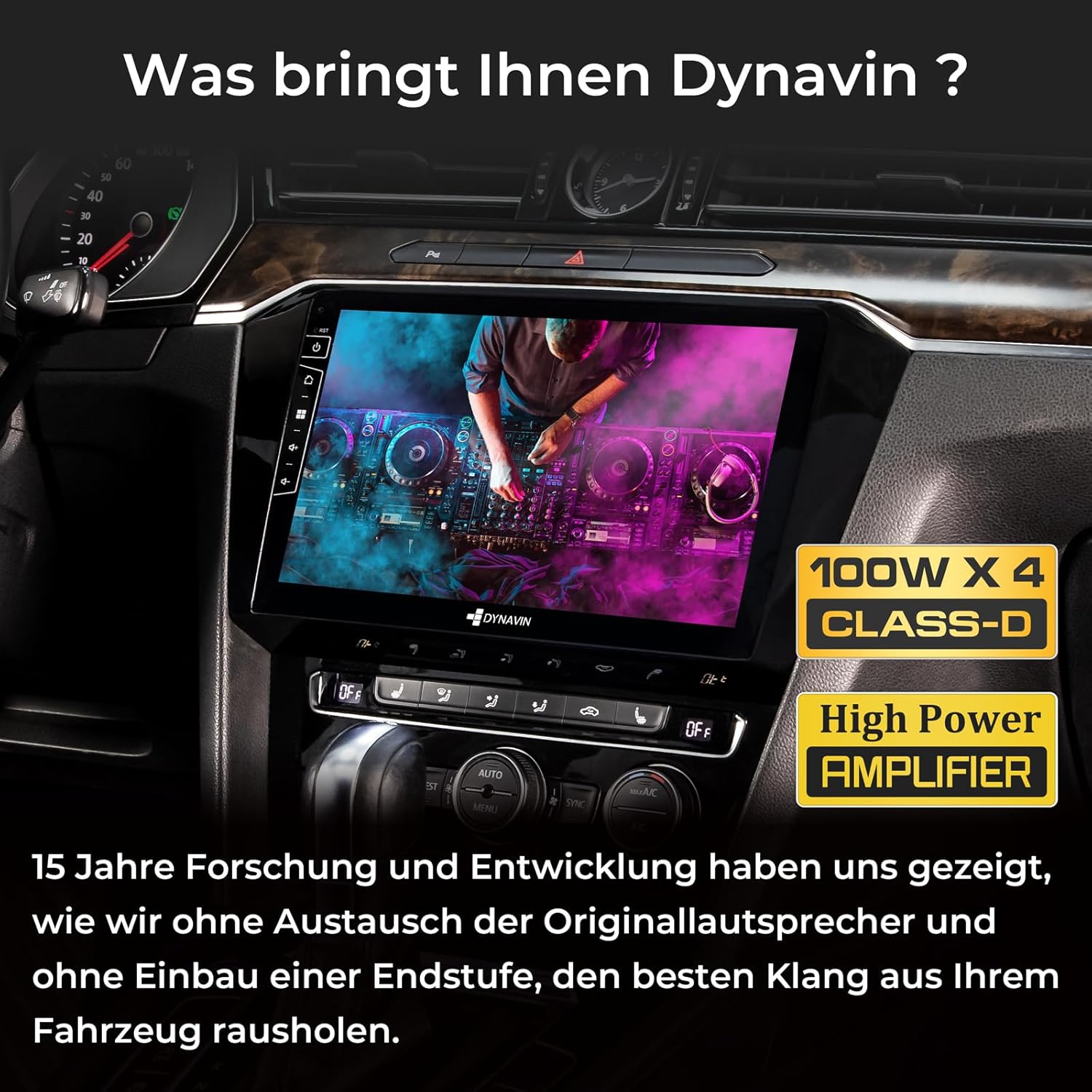
Figi 4.4: DSP entegre Amplifier. This image highlights the 100W x 4 Class-D High Power Amplifier, emphasizing Dynavin's focus on delivering superior sound quality without needing to replace original speakers or add an external amplifier.
4.5. Digital Dual Microphone
The compact digital dual microphone utilizes a unique noise reduction algorithm to ensure clear call quality during hands-free operation.

Figi 4.5: Dynavin Digital Dual Microphone. This image shows the small, discreet digital dual microphone, typically mounted near the speedometer, designed for stable and excellent call quality with noise reduction.
4.6. DAB/DAB+ Radyo
Access digital radio stations with the integrated DAB/DAB+ tuner. Scan for available stations and enjoy high-quality digital audio.

Figi 4.6: DAB/DAB+ Radio Interface. This image displays the user interface for the integrated DAB/DAB+ radio, showing station selection and information display.
5. Antretyen
To ensure the longevity and optimal performance of your DYNAVIN D9-55 Premium Flex, follow these maintenance guidelines:
- Netwaye ekspozisyon an: Sèvi ak yon twal mou ki pa gen pousyè pou netwaye ekran tactile a. Pou tach ki difisil pou retire, siye yon ti kras.ampLave twal la avèk dlo oswa yon pwodui netwayaj ki pa danjere pou ekran. Evite materyèl abrazif oswa pwodui chimik ki agresif.
- Mizajou lojisyèl: Periodically check the Dynavin website for available software updates. Keeping the system's firmware updated ensures access to the latest features, performance improvements, and bug fixes.
- Kondisyon anviwònman: Evite ekspoze aparèy la nan tanperati ekstrèm, limyè solèy dirèk pou peryòd pwolonje, oswa imidite twòp.
- Koneksyon kab: Ensure all cables are securely connected. Loose connections can lead to intermittent functionality or poor performance.
NAN. Depanaj
If you encounter issues with your DYNAVIN D9-55 Premium Flex, refer to the following common troubleshooting steps:
| Pwoblèm | Kòz posib | Solisyon |
|---|---|---|
| Aparèy pa limen. | Koneksyon kouran ki lach, fizib boule. | Check power cables and vehicle fuses. Consult a professional if unsure. |
| Pa gen son oswa odyo a defòme. | Incorrect audio settings, loose speaker connections, amppwoblèm lifier. | Verify audio settings (volume, balance, fader, DSP settings). Check speaker wiring. |
| CarPlay/Android Auto pa konekte. | Bluetooth/Wi-Fi interference, trial period expired, phone compatibility. | Ensure phone's Bluetooth/Wi-Fi is on. Check trial status and activate if needed. Restart phone and unit. |
| Siyal GPS la pèdi oswa li pa egzak. | GPS antenna obstruction or faulty connection. | Asire w ke antèn GPS la gen yon vizyon klè. view nan syèl la epi li konekte byen fèm. |
| Touchscreen pa reponn. | Pwoblèm lojisyèl, bloke tanporèman. | Perform a soft reset (refer to the main unit's manual for specific instructions). If issue persists, contact support. |
For issues not covered here, or if troubleshooting steps do not resolve the problem, please contact Dynavin customer support.
7. Espesifikasyon
| Karakteristik | Detay |
|---|---|
| Mak | Dynavin |
| Modèl | D9-55 Premium Flex |
| Nimewo Pati | D8-55 Flex |
| Sistèm operasyon | Android 11 |
| RAM | 4 GB |
| Kapasite Depo | 32 GB |
| Gwosè ekran | 10.1 pous |
| Rezolisyon ekran | 1280 x 720 piksèl |
| Kalite ekran | LCD, Anti-glare |
| Amplifier Sòti | 4 x 60 W RMS Class D DSP |
| Total pouvwa Sòti | 180 Watt |
| Audio Sòti Mode | Antoure |
| Speaker Channel Config | 4.1 |
| Koneksyon | Bluetooth, USB |
| Pò USB | 2 |
| Antre Entèfas Imèn | Touchscreen |
| Aparèy konpatib | Smartphone |
| Kalite Medya | SD |
| Kodaj videyo | H.264, H.265/HEVC, MPEG-4 |
| Dimansyon pwodwi | 47 x 28 x 19 cm |
| Pwa pwodwi | 3 kg |
8. Garanti ak sipò
For warranty information, please refer to the documentation provided with your purchase or visit the official Dynavin website. Dynavin offers customer support for technical assistance and inquiries.
Resous sou entènèt:
- Dynavin Official Websit: www.dynavin.com (for software updates, sound files, and support contact information)
Please have your product model (D9-55 Premium Flex) and any relevant purchase details ready when contacting support.
Ask a question about this manual
Ask about setup, troubleshooting, compatibility, parts, safety, or missing instructions. Manuals+ will review the question and use this page’s manual context to help answer it.