
1. Entwodiksyon
The Lepro PR902103-US Smart Table Lamp offers versatile lighting solutions for your home. This LED touch lamp features RGB color changing capabilities, tunable warm to cool white light, and dimmable brightness. It is designed for seamless integration with smart home ecosystems, supporting both Amazon Alexa and Google Assistant for voice control, as well as control via a dedicated mobile application. This manual provides comprehensive instructions for setup, operation, and maintenance.

Figure 1: Lepro Smart Table Lamp montreasing its app control interface.
2. Ki sa ki nan bwat la
Tanpri verifye ke tout konpozan yo prezan nan anbalaj la:
- 1 x Lepro Smart Table Lamp (Model: PR902103-US)
- 1 x 4.9 ft USB Cable
- 1 x pouvwa adaptè
- 1 x Manyèl Itilizatè (dokiman sa a)
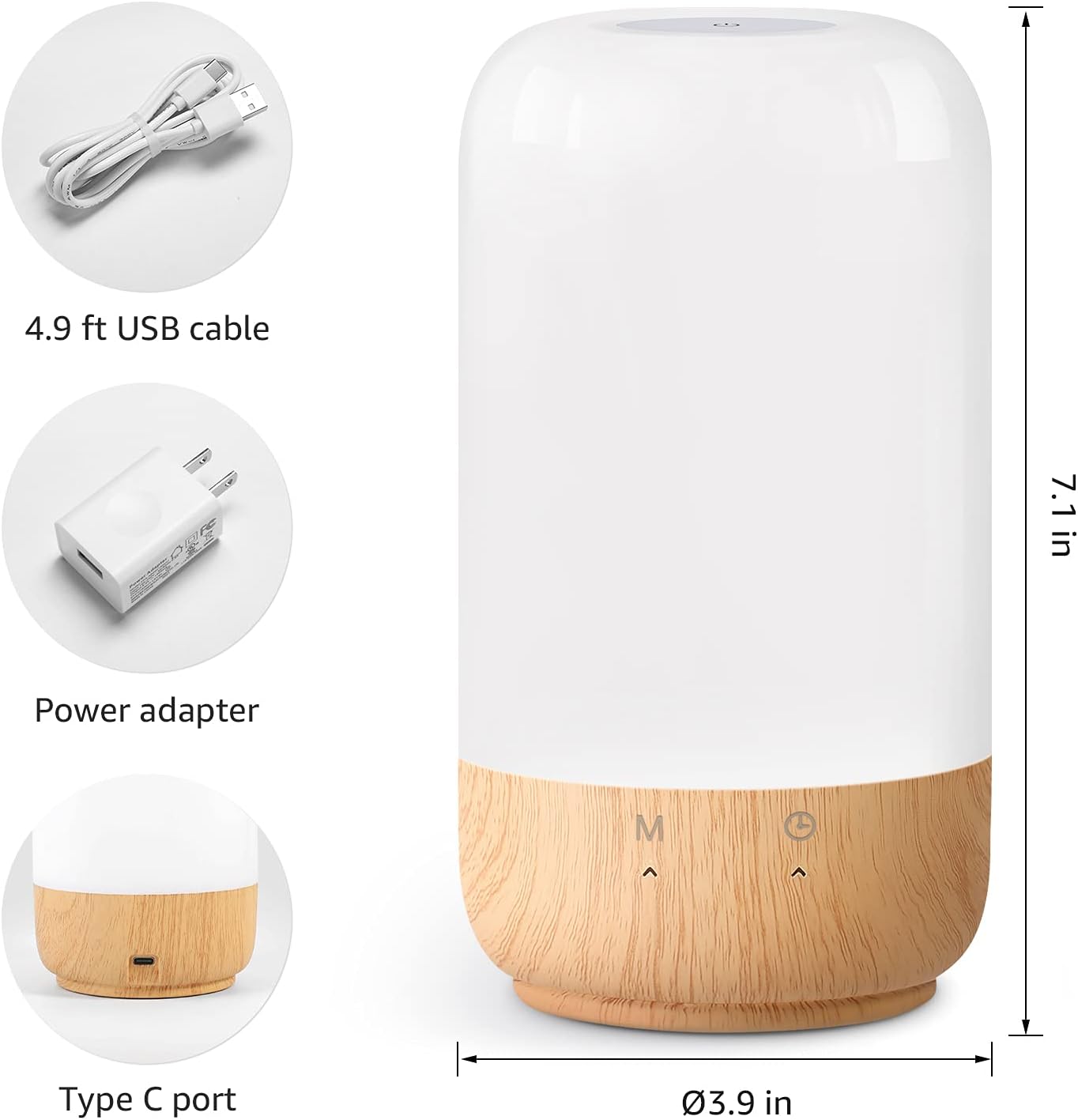
Figure 2: Included components and product dimensions.
3. Enstalasyon
Follow these steps to set up your Lepro Smart Table Lamp:
- Koneksyon pouvwa: Konekte kab USB bay la pou lamp's Type-C port and the power adapter. Plug the power adapter into a standard wall outlet. The lamp pral eklere.
- Download app: Download the 'Lepro LampUX' app from your mobile device's App Store (iOS) or Google Play Store (Android).
- Enskripsyon kont: Open the 'Lepro LampUX' app and register a new account or log in if you already have one.
- Aparèy Pairing:
- In the app, tap 'Add Device' or the '+' icon.
- Select 'Table Lamp' from the lighting category.
- Asire lamp is powered on. Long press the timer button on the lamp's base for at least 5 seconds until the indicator light blinks rapidly.
- Confirm the indicator light is blinking rapidly in the app and proceed.
- Select your 2.4 GHz Wi-Fi network and enter the password. (Note: The lamp only supports 2.4 GHz Wi-Fi networks. If your router is 5 GHz, please set it to 2.4 GHz during setup.)
- The app will begin adding the device. Once successfully added, you can rename your lamp pou idantifikasyon pi fasil.
Video 1: Detailed steps on how to set up your Lepro Smart Lamp using the mobile application.
4. Operasyon Enstriksyon
The Lepro Smart Table Lamp can be controlled via touch, the mobile app, or voice commands.
4.1. Touche Kontwòl
- Limen/Etenyen: Short press the power button (marked 'M') on the lampbaz la.
- Ajisteman klète: Slide your finger along the left side of the lamp's base to adjust brightness.
- Color Change (RGB): Slide your finger along the right side of the lamp's base to cycle through RGB colors.
- Chanjman mòd: Short press the timer button (clock icon) to switch between white light modes (warm white, cool white) and RGB color mode.
4.2. Mobile App Controls
The 'Lepro LampUX' app provides comprehensive control over your lamp:
- Brightness & Color Temperature: Adjust the brightness level and select color temperatures from 2700K (warm white) to 5700K (cool white).
- Seleksyon koulè RGB: Choose from 16 million colors using the color wheel in the app.
- Sèn: Select from pre-set scenes like 'Night', 'Read', 'Meeting', 'Leisure', or customize your own scenes with specific colors and effects.
- Timer & Wake-up: Set schedules for the lamp to turn on/off automatically. Utilize the 'Sunrise Simulation' feature to gradually increase light for a gentle wake-up.

Figure 3: Mobile application interface for controlling lamp anviwònman.

Figi 4: lamp's timer and wake-up functions in use.
4.3. Kontwòl vwa
The Lepro Smart Table Lamp is compatible with Amazon Alexa and Google Assistant. To enable voice control:
- Asire w lamp is successfully paired with the 'Lepro LampUX' app.
- Louvri aplikasyon Amazon Alexa a oswa Google Home la.
- Ale nan seksyon 'Konpetans ak Jwèt' (Alexa) oubyen 'Fonksyone avèk Google' (Google Home).
- Chèche pou and enable the 'Lepro LampUX' skill/service.
- Link your 'Lepro LampUX' account with your Alexa/Google account.
- Yon fwa konekte, ou ka itilize kòmandman vokal tankou:
- "Alexa, limen [L]"amp Non]."
- "Hey Google, mete [Lamp Name] to warm white."
- "Alexa, change [Lamp Non] an ble."
- "Hey Google, dim [Lamp Non] a 50%."

Figure 5: Voice control integration with Amazon Alexa.
Video 2: Demonstration of the Lepro Smart Table Lamp working with Alexa and Google Home.
5. Antretyen
To ensure the longevity and optimal performance of your Lepro Smart Table Lamp, please follow these maintenance guidelines:
- Netwayaj: Disconnect the power before cleaning. Use a soft, dry cloth to wipe the lamp's surface. Avoid using abrasive cleaners, solvents, or harsh chemicals, as these may damage the finish or electronic components.
- Depo: Si sere lamp pou yon peryòd tan pwolonje, asire w ke li pwòp epi sèk. Sere l nan yon kote ki fre epi sèk, lwen limyè solèy dirèk ak tanperati ekstrèm.
- Manyen: Manyen l laamp with care. Avoid dropping it or subjecting it to strong impacts.
NAN. Depanaj
If you encounter issues with your Lepro Smart Table Lamp, gade pwoblèm ak solisyon komen sa yo:
| Pwoblèm | Kòz posib | Solisyon |
|---|---|---|
| Lamp pa limen. | Pa gen ekipman pou pouvwa. | Tcheke si adaptè kouran an byen branche nan priz la.amp ak priz miray la. Asire w ke priz la fonksyone byen. |
| Pa ka konekte ak Wi-Fi. | Incorrect Wi-Fi band (5 GHz). Modpas la pa bon. Siyal Wi-Fi fèb. | Ensure your Wi-Fi network is 2.4 GHz. Verify the Wi-Fi password. Move the lamp closer to your router. |
| Kontwòl vwa a pa fonksyone. | Skill not enabled/linked. Non aparèy la pa kòrèk. | Ensure the 'Lepro LampUX' skill is enabled and linked in your Alexa/Google Home app. Use the exact device name configured in the app. |
| Lamp pa reponn. | Pwoblèm lojisyèl tanporè. | Deploge lamp from the power outlet for 10 seconds, then plug it back in to perform a soft reset. |
7. Espesifikasyon
| Karakteristik | Detay |
|---|---|
| Mak | Lepro |
| Nimewo Modèl | PR902103-US |
| Dimansyon pwodwi | 3.9"D x 3.9"W x 7.1"H |
| Pwa atik | 1.19 liv |
| Materyèl | Plastik, bwa |
| Kalite sous limyè | dirije |
| Wattage | 7 wat |
| Klète | 350 Lumen |
| Koulè limyè | RGB + CCT (Tunable White 2700-5700K) |
| Metòd kontwòl | App, Touch, Voice (Alexa, Google Assistant) |
| Koneksyon | WiFi 2.4 GHz sèlman |
| Itilizasyon Andedan kay la / Deyò | Andedan kay la |
8. Garanti ak sipò
Lepro products are designed and manufactured to the highest quality standards. For warranty information and technical support, please refer to the contact details provided on the product packaging or visit the official Lepro websit la. Kenbe resi acha ou kòm prèv acha pou reklamasyon garanti.