
1. Pwodwi souview
The KAIDI KD-763 is a wired gaming headset designed for use with the PlayStation 4 (PS4) console and other compatible devices with a 3.5mm audio jack. It features over-ear cups for immersive sound, a rotary microphone for clear communication, and an inline volume control for convenient audio adjustments. The headset also includes an LED lighting effect, typically powered via a USB connection.
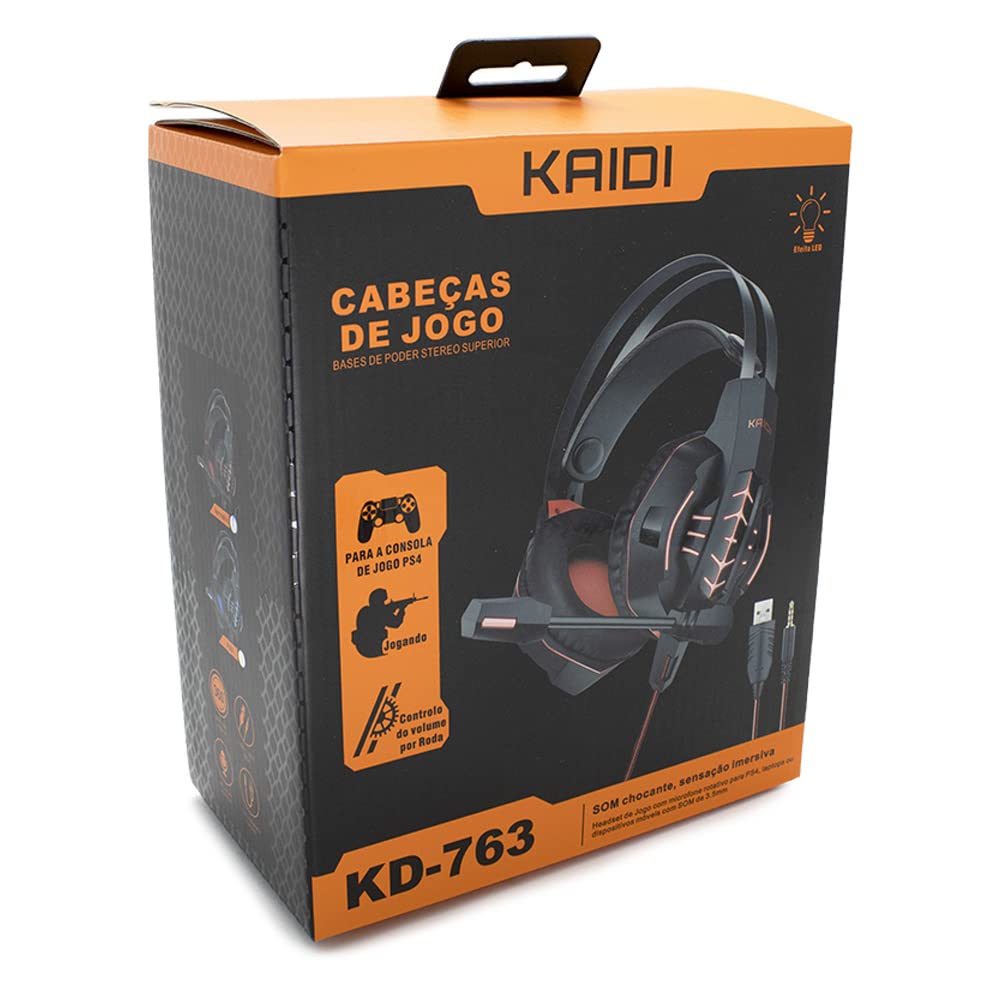
Figi 1.1: The KAIDI KD-763 PS4 Gaming Headset packaging, showing the headset, its features, and compatibility with PS4.
2. Enfòmasyon sou Sekirite
- Evite koute mizik pandan lontan ak gwo volim pou anpeche domaj nan zòrèy ou.
- Do not expose the headset to extreme temperatures, humidity, or direct sunlight.
- Kenbe ekoutè a lwen dlo ak lòt likid.
- Do not attempt to disassemble or modify the headset. This may void the warranty and cause damage.
- Clean the headset with a soft, dry cloth only.
- Kenbe soti nan atenn timoun yo.
3. Pake kontni
Tanpri verifye sa ki nan pake a lè w ap ouvri l. Si gen nenpòt atik ki manke oswa ki domaje, kontakte machann ou an.
- KAIDI KD-763 Gaming Headset
- Manyèl Itilizatè (dokiman sa a)
4. Gid Enstalasyon
- Connect to PS4 Controller: Locate the 3.5mm audio jack on your PS4 controller. Insert the 3.5mm connector from the KD-763 headset firmly into this port.
- Powering LED Lights (Optional): If your headset features LED lighting, connect the USB connector from the headset to an available USB port on your PS4 console or a compatible USB power adapter. The LED lights will illuminate once connected.
- Ajiste anfòm kas ekoutè a: Extend or retract the headband to ensure the earcups sit comfortably and securely over your ears. The over-ear design should fully enclose your ears for optimal sound isolation.
- Pozisyon Mikwofòn: Adjust the flexible rotary microphone boom to a position near your mouth for clear voice pickup. Ensure it is not obstructing your vision.
- Configure PS4 Audio Settings:
- Ale nan Anviwònman > Aparèy > Aparèy odyo on your PS4.
- Mete Aparèy Antre to "Headset (Controller)".
- Mete Aparèy Sòti to "Headset (Controller)".
- Mete Sòti nan kas ekoutè to "All Audio" for full game and chat sound.
- Ajiste Kontwòl Volim (Kas Ekoutè) nan yon nivo konfòtab.
5. Operasyon Enstriksyon
5.1. Kontwòl Volim
The KD-763 headset features an inline volume control wheel located on the cable. Rotate the wheel upwards to increase the volume and downwards to decrease it. Adjust to a comfortable listening level.
5.2. Itilizasyon Mikwofòn
The microphone is designed to capture your voice clearly. Ensure it is positioned correctly near your mouth. If your PS4 audio settings are configured correctly, your voice will be transmitted to other players in online games or chat parties.
To mute the microphone, check if there is a physical mute switch on the inline control. If not, you can mute the microphone through your PS4's quick menu (hold the PS button on your controller).
6. Antretyen
- Netwayaj: Use a soft, dry, lint-free cloth to wipe the earcups and headband. Do not use liquid cleaners or abrasive materials.
- Depo: Lè w pa ap itilize kas ekoutè a, sere l nan yon kote ki pwòp epi sèk, lwen limyè solèy dirèk ak tanperati ekstrèm. Evite fè kab la mele.
- Swen kab: Do not pull on the cable to disconnect the headset. Always grasp the plug. Avoid bending or twisting the cable excessively.
NAN. Depanaj
- Pa gen son oswa volim ki ba:
- Asire w ke priz 3.5mm lan byen branche nan kontwolè PS4 la.
- Check the inline volume control wheel on the headset cable and turn it up.
- Verify PS4 audio settings (Anviwònman > Aparèy > Aparèy odyo) are correctly configured for the headset.
- Test the headset with another device (e.g., smartphone) to rule out a headset issue.
- Mikwofòn nan pa fonksyone:
- Asire w ke ti boom mikwofòn nan byen pozisyone.
- Check PS4 audio settings (Anviwònman > Aparèy > Aparèy odyo) to ensure Aparèy Antre is set to "Headset (Controller)".
- Confirm the microphone is not muted via an inline switch or the PS4 quick menu.
- Teste mikwofòn nan avèk yon lòt aplikasyon oswa aparèy si sa posib.
- Limyè LED yo pa fonksyone:
- Ensure the USB connector is firmly plugged into a powered USB port.
- Eseye yon pò USB diferan.
8. Espesifikasyon
| Mak: | KAIDI |
| Modèl: | KD-763 |
| Kalite Headset: | Over-ear (Circumaurais) |
| Enpedans: | 32 Ohms |
| Sansiblite: | 110 dB |
| Koneksyon: | Wired (3.5mm audio jack + USB for LED) |
| Aparèy konpatib: | Gaming Consoles (e.g., PS4), devices with 3.5mm audio jack |
| Itilizasyon espesifik: | Gaming |
| Kalite kontwòl: | Inline Volume Control Wheel |
| Mikwofòn: | Rotary/Swivel |
| Efè ki ap dirije: | Yes (USB powered) |
9. Garanti ak sipò
KAIDI products are designed and manufactured to the highest quality standards. For information regarding warranty coverage, terms, and conditions, please refer to the warranty card included with your purchase or visit the official KAIDI websit.
For technical support, troubleshooting assistance, or to inquire about replacement parts, please contact KAIDI customer service through their official channels. Contact information can typically be found on the product packaging or the official KAIDI websit.