
Entwodiksyon
This manual provides detailed instructions for the proper use and maintenance of your Conambo Trucker Bluetooth Headset 5.0. Please read this manual thoroughly before using the device to ensure optimal performance and longevity.
Kontni pake
Lè w ap ouvri pake a, tanpri verifye si tout bagay sa yo ladan l:
- Conambo Trucker Bluetooth Headset (Model DE-JBT9)
- USB-C Chaje Kab
- Manyèl itilizatè

Image: The Conambo Trucker Bluetooth Headset, a USB-C charging cable, and the user manual are neatly arranged in the product packaging.
Pwodwi souview
Familiarize yourself with the various components and controls of your headset.
- Bando reglabl: Allows for a customized and comfortable fit for various head sizes.
- Soft Protein Memory-Foam Earpad: Provides comfort for extended wear.
- Flexible Gooseneck Microphone: Can be rotated 270 degrees for use on either the left or right ear, and adjusted for optimal voice pickup. Features a wind cover for clear audio.
- Bouton kontwòl: Located on the earpiece for easy access to power, volume, call management, and mute functions.
- USB-C chaje pò: Pou rechaje batri kas ekoutè a.

Image: A user demonstrates the adjustable headband, soft ear pad, and anti-slip pad for comfortable wear on either ear.
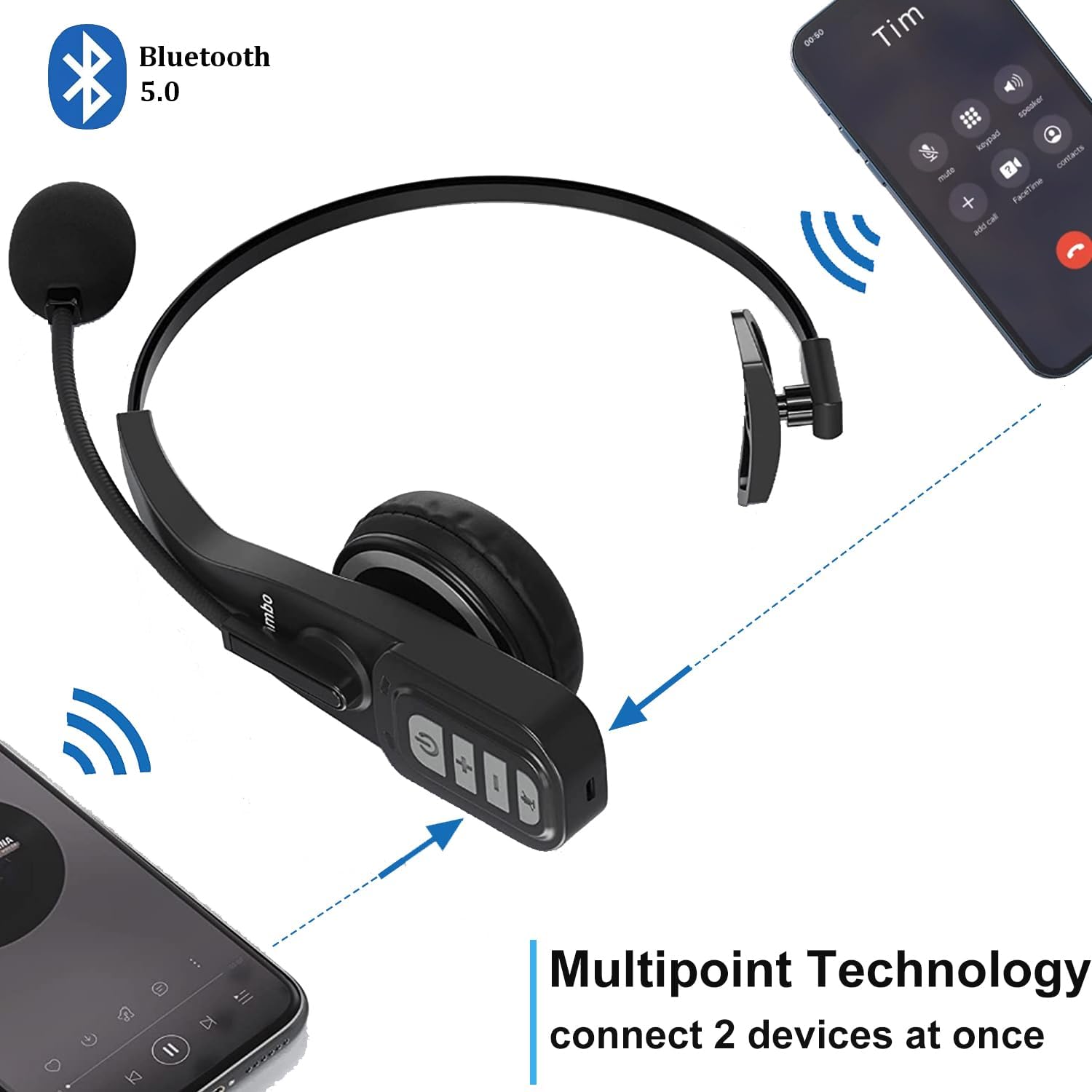
Image: Close-up of the headset's control panel, highlighting the volume up/down, power/call, and mute buttons.
Enstalasyon
1. Chaje Headset la
Before initial use, fully charge your headset. A full charge takes approximately 4 hours.
- Connect the provided USB-C charging cable to the charging port on the headset.
- Connect the other end of the USB-C cable to a compatible USB power source (e.g., computer USB port, wall adapter).
- The LED indicator on the headset will show charging status (refer to the LED indicator section for details).
2. Pairing ak yon Aparèy Bluetooth
The headset uses Bluetooth 5.0 technology for stable and fast connections. It supports multipoint connection, allowing simultaneous connection to two Bluetooth devices.
- Asire w ke kask la chaje.
- Slide the power switch to the "ON" position. The headset will automatically enter pairing mode, indicated by a flashing LED light.
- On your device (e.g., smartphone, laptop, PC), enable Bluetooth and search for available devices.
- Select "A19" or "Conambo JBT900" (or similar model name) from the list of found devices to connect.
- Once connected, the LED indicator will become solid, confirming successful pairing.

Image: The headset is shown connected to two different smartphones, illustrating its multipoint technology feature.
Video: A demonstration of the Conambo JBT900 Bluetooth 5.0 Headset, showcasing karakteristik li yo ak fasilite li pou itilize.
Enstriksyon Operasyon
Jesyon Rele
- Reponn/Fen Apèl: Press the Phone Call button once.
- Rejte apèl: Press and hold the Phone Call button for 2 seconds.
- Mikwofòn pou fèmen/retire son: During a call, press the Mute button (often the same as the Phone Call button or a dedicated button) once.
- Recomposition Dènye Nimewo: Double-press the Phone Call button.

Image: A woman wearing the headset, demonstrating the mute function during a call.
Kontwòl Mizik
- Jwe/Poz: Press the Phone Call button once.
- Volim monte/desann: Use the dedicated Volume + and Volume - buttons.
- Pwochen Track: Peze epi kenbe bouton Volim + la.
- Track Previous: Peze epi kenbe bouton Volim - la.
Asistan Vwa (Siri/Asistan Google)
Press and hold the Mute button to activate your device's voice assistant for hands-free commands.
Konfò ak Ajistabilite
The Conambo headset is designed for comfort during prolonged use.
- The headband is stretchable and can be adjusted to fit various head sizes.
- The soft protein memory-foam earpad ensures a comfortable fit on your ear.
- The microphone boom can be rotated 270 degrees, allowing you to wear the earpiece on either your left or right ear.

Image: A man wearing the headset, demonstrating the flexible microphone positioned for clear communication, highlighting its noise-cancelling capabilities.
Antretyen
Pou asire lonjevite ak pèfòmans optimal kas ekoutè ou a, swiv gid antretyen sa yo:
- Clean the earpad and microphone foam regularly with a soft, dry cloth.
- Avoid exposing the headset to extreme temperatures, moisture, or direct sunlight.
- Sere kas ekoutè a nan yon kote ki fre epi sèk lè w pa ap itilize li.
- Do not attempt to disassemble or repair the headset yourself. Contact customer support for assistance.
Depanaj
If you encounter any issues with your headset, please refer to the following common solutions:
- Headset not turning on: Asire w ke kask la konplètman chaje.
- Pa kapab marye: Make sure the headset is in pairing mode (flashing LED) and your device's Bluetooth is enabled and searching. Try restarting both the headset and your device.
- Pa gen odyo/bon kalite odyo: Check the volume levels on both the headset and your connected device. Ensure the headset is within the 33ft wireless range of your device.
- Mikwofòn nan pa fonksyone: Ensure the microphone is not muted. Adjust the microphone's position closer to your mouth.
Espesifikasyon
| Nimewo Modèl | DE-JBT9 |
| Bluetooth vèsyon | 5.0 |
| Koneksyon Teknoloji | Bluetooth 5.0, San fil |
| Wireless Range | Jiska 33 pye (10 mèt) |
| Tan pale | Jiska 22 èdtan |
| Tan pou chaje | Apeprè 4 èdtan |
| Tan sibstiti | Up to 360 hours (implied from images) |
| Kontwòl bri | Anilasyon Bri Aktif (pou mikwofòn) |
| Pwa atik | 0.17 kilogram (5.9 ons) |
| Materyèl | Leather, Soft protein memory-foam, Stretchable headband |
| Aparèy konpatib | Cellphones, Laptops, PC Call Center Equipment |
Garanti ak sipò
For warranty information or technical support, please refer to the contact details provided in the included user manual or visit the official Conambo websit.