
1. Entwodiksyon
This manual provides comprehensive instructions for the installation, operation, and maintenance of your Aigo Warrior AK700 Max 700W Power Supply. Designed for high-performance desktop computers, this power supply unit (PSU) delivers stable and efficient power to your system components. Please read this manual thoroughly before installation and use to ensure proper functionality and safety.
2. Enfòmasyon sou Sekirite
Always observe the following safety precautions to prevent injury or damage to the product and other components:
- Ensure the power supply is disconnected from the main power outlet before installation or handling.
- Pa louvri fil kouran an casing. Gwo volimtages are present inside, even when disconnected, and can cause electric shock.
- Enstale ekipman pou pouvwa a nan yon zòn ki byen ayere pou anpeche li chofe twòp.
- Sèvi ak sèlman fil ki vini ak ekipman pou pouvwa a.
- Evite ekspoze aparèy la nan imidite oswa tanperati ekstrèm.
- Pwodwi sa a fèt pou itilize andedan kay la sèlman.
3. Pake kontni
Verifye ke tout atik yo prezan nan pakè ou a:
- Aigo Warrior AK700 Max 700W Power Supply Unit
- AC pouvwa kòd
- Modular Cables (if applicable, otherwise fixed cables)
- Montaj Vis
- Manyèl Itilizatè (dokiman sa a)
4. Pwodwi souview
The Aigo Warrior AK700 Max is a 700-watt power supply designed to meet the demands of modern gaming and high-performance computing systems. It features an energy-efficient design with a silent 12cm hydraulic bearing fan for optimal cooling and quiet operation. The unit incorporates a built-in Power Factor Correction (PFC) and a dual magnetic ring magnetic amplifier circuit, along with high-frequency low-resistance filter capacitors, to ensure a pure and stable current output. Multiple protection circuits are integrated to safeguard against overvoltage, overcurrent, overload, undervoltage, ak sikui kout.
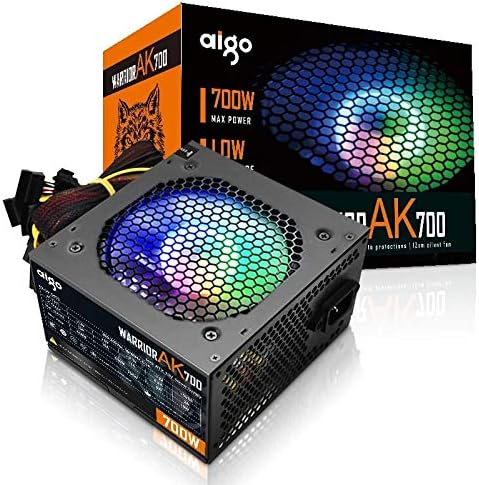
Figure 4.1: The Aigo Warrior AK700 Max 700W Power Supply, showcasing its RGB fan and retail packaging.
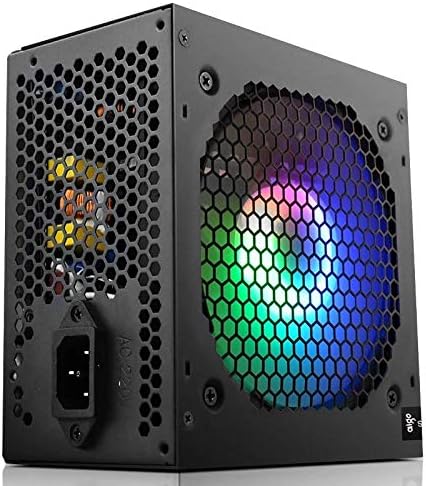
Figi 4.2: Side view of the power supply, highlighting the 12cm RGB cooling fan and honeycomb grille.

Figi 4.3: Dèyè view of the power supply, illustrating the exhaust grille and AC power input socket.
5. Enstalasyon ak Enstalasyon
Follow these steps to properly install the Aigo Warrior AK700 Max power supply into your computer system:
- Preparasyon: Asire w òdinatè w la etenn nèt epi li debranche nan priz miray la. Louvri bwat òdinatè w la.
- Retire ansyen PSU a (si sa aplikab): Disconnect all cables from your old power supply and remove its mounting screws. Carefully slide it out of the case.
- Enstale nouvo PSU a: Gently slide the Aigo Warrior AK700 Max into the power supply bay of your computer case. Ensure the fan is oriented correctly for optimal airflow (usually facing down or up, depending on your case design).
- Alimantasyon elektrik an sekirite: Align the screw holes on the power supply with those on your case. Secure the power supply using the provided mounting screws.
- Konekte kab:
- Konektè kat manman ATX 24-pin: Konekte kab prensipal 24-pin lan ak kat manman ou.
- CPU Power Connector (4+4 pin or 8-pin EPS): Connect the CPU power cable to the appropriate socket on your motherboard.
- PCIe Power Connectors (6+2 pin): Connect these to your graphics card(s) if required.
- Konektè pouvwa SATA: Connect to your storage drives (HDDs, SSDs) and optical drives.
- Peripheral (Molex) Connectors: Connect to other peripherals as needed.
- Jesyon kab: Chemen kab yo byen pou amelyore sikilasyon lè a ak estetik andedan bwat ou a.
- Fèmen Ka a: Once all connections are made and verified, close your computer case.
- Konekte AC Power: Plug the AC power cord into the power supply and then into a wall outlet.
6. Operasyon Enstriksyon
After successful installation, follow these steps to operate your computer system with the Aigo Warrior AK700 Max power supply:
- Pouvwa sou: Ensure the power switch on the back of the PSU is in the 'ON' (I) position. Press the power button on your computer case.
- Bòt sistèm: Your computer should now power on and begin its boot sequence. The RGB fan on the power supply will illuminate.
- Pouvwa Off: To turn off your computer, use the operating system's shutdown function. For a complete power cycle, switch the PSU to the 'OFF' (O) position after shutting down the computer.
The intelligent temperature control design automatically adjusts the fan speed to maintain optimal cooling and extend the lifespan of the unit, ensuring quiet operation under various loads.
7. Antretyen
Bon antretyen asire lonjevite ak pèfòmans optimal ekipman pou pouvwa ou a:
- Netwayaj pousyè: Periodically clean dust from the power supply's fan and vents using compressed air. Ensure the computer is powered off and unplugged before cleaning.
- Airflow: Ensure that the power supply's intake and exhaust vents are not obstructed by cables or other components within the computer case.
- Kondisyon anviwònman: Operate the power supply in a clean, dry environment with adequate ventilation.
- Pa demonte: Never attempt to open the power supply unit. There are no user-serviceable parts inside, and doing so will void your warranty and poses a risk of electric shock.
NAN. Depanaj
If you encounter issues with your Aigo Warrior AK700 Max power supply, refer to the following common problems and solutions:
| Pwoblèm | Kòz posib | Solisyon |
|---|---|---|
| Odinatè a pa limen. |
|
|
| Sistèm nan limen men li fèmen imedyatman. |
|
|
| Fan is not spinning or is excessively loud. |
|
|
If the problem persists after attempting these solutions, please contact Aigo customer support for further assistance.
9. Espesifikasyon
Detailed technical specifications for the Aigo Warrior AK700 Max 700W Power Supply:
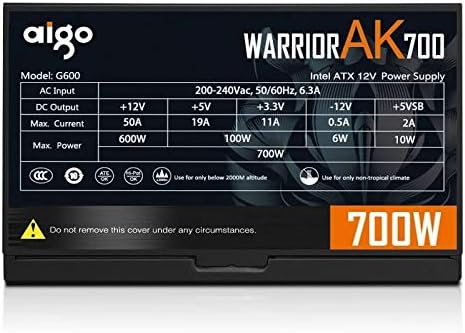
Figure 9.1: The specifications label found on the Aigo Warrior AK700 Max Power Supply.
| Karakteristik | Detay |
|---|---|
| Modèl | AK700 Max |
| Wattage | 700 Watts |
| Faktè fòm | ATX, ATX12V |
| Antre Voltage | 220V (Minimum 220V, Maximum 220V) |
| Metòd refwadisman | Refwadisman lè |
| Gwosè fanatik | 120 Millimeters (Hydraulic Bearing) |
| Aparèy konpatib | Odinatè pèsonèl |
| Kalite Connector | SATA, PCIe (6+2 pin), ATX 24-pin, EPS 4+4 pin |
| Karakteristik pwoteksyon | Overvoltage, Overcurrent, Overload, Undervoltage, Short Circuit, Light Protection |
| Pwa atik | 1.9 Kilogram |
| Dimansyon pake | 5 x 5 x 5 cm (apeprè) |
10. Garanti ak sipò
Pou enfòmasyon sou garanti ak sipò teknik, tanpri al gade paj ofisyèl Aigo a. websit la oubyen kontakte détayan lokal ou a. Kenbe prèv acha ou pou reklamasyon garanti.
Aigo Official Websit: www.aigocorp.com (Nòt: Sa a se yon espas rezève URL as no official website was provided in the product data. Please refer to actual product documentation for correct contact information.)