
1. Entwodiksyon
The ProForm Carbon T7 Smart Treadmill is designed to provide an effective and engaging cardiovascular workout experience in your home. Featuring a 7-inch HD touchscreen and integration with iFIT, this treadmill offers a variety of interactive training options. This manual provides essential information for the safe assembly, operation, maintenance, and troubleshooting of your Carbon T7 treadmill.

This image shows the ProForm Carbon T7 Smart Treadmill from a front-side angle, highlighting its console with a 7-inch HD touchscreen, the running deck, and the sturdy frame.
2. Enfòmasyon enpòtan sou sekirite
Before operating the ProForm Carbon T7 Smart Treadmill, please read all instructions carefully. Keep this manual for future reference. Failure to follow these instructions could result in injury or damage to the product.
- Toujou konsilte ak yon doktè anvan ou kòmanse nenpòt pwogram egzèsis.
- Place the treadmill on a level surface with at least 2 meters (6.5 feet) of clear space behind it and 0.5 meters (1.6 feet) on each side.
- Kenbe timoun ak bèt kay lwen tapi a pandan operasyon an.
- Pa sèvi ak tapi kous la si kòd kouran an oswa ploge a domaje, oubyen si li pa ap fonksyone byen.
- Wear appropriate exercise clothing and athletic shoes. Avoid loose clothing that could get caught in moving parts.
- Always use the safety key. Attach the clip to your clothing before starting the treadmill.
- Pa monte oswa desann tapi kous la pandan senti kous la ap deplase.
- Pa eseye ajiste oswa repare tapi kous la tèt ou. Kontakte pèsonèl sèvis kalifye.
3. Asanble
The ProForm Carbon T7 Treadmill requires assembly. For detailed, step-by-step 3D instructions, download the free Bilt app on your smartphone or tablet. Ensure all parts are present before beginning assembly. It is recommended to have two people for assembly due to the weight and size of the components.
- Unpack all components and place them on a clear, flat surface.
- Follow the instructions provided in the Bilt app or the included assembly guide.
- Ensure all bolts, nuts, and screws are securely tightened before use.

The ProForm Carbon T7 Smart Treadmill is shown in its upright, folded configuration, illustrating its SpaceSaver design for compact storage when not in use.
4. Operasyon
4.1 Kòmanse
- Koneksyon pouvwa: Ploge kòd la pouvwa nan yon priz baz.
- Kle sekirite: Attach the safety key clip to your clothing and insert the safety key into the console. The treadmill will not operate without the safety key in place.
- Standing on the Treadmill: Stand on the foot rails, not the running belt, before starting your workout.
- Kòmanse yon antrennman: Peze bouton 'Start' la sou konsole a. Senti a ap kòmanse deplase a yon vitès ki ba.
4.2 Using the Console and 7" HD Touchscreen
The Carbon T7 features a 7-inch HD interactive touchscreen display that allows you to stream iFIT workouts directly. The console also includes physical buttons for quick adjustments.
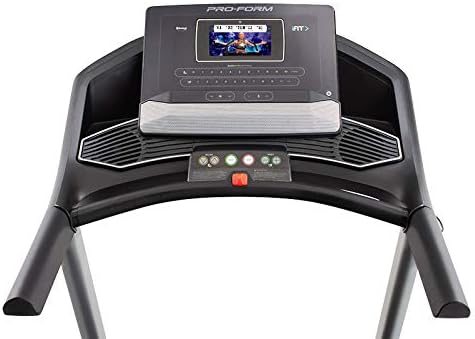
Yon detaye view of the treadmill's console, featuring the 7-inch HD touchscreen display, control buttons for speed and incline, and integrated speakers.
- Navigasyon ekran tactile: Use the touchscreen to browse iFIT workouts, adjust settings, and view workout metrics.
- QuickSpeed Controls: Use the 'Speed' buttons or quick-select buttons on the console to adjust the running belt speed from 0 to 10 MPH.
- Quick Incline Controls: Use the 'Incline' buttons or quick-select buttons to adjust the incline from 0% to 10%.
- Sispann yon antrennman: Press the 'Stop' button to pause or end your workout. Remove the safety key to fully power off the treadmill.
4.3 iFIT Integration
Your ProForm Carbon T7 Treadmill includes a 30-Day iFIT Family Membership. iFIT provides access to live workouts, studio classes, and global workouts led by expert personal trainers. With iFIT, your trainer can auto-adjust your treadmill's speed and incline for an optimized and immersive exercise experience.
- Activating iFIT: Follow the on-screen prompts on the 7-inch HD touchscreen to activate your iFIT membership.
- Seleksyon antrennman: Browse the iFIT library for a wide range of workouts, including running, walking, and cross-training.
- Trainer Control: During iFIT workouts, the treadmill's speed and incline may automatically adjust according to the trainer's program. You can override these adjustments manually if needed.

A woman is shown actively running on the ProForm Carbon T7 Smart Treadmill, demonstrating its use in a typical home environment. The treadmill's running deck and console are visible.
5. Antretyen
Regular maintenance ensures the longevity and optimal performance of your ProForm Carbon T7 Treadmill.
- Netwayaj: Regularly wipe down the treadmill surfaces with a damp twal. Evite itilize pwodui netwayaj abrazif oswa solvang.
- Belt Cleaning: Periodically clean the running belt and the area beneath it to prevent debris buildup.
- Lubrification Belt: The running belt is pre-lubricated. Refer to the full product manual for specific lubrication instructions and frequency, typically required after a certain number of hours of use.
- Aliyman ak Tansyon Senti: Check the running belt for proper alignment and tension. Adjust as needed according to the detailed instructions in the full product manual.
- Enspeksyon fil elektrik: Enspekte kòd kouran an pou wè si li domaje. Si li domaje, sispann itilize li epi kontakte sèvis kliyan.
NAN. Depanaj
If you encounter issues with your ProForm Carbon T7 Treadmill, refer to the table below for common problems and solutions.
| Pwoblèm | Kòz posib | Solisyon |
|---|---|---|
| Tapis roulan an pa limen. | Kòd kouran an pa branche; disjonktè a sote; kle sekirite a pa antre nan plas li. | Asire w kòd kouran an byen branche. Tcheke disjonktè kay la. Mete kle sekirite a nèt nan konsole a. |
| Running belt does not move. | Safety key not inserted; 'Start' button not pressed; motor overload. | Insert safety key. Press 'Start'. If motor overload, reduce load and try again. |
| Senti a glise oswa li ezite. | Tansyon senti a twò lach; senti a bezwen wilaj. | Adjust belt tension according to the full manual. Lubricate the belt if necessary. |
| Console display is blank or unresponsive. | Pwoblèm kouran; pwoblèm lojisyèl. | Ensure power is connected. Try unplugging the treadmill for 60 seconds and plugging it back in. If issue persists, contact customer support. |
7. Espesifikasyon
Key technical specifications for the ProForm Carbon T7 Smart Treadmill:
| Karakteristik | Detay |
|---|---|
| Nimewo Modèl | PFTL87720 |
| Dimansyon pwodwi (L x W x H) | 186.69 santimèt x 89.41 santimèt x 146.05 santimèt (73.5" x 35.2" x 57.5") |
| Pwa atik | 97.98 kg (216 liv) |
| Motè puisans | 2.6 CHP (Continuous Horsepower) |
| Range vitès | 0-10 MPH (0-16 KPH) |
| Ranje Incline | 0-10% Digital Quick Incline |
| Tread Belt Size | 20" x 55" (51 santimèt x 140 santimèt) |
| Ekspozisyon | 7" HD Interactive Touchscreen |
| Kapasite pwa | 300 liv (136 kg) |
| Materyèl ankadreman | Alloy Steel |
| Sous pouvwa | Fil elektrik |
| Karakteristik espesyal | SpaceSaver Design, ISO Flex Deck Cushioning |
8. Garanti ak Sipò Kliyan
Your ProForm Carbon T7 Smart Treadmill is backed by a comprehensive warranty to ensure your peace of mind.
- Garanti ankadreman: 10 ane
- Pati ak garanti travay: 1 ane
For warranty claims, technical assistance, or to order replacement parts, please contact ProForm customer support. Refer to the contact information provided in your product packaging or on the official ProForm websit.