
Entwodiksyon
The AgraTronix Ag-MAC Plus is a precision instrument designed for accurately measuring the moisture content and test weight of various grains. This manual provides essential information for the proper setup, operation, and maintenance of your device to ensure reliable performance.
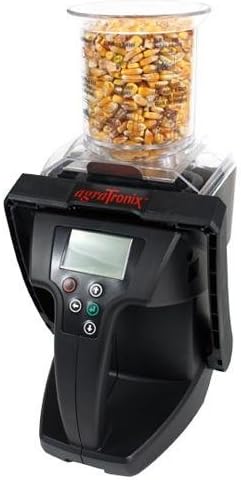
Image: The AgraTronix Ag-MAC Plus Grain Moisture Tester, shown with a sample of corn in its transparent hopper, ready for measurement. The device features an LCD display and control buttons.
Karakteristik pwodwi
- Direct readout for 20 different grain scales.
- Displays grain test weight without the need for pre-weighing.
- Measures moisture content quickly and accurately.
- Non-compaction design ensures consistent sample dansite.
- Integrated LCD display for clear readings.
- USB compatibility for data transfer.
- Automatic temperature compensation for enhanced accuracy.
Enstalasyon
1. Debake
Carefully remove the Ag-MAC Plus tester and all accessories from its packaging. Inspect the device for any signs of damage. Retain the packaging for future storage or transport.
2. Enstalasyon batri
- Locate the battery compartment, typically on the underside or rear of the unit.
- Louvri kouvèti lòj la.
- Mete kat (4) pil AA, asire w polarite ki kòrèk la (+/-) jan yo endike anndan konpatiman an.
- Fèmen kouvèti lòj batri a byen.
3. Premye Limen
Press the power button to turn on the device. The LCD display should illuminate, indicating the device is ready for operation. If the display does not turn on, recheck battery installation or replace with fresh batteries.
Enstriksyon Operasyon
1. Selecting Grain Scale
- Turn on the Ag-MAC Plus tester.
- Use the navigation buttons (usually up/down arrows) to scroll through the available grain scales on the LCD display.
- Select the appropriate grain type that matches your sample.
2. Chaje Sample
- Asire s laample hopper is clean and empty.
- Pour the grain sample into the hopper. The non-compaction design allows for consistent sample loading without manual packing.
- Fill the hopper to the indicated level for accurate measurement.
3. Taking a Reading
- Once the grain scale is selected and the sample is loaded, press the 'Measure' or 'Enter' button (refer to device specific button labels).
- The device will automatically perform the measurement, including temperature compensation.
- The moisture content (in percentage) and grain test weight will be displayed on the LCD.
4. Konprann Lekti yo
The display resolution for moisture is 0.1%. The device provides direct readings, eliminating the need for manual calculations. Automatic temperature compensation ensures accuracy across varying environmental conditions.
Supported Grain Scales
The AgraTronix Ag-MAC Plus supports direct readout for the following grain types:
- Barley 2R
- Barley 6R
- Mayi
- Oats
- Rapeseed (Canola)
- Rye
- Safran
- Sorgo (Milo)
- Pwa soya
- Lwil tounsòl
- Triticale
- Wheat: Durum
- Wheat: Hard Red Spring
- Wheat: Hard Red Winter
- Wheat: Soft Red Winter
Antretyen
1. Netwayaj
Regilyèman netwaye s laample hopper and any grain contact surfaces to prevent contamination and ensure accurate readings. Use a soft, dry cloth or brush. Do not use abrasive cleaners or immerse the device in water.
2. Depo
Store the Ag-MAC Plus tester in a cool, dry place away from direct sunlight and extreme temperatures. If storing for extended periods, remove the batteries to prevent leakage.
3. Ranplasman batri
Replace batteries when the low battery indicator appears on the LCD or if the device fails to power on. Always use fresh AA alkaline batteries.
Depanaj
- Aparèy pa limen: Tcheke enstalasyon pil yo epi asire w pil yo fre.
- Lekti ki pa kòrèk: Ensure the correct grain scale is selected. Verify the sample hopper is clean and free of debris. Ensure the sample is loaded correctly without compaction.
- Pwoblèm ekspozisyon: If the LCD is dim or flickering, replace the batteries.
- Kòd erè: Refer to the full manufacturer's manual for specific error code interpretations and solutions.
Espesifikasyon
| Ranje imidite | 6% – 45% (depending on grain tested) |
|---|---|
| Ranje Tanperati | 40 ° - 113 ° F (5 ° - 45 ° C) |
| Repetabilite ak Presizyon | ±0.3% in normal moisture range for stored grain |
| Rezolisyon ekspozisyon | 0.1% imidite |
| Sous pouvwa | 4 pil AA |
| Design | Non-compaction |
| Koneksyon | USB konpatib |
Garanti ak sipò
The AgraTronix Ag-MAC Plus Grain Moisture Tester is covered by a manufacturer's warranty. For detailed information regarding warranty terms, conditions, and duration, please refer to the documentation included with your product or visit the official AgraTronix website. For technical support, service, or parts, please contact AgraTronix customer service directly.