
SUNMI TF700
SUNMI M2 MAX Industrial Tablet User Manual
Modèl: TF700
Entwodiksyon
This manual provides comprehensive instructions for the safe and efficient use of your SUNMI M2 MAX Industrial Tablet, model TF700. Please read this manual thoroughly before operating the device and retain it for future reference.

Figi 1: Devan view of the SUNMI M2 MAX Industrial Tablet, showing its display with various application icons.
Enstalasyon
1. Unboxing ak Inisyal Enspeksyon
Retire tout konpozan yo nan anbalaj la avèk prekosyon. Verifye ke tout atik ki nan lis anba a yo prezan epi yo pa domaje:
- SUNMI M2 MAX Industrial Tablet (TF700)
- Adaptè pouvwa
- USB Kalite-C kab
- Hand Strap (optional, if included with your model)
2. Chaje Aparèy la
Before first use, fully charge the tablet. Connect the USB Type-C cable to the tablet's charging port and the other end to the power adapter. Plug the power adapter into a wall outlet. The charging indicator will illuminate.
The tablet is equipped with an 8360mAh non-removable lithium polymer battery. A full charge can provide over 12 hours of continuous operation.
3. Installing SIM Card and MicroSD Card (Optional)
The device supports MicroSIM or NanoSIM cards (Config 1) and an eSIM (Config 2). It also supports MicroSD cards up to 128GB for expanded storage.
- Locate the SIM/MicroSD card slot on the side of the tablet.
- Use the provided SIM ejector tool (if applicable) or a small paperclip to open the tray.
- Carefully place the SIM card(s) and/or MicroSD card into the tray according to the diagram on the tray.
- Dousman pouse plato a tounen nan fant lan jiskaske li fè yon klik.

Figi 2: Dèyè view of the SUNMI M2 MAX, highlighting the camera, pogo pin charging interface, and the location of the SIM/MicroSD card slot.
4. Attaching the Hand Strap (Optional)
If your model includes a hand strap, attach it to the designated points on the back of the tablet for secure handling during mobile operations.
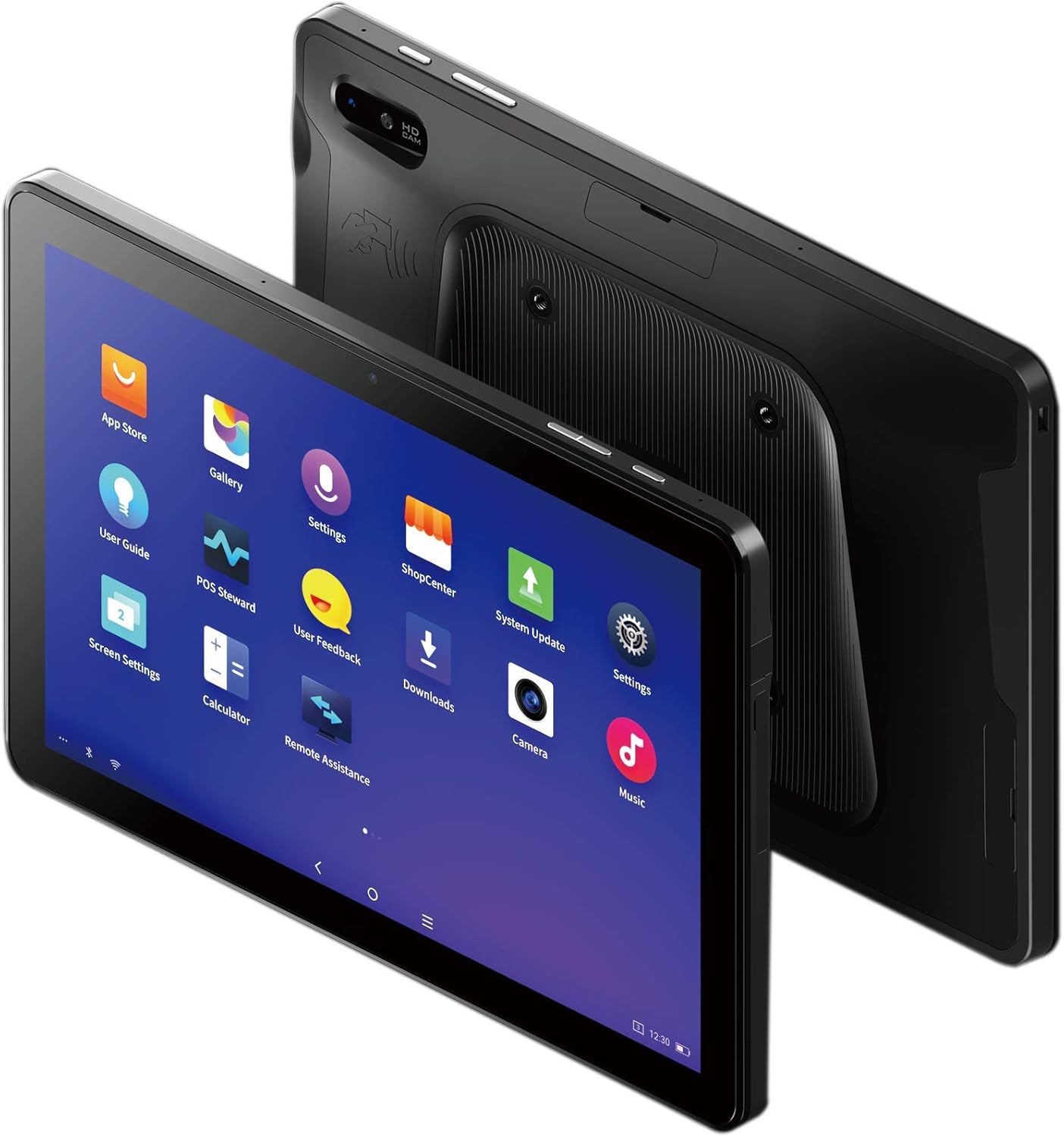
Figure 3: The SUNMI M2 MAX Industrial Tablet being held with an optional hand strap, demonstrating enhanced portability and secure grip.
Opere Aparèy la
1. Power On/Off
- Pouvwa sou: Press and hold the Power button (located on the side) until the SUNMI logo appears on the screen.
- Pouvwa Off: Press and hold the Power button until a power-off menu appears. Select "Power Off" and confirm.
- Rekòmanse: From the power-off menu, select "Restart" to reboot the device.
2. Navigasyon debaz
The SUNMI M2 MAX runs on the Android operating system. Navigation is primarily touch-based:
- Tape: Pou chwazi yon atik oubyen louvri yon aplikasyon.
- Glise: To scroll through lists or switch between screens.
- Zoom-pou-zoom: Pou agrandi oswa diminye imaj yo oubyen web paj.
- Bouton Kay: Retounen nan ekran kay la.
- Bouton tounen: Retounen nan ekran anvan an.
- Bouton Aplikasyon Dènye: Montre dènyèman itilize aplikasyon yo.
3. Konekte ak rezo
The tablet supports Wi-Fi (2.4GHz/5GHz, 802.11 a/b/g/n/ac) and cellular networks (2G, 3G, 4G).
- Wi-Fi: Ale nan Anviwònman > Rezo ak entènèt > Wi-Fi. Turn Wi-Fi on, select your desired network, and enter the password if required.
- Done selilè: Ensure a valid SIM card is inserted. Go to Anviwònman > Rezo ak entènèt > Rezo mobil to enable mobile data and configure APN settings if necessary.
- Bluetooth: Ale nan Anviwònman > Aparèy konekte > Bluetooth to pair with Bluetooth devices (supports Bluetooth 5.0).
4. Using NFC
The SUNMI M2 MAX is equipped with NFC (Near Field Communication) for contactless transactions and data exchange. To use NFC, ensure it is enabled in settings and hold the tablet near a compatible NFC reader or device.
5. Operasyon Kamera
The tablet features a 13 MP rear camera with flash and autofocus, and a 5 MP front camera. Open the "Camera" application to capture photos or record videos.
Antretyen
1. Netwaye Aparèy la
Sèvi ak yon ti moso twal mou, ki san pèl dampened with water or a screen cleaner to wipe the display and exterior. Avoid using harsh chemicals, abrasive cleaners, or excessive moisture.
2. Swen batri
- Avoid exposing the tablet to extreme temperatures (below -20°C or above 70°C).
- Pa kite batri a dechaje nèt souvan.
- Use only the original or certified compatible power adapter and cable.
3. Mizajou lojisyèl
Tcheke epi enstale mizajou sistèm yo regilyèman pou asire pèfòmans ak sekirite optimal. Ale nan Anviwònman > Sistèm > Mizajou sistèm.
4. Pwoteksyon anviwònman
The SUNMI M2 MAX is designed with IP68 protection and a 1m drop specification, making it suitable for demanding environments. However, avoid intentional drops or prolonged submersion in water.
Depanaj
| Pwoblèm | Kòz posib | Solisyon |
|---|---|---|
| Aparèy pa limen. | Batri fèb; lojisyèl la kraze. | Chaje aparèy la pou omwen 30 minit. Peze epi kenbe bouton Pouvwa a pandan 10-15 segonn pou fòse rekòmanse li. |
| Pa ka konekte ak Wi-Fi. | Incorrect password; Wi-Fi disabled; router issue. | Verify password. Ensure Wi-Fi is enabled in settings. Restart router. Forget and reconnect to the network. |
| Touchscreen pa reponn. | Pwoblèm lojisyèl tanporè. | Fòse rekòmanse aparèy la lè w kenbe bouton Pouvwa a peze. |
| Applications crashing. | Insufficient RAM; app bug. | Close background apps. Clear app cache/data (Settings > Apps). Update the app. |
Espesifikasyon
The following table outlines the key technical specifications of the SUNMI M2 MAX Industrial Tablet (Model: TF700).

Figure 4: Comprehensive technical specifications for the SUNMI M2 MAX Industrial Tablet.
- Modèl: TF700
- Sistèm operasyon: Android 9.0 (SUNMI OS)
- Processeur: Kryo-260, Octa-core 2.2GHz (Qualcomm)
- memwa: 3GB RAM + 32GB ROM (eMMC)
- Ekspozisyon: 10.1-inch FHD, 1920x1200, Capacitive multitouch, Corning Gorilla Glass 3
- Kamera: Front: 5MP FF; Rear: 13MP AF + Flashlight, supports 1D/2D barcode recognition
- NFC: Type-A&B card, Mifare card, Felica card, ISO/IEC 14443 and ISO/IEC 15693 compliant
- Speaker/MIC: 1W Speaker, 2x MIC
- Plas kat PSAM: 1x PSAM
- Fant kat SIM: 1x MicroSD (TF), 1x MicroSIM or 1x NanoSIM (TF700 Config 1), eSIM (TF700 Config 2)
- Rezo: 2G & 3G & 4G
- Wi-Fi: 2.4GHz/5GHz, 802.11 a/b/g/n/ac
- Bluetooth: Supports Bluetooth 2.1/3.0/4.2/5.0 (BLE)
- GPS: Supports AGPS, GPS, GLONASS, Beidou (Config 2)
- Capteur: Gravity sensor, light sensor, compass, Hall
- Bouton: 1x Power (lock screen), 2x Volume (+/-)
- Pò: 1x Type-C (supports OTG), 1x Audio Jack, 1x MicroSD (up to 128GB expansion)
- Batri: Non-removable Lithium Polymer battery, 8360mAh
- Adaptè pouvwa: Input: AC 100-240V, Output: DC 5V/2A
- Dimansyon (LxWxH): 249.8 x 160 x 9.9 mm (0.39 x 6.3 x 9.84 pous)
- Pwa total: 673g (1.48 liv)
- Pwoteksyon: IP68, 1m drop spec
- Tanperati operasyon: -20 ° C a 55 ° C
- Tanperati Depo: -40 ° C a 70 ° C
Garanti ak sipò
For warranty information and technical support, please refer to the documentation provided with your purchase or visit the official SUNMI websit la. Kenbe prèv acha ou pou reklamasyon garanti.
SUNMI Official Websit: www.sunmi.com
Ask a question about this manual
Ask about setup, troubleshooting, compatibility, parts, safety, or missing instructions. Manuals+ will review the question and use this page’s manual context to help answer it.