
ELEPHAS JingHuier
ELEPHAS Mini Portable Projector User Manual
Model: JingHuier
1. Entwodiksyon
Mèsi pou acha aasing the ELEPHAS Mini Portable Projector. This compact and versatile projector is designed to provide an immersive viewing experience for movies, videos, and games, whether at home or on the go. Its small size and multiple connectivity options make it an ideal entertainment solution for various environments. Please read this manual thoroughly before using the projector to ensure proper operation and to maximize its lifespan.
Ki sa ki nan bwat la:
- ELEPHAS Mini Portable Projector
- HDMI kab
- AV Kab
- Kontwòl Remote
- Kòd pouvwa
- Manyèl Itilizatè (dokiman sa a)
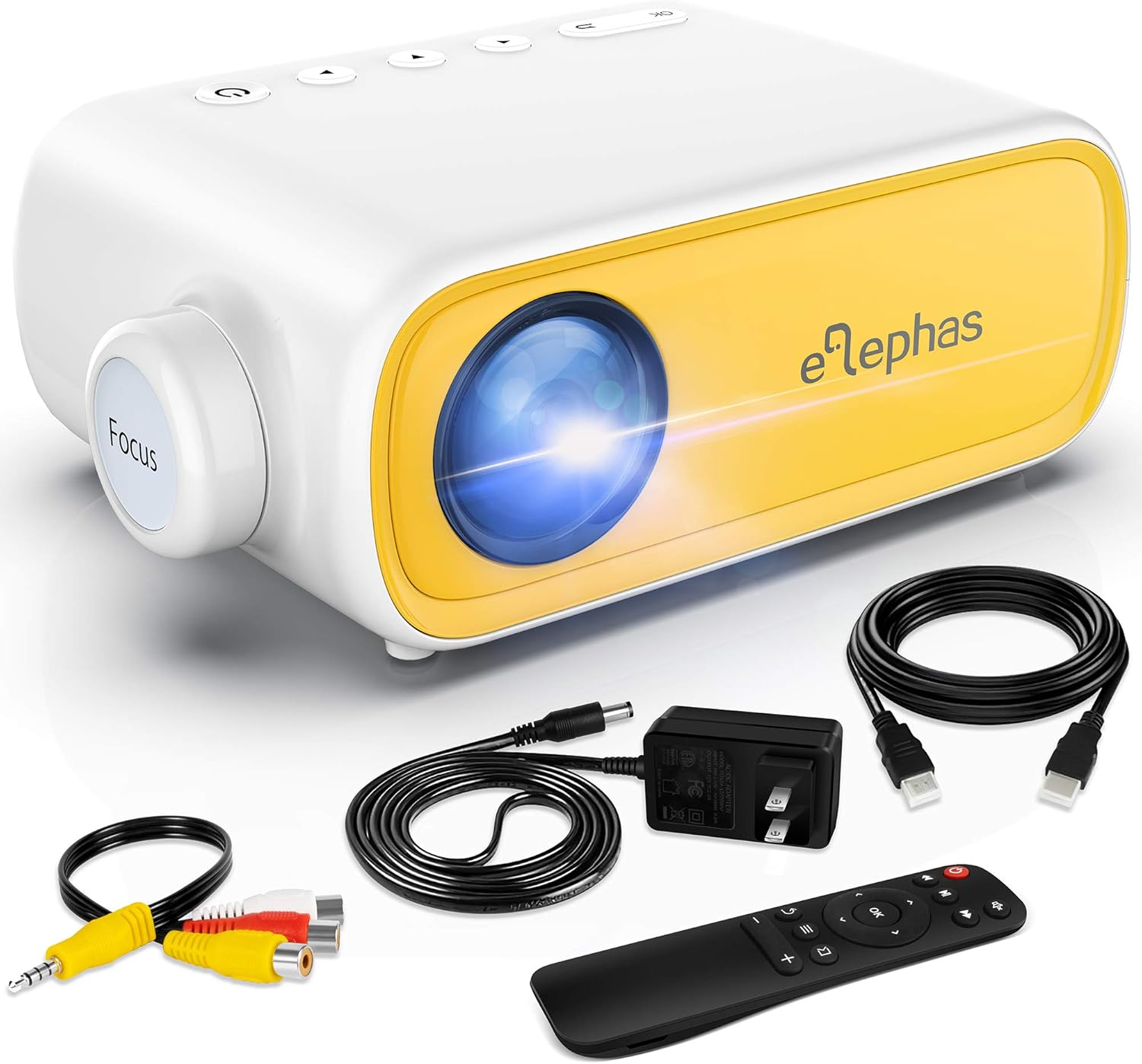
Figure 1.1: ELEPHAS Mini Portable Projector with its accessories including HDMI cable, AV cable, remote control, and power cord.
2. Enfòmasyon sou Sekirite
To ensure safe and optimal operation of your projector, please observe the following safety precautions:
- Pwovizyon pou pouvwa: Use only the original power adapter and cord provided with the projector. Ensure the power outlet matches the voltage kondisyon.
- Vantilasyon: Do not block the ventilation openings on the projector. Ensure adequate airflow around the device to prevent overheating.
- Plasman: Mete pwojektè a sou yon sifas ki plat e ki estab. Evite mete l anba limyè solèy dirèk, toupre sous chalè, oswa nan anviwònman ki gen anpil imidite oswa pousyè.
- Sekirite je: Pa gade dirèkteman nan lantiy pwojektè a lè l ap limen.amp is on. The bright light can cause eye strain or damage.
- Netwayaj: Disconnect the power before cleaning. Use a soft, dry cloth for cleaning the exterior. For the lens, use a specialized lens cleaning cloth.
- Timoun: Keep the projector and its accessories out of reach of small children. Adult supervision is recommended when children are using the device.
- Demonte: Pa eseye demonte oswa repare pwojektè a tèt ou. Konfye tout antretyen bay pèsonèl kalifye.
3. Pwodwi souview ak Konpozan
Familiarize yourself with the various parts and interfaces of your ELEPHAS Mini Portable Projector.

Figi 3.1: Dèyè ak bò view of the projector highlighting its input/output ports.
Konpozan kle:
- Lantiy: Pwojte imaj la sou ekran an.
- Bag konsantre: Ajiste klète imaj pwojekte a.
- Pò DC-IN: Pou konekte adaptè pouvwa a.
- Pò AV: For connecting devices using the included AV cable.
- HDMI Port: For connecting devices with HDMI output (e.g., laptops, game consoles, TV boxes).
- Pò USB: Pou konekte kle USB pou jwe medya files.
- Audio Out (3.5mm) Port: Pou konekte oratè ekstèn oswa kas ekoutè.
- Micro SD/TF Card Slot: Pou jwe medya files directly from a Micro SD card.
- Oratè entegre: Bay pwodiksyon odyo.
- Bouton kontwòl: Power, navigation, and input selection buttons on top of the projector.
- Capteur Remote Control: Resevwa siyal soti nan kontwòl la remote.
4. Enstalasyon
4.1 Koneksyon pouvwa:
- Konekte fil elektrik la ak adaptè pouvwa a.
- Plug the power adapter into the DC-IN port on the projector.
- Ploge lòt bout kòd kouran an nan yon priz miray.
4.2 Placement and Projection Distance:
Place the projector on a stable surface. The optimal projection distance ranges from 0.8 to 2 meters (approximately 31 to 79 inches) for a screen size of 24 to 60 inches. Adjust the distance to achieve your desired screen size.

Figure 4.1: Recommended projection distances and screen sizes.
4.3 Ajisteman Konsantrasyon:
After powering on the projector, rotate the focus ring on the front of the projector until the image appears clear and sharp on the projection surface.
5. Operasyon Enstriksyon
5.1 Limen/Etenyen:
- Pou limen: Peze bouton pouvwa a sou pwojektè a oswa sou kontwòl remote la. Limyè endikatè a ap limen.
- Pou etenn: Peze bouton pouvwa a ankò. Pwojektè a ap fèmen.
5.2 Input Source Selection:
After connecting your device, press the "Source" button on the projector or remote control to select the correct input source (e.g., HDMI, AV, USB, Micro SD).
5.3 Kontwòl Volim:
Use the volume buttons on the remote control to adjust the audio output level. You can also connect external speakers or headphones to the 3.5mm audio out port for enhanced sound.
6. Koneksyon
6.1 Connecting to Laptops/PCs/Game Consoles (HDMI):
- Connect one end of the HDMI cable to the HDMI port on your device.
- Connect the other end of the HDMI cable to the HDMI port on the projector.
- Select "HDMI" as the input source on the projector.
6.2 Connecting to USB Drives/Micro SD Cards:
- Insert your USB drive into the USB port or your Micro SD card into the TF card slot.
- Select "USB" or "Micro SD" as the input source.
- Navige atravè medya yo files using the remote control and select the desired content to play.
6.3 Connecting to Smartphones/Tablets:
To connect your smartphone or tablet, you will need an appropriate adapter (not included):
- For iOS devices (iPhone/iPad): A Lightning to HDMI adapter is required.
- For Android devices: A Micro USB to HDMI or Type-C to HDMI adapter is required.
- For wireless connection: A Wi-Fi network adapter (dongle) is needed.
Once connected via the adapter, select "HDMI" as the input source.

Figure 6.1: Smartphone connectivity options using HDMI adapters (adapters not included).
6.4 Streaming Services Note:
Due to HDCP copyright restrictions, this mini projector does not directly support streaming from apps like Netflix, Amazon Prime Video, or Hulu when connected via smartphone mirroring. To watch content from these services, you can use an external streaming device such as an Amazon Fire Stick or Roku Stick, connected to the projector's HDMI port.
7. Antretyen
- Netwayaj lantiy: Gently wipe the projector lens with a soft, lint-free cloth specifically designed for optical lenses. Do not use abrasive cleaners or harsh chemicals.
- Netwayaj eksteryè: Sèvi ak yon twal mou epi sèk pou netwaye deyò pwojektè a. Pou mak ki difisil pou retire, yon ti kras twal sèk.amp Ou ka itilize yon twal, epi apre sa, siye l sèk.
- Vantilasyon: Regularly check that the ventilation openings are free from dust and debris to ensure proper heat dissipation.
- Depo: Lè w pa itilize pwojektè a pou yon bon bout tan, sere l nan yon kote ki fre epi sèk, lwen limyè solèy dirèk ak tanperati ekstrèm. Li rekòmande pou w itilize anbalaj orijinal la pou depo.
NAN. Depanaj
| Pwoblèm | Kòz posib | Solisyon |
|---|---|---|
| Pa gen pouvwa | Kòd kouran an pa konekte; pwoblèm ak priz kouran an. | Asire w kòd kouran an byen konekte. Eseye yon lòt priz kouran. |
| Pa gen Imaj | Incorrect input source selected; device not connected properly. | Select the correct input source (HDMI, AV, USB). Check all cable connections. |
| Imaj flou | Focus not adjusted; projection distance incorrect. | Rotate the focus ring until the image is clear. Adjust the projector's distance from the screen. |
| Pa gen Son | Volume too low; external speakers not connected; audio format not supported. | Increase volume. Ensure external speakers are connected correctly or disconnect them to use built-in speaker. Check audio format compatibility. |
| Remote Control pa travay | Batteries low/dead; sensor blocked. | Replace batteries. Ensure no obstructions between remote and projector sensor. |
9. Espesifikasyon
| Karakteristik | Detay |
|---|---|
| Nimewo Modèl | JingHuier |
| Mak | ELEPHAS |
| Dimansyon pwodwi | 5 x 3.6 x 2.16 pous |
| Pwa atik | 10.4 ons |
| Rezolisyon ekspozisyon | 1920 x 1080 (Sipòte) |
| Koneksyon Teknoloji | HDMI, USB, AV, 3.5mm Audio, Micro SD/TF |
| Karakteristik espesyal | Oratè entegre, pòtab |
| Manifakti | ELEPHAS |
| Premye Dat ki disponib | 28 oktòb 2020 |

Figure 9.1: The compact dimensions of the projector, emphasizing its portability.
10. Garanti ak sipò
ELEPHAS products are manufactured to the highest quality standards. For information regarding warranty coverage, please refer to the warranty card included with your product or visit the official ELEPHAS websit.
If you encounter any issues or have questions about your ELEPHAS Mini Portable Projector, please contact our customer support team. Provide your model number (JingHuier) and a detailed description of the issue for prompt assistance.
Pou plis asistans, ou ka vizite ELEPHAS Store on Amazon.
Dokiman ki gen rapò - JingHuier
 |
ELEPHAS W13 Mini Projector User Manual and Setup Guide Comprehensive user manual for the ELEPHAS W13 Mini Projector, covering setup, wireless and wired connections (iOS, Android), settings, troubleshooting, and safety information. Learn how to connect your devices and optimize your vieweksperyans nan. |
 |
Elephas YG691 Movin Projector User Manual Comprehensive user manual for the Elephas YG691 Movin projector, covering setup, connection guides, maintenance, and troubleshooting. |
 |
ELEPHAS BL128 Pwojektè LCD LED Full HD pòtab - Espesifikasyon ak Karakteristik Dekouvri pwojektè LCD LED pòtab ELEPHAS BL128 la, ki ofri yon rezolisyon Full HD 1080P, 320 ANSI lumen, yon kontras 6000:1, epi yon lektè medya entegre ak Miracast ak Airplay. Ideyal pou amizman lakay ou. |
 |
Espesifikasyon Pwojektè LCD LED pòtab ELEPHAS BL128 pou jwèt Dekouvri ELEPHAS BL128 la, yon pwojektè LCD LED pòtab pou jwèt videyo ki gen 320 Ansi-Lumen, yon kontras 6000:1, ak yon rezolisyon HDTV 1920x1080. Avèk yon dire lavi 60,000 èdtan.amp life ak jwè medya entegre, li sipòte Airplay, Miracast, ak plizyè fòma medya pou amizman versatile. |
 |
ELEPHAS YG561 LCD LED Projector Specifications Technical specifications and features for the ELEPHAS YG561 LCD LED projector, including resolution, connectivity, and performance details. |
 |
Pwojektè LCD LED pòtab Elephas W13 - Full HD 1080p Espesifikasyon ak karakteristik detaye sou pwojektè pòtab LCD LED Elephas W13 la, ki gen ladan rezolisyon Full HD 1080p li a, lektè medya entegre li a, koneksyon Wi-Fi li a, ak operasyon silansye li a. |
Ask a question about this manual
Ask about setup, troubleshooting, compatibility, parts, safety, or missing instructions. Manuals+ will review the question and use this page’s manual context to help answer it.