
1. Entwodiksyon
Thank you for choosing the XTUGA ES USB/MP3/Bluetooth Professional Audio Mixer. This manual provides essential information for the safe and efficient operation of your mixer. Please read it thoroughly before use and retain it for future reference.
The XTUGA ES series mixers (ES802/ES1202) are designed for professional audio applications, offering features such as USB/MP3 playback and recording, Bluetooth connectivity, built-in digital effects, and +48V phantom power for condenser microphones. Its ultra-thin design and robust metal chassis make it suitable for various environments, including DJ setups, stage performances, and recording studios.
2. Enstriksyon Sekirite
- Pwovizyon pou pouvwa: Sèvi ak adaptè kouran espesifye a sèlman. Asire w ke vòl latage matche ak ekipman pou kouran lokal ou a.
- Vantilasyon: Pa bloke ouvèti vantilasyon yo. Asire w ke gen ase lè k ap sikile toutotou aparèy la pou anpeche l chofe twòp.
- Dlo ak imidite: Pa ekspoze mixer la anba lapli, imidite, oswa okenn likid. Pa mete objè ki plen likid sou mixer la.
- Sous Chalè: Keep the mixer away from heat sources such as radiators, heat registers, stoves, or other apparatus (including amplifiers) ki pwodui chalè.
- Netwayaj: Clean only with a dry cloth. Disconnect the power before cleaning.
- Sèvis: Pa eseye fè sèvis pwodui sa a tèt ou. Refere tout sèvis yo bay pèsonèl sèvis kalifye.
- Atè: Asire bon baz pou anpeche chòk elektrik.
- Jesyon kab: Pwoteje kòd kouran yo pou yo pa mache sou yo oswa pou yo pa kwense yo, sitou nan ploge yo, priz kouran yo, ak kote yo soti nan aparèy la.
3. Pwodwi souview
The XTUGA ES series mixer features a compact, durable design with a comprehensive set of controls for versatile audio mixing. It includes multiple input channels, a 3-band equalizer per channel, built-in digital effects, and various connectivity options.

Figi 3.1: Devan view of the XTUGA ES Series Professional Audio Mixer, showing all input channels, faders, EQ knobs, and the central control panel with USB/MP3 display.
Karakteristik kle:
- Chanèl: Available in 8 or 12 mono channel configurations with stereo inputs.
- Preamplifiers: High-quality microphone preamplifikatè.
- Egalizasyon: 3-band EQ on each mono channel for precise tone shaping.
- Koneksyon: USB/MP3 playback and recording, Bluetooth function for wireless audio streaming.
- Phantom pouvwa: +48V pouvwa fantom pou mikwofòn kondansateur.
- Efè dijital: Built-in digital effects processor.
- Siveyans: Headphone monitoring and dual 12-band main level display.
- Konsepsyon dirab: Ultra-thin metal chassis for durability and portability.
4. Enstalasyon
4.1 Koneksyon pouvwa
- Ensure the mixer's power switch is in the "OFF" position.
- Connect the provided power adapter to the mixer's power input.
- Branche adaptè kouran an nan yon priz kouran AC ki apwopriye.
- Turn the mixer's power switch to "ON". The power indicator will illuminate.
4.2 Koneksyon Antre
The mixer supports various input sources:
- Mikwofòn: Connect microphones to the XLR inputs (MIC) on each channel. For condenser microphones requiring phantom power, ensure the +48V button is activated (see Section 5.2).
- Aparèy Nivo Liy: Connect instruments, keyboards, or other line-level devices to the 1/4" TRS/TS LINE inputs on each channel.
- Antre Estereo: Use the dedicated stereo input channels for devices like CD players or external media players.
4.3 Koneksyon Sòti
- Main Sòti: Konekte oratè prensipal ou yo oubyen amplifier to the MAIN L/R outputs (XLR or 1/4" TRS).
- Sòti ekoutè: Connect headphones to the PHONES output for monitoring.
- Voye AUX: Use the AUX SEND output to connect to external effects processors or monitor speakers.
4.4 Koneksyon Odinatè (USB)
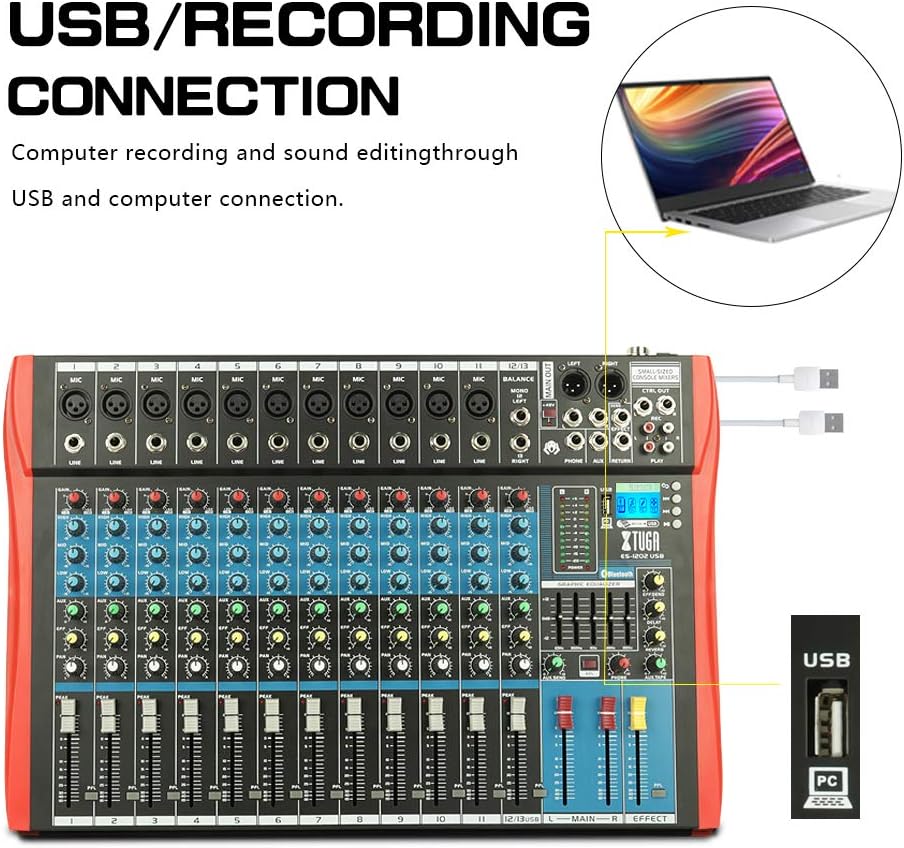
Figi 4.1: Diagram illustrating the USB connection for computer recording and sound editing. Connect the mixer's USB port to your computer using a standard USB cable.
To use the mixer with a computer for recording or playback:
- Konekte yon kab USB soti nan pò USB mixer a nan yon pò USB ki disponib sou òdinatè w la.
- The mixer will typically be recognized as a standard audio device. No special drivers are usually required for basic functionality.
- Select the mixer as your input/output device in your computer's sound settings or digital audio workstation (DAW) software.
5. Operasyon Enstriksyon
5.1 Kontwòl Chanèl
- GAY: Adjusts the input sensitivity for each channel. Set this to achieve a strong signal without clipping (the PEAK LED should only flash occasionally).
- Egalizè (WO, MWAYEN, BA): 3-band equalizer for shaping the tone of each channel.

Figi 5.1: Visual representation of the 3-band EQ frequency response curves. The HIGH band boosts/cuts above 12kHz, the MID band sweeps from 250Hz to 6kHz, and the LOW band boosts/cuts below 80Hz.
- Segondè: Adjusts frequencies above 12 kHz (±15 dB).
- MID: Adjusts frequencies between 150 Hz and 3.5 kHz (±15 dB). This is a sweepable mid-range control.
- BA: Adjusts frequencies below 80 Hz (±15 dB).
- EFÈ: Sends a portion of the channel signal to the built-in effects processor.
- PAN: Adjusts the stereo position of the channel signal (left to right).
- CHANNEL FADER: Controls the output level of each individual channel to the main mix.
- PEAK LED: Li limen lè siyal antre a twò wo, sa ki endike yon potansyèl pou saturation. Diminye GAIN nan si LED sa a limen souvan.
5.2 +48V Pouvwa Fantom
Mixer a bay yon kouran fantom +48V pou mikwofòn kondansateur yo. Pou aktive:
- Ensure all channel faders and the main fader are set to their minimum positions.
- Connect your condenser microphone(s) to the XLR inputs.
- Press the +48V PHANTOM POWER button. An indicator light will confirm activation.
- Gradually raise the channel faders and main fader to the desired levels.
Caution: Do not activate phantom power when dynamic microphones or other devices not requiring +48V are connected, as this may cause damage.
5.3 Bluetooth Koneksyon

Figi 5.2: Close-up of the Bluetooth and MP3 control panel, showing the digital LCD display and control buttons.
Pou konekte yon aparèy Bluetooth:
- Press the "MODE" button on the MP3 player section until "Bluetooth" is selected on the digital display.
- On your mobile phone, tablet, or other Bluetooth-enabled device, search for available Bluetooth devices.
- Select "XTUGA MIXER" (or similar name) from the list to pair.
- Once paired, you can play audio from your device through the mixer.
5.4 USB/MP3 Playback and Recording
The mixer supports U-DISK MP3 playback and direct recording to a USB drive.
- Lekti MP3: Mete yon kondwi flash USB ki gen MP3 files into the USB port. The mixer will automatically detect and begin playing the files. Use the control buttons (PLAY/PAUSE, PREV, NEXT) on the MP3 player section to navigate.
- Anrejistreman: To record the main mix to a USB drive, ensure a formatted USB drive is inserted. Press the "REC" button on the MP3 player section to start recording. Press it again to stop.
5.5 Efè dijital
The mixer includes a built-in digital effects processor. Use the "EFFECT" knob on each channel to send signal to the effects. The main "EFFECT" fader controls the overall level of the effects return to the main mix. Adjust the effect type and parameters using the dedicated controls in the effects section.
5.6 Siveyans
Connect headphones to the PHONES jack to monitor the main mix. The PHONES level knob controls the headphone volume. The main LED meters provide a visual indication of the main output level.

Figi 5.3: Close-up of the main LED level meters, showing output levels for Left (L) and Right (R) channels, along with the USB and PC connection ports.
6. Antretyen
- Netwayaj: Regularly wipe the mixer's surface with a soft, dry, lint-free cloth. Do not use abrasive cleaners, solvents, or waxes.
- Depo: Lè w pa itilize mixer a pou yon bon bout tan, sere l nan yon kote ki fre epi sèk, lwen limyè solèy dirèk ak tanperati ekstrèm. Kouvri aparèy la pou pwoteje l kont pousyè.
- Swen kab: Avoid bending or twisting cables excessively. Disconnect cables by pulling the plug, not the cable itself.
NAN. Depanaj
| Pwoblèm | Kòz posib | Solisyon |
|---|---|---|
| Pa gen pwodiksyon son |
|
|
| Son defòme |
|
|
| Bluetooth pa konekte |
|
|
| USB/MP3 not playing or recording |
|
|
8. Espesifikasyon
| Karakteristik | Spesifikasyon |
|---|---|
| Mak | XTUGA |
| Modèl | ES802/1202 |
| Kantite Chanèl | 8 or 12 (depending on model) |
| Koneksyon Teknoloji | Oksilyè, Bluetooth, USB |
| Sous pouvwa | Fil elektrik |
| Repons Frekans | Microphone line input to any output: ±1.5 dB, 20 Hz ~ 20 KHz |
| Total Harmonik Distorsion + Bri | Sensitivity -30dB, Mix output +14dBu <0.02% @ 1 KHz or EQ (stereo input) |
| Crosstalk (1 KHz) | Channel mute > 90 dB, Fader off > 90 dB, AUX send port closed > 83 dB |
| Mono EQ (Q(MF): 1.5) | Low: 80Hz ± 15dB, Mid (sweepable): 150Hz-3.5KHz ± 15dB, High: 12 KHz ± 15 dB |
| Stereo EQ (Q(MF): 0.8) | Low: 80Hz ± 15dB, Mid: 720Hz ± 15dB, High: 12KHz ± 15dB |
| Konsomasyon pouvwa | Mwens pase 35 W |
| Tanperati Fonksyònman | 5°C pou +40°C |
| Antre odyo | XLR, Line, and Digital Inputs |
| UPC | 784124158662 |
| GTIN | 784124158662 |
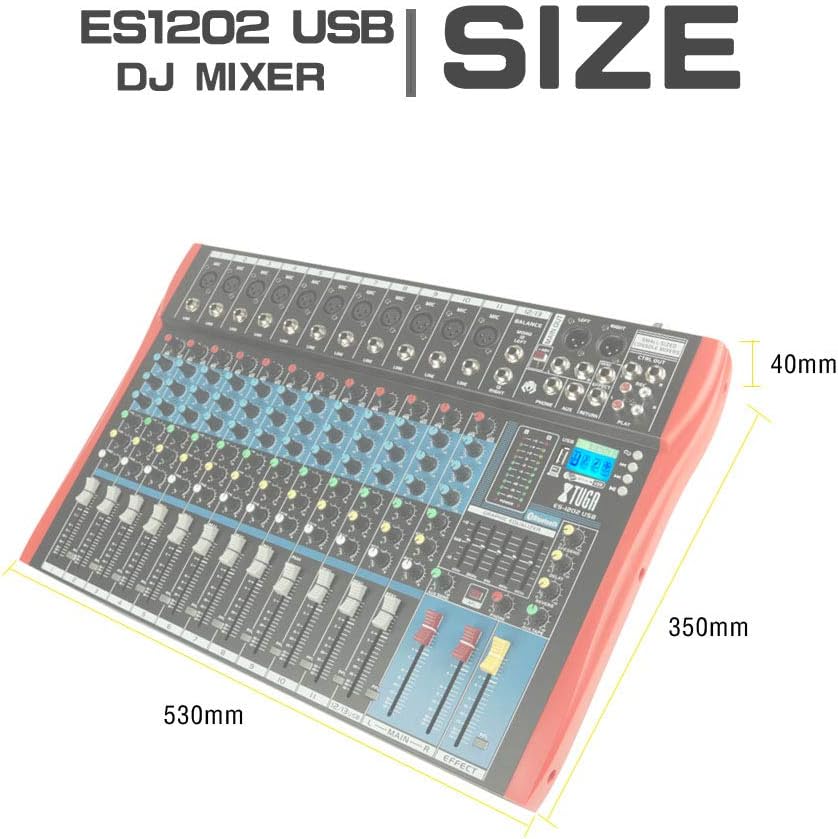
Figi 8.1: Dimensions of the XTUGA ES1202 USB Mixer, showing approximate measurements of 530mm (width), 350mm (depth), and 40mm (height).
9. Garanti ak sipò
9.1 Enfòmasyon sou Garanti
XTUGA products are designed and manufactured to high-quality standards. For specific warranty terms and conditions, please refer to the warranty card included with your product or contact your local XTUGA distributor or retailer. Keep your proof of purchase for warranty claims.
9.2 Sipò pou Kliyan
If you encounter any issues or have questions regarding your XTUGA ES USB/MP3/Bluetooth Professional Audio Mixer that are not covered in this manual, please contact XTUGA customer support or your authorized dealer for assistance. Please have your model number (ES802/1202) and purchase information ready when contacting support.