
1. Entwodiksyon
Mèsi pou acha aasing the SHARP XL-B512 Stereo Sound System. This micro sound system offers a rich 45-watt sound experience with versatile connectivity options including Bluetooth, CD player, USB, and FM radio. Its elegant design with a wooden speaker housing and LED display complements any living space. This manual provides essential information for setting up, operating, and maintaining your device to ensure optimal performance and longevity.
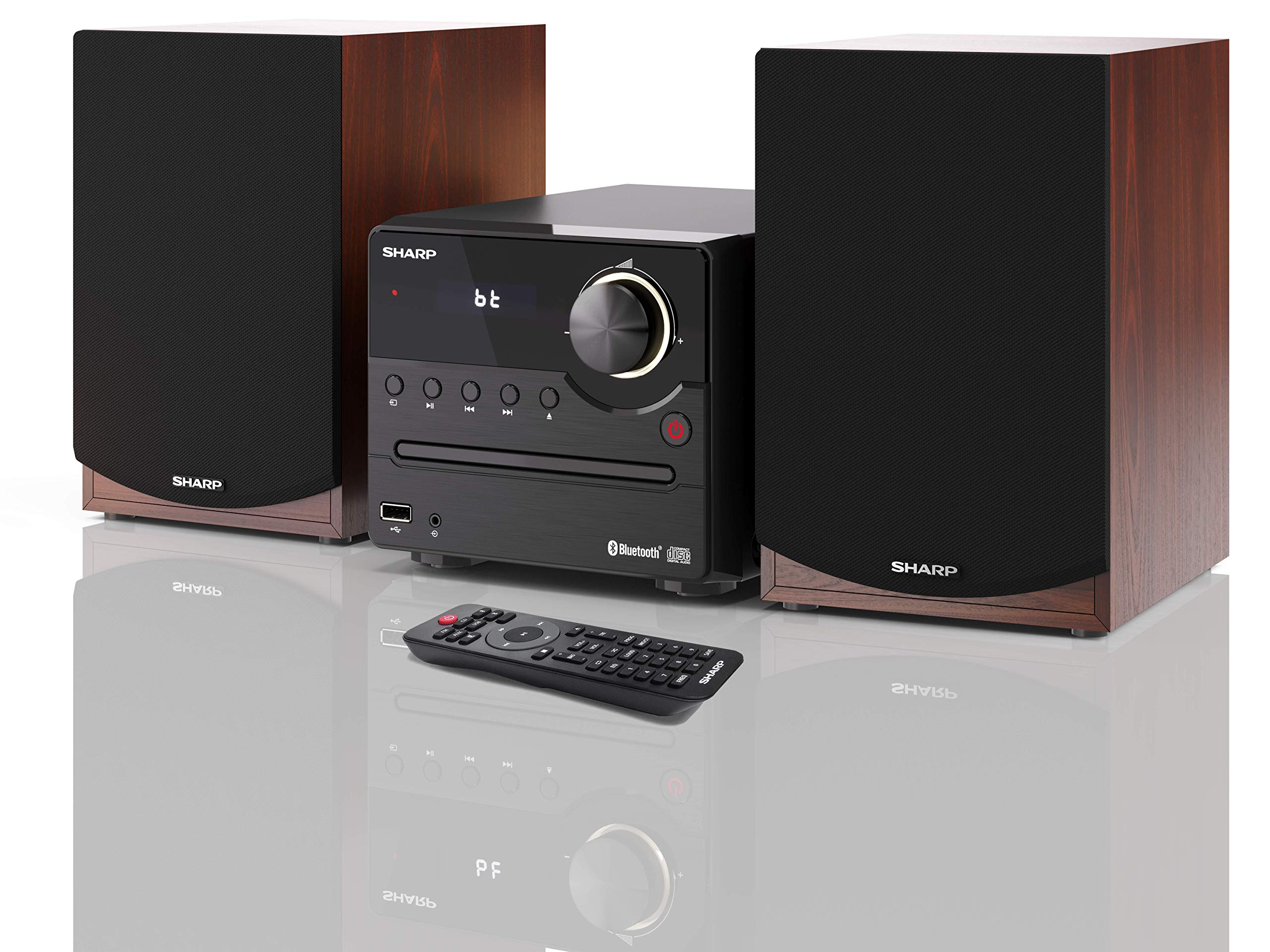
Figi 1: SHARP XL-B512 Stereo Sound System. This image shows the central unit flanked by two wooden-cased speakers, reflecting on a polished surface.
2. Enfòmasyon sou Sekirite
Tanpri li tout enstriksyon sekirite yo ak anpil atansyon anvan ou itilize pwodwi a. Kenbe manyèl sa a pou referans pita.
- Sous pouvwa: Use only the specified power supply. Ensure the voltage matche ak ekipman pou kouran lokal ou a.
- Vantilasyon: Do not block any ventilation openings. Allow adequate space around the unit for proper airflow.
- Dlo ak imidite: Pa ekspoze aparèy la anba lapli, imidite, oswa likid k ap degoute/pwojeksyon. Pa mete objè ki plen likid, tankou vaz, sou aparèy la.
- Chalè: Kenbe aparèy la lwen sous chalè tankou radyatè, recho, recho, oswa lòt aparèy (ki gen ladan amplifiers) ki pwodui chalè.
- Netwayaj: Debranche aparèy la nan priz miray la anvan ou netwaye li. Sèvi ak yon twal sèk sèlman.
- Sèvis: Pa eseye fè sèvis pwodui sa a tèt ou. Refere tout sèvis yo bay pèsonèl sèvis kalifye.
3. Pake kontni
Verifye ke tout atik ki nan lis anba a yo enkli nan pakè ou a:
- SHARP XL-B512 Micro Sound System (Main Unit)
- Two Speakers (with wooden housing)
- Pouvwa kab
- Kontwòl Remote (ak pil)
- Manyèl Enstriksyon (dokiman sa a)
- Gid Quick Start
4. Enstalasyon
4.1 Koneksyon oratè
Connect the two speakers to the main unit using the provided speaker cables. Ensure correct polarity (positive to positive, negative to negative) for optimal sound quality.
4.2 Koneksyon pouvwa
Connect the power cable to the AC IN port on the rear of the main unit, then plug it into a wall outlet.

Figi 2: Rear panel connections. This image displays the back of the central unit with ports for speaker wires and the AC power input, alongside the rear of the two speakers.
4.3 Premye pouvwa sou
Press the Power button on the main unit or the remote control to turn on the system. The LCD display will illuminate.
5. Operasyon Enstriksyon
5.1 Kontwòl Panel Front

Figi 3: Front panel controls. This close-up shows the central unit's display, volume knob, and various control buttons for playback and source selection.
- Bouton pouvwa: Limen oswa etenn inite a.
- Sous bouton: Cycles through available input sources (CD, FM, Bluetooth, USB, AUX).
- Volim bouton: Ajiste nivo volim prensipal la.
- Kontwòl Lekti: Play/Pause, Stop, Skip Forward/Backward for CD and USB modes.
- Pò USB: For connecting USB storage devices for music playback.
- Antre AUX: Yon jack 3.5mm pou konekte aparèy odyo ekstèn.
5.2 Lekti CD
- Peze a Sous button to select 'CD' mode.
- Open the CD tray by pressing the Eject button.
- Place a CD (CD/CD-R/CD-RW/MP3 format) with the label side up into the tray.
- Close the CD tray. The system will read the disc and begin playback automatically or display track information.
- Sèvi ak kontwòl lekti yo (Jwe/Pòz, Sispann, Sote) pou jere mizik ou.
5.3 FM Radyo
- Peze a Sous bouton an pou chwazi mòd 'FM'.
- The system will automatically search for available stations or you can manually tune.
- To save a station as a preset, tune to the desired station, then press and hold the Prereglaj button (if available on remote) or follow on-screen instructions. The system supports 40 preset memories.
- Sèvi ak la Prereglaj leve/desann bouton navige nan estasyon sove.
5.4 Bluetooth Pairing
- Peze a Sous button to select 'Bluetooth' mode. The display will show 'bt' and flash, indicating it's in pairing mode.
- Sou aparèy mobil ou, aktive Bluetooth epi chèche aparèy ki disponib.
- Select 'SHARP XL-B512' from the list of devices.
- Once paired, the 'bt' indicator on the system's display will stop flashing. You can now stream audio from your device.
5.5 Lekti USB
- Insert a USB storage device into the USB port on the front panel.
- Peze a Sous bouton an pou chwazi mòd 'USB' la.
- The system will automatically detect and play compatible audio files (MP3).
- Sèvi ak kontwòl lekti yo pou navige nan mizik yo.
5.6 Antre AUX
- Connect an external audio device (e.g., smartphone, MP3 player) to the AUX IN jack on the front panel using a 3.5mm audio cable (not supplied).
- Peze a Sous button to select 'AUX' mode.
- Play audio from your connected device. The sound will be output through the SHARP XL-B512 system.
5.7 Anviwònman Egalizè
The system features 6 preset equalizers with independent treble and depth control. Use the EQ button on the remote control or main unit to cycle through the presets and adjust sound to your preference.
6. Antretyen
6.1 Netwaye inite a
Wipe the unit with a soft, dry cloth. Do not use abrasive cleaners, waxes, or solvents as they may damage the finish. Ensure the unit is unplugged before cleaning.
6.2 Swen CD
Handle CDs by their edges. Keep them clean and free of scratches. Store CDs in their cases when not in use.
6.3 Swen Oratè
The wooden speaker housing can be cleaned with a soft, dry cloth. Avoid placing heavy objects on the speakers or exposing them to direct sunlight or extreme temperatures.
NAN. Depanaj
If you encounter any issues with your SHARP XL-B512 system, refer to the following table for common problems and solutions.
| Pwoblèm | Kòz posib | Solisyon |
|---|---|---|
| Pa gen pouvwa | Power cable not connected securely; Power outlet not active. | Tcheke koneksyon kab kouran an; Eseye yon lòt priz kouran. |
| Pa gen son | Volume too low; Incorrect source selected; Speaker cables disconnected. | Increase volume; Select correct input source; Check speaker cable connections. |
| Bluetooth pa asosye | System not in pairing mode; Device too far; Bluetooth disabled on device. | Ensure system is in Bluetooth pairing mode; Move device closer; Enable Bluetooth on your device. |
| CD a pa ap jwe | CD inserted incorrectly; CD is dirty or scratched; Incorrect format. | Reinsert CD correctly; Clean CD; Ensure CD is a supported format (CD/CD-R/CD-RW/MP3). |
| Remote kontwòl pa travay | Batteries are dead or inserted incorrectly; Obstruction between remote and unit. | Ranplase pil yo; Asire w ke polarite pil yo kòrèk; Retire tout obstak. |
Si pwoblèm nan pèsiste apre ou fin eseye solisyon sa yo, tanpri kontakte sèvis kliyan.
8. Espesifikasyon
Below are the technical specifications for the SHARP XL-B512 Stereo Sound System:
- Modèl: XL-B512
- Pouvwa pwodiksyon total: 45 Watts
- Audio Sòti Mode: Stereo
- Speaker Output Channel Quantity: 2
- Fòma odyo sipòte: MP3, CD, CD-R, CD-RW
- Teknoloji sentonizè: FM PLL Tuner
- FM frekans Range: 87.5 a 108 MHz
- FM Preset Memory: 40 estasyon
- Koneksyon: Bluetooth, USB, Auxiliary (3.5mm)
- Karakteristik espesyal: 6 Preset Equalizers, LCD Display with white backlight
- Sound System Dimensions (W x H x D): 17 x 22 x 15 cm
- Speaker Dimensions (W x H x D): 14.5 x 17.7 x 22.3 cm (each)
- Pwa atik: 4 kg
- Sous pouvwa: Fil elektrik
- Kontwòl Remote: Wi (pil enkli)
9. Garanti ak sipò
Your SHARP XL-B512 Stereo Sound System comes with a standard manufacturer's warranty. Please refer to the warranty card included in your package for specific terms and conditions, including the warranty period and coverage details.
For technical support, service inquiries, or further assistance, please contact your local SHARP customer service center. Contact information can typically be found on the manufacturer's websit la oubyen nan dokiman garanti a.