
1. Entwodiksyon
This manual provides comprehensive instructions for the setup, operation, maintenance, and troubleshooting of your BOYI 60% Mechanical Gaming Keyboard. This compact keyboard features RGB backlighting, durable PBT keycaps, and Cherry MX Brown switches, designed for both gaming and general use.

Imaj 1.1: Anwo-anba view of the BOYI 60% Mechanical Gaming Keyboard, showcasing its compact layout and colorful keycaps.
2. Pake kontni
Asire w tout atik yo prezan nan pakè a:
- BOYI 60% Mechanical Gaming Keyboard
- USB-C kab
- Keycap Puller
3. Enstalasyon
3.1 Konekte klavye a
Connect the provided USB-C cable to the port on the keyboard and the other end to an available USB port on your computer. The keyboard is designed for wired connectivity to ensure stable performance.

Image 3.1: Detail of the Type-C connector on the keyboard, highlighting its robust design for high-speed data transmission.
3.2 Adjusting Keyboard Angle
The keyboard features adjustable feet on the underside to customize the typing angle for ergonomic comfort. Flip out the feet to raise the keyboard or keep them folded for a flatter profile.

Imaj 3.2: Kote view of the keyboard with its adjustable feet extended, providing an elevated typing angle.
3.3 Konpatibilite
The keyboard is compatible with PC systems. For specific operating system compatibility, refer to your system's peripheral support documentation.
4. Operasyon Enstriksyon
4.1 Kontwòl ekleraj RGB
The keyboard features customizable RGB backlighting. To cycle through different lighting modes, press the Fn + Alt + T Right Key combination. Experiment with various patterns and effects to personalize your experience.

Image 4.1: The keyboard illuminated with vibrant RGB backlighting, showcasing divès modèl koulè.
4.2 Function Keys and NKRO
The 60% layout utilizes function key combinations (Fn key) to access secondary functions typically found on a full-sized keyboard. This keyboard supports N-Key Rollover (NKRO), ensuring that every key press is registered accurately, even when multiple keys are pressed simultaneously.
4.3 Pwodwi souview Videyo
Video 4.1: An official product video from BOYI Keyboard, demonstrating the RGB lighting and compact design of the 61-key mini keyboard.
4.4 Features Demonstration Video
Video 4.2: An official product video from BOYI Keyboard, showcasing various features and the overall aesthetic of the Joker-color 61-key mini keyboard.
5. Antretyen
5.1 Cleaning and Keycap Replacement
To clean the keyboard, disconnect it from your computer. Use a soft, dry cloth to wipe the surface. For deeper cleaning or keycap replacement, use the included keycap puller to carefully remove keycaps. The PBT keycaps are designed for durability and wear resistance.
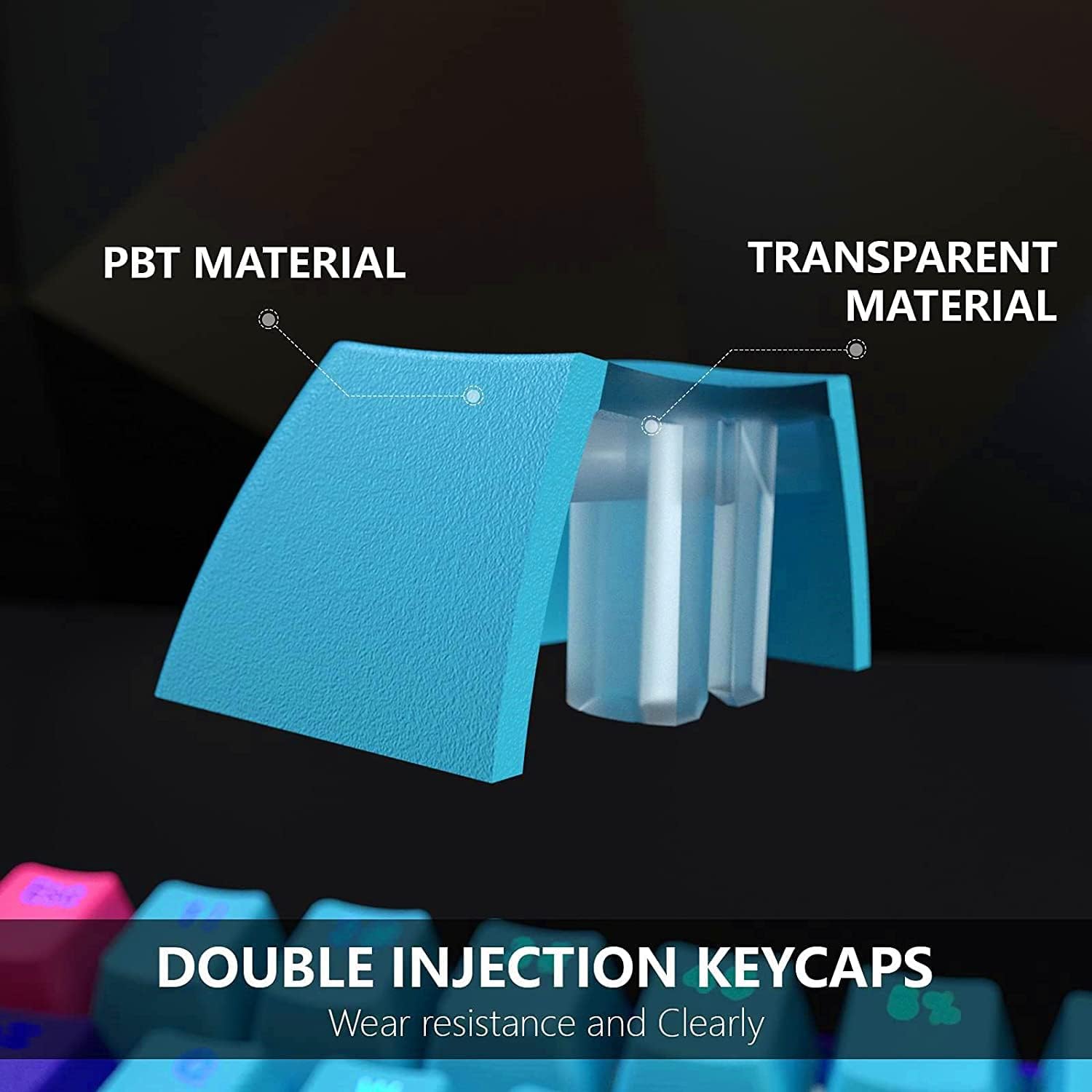
Image 5.1: A diagram explaining the construction of PBT double injection keycaps, highlighting their material and transparent inner layer.
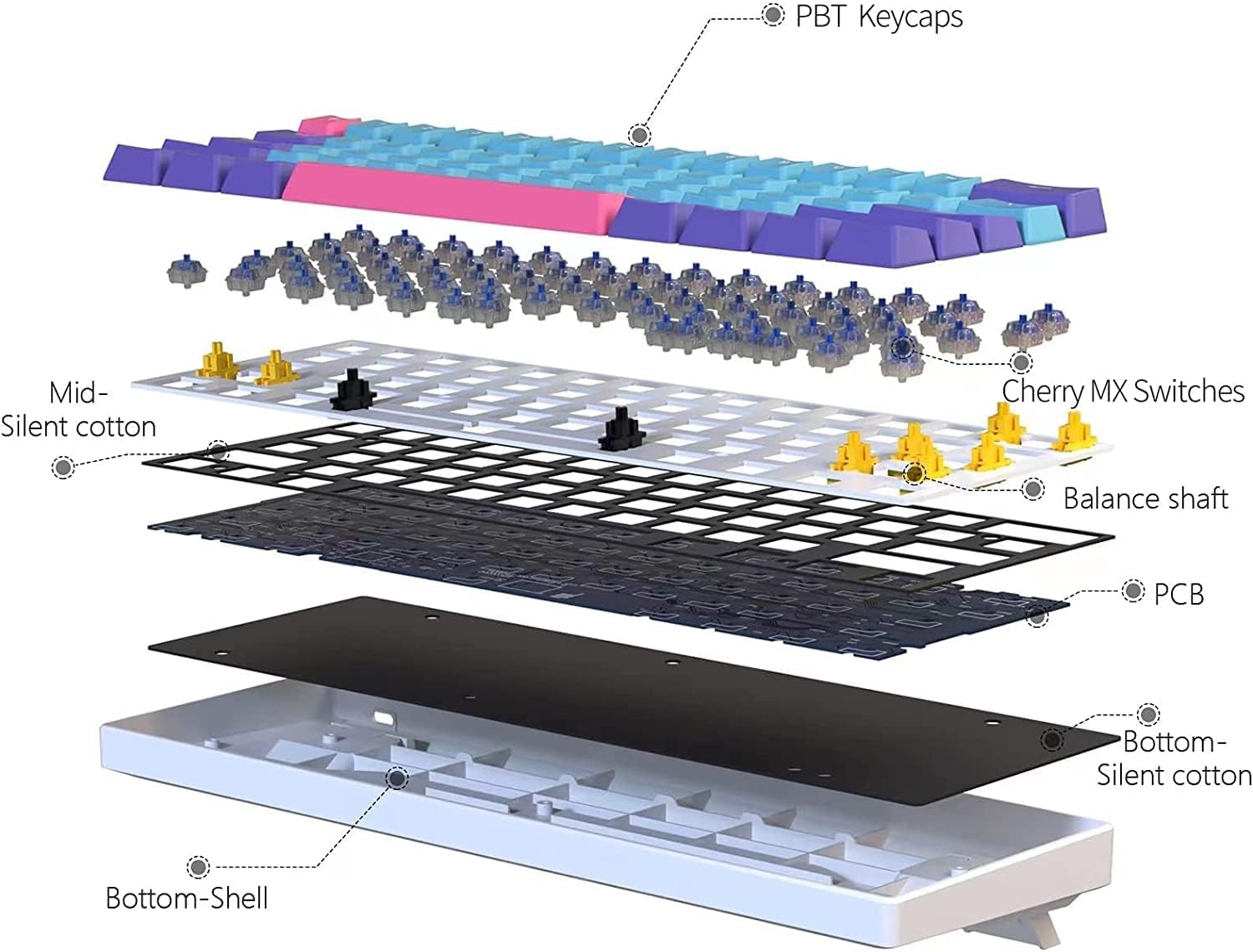
Imaj 5.2: Yon eksplozyon view diagram showing the internal components of the keyboard, including PBT keycaps, Cherry MX switches, and silent cotton layers.
NAN. Depanaj
6.1 Pwoblèm komen
- Klavye a pa reponn: Ensure the USB-C cable is securely connected to both the keyboard and the computer. Try a different USB port.
- Ekleraj RGB a pa fonksyone: Verify the keyboard is powered on. Use the Fn + Alt + T Right Key combination to cycle through lighting modes or ensure it's not set to an 'off' mode.
- Keys sticking or not registering: Clean around the affected keycap. If the issue persists, carefully remove the keycap and inspect the switch for any obstructions.
7. Espesifikasyon
| Karakteristik | Detay |
|---|---|
| Nimewo Modèl | fdhfgh-18 |
| Koneksyon Teknoloji | USB-C |
| Deskripsyon klavye | Mekanik |
| Karakteristik espesyal | Ki enpèmeyab |
| Klavye ekleraj | RGB |
| Materyèl | Tereftalat polibutilèn (PBT) |
| Pwa atik | 2.18 liv |
| Dimansyon pake | 12.8 x 6.89 x 1.93 pous |
| Aparèy konpatib | PC |
8. Garanti ak sipò
For warranty information or technical support, please refer to the official BOYI websit la oubyen kontakte sèvis kliyan atravè platfòm acha ou a. Kenbe prèv acha ou a pou nenpòt reklamasyon garanti.