
1. Entwodiksyon
Thank you for choosing the iClever GK08 Wireless Keyboard and Mouse Combo. This full-size keyboard with a numeric keypad and a silent mouse offers a stable 2.4 GHz connection, USB-C recharging, and dual-layout compatibility for Mac and Windows systems. This manual provides detailed instructions to help you set up, operate, and maintain your new device.
2. Enfòmasyon sou Sekirite
- Kenbe aparèy la lwen dlo, dife, ak tanperati ki wo.
- Pa eseye demonte oswa modifye aparèy la.
- Sèvi sèlman ak kab USB-C ki vini ak aparèy la pou chaje.
- Evite jete oswa sibi aparèy la nan gwo enpak.
- Jete pil ak konpozan elektwonik yo yon fason responsab dapre règleman lokal yo.
3. Gid Enstalasyon
3.1 Kontni pake a
- iClever GK08 Wireless Keyboard
- iClever Wireless Mouse
- USB-A Nano Receiver (stored inside the mouse)
- USB-C Chaje Kab
- Washable Dust Cover
- Manyèl itilizatè
3.2 Premye chaj
Anvan premye itilizasyon an, asire w ke klavye a ak sourit la byen chaje.
- Connect the provided USB-C charging cable to the keyboard's USB-C port (located on the top edge).
- Konekte lòt bout kab la nan yon sous kouran USB (pa egzanp, yon pò USB òdinatè, yon adaptè USB nan miray).
- Limyè endikatè chaj la sou klavye a ap limen pandan chaj la epi li ap etenn lè li fin chaje nèt.
- For the mouse, connect the USB-C cable to its charging port. The mouse also has an indicator light.
- A full charge takes approximately 2 hours and provides up to 45 days of use for the keyboard.
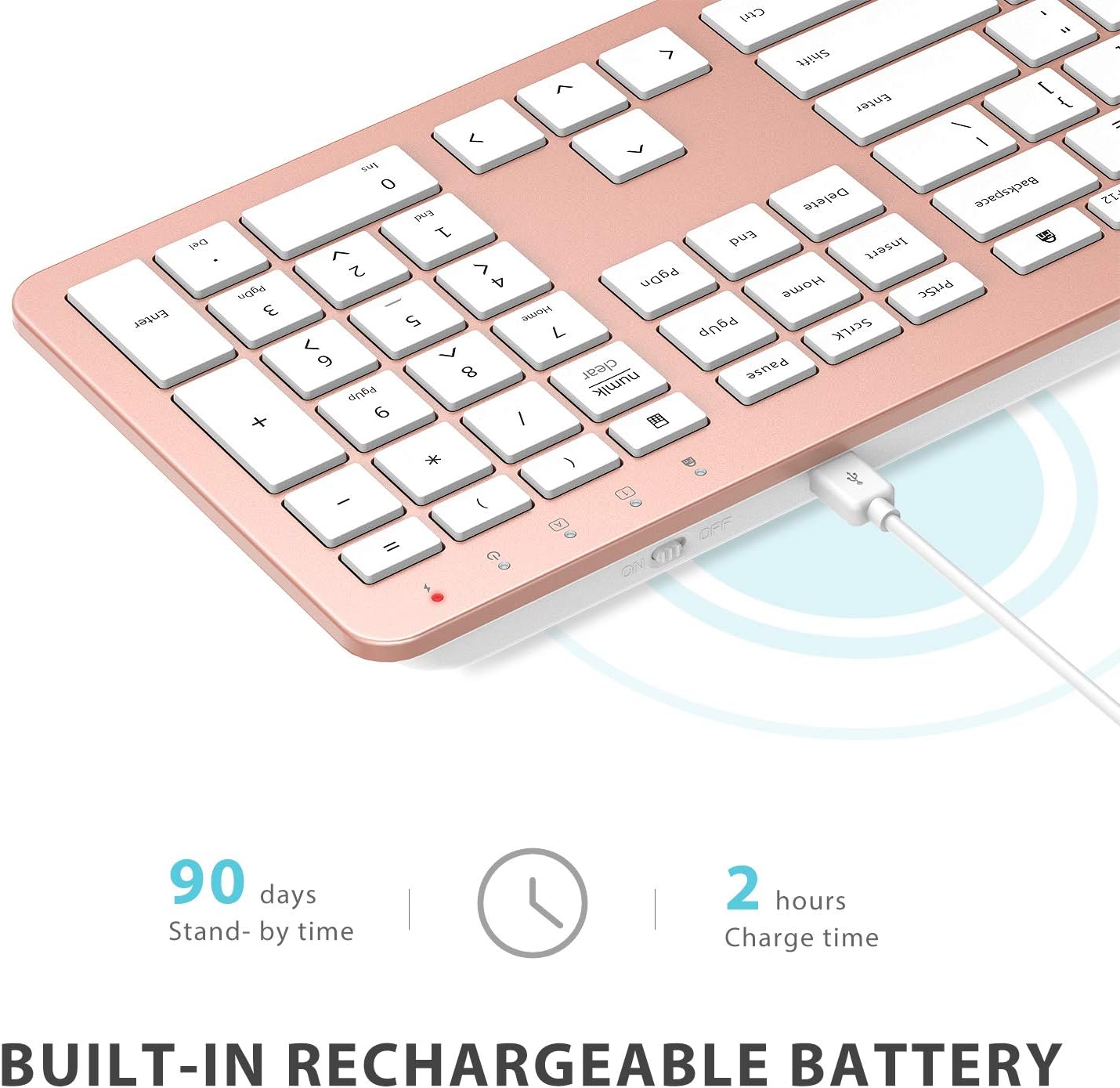
Image: The iClever GK08 keyboard connected to a USB-C charging cable, illustrating the charging process and battery life indicators.
3.3 Connecting to Your Computer (2.4 GHz Wireless)
The keyboard and mouse connect via a single 2.4 GHz USB-A nano receiver.
- Locate the USB-A nano receiver. It is typically stored in a compartment on the underside of the mouse.
- Plug the nano receiver into an available USB-A port on your computer.
- Turn on the keyboard using the ON/OFF switch (usually on the top edge).
- Turn on the mouse using the ON/OFF switch (located on the underside).
- Your computer should automatically detect and install the necessary drivers. The devices are ready for use once recognized.
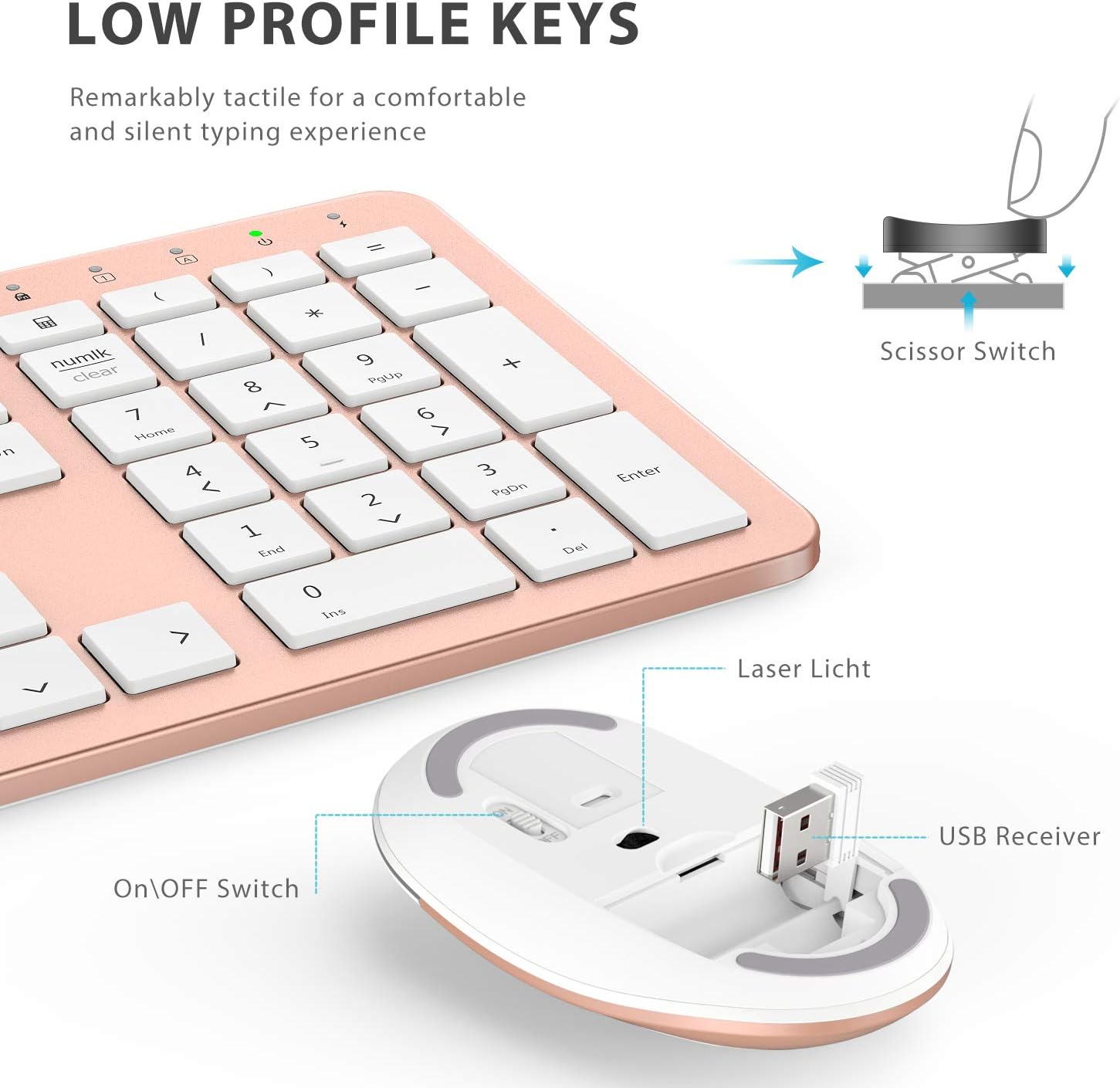
Imaj: Yon gwo plan view of the iClever mouse, highlighting the compartment where the USB nano receiver is stored for convenience.
3.4 Verifikasyon Konpatibilite
This combo requires an available USB-A port for the nano receiver. For newer Macs with only USB-C ports, a USB-C to USB-A adapter (not included) is required. It is compatible with:
- Windows 10/11 PC & laptop
- macOS desktops / notebooks with USB-A port (e.g., iMac Retina 4K/5K, MacBook Air/Pro ≤ 2017)
- Chrome OS

Image: A visual representation emphasizing the requirement of a USB-A port for the 2.4G wireless receiver, with a note about USB-C adapters for newer devices.
4. Operasyon Enstriksyon
4.1 Fonksyon klavye
- Layout tout gwosè: The keyboard features a 110-key layout with a dedicated numeric keypad for efficient data entry.
- Quiet Scissor-Switch Keys: Enjoy a comfortable and quiet typing experience with low-profile keys that produce less than 50 dB of sound.
- Media Shortcuts: Access common media functions directly from the keyboard.
- Dual-Layout Compatibility: The keyboard has clearly printed Mac and PC legends.
Switching Between Mac and Windows Layouts:
- Pou Windows: Peze Fn + W to activate Win, Alt, NumLK functions.
- Pou Mac OS: Peze Fn + Q to activate Alt (Option), Cmd, Clear functions.

Image: The iClever GK08 keyboard displaying the dual Mac and Windows key legends, with instructions for switching between operating system layouts using the Fn key combinations.
4.2 Fonksyon Sourit
- Klike an silans: The mouse is designed for quiet operation, minimizing distractions.
- DPI reglabl: The mouse features 3 adjustable DPI levels (800/1200/1600) to customize cursor sensitivity. Press the DPI button (usually located near the scroll wheel) to cycle through the settings.

Image: A visual demonstrating the quiet operation of the iClever mouse and the three adjustable DPI settings (800, 1200, 1600) for varied precision needs.
4.3 Fonksyon Oto-Dòmi
To conserve battery life, both the keyboard and mouse will enter an auto-sleep mode after 10 minutes of inactivity. To wake them up, simply press any key on the keyboard or move the mouse.
Video: A seller-provided video demonstrating the plug-and-play functionality and long battery life of the iClever Wireless Keyboard and Mouse. This video highlights the ease of setup and extended usage between charges.
5. Antretyen
- Netwayaj: Sèvi ak yon mou, damp cloth to clean the surfaces of the keyboard and mouse. Avoid harsh chemicals.
- Kouvèti pousyè: Utilize the included washable dust cover to protect the keyboard from dust and spills when not in use.
- Depo: When not in use for extended periods, turn off both devices to conserve battery. Store the USB receiver inside the mouse.
NAN. Depanaj
- Pa gen koneksyon:
- Ensure both keyboard and mouse are turned ON.
- Verify the USB nano receiver is securely plugged into a working USB-A port on your computer.
- Try plugging the receiver into a different USB-A port.
- Check if the devices are charged.
- Koneksyon ki ralanti oswa ki pa konekte:
- Ensure the devices are within the 33 ft / 10 m operating range of the receiver.
- Avoid placing the receiver near strong interference sources (e.g., other wireless devices, large metal objects).
- Re-pair the devices by unplugging and re-plugging the receiver.
- Keyboard Not Typing Correctly (Mac/Windows):
- Ensure you have selected the correct operating system layout using Fn + W pou Windows oswa Fn + Q pou Mac.
- Kisè sourit la sote oswa li pa egzak:
- Ajiste paramèt DPI a avèk bouton DPI ki sou sourit la.
- Asire w ke captè sourit la pwòp epi li pa gen okenn obstak.
- Sèvi ak sourit la sou yon sifas ki apwopriye (ki pa twò reflektif oswa transparan).
7. Espesifikasyon
| Karakteristik | Detay |
|---|---|
| Mak | iClever |
| Nimewo Modèl | GK08 |
| Koulè | Rose Gold |
| Koneksyon Teknoloji | 2.4 GHz wireless (USB-A nano receiver) |
| Wireless Range | Jiska 33 pye / 10 m |
| Layout klavye | QWERTY, Full-size 110-key with Numpad |
| Kalite kle | Scissor Switch (Quiet typing < 50 dB) |
| Sous pouvwa | Rechargeable Lithium Ion Battery (Keyboard) |
| Port chaje | USB-C |
| Tan pou chaje | Apeprè. 2 èdtan |
| Dire batri (klavye) | Jiska 45 jou (itilizasyon tipik) |
| Anviwònman DPI sourit | 800 / 1200 / 1600 DPI |
| Sistèm operasyon konpatib | Windows 8/10/11, macOS, Chrome OS |
| Karakteristik espesyal | Dual Mac/Windows layout, 10-min auto-sleep, Washable dust cover |
8. Garanti ak sipò
iClever products typically come with a standard manufacturer's warranty. Please refer to the warranty card included in your product packaging or visit the official iClever websit la pou wè tèm ak kondisyon garanti detaye yo.
For technical support, troubleshooting assistance, or any product-related inquiries, please contact iClever customer service through their official websit la oswa enfòmasyon kontak yo bay nan dokimantasyon pwodwi ou a.
Sipò sou entènèt: www.iclever.com/support