
Entwodiksyon
The 4smarts Powerbank Enterprise 2 is a high-capacity 20000 mAh portable charger designed to provide fast and efficient power to a wide range of electronic devices. With a total output of 130 watts and multiple charging ports, it supports various fast charging standards, including Power Delivery (PD), Qualcomm Quick Charge 3.0 (QC3.0), and Samsung Adaptive Fast Charge. This manual provides essential information for the safe and optimal use of your power bank.

Image: The 4smarts Powerbank Enterprise 2, highlighting its 130W output capability.
Enstalasyon
Inisyal chaje
Before first use, fully charge your 4smarts Powerbank Enterprise 2. For the fastest charging experience, use a 100W Power Delivery (PD) compatible wall charger and a USB-C to USB-C cable (sold separately). The power bank can be fully recharged in approximately 60 minutes with a 100W charger.
Endikatè ki ap dirije
The power bank features LED indicators to display the current charge level. Observe these lights to monitor the battery status during charging and discharging.
Enstriksyon Operasyon
Chaje Power Bank la
- Connect a compatible charging cable to either the USB-C1 or USB-C2 input port on the power bank. For optimal speed, use the USB-C1 port with a 100W PD charger.
- Altènativman, ou ka itilize Mikwo USB input port with a compatible cable and charger.
- Endikatè LED yo ap limen pou montre pwogrè chaj la. Tout LED yo ap rete fiks lè yo fin chaje nèt.
Chaje Aparèy Ekstèn yo
The Powerbank Enterprise 2 offers multiple output ports to charge your devices:
- USB-C1 Output (PD/PPS): Up to 100W for fast charging laptops (e.g., MacBook Pro), tablets, and smartphones.
- USB-C2 Output (PD): Up to 30W for fast charging tablets and smartphones.
- USB-A Output (QC3.0): Up to 18W for devices supporting Qualcomm Quick Charge 3.0 or other standard charging protocols.
Pou chaje yon aparèy:
- Konekte aparèy ou an nan pò pwodiksyon ki apwopriye a sou bank pouvwa a lè l sèvi avèk yon kab chaje konpatib.
- The power bank will automatically begin charging your device. If not, press the power button once to activate charging.
- You can charge multiple devices simultaneously. The total output is up to 130W (e.g., USB-C1 at 100W + USB-C2 at 30W). For safety, if the total output exceeds 130W, the power bank will regulate the output of each port accordingly.

Image: Diagram illustrating the various input and output ports of the power bank, including their respective wattages and functions (Micro USB input, USB-C1 input/output with PD/PPS, USB-C2 input/output with PD, and USB-A output with QC3.0).
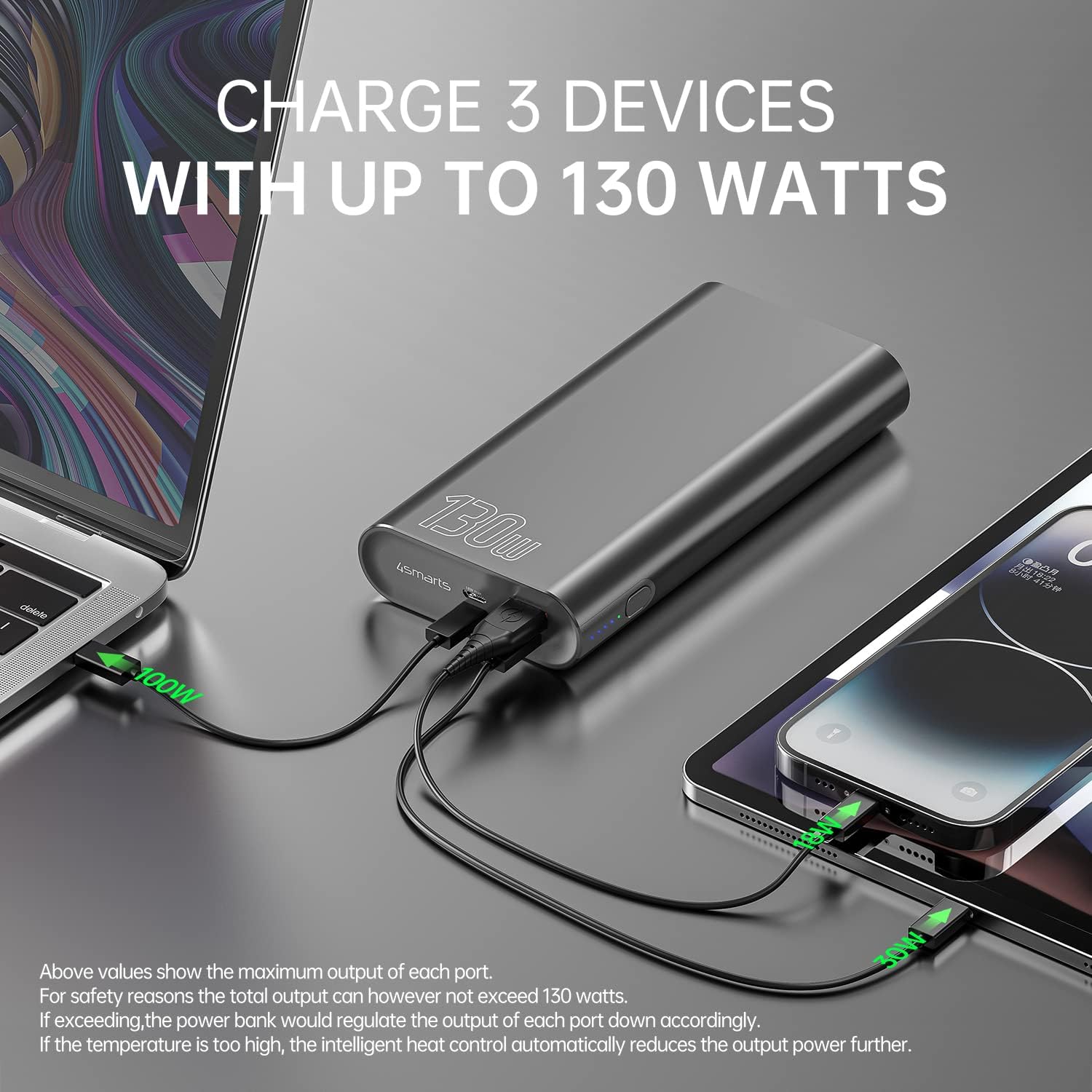
Image: The power bank connected and simultaneously charging a laptop and a tablet, demonstrating its multi-device charging capability.

Image: The power bank charging a MacBook Pro 16", illustrating 100W fast charging to reach 50% in 45 minutes.
Antretyen
- Netwayaj: Sèvi ak yon twal mou epi sèk pou netwaye power bank lan. Evite itilize pwodui chimik ki agresif oswa materyèl abrazif.
- Depo: Sere bank pouvwa a nan yon kote ki fre epi sèk, lwen limyè solèy dirèk, tanperati ekstrèm ak imidite.
- Swen batri: Pou pwolonje lavi batri a, chaje bank ekstèn lan nèt omwen yon fwa chak twa mwa si w pa itilize l regilyèman. Evite vide batri a nèt pandan yon bon bout tan.
- Manyen: Do not drop, puncture, or disassemble the power bank. This can damage the internal components and void the warranty.
Depanaj
- Batri pouvwa a pa chaje: Ensure the charging cable and wall adapter are functioning correctly and are securely connected. For fastest charging, use a 100W PD charger with the USB-C1 port.
- Aparèy la pa chaje ak bank pouvwa a: Ensure the power bank has sufficient charge. Press the power button to activate output if necessary. Check that the cable connecting your device to the power bank is not damaged and is compatible.
- Chaje dousman: Verify that your device and cable support fast charging protocols (PD, QC3.0) and are connected to the appropriate high-output port (USB-C1 for up to 100W, USB-C2 for up to 30W, USB-A for up to 18W).
- Surchof: The power bank features intelligent heat control. If the temperature is too high, it will automatically reduce output power. Ensure proper ventilation during use.
The 4smarts Powerbank Enterprise 2 is equipped with multiple safety features, including overload protection, short circuit protection, intelligent charge shutdown, and deep discharge protection, to ensure safe operation.

Image: An internal diagram of the power bank, showcasing its certified safety features such as overload protection, short circuit protection, intelligent charge shutdown, and deep discharge protection.
Espesifikasyon
| Karakteristik | Detay |
|---|---|
| Non modèl | Powerbank Enterprise 2 |
| Nimewo Modèl Atik | 4S468747 |
| Kapasite batri | 20000 mAh |
| Konpozisyon selil batri | Lithium-ion (4 Tesla 21700 Li-ion cells) |
| Mikwo USB Antre | DC 5V/2A, 9V/2A, 12V/1.5A (Max 18W) |
| USB-C1 Input/Output (PD/PPS) | DC 5V/3A, 9V/3A, 12V/3A, 15V/3A, 20V/5A (Max 100W) |
| USB-C2 Input/Output (PD) | DC 5V/3A, 9V/3A, 12V/3A, 15V/2A, 20V/1.5A (Max 30W) |
| USB-A Output (QC3.0) | DC 5V/3A, 9V/2A, 12V/1.5A (Max 18W) |
| Sòti total | 130W (USB-C1 100W + USB-C2 30W) |
| Power Bank Charging Time | Approx. 60 minutes (with 100W AC charger and cable, sold separately) |
| Dimansyon (L x W x H) | 15.2 x 7.5 x 2.5 cm (5.98 x 2.95 x 0.98 pous) |
| Pwa atik | 515 gram (1.13 liv) |
| Koulè | Nwa |
| Karakteristik espesyal | Fast Charging, Overload Protection, Short Circuit Protection, Deep Discharge Protection |
| Itilizasyon Rekòmande | iPhone, Laptop, Smartphone, Tablet |
Enfòmasyon sou Sekirite
- Pa ekspoze bank pouvwa a nan dlo, dife, oswa tanperati ekstrèm.
- Evite jete oswa soumèt bank pouvwa a nan gwo enpak.
- Pa eseye demonte, repare, oswa modifye bank pouvwa a.
- Kenbe soti nan atenn timoun yo.
- Sèvi ak sèlman kab ak adaptè chaj orijinal oswa sètifye konpatib.
- Dispose of the power bank responsibly according to local regulations for electronic waste.
Garanti ak sipò
Garanti
The 4smarts Powerbank Enterprise 2 comes with a manufacturer's warranty. Please refer to the warranty card included in the product packaging or visit the official 4smarts websit la pou wè kondisyon garanti detaye ki espesifik pou rejyon ou an.
Sipò pou Kliyan
For technical assistance, troubleshooting, or any questions regarding your 4smarts Powerbank Enterprise 2, please contact 4smarts customer support. Contact information can typically be found on the official 4smarts websit oswa nan anbalaj pwodwi a.