
Entwodiksyon
This manual provides detailed instructions for the proper use and care of your CASIO G-Shock AWR-M100SDC-1A watch. This timepiece features a shock-resistant construction, 20 ATM water resistance, and Tough Solar power, combining analog and digital displays for versatile functionality.
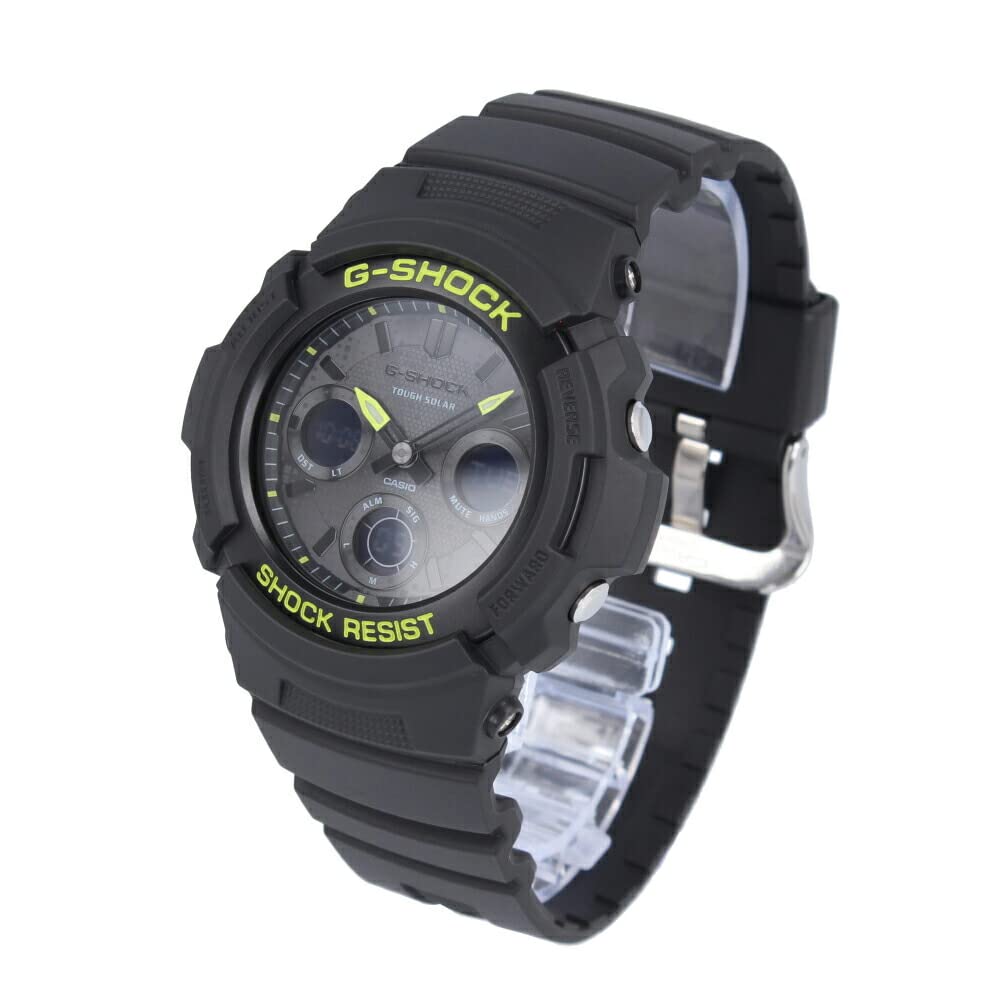
Imaj: Devan view of the CASIO G-Shock AWR-M100SDC-1A watch, showcasing its black case, band, and dial with lime green accents and analog-digital display.
Enstalasyon
Inisyal chaje
Your watch is equipped with Tough Solar technology, which converts light into power. Before initial use, expose the watch face to bright light for several hours to ensure a full charge. Avoid blocking the watch face from light for extended periods to maintain optimal performance.
Tan ak Dat Anviwònman
The watch automatically receives time calibration signals in certain regions. If manual adjustment is needed or if you are outside a signal reception area, refer to the 'Operating' section for detailed instructions on setting the home city, time, and date. Ensure your home city is correctly set for accurate timekeeping and world time functions.
Opere

Imaj: Bò kote view of the CASIO G-Shock AWR-M100SDC-1A watch, highlighting the buttons on the left and right sides of the case, used for mode selection and adjustments.
Mòd Navigasyon
Peze a MÒD button (typically bottom left) to cycle through the watch's various modes: Timekeeping, World Time, Stopwatch, Countdown Timer, and Alarm. The current mode will be indicated on the digital display.
Tan Mondyal
Nan mòd Lè Mondyal la, ou kapab view the current time in 31 time zones (48 cities + Coordinated Universal Time). Use the AVANSE epi RAVE buttons (typically top right and bottom right) to scroll through cities. To swap your Home City and World Time City, press and hold the appropriate button as indicated in the watch's on-screen prompts.
Kronomètr
The 1/100 second stopwatch measures elapsed time, split times, and two finishes. In Stopwatch mode, press the KÒMANSE/KANPE button (usually top right) to begin and end timing. Press the RESET button (usually bottom right) to clear the measurement.
Revèy Countdown
The countdown timer can be set for durations up to 24 hours. In Countdown Timer mode, use the adjustment buttons to set the desired countdown start time. Press the KÒMANSE/KANPE button to begin and pause the countdown. An alarm will sound when the countdown reaches zero.
Alam
Mont lan gen 5 alam chak jou ak yon orè.urly time signal. In Alarm mode, select an alarm number and use the adjustment buttons to set the alarm time. Activate or deactivate alarms as needed. The hourly time signal will beep every hour on the hour when enabled.
Limyè otomatik ki ap dirije
The full auto LED light illuminates the display for easy reading in low light conditions. The light activates automatically when the watch is tilted towards your face in dim environments. This feature can be enabled or disabled through the watch settings.
Hand Shift Function
If the analog hands obstruct the digital display, the hand shift function allows you to temporarily move them out of the way. Refer to the watch's on-screen prompts or specific button combinations to activate and deactivate this function.
Antretyen
Rezistans dlo (20 ATM)
Your watch is water resistant to 20 ATM (200 meters), suitable for swimming, showering, and snorkeling. Pa opere bouton anba dlo. Avoid exposing the watch to hot water or steam, as this can compromise the seals. After exposure to saltwater, rinse the watch with fresh water and wipe it dry.
Netwayaj
Wipe the watch case and band with a soft, dry cloth to remove dirt and moisture. For stubborn dirt, use a soft cloth dampened with a mild soap solution, then wipe dry. Avoid using chemical cleaners or solvents, as these can damage the resin materials.
Swen Selil Solè
To ensure continuous operation, regularly expose the watch face to light. Avoid storing the watch in dark places for extended periods. If the charge level becomes low, the watch's functions may be limited. A full charge can take several hours under direct sunlight or longer under fluorescent light.
Rezistans chòk
While designed to be shock-resistant, avoid subjecting the watch to excessive impacts or vibrations, which could potentially damage internal components.
Depanaj
Enpresizyon tan
- Tcheke Nivo Chaj la: Ensure the watch is sufficiently charged by exposing it to light. Low charge can affect timekeeping accuracy.
- Anviwònman Vil Lakay: Verify that your Home City is correctly set, especially if you rely on automatic time calibration.
- Ajisteman manyèl: If automatic calibration is unavailable or unsuccessful, manually adjust the time and date as described in the 'Operating' section.
Digital Display Blank or Dim
- This typically indicates a low battery charge. Expose the watch to bright light for an extended period to recharge.
- Ensure the Power Saving function (if enabled) is not causing the display to go blank in darkness.
Bouton pa reponn
- Ensure the watch is not in a locked mode (if applicable).
- Check for any debris or foreign objects obstructing the buttons.
- If the watch has been exposed to water, ensure it is completely dry before attempting to operate buttons.
Espesifikasyon

Imaj: Dèyè view of the CASIO G-Shock AWR-M100SDC-1A watch, showing the stainless steel case back with engraved model information and the resin band.
| Karakteristik | Detay |
|---|---|
| Nimewo Modèl | AWR-M100SDC-1A |
| Mouvman | Solar Analog-Digital |
| Rezistans dlo | 20 ATM (200 mèt) |
| Konstriksyon | Shock resistant |
| Dimansyon (H x W x P) | 52 x 46.4 x 14.9 mm |
| Pwa | Apeprè. 56 g |
| Limyè | Limyè otomatik ki ap dirije |
| Tan Mondyal | 31 Time Zones (48 cities + UTC) |
| Kronomètr | 1/100 segonn |
| Revèy Countdown | Wi |
| Alam | 5 Alam Chak Jou, Hourly Siyal Tan |
| Kalandriye | Full Auto Calendar (up to 2099) |
| Fòma tan | Fòma 12/24 èdtan |
| Presizyon | ±15 segonn pa mwa (an mwayèn) |
| Materyèl Ka/Bann | Rezin |
| Crystal | Mineral Glass |
| Kalite agraf | Boukl |
Garanti ak sipò
For warranty information, service, or technical support, please refer to the warranty card included with your purchase or visit the official CASIO website. Contact details for customer service are typically provided on the manufacturer's support pages.