
Amazon Echo Show 5 (2nd Gen, 2021 release)
Manyèl Itilizatè Amazon Echo Show 5 (2yèm Jenerasyon, Vèsyon 2021)
Model: Echo Show 5 (2nd Gen, 2021 release) | Brand: Amazon
Entwodiksyon
The Amazon Echo Show 5 (2nd Gen, 2021 release) is a smart display designed to simplify your daily routines and enhance your connected home experience. This certified refurbished device has been tested and certified to function like new, offering all the features of a new unit.
With Alexa built-in, you can manage your day, stay entertained, and connect with others using just your voice. The compact 5.5-inch screen provides visual feedback for alarms, timers, news, video calls, and more.

Image: The Echo Show 5 on a nightstand, illustrating its use as a smart display for time and daily information.
Enstalasyon
Setting up your Echo Show 5 is a straightforward process. The device is designed for simple setup, allowing you to connect to your Wi-Fi network with ease.
Ki sa ki nan bwat la:
- Aparèy Echo Show 5 la
- Glacier White power adapter (15W) with cable (4.9 ft.)
- Gid pou kòmanse rapid
Premye etap konfigirasyon:
- Ploge nan: Connect the power adapter to your Echo Show 5 and plug it into a wall outlet.
- Swiv Enstriksyon ki sou Ekran yo: The device will power on and guide you through the initial setup process on its touch screen.
- Konekte ak Wi-Fi: Select your Wi-Fi network from the list and enter the password. The Echo Show 5 supports dual-band 802.11a/b/g/n/ac Wi-Fi networks.
- Sign In to Amazon Account: Konekte avèk kalifikasyon kont Amazon ou.
- Pèsonalize Anviwònman yo: Customize settings such as time zone, device name, and privacy preferences.
- Telechaje aplikasyon Alexa a: For full functionality and advanced controls, download the Alexa app on your Fire OS, Android, or iOS device. The app is also accessible via a web navigatè.
Amazon's Wi-Fi simple setup technology helps streamline the connection process, making it easier to get your device up and running quickly.
Kijan pou w itilize Echo Show 5 ou a
The Echo Show 5 offers a wide range of functionalities, primarily controlled by voice commands to Alexa and through its interactive touch screen.
Asistans chak jou:
- Alam ak revèy: Set alarms and timers with voice commands.
- Calendar & News: Check your calendar, get news updates, and view previzyon metewolojik yo.
- Woutin: Create routines to automate actions, such as gradually turning on compatible lights in the morning.
Kontwòl lakay entelijan:
Manage compatible smart home devices using the interactive display, your voice, or motion detection.
- Kamera entegre: Use the 2 MP camera to look in on your home when you're away.
- Kontwòl Aparèy: Control lights, cameras, and other smart devices.

Image: A man carrying a laundry basket, with an Echo Show 5 in the foreground, demonstrating how the device can be used to control smart home devices, possibly through motion detection.
Kominikasyon:
- Rele videyo: Make video calls to friends and family who have the Alexa app or an Echo device with a screen using the 2 MP camera.
- Anons: Send announcements to other compatible devices in your home.

Image: The Echo Show 5 displaying an active video call, highlighting its communication capabilities.
Divètisman:
- Difizyon: Play TV shows and movies from services like Prime Video and Netflix on the 5.5-inch screen.
- Mizik ak odyo: Stream music from Amazon Music, Apple Music, Spotify, and others.
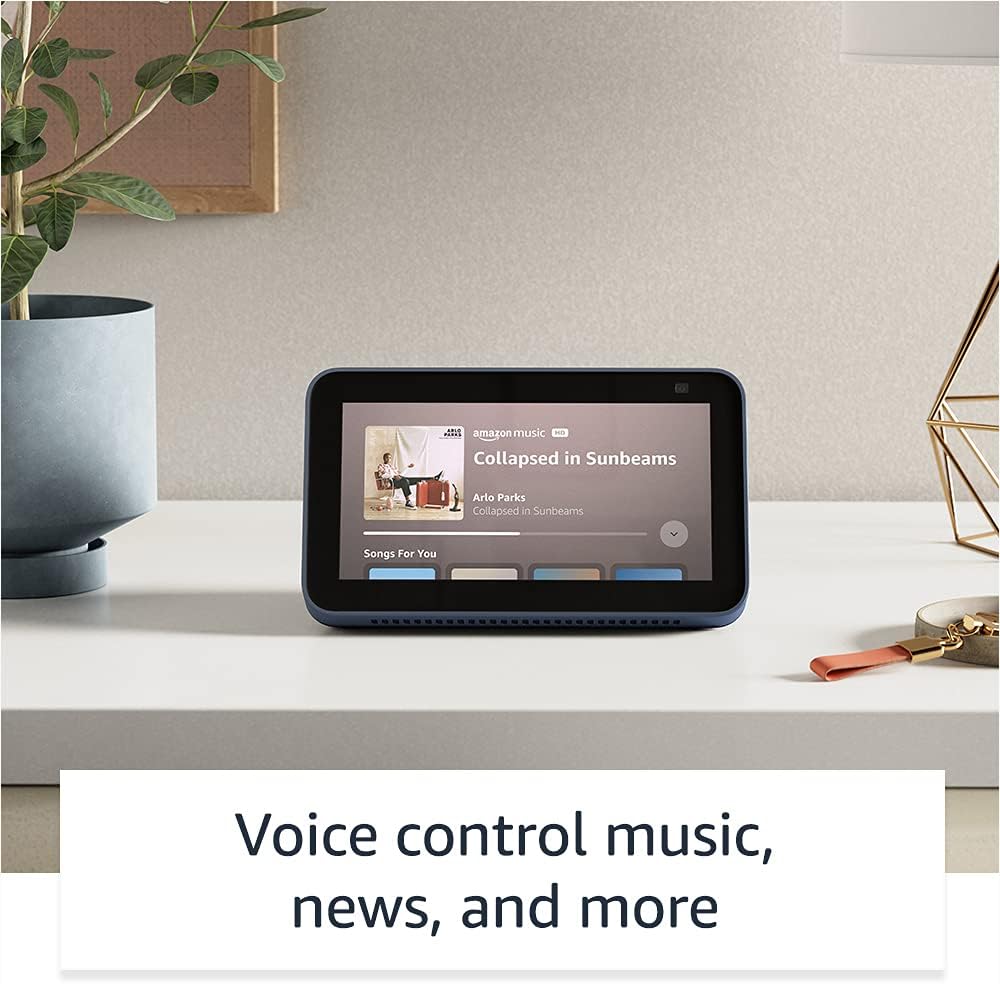
Image: The Echo Show 5 displaying a music playback screen, demonstrating its entertainment features.
Pèsonalizasyon:
- Ankadreman Foto Dijital: Use Amazon Photos to turn your home screen into a digital photo frame.

Image: The Echo Show 5 displaying a personal photo, illustrating its use as a digital photo frame.
Karakteristik sou enfòmasyon prive:
The Echo Show 5 is designed with multiple layers of privacy controls:
- Mic/Camera Off Button: A physical button to electronically disconnect the microphones and camera.
- Deklanchè Kamera Entegre: A physical shutter to cover the camera lens.
- Voice Recording Controls: Kapasite pou view and delete your voice recordings.
- Teknoloji Pawòl Wake: The device only begins listening after detecting your chosen wake word.
- Endikatè difizyon: Visual indicators show when audio or video is being streamed to the cloud.

Imaj: Yon gwo plan view of the Echo Show 5's top, highlighting the physical camera shutter button for privacy control.
Karakteristik Aksè:
The Echo Show 5 includes various accessibility features to personalize Alexa to your abilities. These can be accessed via Anviwònman → Aksè sou aparèy ou an.
- Tape pou Alexa: Interact with Alexa via touch through on-screen tiles or a keyboard.
- Koute Adaptatif: Bay plis tan pou Alexa fini pale anvan li reponn.
- To Preferansyèl pou Pale: Kontwole vitès oswa ralanti Alexa ap pale.
- Captioning: Alexa Captioning, Call Captioning, and Closed Captioning provide text for supported content.
- Montre epi Rakonte: Helps identify products for users who are blind or visually impaired.
- VwaView Lektè ekran: Enables access for blind or visually impaired users.
- Agrandisè ekran: Zoom in/out and pan around the screen.
- Notifye lè li tou pre: Plays notification sounds when detected near the device.
- Lekti Kindle awotvwa: Alexa ka li liv Kindle ou yo awotvwa.
- Tèks an tan reyèl: Type live text during a video call.
- Additional settings for Color Inversion, Color Correction, Request Sound, and more.
Antretyen
The Certified Refurbished Echo Show 5 has undergone rigorous testing and certification to ensure it looks and works like new. Regular maintenance is minimal.
- Netwayaj: Siye ekran an ak deyò aparèy la dousman avèk yon twal mou ki pa gen pousyè. Evite pwodui netwayaj abrazif oswa espre.
- Mizajou lojisyèl: Ensure your device is connected to Wi-Fi to receive automatic software security updates, which are guaranteed for at least four years after the device is last available for purchase as a new unit.
Depanaj
Si w rankontre pwoblèm ak Echo Show 5 ou a, konsidere etap jeneral depanaj sa yo:
- Sik pouvwa: Unplug the device from the power outlet, wait for 30 seconds, and then plug it back in.
- Tcheke Koneksyon Wi-Fi: Ensure your Wi-Fi network is active and the device is connected. You can check network status in the device settings.
- Verify Internet Connectivity: Confirm your internet service is working by testing other devices on the same network.
- Check Microphone/Camera: Ensure the mic/camera off button is not activated and the camera shutter is open if you are trying to use these features.
- Aplikasyon Alexa: Use the Alexa app on your smartphone or tablet to manage device settings, check for updates, and access further support resources.
- Kòmandman vwa: Pale klè epi asire w ke ou nan zòn mikwofòn aparèy la.
For more detailed troubleshooting or specific issues, refer to the help section within the Alexa app or visit the official Amazon support websit.
Espesifikasyon
| Karakteristik | Detay |
|---|---|
| Gwosè | 5.8 "x 3.4" x 2.9" (148mm x 86mm x 73mm) |
| Pwa | 14.5 oz (410 gram) |
| Ekspozisyon | 5.5 "ekran manyen |
| Kamera | Kamera 2 MP ak obturateur entegre |
| Koneksyon WiFi | Dual-band wifi (802.11a/b/g/n/ac). Does not support ad-hoc networks. |
| Koneksyon Bluetooth | A2DP support for audio streaming; AVRCP for voice control of connected mobile devices. PIN-code speakers not supported. |
| Odyo | Oratè entegre 1.65" tout ranje |
| Processeur | MediaTek MT 8163 |
| Jenerasyon | Echo Show 5 (2nd Gen) - 2021 release |
| Lang | Alexa pale angle ak panyòl |
Garanti ak sipò
Your Certified Refurbished Echo Show 5 comes with the same limited warranty as a new device. For specific details regarding your warranty, please refer to the documentation included with your device or visit the official Amazon website for Certified Refurbished Amazon devices.
For customer support, troubleshooting, and to manage your device settings, utilize the Alexa app on your compatible smartphone or tablet. You can also find extensive support resources and FAQs on the Amazon support websit.
Mizajou Sekirite Lojisyèl: Aparèy sa a resevwa mizajou sekirite lojisyèl garanti jiska omwen kat ane apre aparèy la te disponib pou achte kòm yon nouvo inite sou Amazon. websit.
Ask a question about this manual
Ask about setup, troubleshooting, compatibility, parts, safety, or missing instructions. Manuals+ will review the question and use this page’s manual context to help answer it.