
1. Entwodiksyon
The Ewent EW1538 Dual Monitor Desk Mount is designed to create an ergonomic and space-saving workspace. This gas spring-powered desk mount allows you to position two monitors (13-27 inches, 2-7 kg each) at your ideal height and viewing angle with ease. Its flexible adjustments help reduce strain on your neck, back, and shoulders, promoting a more comfortable and productive environment. The integrated cable management system keeps your workspace tidy.

Image 1.1: Ewent EW1538 Dual Monitor Desk Mount without monitors.
2. Enfòmasyon sou Sekirite
Tanpri li tout enstriksyon yo ak anpil atansyon anvan ou monte epi itilize li. Si ou pa swiv enstriksyon sa yo, ou ka domaje materyèlman, blese gravman oswa mouri.
- Kapasite pwa: Do not exceed the maximum weight capacity of 7 kg (15.4 lbs) per monitor. Ensure your monitors are within the specified weight range.
- Gwosè monitè: This mount is suitable for monitors between 13 and 27 inches.
- VESA konpatibilite: Ensure your monitors have VESA mounting patterns (75x75mm or 100x100mm).
- Epesè biwo: Verify your desk is thick enough and structurally sound to support the combined weight of the mount and monitors.
- Pwen zongle: Be aware of moving parts and potential pinch points during assembly and adjustment. Keep hands clear.
- Asanble: Assemble the product exactly as described in this manual. Do not modify the mount.
- Timoun: Kenbe timoun yo lwen zòn asanblaj la. Ti pyès yo ka reprezante yon danje toufe.
3. Pake kontni
Before assembly, ensure all parts are present and undamaged. If any parts are missing or damaged, contact your retailer for assistance.
- Baz biwo
- Pòl prensipal
- Asanble Bra Doub Monitè
- VESA Mounting Plates (x2)
- Twous pyès ki nan konpitè (vis, rondelles, espasè)
- Allen Keys / Wrenches
- Klip Jesyon Kab
4. Enstriksyon Enstalasyon
Follow these steps to assemble and install your Ewent EW1538 Dual Monitor Desk Mount.
4.1. Attach Base to Pole
- Place the desk base on a stable surface.
- Insert the main pole into the designated slot on the desk base.
- Secure the pole to the base using the provided screws and an Allen key from underneath the base. Tighten firmly.
4.2. Attach Monitor Arm Assembly to Pole
- Slide the dual monitor arm assembly onto the main pole.
- Adjust the arm to your desired initial height and secure it by tightening the locking screw on the back of the arm assembly with an Allen key.

Imaj 4.1: Plis paseview of the monitor mount components and assembly.
4.3. Attach VESA Plates to Monitors
- Mete monitè a ak anpil atansyon fas anba sou yon sifas mou epi pwòp.
- Attach a VESA mounting plate to the back of each monitor using the appropriate screws and washers from the hardware kit. Ensure the screws are tightened securely but do not overtighten.

Image 4.2: Detail of VESA plate attachment to a monitor.
4.4. Monte monitè yo sou bra yo
- With assistance, carefully lift each monitor and slide the VESA plate attached to the monitor onto the corresponding arm bracket.
- Ensure the monitor is securely seated on the bracket. Some brackets may have a quick-release or locking mechanism; engage it if present.
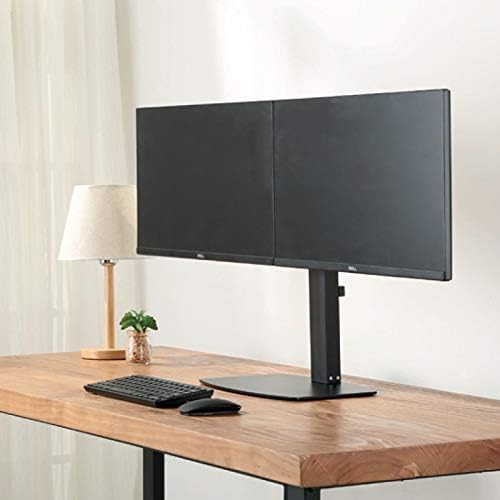
Imaj 4.3: Devan view of two monitors mounted on the desk stand.
4.5. Ajiste gaz Spring Tansyon
- The gas spring tension may need adjustment to properly support your monitor's weight.
- Locate the tension adjustment screw on the arm (usually near the VESA plate or the arm pivot point).
- If the monitor sags, turn the screw clockwise to increase tension. If the monitor floats up too easily, turn the screw counter-clockwise to decrease tension. Adjust until the monitor stays in place when moved.
4.6. Jesyon kab
- Route your monitor cables (power, video) through the integrated cable management clips or channels on the monitor arms and down the main pole.
- This helps keep your workspace organized and prevents cable clutter.
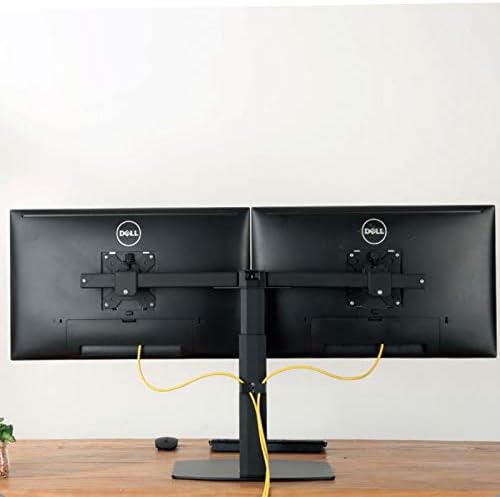
Imaj 4.4: Dèyè view illustrating cable management with monitors mounted.
5. Operasyon Enstriksyon
The Ewent EW1538 offers various adjustments for optimal viewing konfò.
- Ajisteman wotè: Dousman pouse oswa rale monitè a monte oswa desann pou ajiste wotè li. Mekanis resò gaz la ap kenbe l an plas.
- Ajisteman enklinezon: Tilt the monitor screen up or down to reduce glare and find your preferred viewang ang.
- Ajisteman Swivel: Swivel the monitor left or right to share your screen or adjust your viewpozisyon ing.
- Wotasyon: Vire monitè a 360 degre pou chanje ant oryantasyon peyizaj ak pòtrè.

Image 5.1: Monitors adjusted to different orientations (landscape and portrait).
6. Antretyen
Regular maintenance ensures the longevity and proper function of your monitor mount.
- Netwayaj: Netwaye montaj la ak yon twal mou.amp twal. Evite pwodui netwayaj abrazif oswa solvan.
- Tcheke Koneksyon: Tcheke tout vis ak koneksyon yo detanzantan pou asire yo rete sere. Sere yo ankò si sa nesesè.
- Sous-gaz: The gas spring is designed for long-term use and generally requires no maintenance. If adjustment becomes difficult, re-check the tension setting.
NAN. Depanaj
If you encounter issues with your monitor mount, refer to the following common solutions:
| Pwoblèm | Kòz posib | Solisyon |
|---|---|---|
| Monitor sags or drops | Tansyon resò gaz la twò ba pou pwa monitè a. | Ogmante tansyon resò gaz la lè w vire vis ajisteman an nan sans zegwi mont lan. |
| Monitor floats up too easily | Tansyon resò gaz la twò wo pou pwa monitè a. | Diminye tansyon resort gaz la lè w vire vis ajisteman an nan sans kontrè ak zegwi mont lan. |
| Monitors are not level | Minor height discrepancy between arms or VESA plates. | Adjust the individual VESA plate height or arm tilt to level the monitors. |
| Mòn nan santi l enstab | Base screws are loose or desk is not sturdy. | Ensure all assembly screws are tightened. Verify desk stability. |
8. Espesifikasyon
- Modèl: EW1538
- Mak: Ewent
- Konpatibilite gwosè ekran: 13 - 27 pous
- Kapasite pwa: 2 - 7 kg (4.4 - 15.4 lbs) per monitor
- VESA konpatibilite: 75x75mm, 100x100mm
- Mouvman: Height adjustment (gas spring), Tilt (up to 15 degrees), Swivel, 360° Rotation
- Materyèl: Konstriksyon metal ak plastik dirab
- Koulè: Nwa
- Pwa pwodwi: Apeprè 6 kg (13.2 lbs)
9. Garanti ak sipò
For warranty information or technical support, please refer to the documentation provided with your purchase or visit the official Ewent website. Contact details for customer service can typically be found there.