
1. Entwodiksyon
The Walfront HT107D Digital LCD Socket Tester is an advanced electrical testing device designed for quick and accurate detection of correct wiring connections in electrical sockets. It features a clear LCD display for voltage and frequency readings, and multiple LED indicators to identify various wiring faults. This manual provides essential information for safe and effective use of the device.
2. Enfòmasyon sou Sekirite
Please read and understand all safety warnings and operating instructions before using this device. Failure to do so may result in electric shock, fire, or serious injury.
- Toujou asire w ke aparèy la an bon kondisyon pou fonksyone anvan w itilize li.
- Do not use the tester if it appears damaged or if the casing ouvè.
- Do not use the tester in wet conditions or with wet hands.
- This device is designed for testing standard electrical sockets within its specified voltage range (90-250V). Do not use it for voltages outside this range.
- The RCD test function should only be performed on circuits protected by a Residual Current Device (RCD) or Ground Fault Circuit Interrupter (GFCI). This test will trip the RCD/GFCI, cutting power to the circuit.
- Always consult a qualified electrician if you detect any wiring faults or are unsure about electrical safety.
- Kenbe soti nan atenn timoun yo.
3. Pwodwi souview
The Walfront HT107D Socket Tester is a compact and portable tool for electrical safety.
Karakteristik kle:
- Advanced socket tester for quick detection of correct wiring.
- Integrated RCD/GFCI test button for safety system verification.
- 7 LED indicator modes to clearly display wiring status.
- LCD display with backlight for frequency, phase voltage (L-N), and leakage voltage (N-E) readings.
- Compact, lightweight, and easy-to-use design.
Eleman:
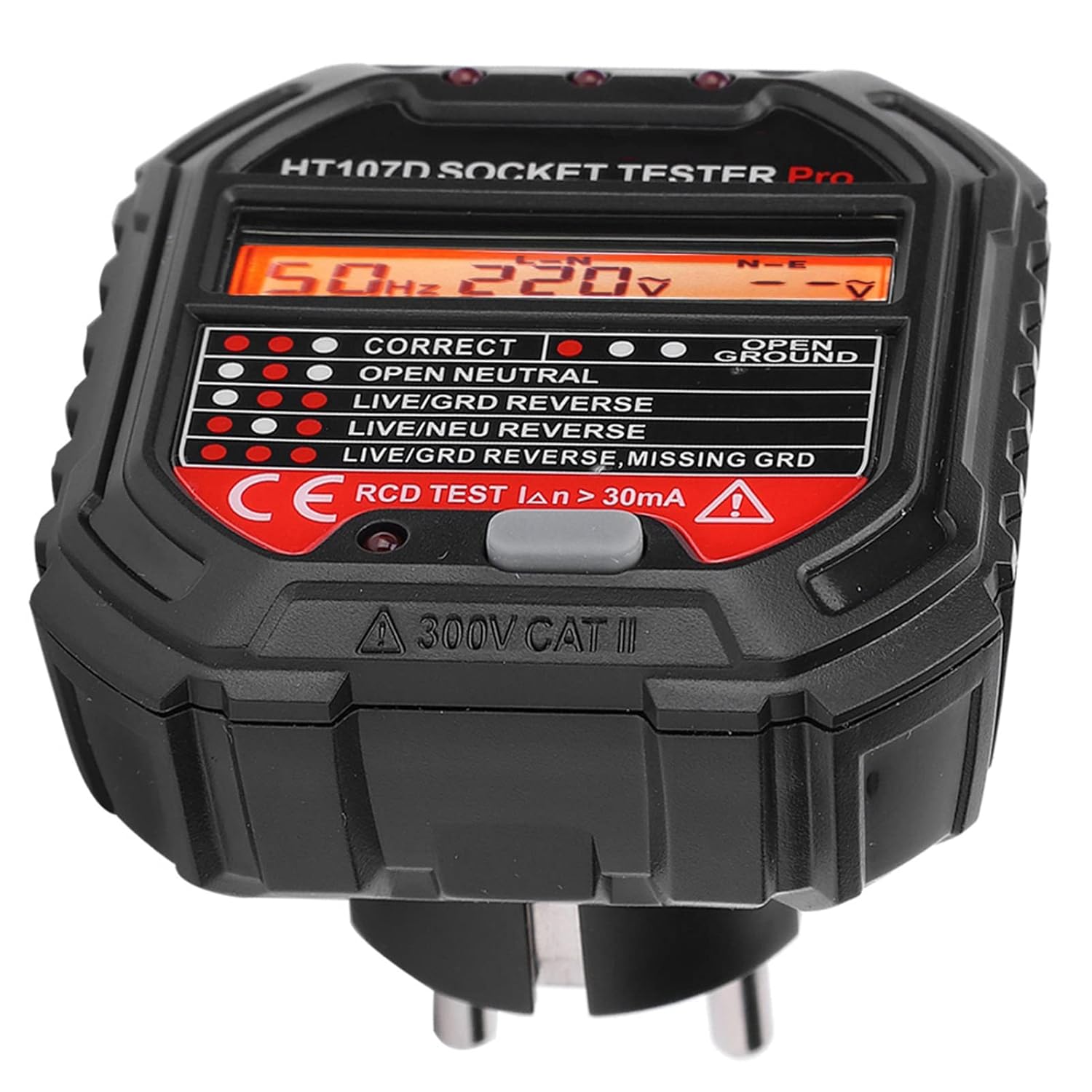
- Ekspozisyon LCD: Montre voltage (L-N, N-E) and frequency.
- Endikatè ki ap dirije: Three lights at the top that illuminate in various patterns to indicate wiring status.
- Bouton Tès RCD: Red button used to test Residual Current Devices.
- Inyon Ewopeyen ploge: For insertion into standard European sockets.
4. Enstalasyon
The Walfront HT107D Socket Tester requires no complex setup. It is ready for use directly out of the packaging.
- Ensure the socket tester is clean and free from any visible damage.
- Jwenn priz elektrik ou vle teste a.
- Carefully insert the Walfront HT107D Socket Tester into the socket.

5. Operasyon Enstriksyon
Once the Walfront HT107D Socket Tester is plugged into a live socket, it will automatically begin testing and display the results.
- Tès Inisyal: Plug the tester into the socket. The LCD screen will light up, displaying the frequency (Hz), phase voltage (L-N), and leakage voltage (N-E). The LED indicators will also illuminate according to the detected wiring status.
- Lekti ekspozisyon LCD a:
- Hz: Indicates the frequency of the AC power supply.
- LN: Montre voltage between the Live and Neutral wires.
- N-E: Montre voltage between the Neutral and Earth (Ground) wires.
- Interpreting LED Indicators: Refer to Section 6, "Understanding the Indicators," for a detailed explanation of the LED patterns and their corresponding wiring conditions.

6. Understanding the Indicators
The Walfront HT107D Socket Tester uses three LED indicator lights to quickly communicate the wiring status of the socket. Observe the pattern of the lights and compare it to the table below.

| Modèl Endikatè | Kondisyon fil elektrik |
|---|---|
| ● ● ● (Left, Middle, Right ON) | Koneksyon kòrèk |
| ● ● ○ (Left, Middle ON, Right OFF) | Open Ground (Unconnected ground wire) |
| ● ○ ● (Left, Right ON, Middle OFF) | Louvri net (Unconnected neutral wire) |
| ○ ● ● (Middle, Right ON, Left OFF) | Louvri Live (Unconnected live wire) |
| ● ○ ○ (Left ON, Middle, Right OFF) | Viv/Tè Ranvèse (Live wire and ground wire reversed) |
| ○ ● ○ (Middle ON, Left, Right OFF) | An dirèk/netral ranvèse (Live wire and neutral wire reversed) |
| ○ ○ ● (Right ON, Left, Middle OFF) | Live/Ground Reverse, Missing Ground (Live wire and ground wire reversed, and ground wire is missing) |
Enpòtan: If any fault condition is indicated, do not use the socket and consult a qualified electrician immediately.
7. RCD Test Function
The RCD (Residual Current Device) test function is designed to verify the proper operation of RCDs or GFCIs in the electrical circuit. This test simulates a fault condition to ensure the RCD trips and cuts power, preventing electric shock.
- Ensure the socket tester is plugged into a socket that is part of an RCD/GFCI protected circuit.
- After the initial wiring test shows a "Correct Connection" (all three LEDs ON), press the red "RCD TEST" button on the tester.
- Observe the RCD/GFCI. A properly functioning RCD/GFCI should trip, cutting power to the circuit and turning off the tester's display and lights.
- If the RCD/GFCI does not trip, it indicates a potential fault with the RCD/GFCI itself or the wiring. Do not use the circuit and consult a qualified electrician.
- To restore power, reset the RCD/GFCI at your consumer unit/fuse box.
Atansyon: Performing the RCD test will temporarily cut power to the tested circuit. Ensure all sensitive equipment is safely shut down or disconnected before performing this test.
8. Antretyen
The Walfront HT107D Socket Tester requires minimal maintenance.
- Netwayaj: Wipe the device with a soft, dry cloth. Do not use abrasive cleaners or solvents. Ensure no liquids enter the device.
- Depo: Store the tester in a cool, dry place, away from direct sunlight and extreme temperatures. Keep it in its original packaging or a protective case when not in use.
- Enspeksyon: Periodically inspect the device for any signs of damage, such as cracks in the casing or bent pins. If damage is found, discontinue use and replace the device.
NAN. Depanaj
If you encounter issues with your Walfront HT107D Socket Tester, refer to the following common problems and solutions:
| Pwoblèm | Kòz posib | Solisyon |
|---|---|---|
| Tester does not light up or display anything. | No power to the socket, or the socket is faulty. | Test another known working socket. Check the circuit breaker or fuse for the circuit. If other sockets work, the original socket may be dead or faulty. |
| LED indicators show a fault, but the socket appears to work. | Hidden wiring fault. | The tester is designed to detect faults that may not be immediately obvious. Do not ignore fault indications. Consult a qualified electrician. |
| RCD test button does not trip the RCD/GFCI. | Faulty RCD/GFCI, or the circuit is not protected by an RCD/GFCI. | Ensure the circuit is indeed RCD/GFCI protected. If it is, the RCD/GFCI may be faulty and requires inspection by a qualified electrician. Do not use the circuit until it is verified safe. |
| Lekti ki pa konsistan oswa ekspozisyon ki ap tranble. | Loose connection, unstable power supply, or device malfunction. | Ensure the tester is firmly plugged into the socket. Test in another socket. If the problem persists, the device may be faulty and should be replaced. |
For issues not covered here, please contact Walfront customer support or a qualified electrician.
10. Espesifikasyon
| Paramèt | Valè |
|---|---|
| Non pwodwi | Socket tèsteur |
| Modèl | HT107D |
| Mak | Walfront |
| Opere Voltage | 90-250V AC |
| Gamme frekans | 45-65Hz |
| Kouran Tès RCD | > 30mA |
| Materyèl | Flanm dife rezistan ABS |
| Koulè | Nwa |
| Style | Voltage tèsteur |
| Konfòmite | CE |
| Max Tanperati Fonksyònman | 40 Degre Sèlsiyis |
| Peyi orijin | Lachin |
11. Garanti ak sipò
For warranty information, please refer to the documentation provided at the time of purchase or contact your retailer. Walfront products typically come with a standard manufacturer's warranty against defects in materials and workmanship.
For technical support, product inquiries, or assistance with troubleshooting, please visit the official Walfront website or contact their customer service department. Contact details can usually be found on the product packaging or the manufacturer's websit.
Nòt: Toujou konsève prèv acha ou pou reklamasyon garanti a.