
1. Entwodiksyon
This user manual provides detailed instructions for the Sensio SE770390 RGB CCT Remote Control. Please read this manual thoroughly before using the product to ensure proper operation and to maximize its lifespan. Keep this manual for future reference.
2. Pwodwi souview
The Sensio SE770390 is a versatile 3-in-1 remote control designed to manage various lighting types. It supports single-color lighting (dimming), CCT (tunable white), and RGB (color-changing) lighting systems. Its modern aesthetic and multi-functional capabilities allow for comprehensive control, including setting up multiple channels and zone lighting.
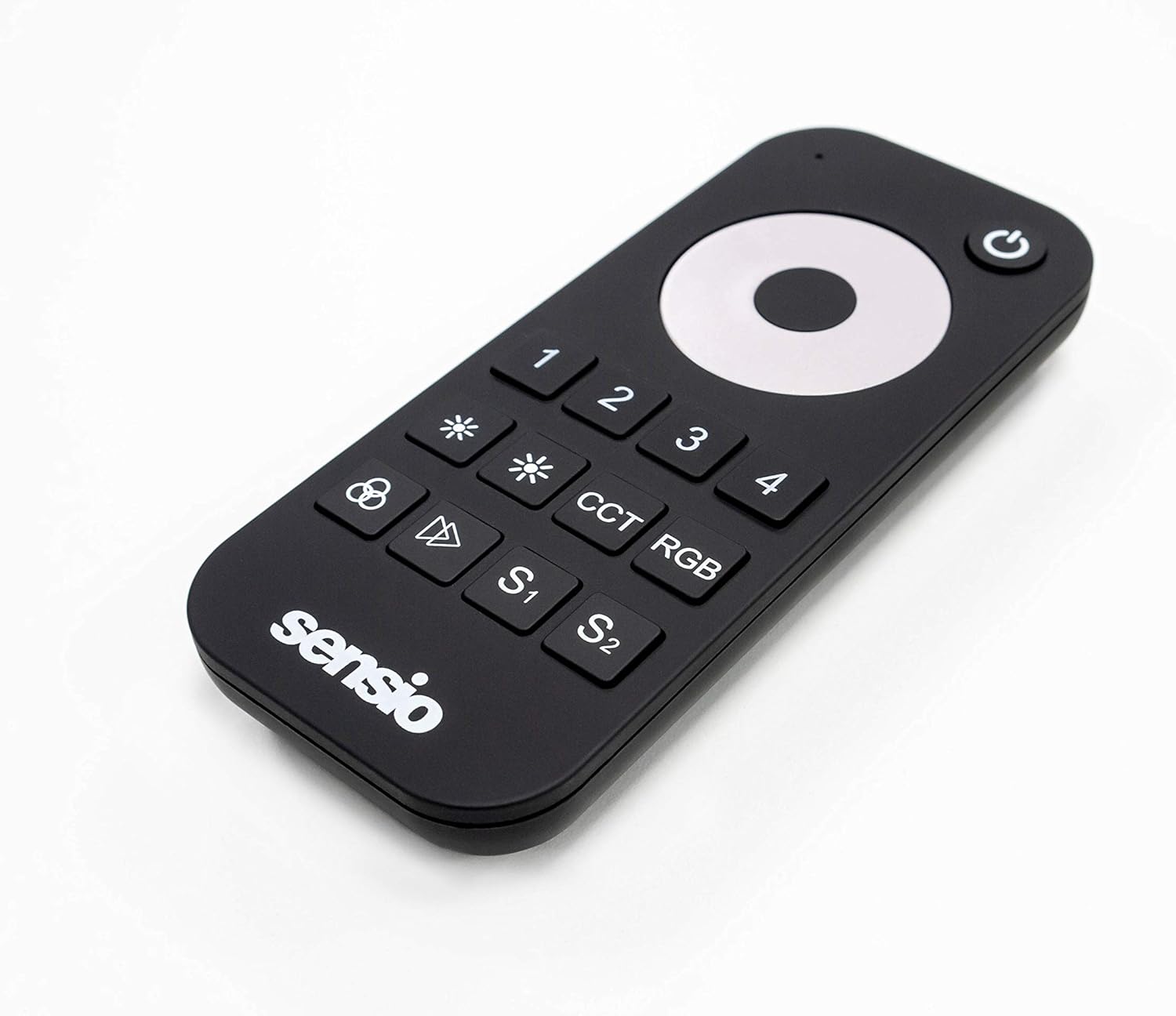
Figi 1: Top-desann view of the Sensio SE770390 RGB CCT Remote Control. This image displays the main control dial, numbered zone buttons (1-4), dimming buttons, CCT and RGB mode buttons, and two memory preset buttons (S1, S2).

Figi 2: Devan angilè view of the Sensio SE770390 RGB CCT Remote Control. This perspective highlights the slim profile and the arrangement of the control buttons, including the power button and the Sensio logo.
3. Enstalasyon
3.1. Enstalasyon batri
- Jwenn kouvèti lòj batri a sou do kontwòl remote la.
- Glise oswa deklipe kouvèti a pou ouvri konpatiman an.
- Mete de (2) pil AAA, asire w polarite ki kòrèk la (+/-) jan yo endike anndan konpatiman an.
- Ranplase kouvèti lòj batri a byen.
Nòt: Always use new batteries and dispose of old batteries responsibly.
3.2. Pairing with Lighting System
The Sensio SE770390 remote control needs to be paired with your compatible Sensio lighting system. The exact pairing procedure may vary slightly depending on your specific lighting receiver or controller. Generally, the steps involve:
- Ensure your lighting system is powered off.
- Power on your lighting system. Within a few seconds of powering on, press and hold the desired zone button (1, 2, 3, or 4) on the remote control.
- The lights should flash or change color to indicate successful pairing.
- Repeat this process for each zone you wish to control with the remote.
Konsèy: Refer to your Sensio lighting system's manual for specific pairing instructions if you encounter difficulties.
4. Operasyon Enstriksyon
The remote control features an intuitive layout for easy management of your lighting. Below is a guide to its main functions:
- Bouton pouvwa (⏻): Located at the top right. Press to turn the selected zone(s) on or off.
- Zone Selection Buttons (1, 2, 3, 4): Select the specific lighting zone you wish to control. You can control multiple zones simultaneously by pressing their respective buttons.
- Kontwòl klète (✱ / ✱): Use the two asterisk-like buttons to increase or decrease the brightness of the selected lights.
- Main Control Dial: The large circular dial in the center.
- Color Selection (RGB Mode): Rotate the dial to cycle through various RGB colors when in RGB mode.
- Color Temperature Adjustment (CCT Mode): Rotate the dial to adjust the white light from warm white to cool white when in CCT mode.
- Dimming (Single Color Mode): Rotate the dial to fine-tune brightness when controlling single-color lights.
- CCT bouton: Press to switch the remote into CCT (Correlated Color Temperature) mode, allowing adjustment of white light temperature.
- Bouton RGB: Press to switch the remote into RGB mode, allowing selection of various colors.
- Memory Presets (S1, S2): These buttons allow you to save and recall your favorite lighting settings (color, brightness, CCT).
- Pou sove: Set your desired lighting, then press and hold S1 or S2 until the lights flash.
- Pou raple: Briefly press S1 or S2 to activate the saved setting.
5. Antretyen
5.1. Netwayaj
To clean the remote control, gently wipe its surface with a soft, dry, or slightly damp cloth. Do not use abrasive cleaners, solvents, or harsh chemicals, as these can damage the finish and internal components.
5.2. Ranplasman batri
When the remote control's range decreases or it becomes unresponsive, it's likely time to replace the batteries. Follow the battery installation steps outlined in Section 3.1. Always replace both AAA batteries simultaneously.
NAN. Depanaj
- Remote pa reponn:
- Check if the batteries are correctly inserted and not depleted. Replace if necessary.
- Ensure the remote is within range of the lighting receiver.
- Verify that the remote is paired with the correct lighting zone (see Section 3.2).
- Lights not changing color/temperature:
- Confirm that you are in the correct mode (RGB for color, CCT for white temperature).
- Ensure your lighting fixture supports RGB and/or CCT functionality.
- Kontwòl tanzantan:
- Tcheke pou wè si gen entèferans ki ka soti nan lòt aparèy san fil.
- Asire w pa gen okenn obstak ant telekòmand lan ak reseptè a.
7. Espesifikasyon
| Karakteristik | Detay |
|---|---|
| Mak | Sensio |
| Nimewo Modèl | SE770390 |
| Koulè | Nwa |
| Karakteristik espesyal | Color Changing, Tunable White (CCT), Dimming |
| Kalite kontwolè | Kontwòl Remote |
| Maksimòm Aparèy Sipòte | 1 (per remote, controls multiple zones) |
| Batri obligatwa | 2 x AAA pil |
| Pwa atik | 47 gram |
8. Garanti ak sipò
Information regarding specific warranty terms for the Sensio SE770390 remote control is not available in this document. For warranty details, product support, or technical assistance, please contact Sensio customer service directly or refer to the official Sensio website. Please have your product model number (SE770390) and proof of purchase ready when contacting support.
Anjeneral, ou ka jwenn enfòmasyon kontak sou anbalaj manifakti a oswa sou dokiman ofisyèl yo. websit: www.sensio.co.uk (egzanpamplyen an, lyen reyèl la ka varye).