
Entwodiksyon
Mèsi pou acha aasing the Hori Fighting Stick Mini for Nintendo Switch. This compact arcade stick is designed to enhance your gaming experience for arcade classics and fighting games on the Nintendo Switch. Please read this manual thoroughly to ensure proper setup and operation.
Kontni pake
- Hori Fighting Stick Mini (NSW-149A)
- Manyèl Enstriksyon (dokiman sa a)
Please ensure all items are present before proceeding with setup. If any items are missing or damaged, please contact your retailer.
Karakteristik pwodwi
- Compatible with Arcade and Fighting Games
- Konsepsyon kontra enfòmèl ant, lejè, ak pòtab
- Classic button layout for authentic arcade feel
- Includes Home, Capture, and Plus/Minus buttons for full Nintendo Switch functionality
Enstriksyon Enstalasyon
Konekte ak Nintendo Switch la
- Asire w ke konsole Nintendo Switch ou a limen epi li mete ajou ak dènye lojisyèl sistèm lan.
- Locate an available USB port on your Nintendo Switch dock. If playing in handheld mode, you may need a USB-C to USB-A adapter (not included) to connect directly to the console's USB-C port.
- Plug the USB cable from the Hori Fighting Stick Mini into the USB port on the Nintendo Switch dock or console.
- The Fighting Stick Mini should be automatically recognized by your Nintendo Switch. You may need to navigate to the "Controllers" menu on your Switch to confirm it is connected.
- Once connected, you can begin playing compatible games.
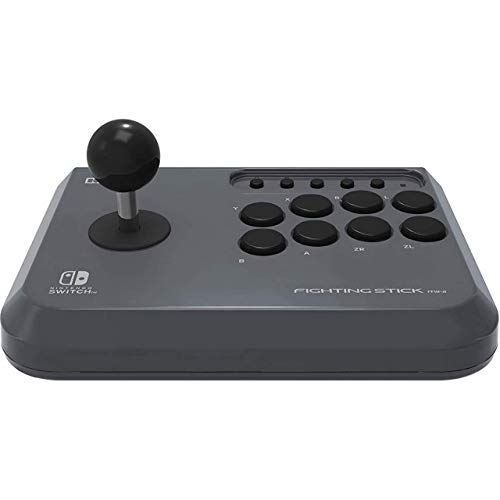
Image: The Hori Fighting Stick Mini NSW-149A shown in its retail packaging. The device features a joystick on the left and multiple action buttons on the right, designed for arcade-style gameplay on the Nintendo Switch.
Enstriksyon Operasyon
Kontwòl debaz yo
- Joysticks: Use the joystick for directional input in games.
- Bouton aksyon: The array of buttons on the right corresponds to various in-game actions (e.g., attack, jump, special moves). Refer to your game's control settings for specific assignments.
- Bouton Kay: Press to return to the Nintendo Switch HOME Menu.
- Bouton Capture: Press to take a screenshot of your current game screen. Hold to record video clips (if supported by the game).
- Bouton Plis (+) / Mwens (-): These function as the Start/Pause and Select buttons, respectively, in many games.
Jwèt Konpatibilite
The Hori Fighting Stick Mini is designed for games that benefit from arcade-style controls, particularly fighting games and classic arcade titles. Compatibility may vary by game. Ensure the game supports Pro Controller input for optimal performance with this device.
Antretyen ak Swen
- Netwayaj: Use a soft, dry cloth to wipe the surface of the Fighting Stick Mini. Do not use liquid cleaners, solvents, or abrasive materials, as these can damage the finish or internal components.
- Depo: Sere aparèy la nan yon kote ki fre epi sèk, lwen limyè solèy dirèk ak tanperati ekstrèm.
- Manyen: Avoid dropping the device or subjecting it to strong impacts. Do not pull on the USB cable forcefully.
Depanaj
- Problem: The Fighting Stick Mini is not recognized by the Nintendo Switch.
- Solisyon:
- Ensure the USB cable is securely plugged into both the Fighting Stick Mini and the Nintendo Switch dock/console.
- Try plugging the Fighting Stick Mini into a different USB port on the dock.
- Rekòmanse konsole Nintendo Switch ou a.
- Asire w ke lojisyèl sistèm Nintendo Switch ou a ajou.
- Problem: Buttons or joystick are unresponsive.
- Solisyon:
- Verify the device is properly connected as described in the Setup section.
- Test the Fighting Stick Mini with a different compatible game to rule out game-specific issues.
- Ensure no debris is obstructing the buttons or joystick.
- Problem: The device feels loose or makes unusual noises.
- Solisyon:
Discontinue use immediately and contact customer support. Do not attempt to open or repair the device yourself, as this may void any applicable warranty.
Espesifikasyon
| Non modèl | Sou entènèt jwèt Goumen baton Mini |
| Nimewo Modèl | NSW-149A |
| Mak | Hori |
| Aparèy konpatib | Nintendo switch |
| Koneksyon Teknoloji | USB (branche) |
| Kalite kontwolè | Joystick |
| Platfòm pyès ki nan konpitè | Nintendo switch |
| Dimansyon atik (L x W x H) | 23 x 18 x 10 cm |
| Pwa atik | 2.78 Kilogram |
| Koulè | Nwa |
Remak: Espesifikasyon yo ka chanje san avètisman.
Sipò pou Kliyan
For further assistance, technical support, or inquiries regarding warranty information, please contact your retailer or visit the official Hori website for your region. Do not attempt to repair the device yourself.
Règleman retounen: Please refer to the returns policy of your purchase retailer for details regarding product returns or exchanges.