
Sharp B08H3STVWG
Sharp Digital Clock with Alarm and Dual USB FastCharge Charging Ports
Model: B08H3STVWG
Mak: Sharp
1. Pwodwi souview
The Sharp Digital Clock is designed for simplicity and convenience, featuring a clear green LED display and dual USB FastCharge ports for charging your devices. It includes an alarm function and a battery backup system to retain settings during power outages.

Figi 1: Devan view of the Sharp Digital Clock, highlighting the large green LED display and dual USB charging ports.
2. Gid Enstalasyon
2.1 Koneksyon pouvwa
Connect the provided power adapter to the DC IN jack located at the back of the clock. Plug the other end into a standard electrical outlet. The display will illuminate, and the clock will be ready for time setting.
2.2 Sovgad batri (Si ou vle)
For battery backup functionality, which retains time and alarm settings during a power outage, install two (2) AAA batteries (not included) into the battery compartment located on the bottom of the unit. During battery backup, the display will go blank to conserve power, but settings will be preserved.
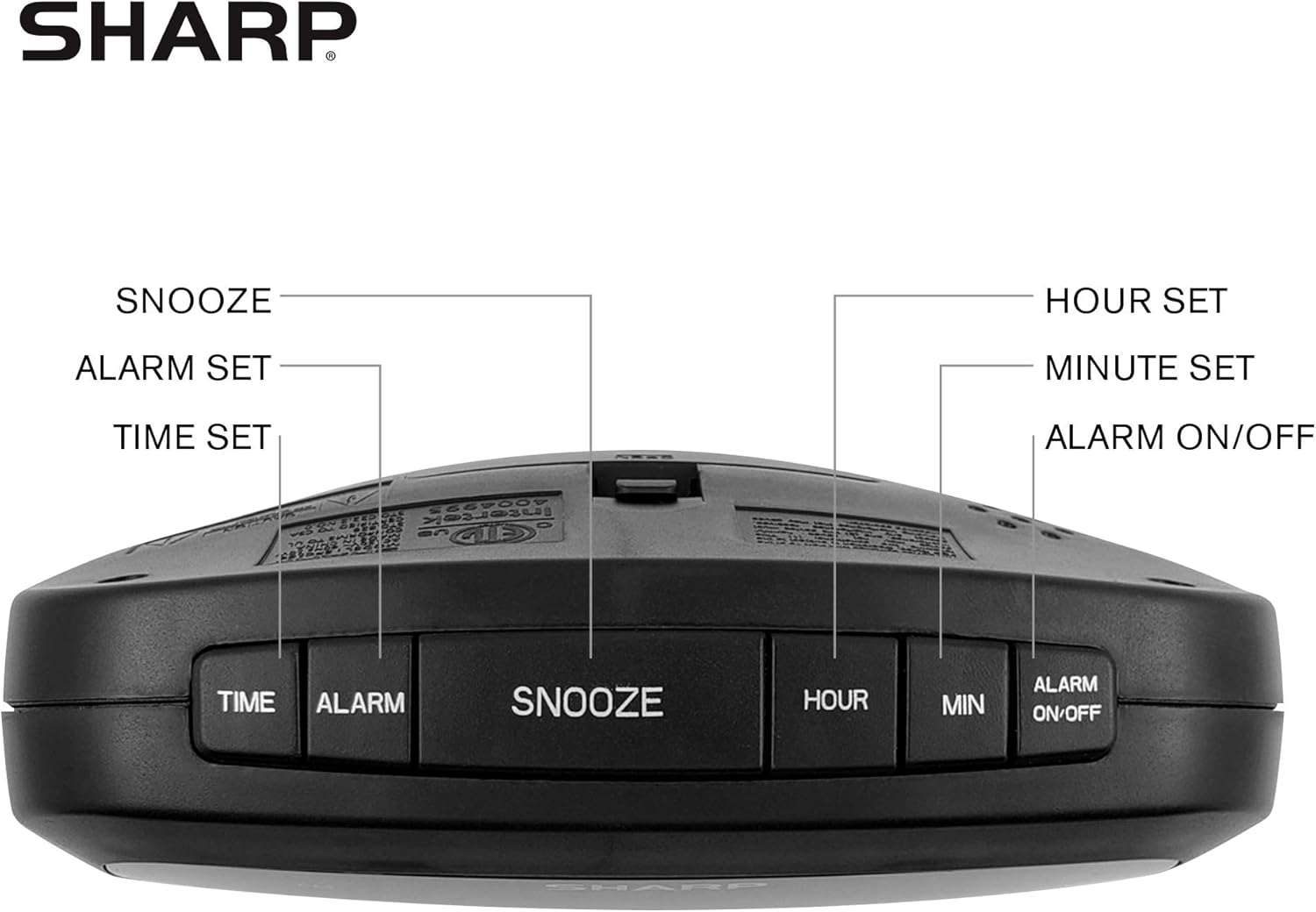
Figure 2: Underside of the clock with the battery compartment visible, requiring 2 AAA batteries for backup.
3. Operasyon Enstriksyon
The clock features intuitive top-mounted buttons for easy operation.

Figure 3: Top panel of the clock with clearly labeled buttons for time, alarm, snooze/dimmer, hour, minute, and alarm on/off.
3.1 Mete tan an
- Peze epi kenbe la TAN bouton an jiskaske chif èdtan yo kòmanse flache.
- Peze a LÈ button to adjust the hour. Pay attention to the PM indicator if setting a PM time.
- Peze a MIN bouton pou ajiste minit yo.
- Peze a TAN bouton an ankò pou konfime epi ekonomize tan.
3.2 Mete alam la
- Peze epi kenbe la ALAM bouton an jiskaske chif lè alam lan kòmanse flache.
- Peze a LÈ bouton pou ajiste lè alam la.
- Peze a MIN bouton pou ajiste minit alam lan.
- Peze a ALAM button again to confirm and save the alarm time.
- Pou aktive oswa dezaktive alam lan, peze bouton an ALARM ON / OFF bouton. Yon limyè endikatè alam ap parèt sou ekran an lè alam lan aktif.
3.3 Snooze and Dimmer Function
- Lè alam lan sonnen, peze gwo bouton an SNOOZE / DIMMER button to temporarily silence the alarm for a few minutes.
- To adjust the brightness of the green LED display, repeatedly press the SNOOZE / DIMMER button when the alarm is not sounding. Cycle through bright, medium, and low brightness settings.
3.4 Using the USB Charging Ports
The clock is equipped with two 2 AMP USB charging ports on the front, allowing you to conveniently charge your smartphone or other USB-powered devices directly from the clock.

Figure 4: The clock demonstrating its dual USB charging capability with two smartphones connected.
- Simply connect your device's USB charging cable to one of the USB ports on the front of the clock.
- Ensure your device is compatible with 2 AMP charging for optimal speed.
4. Antretyen
To ensure the longevity and proper functioning of your Sharp Digital Clock, follow these simple maintenance guidelines:
- Netwayaj: Wipe the clock with a soft, dry cloth. Do not use abrasive cleaners, waxes, or solvents as they may damage the finish.
- Plasman: Mete revèy la sou yon sifas ki plat e ki estab, lwen limyè solèy dirèk, sous chalè, ak imidite twòp.
- Ranplasman batri: If using the battery backup, replace the AAA batteries annually or when the clock consistently loses time during power interruptions.
NAN. Depanaj
| Pwoblèm | Kòz posib | Solisyon |
|---|---|---|
| Ekran revèy la vid. | Pa gen pouvwa oswa pouvwa outage. | Ensure the power adapter is securely plugged into the clock and a working electrical outlet. If there was a power outage, check if backup batteries are installed and functional. |
| Alam lan pa sonnen. | Alam lan pa fikse oubyen li pa aktive. | Verify that the alarm time is correctly set and that the alarm indicator light is visible on the display (press ALARM ON/OFF). |
| Pò USB yo pa sèvi pou chaje aparèy. | Device incompatibility or faulty cable. | Ensure your device is compatible with USB charging. Try a different USB cable. Confirm the clock is powered on. |
| Ekran an twò klere/fèb. | Paramèt klète a bezwen ajisteman. | Press the SNOOZE/DIMMER button repeatedly to cycle through brightness levels (bright, medium, low). |
6. Spécifications pwodwi
- Mak: Sharp
- Modèl: B08H3STVWG
- Kalite ekspozisyon: Digital Green LED
- Sous pouvwa: Fil elektrik
- Batri Backup: 2 x AAA pil (pa enkli)
- Pò USB: 2 x 2 AMP USB FastCharge Ports
- Dimansyon pwodwi: 5.95" lajè x 2.3" wotè
- Pwa atik: 9.59 ons
- Koulè: Green dirije
- Materyèl: Plastik
- UPC: 049353005089
7. Garanti ak sipò
This Sharp Digital Clock comes with a limited warranty. For detailed warranty information, product support, or to purchase accessories, please visit the official Sharp websit la oubyen kontakte sèvis kliyan yo. Ou kapab vizite tou Magazen Sharp sou Amazon.
Tanpri konsève resi acha ou a pou reklamasyon garanti.
Ask a question about this manual
Ask about setup, troubleshooting, compatibility, parts, safety, or missing instructions. Manuals+ will review the question and use this page’s manual context to help answer it.