
1. Entwodiksyon
This manual provides detailed instructions for the IPEGA PG-SW023 Bluetooth Wireless Game Controller. This versatile controller is designed to enhance your gaming experience across multiple platforms, including N-S consoles, PlayStation 3 (PS3), Android devices, and personal computers running Windows 7, 8, or 10.
Tanpri li manyèl sa a avèk atansyon anvan ou itilize pwodwi a pou asire bon fonksyonman li epi pou maksimize karakteristik li yo.
2. Pwodwi Features
- Konpatibilite milti-platfòm: Suitable for gaming on N-S consoles, PS3, Android devices, and PCs (Windows 7/8/10).
- Eksperyans Gaming Amelyore: Supports vibration feedback and a six-axis gyroscope function for immersive gameplay and precise control.
- Fonksyon Makro Pèsonalize: Rear buttons can be configured as common keys or combination keys for simplified actions.
- Continuous TURBO Function: Features a dedicated TURBO button for rapid-fire actions, compatible with N-S Pro gamepads.
- Konsepsyon ergonomique: Engineered for comfort during extended gaming sessions, fitting securely in the palm.

Image: The IPEGA PG-SW023 Wireless Game Controller highlighting its key features: two vibrating motors, six-axis design, high-sensitive buttons, and Turbo function.
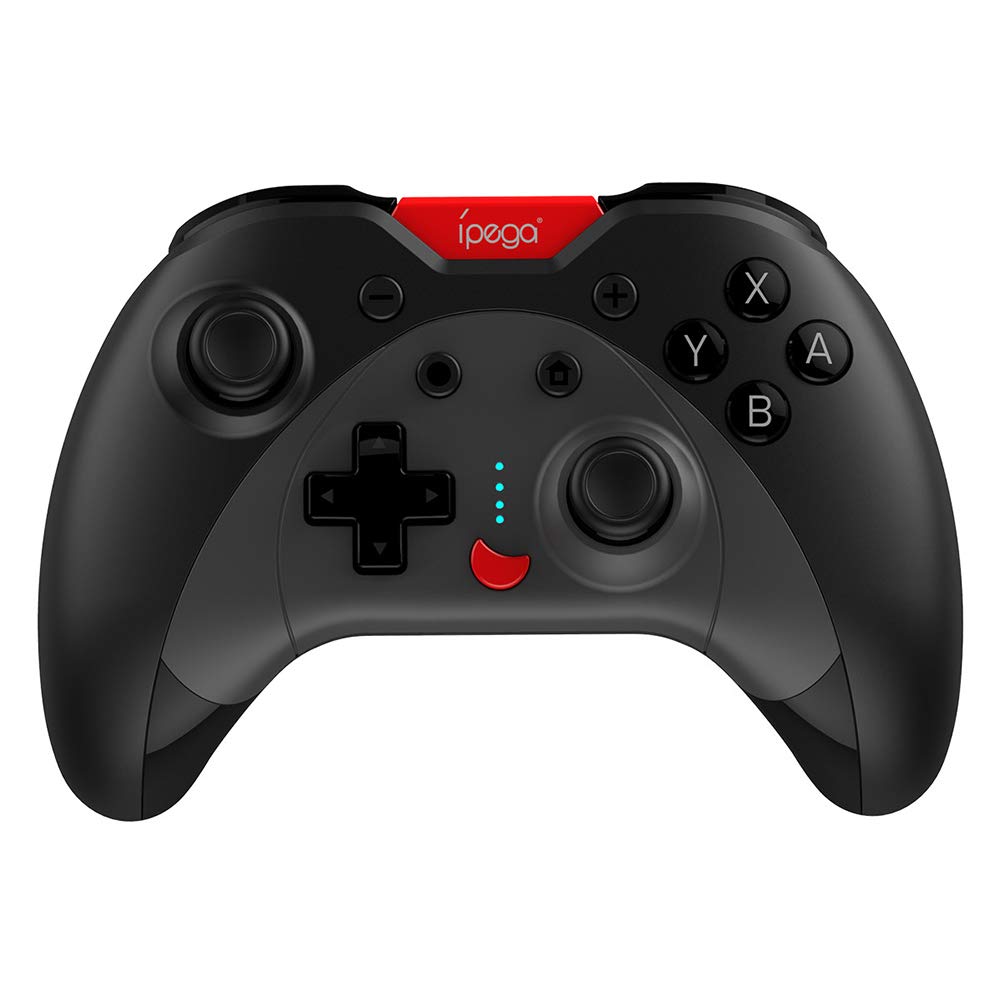
Image: A green IPEGA PG-SW023 controller illustrating its built-in six-axis gyroscope design for improved body feeling and accurate targeting.
3. Pake kontni
Tanpri verifye ke tout atik yo prezan nan pakè a:
- 1 x IPEGA PG-SW023 Wireless Game Controller
- 1 x tip-C chaje kab
- 1 x manyèl itilizatè
4. Espesifikasyon
| Karakteristik | Spesifikasyon |
|---|---|
| Mak | Ipega |
| Modèl | PG-SW023 |
| Opsyon koulè | Black, Green, Blue, Yellow |
| Opere Voltage | DC 3.7V |
| Fonksyone aktyèl | <30mA |
| Kouran estatik | <20uA |
| Kontinyèl Playtime | Apeprè. 15 èdtan |
| Antre Voltage / Kouran | DC 5V/500mA |
| Tan pou chaje | Apeprè. 2 èdtan |
| Bluetooth vèsyon | 3.0 |
| Distans transmisyon | ≤8 mèt |
| Kapasite batri | 400mAh |
| Dimansyon pwodwi | 15 x 10 x 5.5 cm (5.91 x 3.94 x 2.17 pous) |
| Pwa pwodwi | Apeprè 215g (7.58 ons) |
| Aparèy konpatib | N-S Console, PS3, Android, PC (Win 7/8/10) |
| Koneksyon | San fil (Bluetooth) |
| Sous pouvwa | Batri Powered |
5. Enstalasyon
5.1 Chaje Kontwolè a
- Konekte kab chaje Kalite-C ki vini ak li a nan pò chaje kontwolè a.
- Konekte lòt bout kab la nan yon sous kouran USB (pa egzanp, yon òdinatè, yon adaptè USB nan miray).
- The indicator lights on the controller will show charging status. Once fully charged (approx. 2 hours), the lights will indicate completion or turn off.
5.2 Koneksyon ak Aparèy yo
The pairing method varies slightly depending on the device. Ensure the controller is sufficiently charged before attempting to pair.

Image: A blue IPEGA PG-SW023 controller positioned in front of a Nintendo Switch, PlayStation 3, and a laptop, illustrating its multi-platform compatibility.
5.2.1 Pairing with N-S Console
- On your N-S console, go to the HOME Menu.
- Chwazi 'Kontwolè' > 'Chanje Priz/Lòd'.
- Press and hold the pairing button on the IPEGA controller (refer to controller diagram for exact location) until the indicator lights begin to flash rapidly.
- The console will detect the controller. Once paired, the indicator light will become solid.
5.2.2 Pairing with PS3
- Connect the controller to the PS3 console using the Type-C cable.
- Peze bouton HOME sou kontwolè a.
- Once recognized, you can disconnect the cable and the controller should remain paired wirelessly.
5.2.3 Konekte ak Aparèy Android yo
- Pèmèt Bluetooth sou aparèy Android ou.
- On the controller, press and hold the Android pairing button combination (refer to controller diagram or quick start guide for specific button combination, usually 'A' + HOME or 'X' + HOME) until the indicator lights flash rapidly.
- On your Android device, search for new Bluetooth devices and select 'IPEGA PG-SW023' (or similar name) from the list.
- Once paired, the indicator light on the controller will become solid.
5.2.4 Pairing with PC (Windows 7/8/10)
- Asire w ke òdinatè w lan gen Bluetooth aktive.
- Go to 'Settings' > 'Devices' > 'Bluetooth & other devices' and click 'Add Bluetooth or other device'.
- Chwazi 'Bluetooth'.
- On the controller, press and hold the PC pairing button combination (refer to controller diagram or quick start guide for specific button combination, usually 'L1' + HOME or 'Y' + HOME) until the indicator lights flash rapidly.
- Select 'IPEGA PG-SW023' (or similar name) from the list of available devices on your PC.
- Once paired, the indicator light on the controller will become solid.
6. Operasyon Enstriksyon
6.1 Fonksyon bouton debaz yo
The controller features standard gaming buttons including directional pad, analog sticks, action buttons (A, B, X, Y), shoulder buttons (L1, R1), and triggers (L2, R2). Specific button mapping may vary by game and platform.

Image: Hands comfortably gripping a black IPEGA PG-SW023 controller, showcasing its ergonomic design for comfortable and convenient use.
6.2 TURBO Fonksyon
The TURBO function allows for continuous rapid input of a selected button. This can be useful in games requiring fast, repeated button presses.
- To activate TURBO: Press and hold the desired action button (e.g., A, B, X, Y) and then press the TURBO button simultaneously. The button will now continuously input as long as it's held down.
- To deactivate TURBO: Repeat the same process (press the action button and TURBO button simultaneously).

Image: A yellow IPEGA PG-SW023 controller with its prominent TURBO button, shown with a Nintendo Switch console, illustrating the auto-fire feature.
6.3 Fonksyon Makro
The macro function allows you to assign a sequence of button presses or a single common button to the programmable rear buttons. This can simplify complex in-game actions.
- Refer to the specific instructions provided in the quick start guide or on the manufacturer's website for detailed steps on programming macro buttons, as this process can vary.
6.4 Vibration and Gyroscope
The controller features dual motors for vibration feedback, providing tactile sensations that correspond to in-game events. The built-in six-axis gyroscope allows for motion control in supported games, offering a more immersive and precise aiming experience.

Image: A blue IPEGA PG-SW023 controller in use, with visual cues indicating its double motor vibrating design for immersive feedback during gameplay.
7. Antretyen
Bon swen ap pwolonje lavi kontwolè ou a:
- Netwayaj: Sèvi ak yon twal mou epi sèk pou netwaye kontwolè a. Pou pousyè tè ki difisil pou retire, siye l yon ti kras.ampRense twal la avèk dlo oswa yon solisyon netwayaj dou. Evite pwodui chimik ki agresif.
- Depo: Sere kontwolè a nan yon kote ki fre epi sèk, lwen limyè solèy dirèk ak tanperati ekstrèm.
- Evite enpak: Do not drop or subject the controller to strong impacts, as this can damage internal components.
- Ekspozisyon likid: Keep the controller away from liquids. If it comes into contact with liquid, power it off immediately and allow it to dry completely before attempting to use it again.
NAN. Depanaj
If you encounter issues with your IPEGA PG-SW023 controller, try the following solutions:
- Kontwolè a pa konekte:
- Asire w ke kontwolè a chaje nèt.
- Verifye ke Bluetooth aktive sou aparèy ou an.
- Try re-pairing the controller by following the setup instructions for your specific device.
- Move the controller closer to the device to ensure it is within the 8-meter transmission range.
- Restart both the controller and your gaming device.
- Bouton ki pa reponn:
- Check if the controller is properly connected and paired.
- Test the controller with another game or application to rule out software-specific issues.
- Asire w pa gen okenn debri ki kole anba bouton yo.
- Vibrasyon an pa fonksyone:
- Verify that the game or system settings have vibration enabled.
- Some games may not support vibration feedback.
- Kout lavi batri:
- Asire w ke kontwolè a byen chaje anvan w itilize li.
- Battery life can vary based on usage intensity (e.g., continuous vibration).
- Evite chaje nan anviwònman ki trè cho oswa frèt.
9. Garanti ak sipò
For warranty information, technical support, or service inquiries regarding your IPEGA PG-SW023 Bluetooth Wireless Game Controller, please refer to the product packaging or contact the manufacturer directly through their official websit entènèt la oswa chanèl sèvis kliyan yo. Kenbe resi acha ou kòm prèv acha pou nenpòt reklamasyon garanti.