
Imada DST-20K
Imada Digital Force Gauge User Manual
Model: DST-20K
Brand: Imada
1. Entwodiksyon
This manual provides essential information for the safe and effective operation of your Imada Digital Force Gauge, Model DST-20K. This device is designed for precise force measurement, offering a capacity of 20 kg (44 lbf).
The DST digital force gauges feature a large, easy-to-read LCD display and simple push-button operation. They are equipped with a 30,000/sec ultra-high sampling rate for accurate data capture. Data can be collected via USB or RS-232 connections using optional software. The unit is powered by rechargeable Ni-MH batteries or an AC adapter/charger.
Karakteristik kle yo enkli:
- Ergonomic, heavy-duty metal construction
- Easy-to-read, large backlit LCD
- Selectable units: lbf, kgf, and Newtons
- USB and RS-232C outputs for data transfer
- High/low setpoints with LCD indicators for Go/No Go testing
- Overload capacity of 200% F.S.
- Simultaneous display of peak and real-time values
- Reversible display for versatile viewing
- Compatibility with optional Force Logger or SW-1X data acquisition software
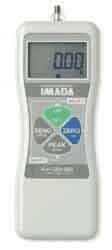
Figi 1: Devan view of the Imada Digital Force Gauge. This image shows the front view of the Imada Digital Force Gauge. It features a large LCD display at the top, showing '0.00'. Below the display, the 'IMADA' logo is visible. The central part of the device has a circular arrangement of four buttons: 'ZERO/CLEAR' (green), 'UNIT/ENTER' (blue), 'MENU/ESC' (grey), and 'PEAK/REAL' (grey). The device has a light grey casing with an ergonomic design.
2. Enfòmasyon sou Sekirite
Please read all safety instructions carefully before operating the device. Failure to comply with these instructions may result in injury or damage to the device.
- Do not exceed the maximum rated capacity of 20 kg (44 lbf). Overloading can cause permanent damage to the sensor.
- Operate the device within the specified temperature range (32°F to 104°F / 0°C to 40°C).
- Avoid exposing the device to excessive moisture, dust, or corrosive substances.
- Use only the specified AC adapter/charger for powering and charging the device.
- Pa eseye demonte oswa repare aparèy la. Konfye tout antretyen bay pèsonèl kalifye.
- Ensure the device is stable and securely positioned during measurements to prevent accidental drops or impacts.
3. Enstalasyon
3.1. Chaje batri a
The force gauge is powered by rechargeable Ni-MH batteries. Before first use, or if the battery is low, connect the supplied AC adapter/charger to the device's charging port and a power outlet. The charging indicator will illuminate. A full charge typically takes several hours.
3.2. Powering On / Off
- Pou limen: Peze epi kenbe bouton an POUVWA button (usually integrated with one of the main function buttons) until the display illuminates.
- Pou etenn: Peze epi kenbe bouton an POUVWA bouton an ankò jiskaske ekran an etenn.
3.3. Initial Zeroing
Before taking any measurements, ensure the gauge is free of any load and press the ZERO/CLEAR button. This will set the current reading to zero, ensuring accurate measurements from the starting point.
4. Operasyon Enstriksyon
4.1. Selecting Measurement Units
The gauge supports lbf (pounds-force), kgf (kilogram-force), and Newtons (N). To change the unit, press the UNIT/ENTER button repeatedly until the desired unit is displayed on the LCD.
4.2. Pran mezi
- Attach the appropriate fixture or adapter to the force gauge's sensor.
- Apply the force to be measured. The display will show the real-time force value.
- For peak hold: Press the PEAK/REAL button to switch to peak hold mode. The display will show the maximum force applied during the measurement. Press again to return to real-time display.
4.3. Using High/Low Setpoints
The gauge allows you to set high and low force limits for Go/No Go testing. When the measured force falls within or outside these limits, the LCD indicators will provide visual feedback.
- Refer to the detailed instructions in the full product manual for setting specific high/low values.
- The LCD indicators will typically show "GO" or "PASS" if within limits, and "NO GO" or "FAIL" if outside.
4.4. Reversible Display
The display can be reversed for easier viewing depending on the orientation of the gauge. Consult the full manual for the specific button combination or menu option to toggle display orientation.
4.5. Sòti Done
The Imada DST-20K features USB and RS-232C outputs for connecting to a computer. This allows for data logging and analysis using optional software such as Force Logger or SW-1X.
- Connect the appropriate cable (USB or RS-232C) from the gauge to your computer.
- Install the necessary drivers and data acquisition software (sold separately).
- Follow the software's instructions for data collection and analysis.
5. Antretyen
5.1. Netwayaj
Wipe the device with a soft, dry cloth. For stubborn dirt, a cloth lightly dampened with water or a mild, non-abrasive cleaner can be used. Do not use harsh chemicals or immerse the device in water.
5.2. Depo
Store the force gauge in a cool, dry place, away from direct sunlight and extreme temperatures. If storing for an extended period, ensure the battery is partially charged (not fully depleted or fully charged) to prolong its lifespan.
5.3. Kalibrasyon
For continued accuracy, periodic calibration by a qualified service center is recommended. The frequency of calibration depends on usage and application requirements.
NAN. Depanaj
| Pwoblèm | Kòz posib | Solisyon |
|---|---|---|
| Aparèy pa limen. | Batri a fin itilize oswa li pa chaje. | Connect the AC adapter/charger and allow the battery to charge. |
| Lekti ki pa kòrèk. | Not zeroed before measurement; Overloaded sensor; Needs calibration. | Peze ZERO/CLEAR before measurement. Ensure load does not exceed 200% F.S. Consider professional calibration. |
| Ekran an vid oswa li ap tranble. | Low battery; Environmental interference. | Charge the battery. Move the device away from strong electromagnetic fields. |
| Pa ka konekte ak òdinatè. | Incorrect cable; Driver not installed; Software issue. | Ensure correct USB/RS-232C cable is used. Install necessary drivers and software. Refer to software manual. |
If the problem persists after attempting these solutions, please contact Imada customer support or your authorized dealer.
7. Espesifikasyon
| Paramèt | Valè |
|---|---|
| Modèl | DST-20K |
| Kapasite (kg) | 20 kg |
| Kapasite (lbs) | 44 lbf |
| Presizyon | 0.2% F.S. ±1 LSD |
| Ekspozisyon | LCD 4.5 chif |
| Sampling To | 30,000/sec |
| Kapasite Surcharge | 200% FS |
| Operating Temperature (Min) | 32 ° F (0 ° C) |
| Tanperati Operasyon (Maksimòm) | 104 ° F (40 ° C) |
| Sòti yo | USB, RS-232C |
| Sous pouvwa | Rechargeable Ni-MH batteries or AC adapter/charger |
8. Garanti ak sipò
For warranty information, please refer to the documentation included with your purchase or visit the official Imada website. Imada products are designed for durability and precision, backed by manufacturer support.
If you require technical assistance, service, or have questions regarding your Imada Digital Force Gauge, please contact your authorized Imada dealer or Imada customer service directly. Have your model number (DST-20K) and serial number ready when contacting support.
Ou ka souvan jwenn enfòmasyon kontak pou sipò a sou paj ofisyèl manifakti a. websit: www.imada.com
Ask a question about this manual
Ask about setup, troubleshooting, compatibility, parts, safety, or missing instructions. Manuals+ will review the question and use this page’s manual context to help answer it.